

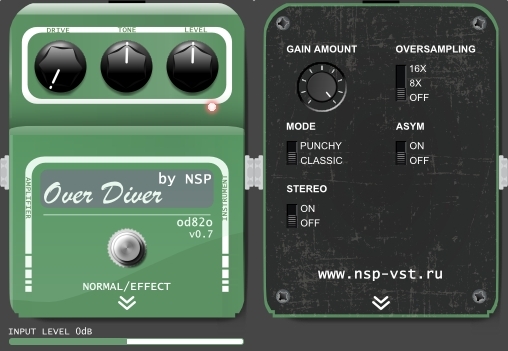
New:
•removed "Quality" switch (now always high quality)
•bug fixes
•new interface
Links are below or in my 1-st post:
http://www.nsp-vst.ru/



GreatNSP wrote:New version 0.5 is available.
New:
•removed "Quality" switch (now always high quality)
•bug fixes
•new interface
Links are below or in my 1-st post:
http://www.nsp-vst.ru/
 Since you are actively working on it, I have to say, the input level adjustment confused me a bit also. Going left is down right? I can't remember unless I open it back up. It confused me when I added to a track that was already bumped up in volume pretty high, so I had trouble getting the input low enough to not clip. It's fine for tracks that are at guitar input level(pretty low) but you almost run out of input adjustment real-estate if you place it on a track bordering on 0 db. The only reason I got there is because I ran something pre to warm it up, satson or something. So I guess I'm suggesting something on the pedal to indicate which way to go with the input maybe, or a little bit wider degree of adjustment on the input for cases of using it closer to 0 db. thanks
  Now you can choose popup menu "Set to default (0)" on "Input level" slider
 *edit: It's working here(Reaper, also tried Cubase and Protools). It seems this new version has less overdrive per knob movement(the gain knob) - I could be wrong though.Masters-of-Music wrote:I tried this plugin in 3 different DAWs and it was broken in all three. What gives?
What DAWs do you use?Masters-of-Music wrote:I tried this plugin in 3 different DAWs and it was broken in all three. What gives?
Where is no changes like that, only block size and sample rate bugfixes. Plus removed "Quality" switch.. Please try "Mode" switchspacekid wrote:*edit: It's working here(Reaper, also tried Cubase and Protools). It seems this new version has less overdrive per knob movement(the gain knob) - I could be wrong though.Masters-of-Music wrote:I tried this plugin in 3 different DAWs and it was broken in all three. What gives?
k. I had been using it with a few real pedals I have, but when I checked it again I used it without. So that explains itNSP wrote:What DAWs do you use?Masters-of-Music wrote:I tried this plugin in 3 different DAWs and it was broken in all three. What gives?
Probably broken files. Please try to delete plugin files and to download them again.
Where is no changes like that, only block size and sample rate bugfixes. Plus removed "Quality" switch.. Please try "Mode" switchspacekid wrote:*edit: It's working here(Reaper, also tried Cubase and Protools). It seems this new version has less overdrive per knob movement(the gain knob) - I could be wrong though.Masters-of-Music wrote:I tried this plugin in 3 different DAWs and it was broken in all three. What gives?
I'm using Cubase elements 8, when I do use it. Just tested again, all fine here. Could it be you may need a runtime environment?Masters-of-Music wrote:Weird. I tried it with Ableton, Bitwig, and Cubase and it looks like that in all of them. It's the same after redownloading. Never had this problem with any other plugin...
Your screen resolution? Screen bit depth? OS version? Pixels per inch?Masters-of-Music wrote:Weird. I tried it with Ableton, Bitwig, and Cubase and it looks like that in all of them. It's the same after redownloading. Never had this problem with any other plugin...
Submit: News, Plugins, Hosts & Apps | Advertise @ KVR | Developer Account | About KVR / Contact Us | Privacy Statement
© KVR Audio, Inc. 2000-2026

