

Don't give up your day job, you'd make a very ordinary teacher.
Can't your ears tell you when you are making "sausage"? I can see how a plugin like this might help you fix a problem, once you identify it, but surely you wouldn't need it to find out if there's a problem?

How to understand compression better
-

- GRRRRRRR!
- 17853 posts since 14 Jun, 2001 from Somewhere you're not!
-

- KVRAF
- 7731 posts since 2 Sep, 2019
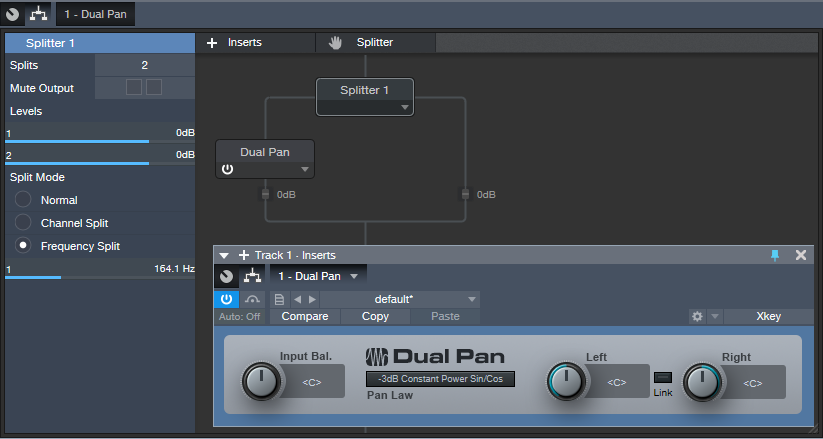
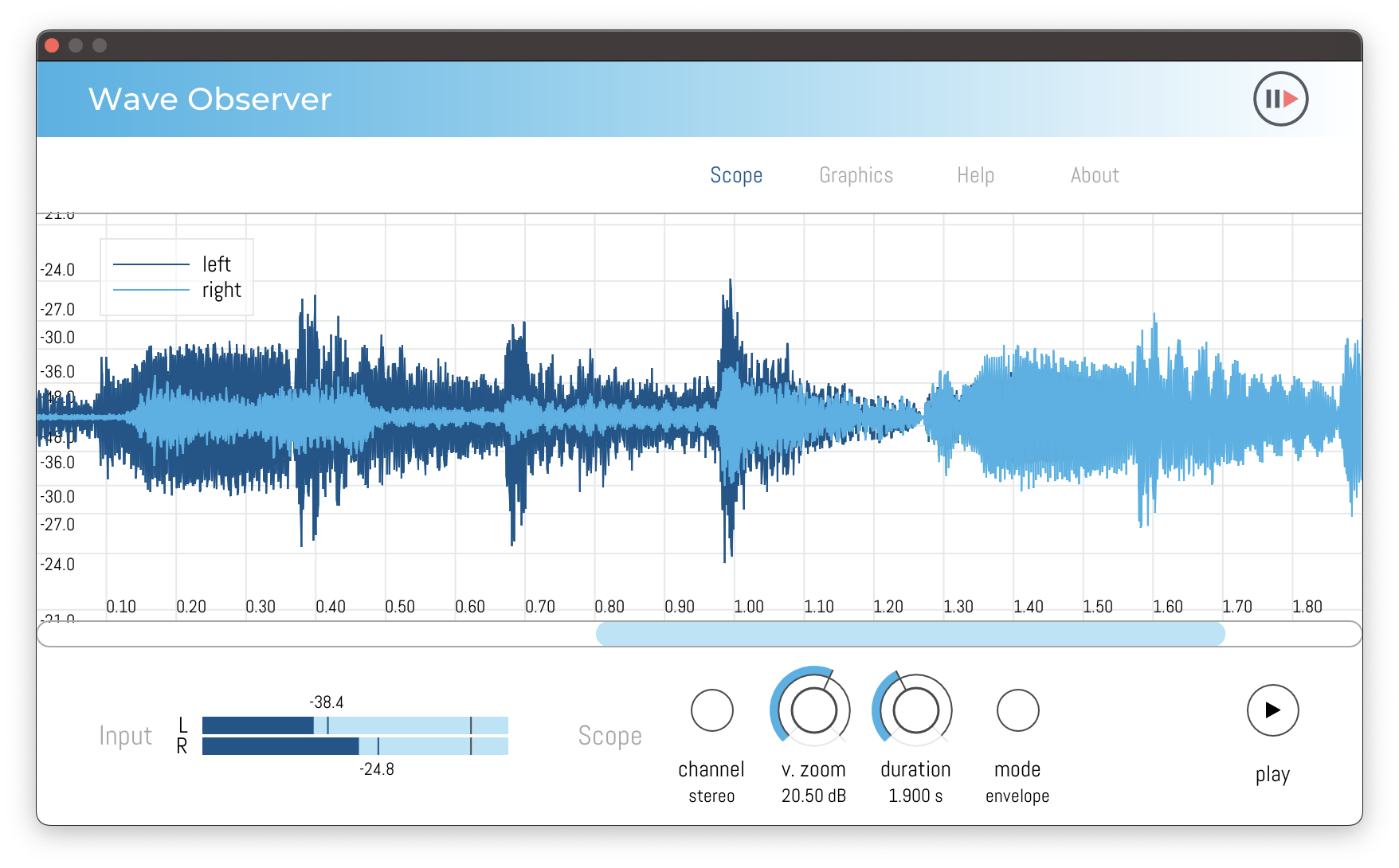
Anyways, if you want to see both the original wave and the compressed wave displayed together to see the difference in Wave Observer, you can use Studio One and toggle your mono audio track to stereo in the mixer, then use the Studio One Splitter tool in Channel Split mode to put a compressor plugin on only one side of the stereo channel (as shown with Dual Pan below). Then follow this with Wave Observer post-Splitter, and look at the left and right sides overlaid in Stereo mode.
It’s possible other DAWs may have a similar stereo splitter tool, too.
It’s possible other DAWs may have a similar stereo splitter tool, too.
Last edited by jamcat on Tue Mar 07, 2023 12:48 am, edited 2 times in total.
THIS MUSIC HAS BEEN MIXED TO BE PLAYED LOUD SO TURN IT UP
-
- GRRRRRRR!
- 17853 posts since 14 Jun, 2001 from Somewhere you're not!
Dude, you're just digging a deeper hole. By the time someone has learned how to do all that, they'll have forgotten why they were doing it in the first place.
No, I am teaching the technique first. After they become confident with the technique, they can move on to the skill of knowing how and when to apply it in a DAW. It's the same way you teach kids to play football - they learn how to trap the ball and the different ways they can kick it at training, before they play an actual game.jamcat wrote: Mon Mar 06, 2023 6:08 amOk, but you’re literally telling your students to use a slide rule.
NOVAkILL : Legion GO, AMD Z1x, 16GB RAM, Win11 | Audient EVO 8 | Lumi Keys | Studio Pro 8
Korg Odyssey, bx-oberhausen, Proxima, PolyMax, GR8, JP6K, Union, Atomika,
Invader 2, Flow Motion, Olga, TRK 01, Thorn, Spire, VG Iron
Korg Odyssey, bx-oberhausen, Proxima, PolyMax, GR8, JP6K, Union, Atomika,
Invader 2, Flow Motion, Olga, TRK 01, Thorn, Spire, VG Iron
-
- KVRAF
- 7731 posts since 2 Sep, 2019
Well, if you already use Studio One, like you and I, it takes about 2 seconds to drag&drop the Splitter tool and Wave Observer.
The cool thing about this method I devised is you can see the effects of any compressor plugin (or any plugin, for that matter) as you make adjustments in real-time. It can be quite educational.
The cool thing about this method I devised is you can see the effects of any compressor plugin (or any plugin, for that matter) as you make adjustments in real-time. It can be quite educational.
THIS MUSIC HAS BEEN MIXED TO BE PLAYED LOUD SO TURN IT UP
-
- KVRAF
- 2751 posts since 15 Apr, 2004 from Capital City, UK
Thankfully BONES doesn't teach music to anybody!
I'm sure his methods work great for ball-games, but people need to understand what they're doing to the signal and the best place to start is visually "Look, the signal's being turned down at the loudest parts, can you hear it? no? how about if I effect it a bit more, you can see those peaks getting crushed, now you know which ones are being affected, and can you hear the difference when I turn it off?" - the more you can highlight what things are doing to the sound, the quicker the students will understand it.
So, I'm all for the visualisation of audio signals to aid in people's understanding of what they're doing. The most useful I've found is the compressor line in Logic stock comps; they all include the gain reduction line so you can see historically what is going on. Very useful.
I'm sure his methods work great for ball-games, but people need to understand what they're doing to the signal and the best place to start is visually "Look, the signal's being turned down at the loudest parts, can you hear it? no? how about if I effect it a bit more, you can see those peaks getting crushed, now you know which ones are being affected, and can you hear the difference when I turn it off?" - the more you can highlight what things are doing to the sound, the quicker the students will understand it.
So, I'm all for the visualisation of audio signals to aid in people's understanding of what they're doing. The most useful I've found is the compressor line in Logic stock comps; they all include the gain reduction line so you can see historically what is going on. Very useful.
-

- KVRAF
- 25037 posts since 12 Jul, 2003 from West Caprazumia
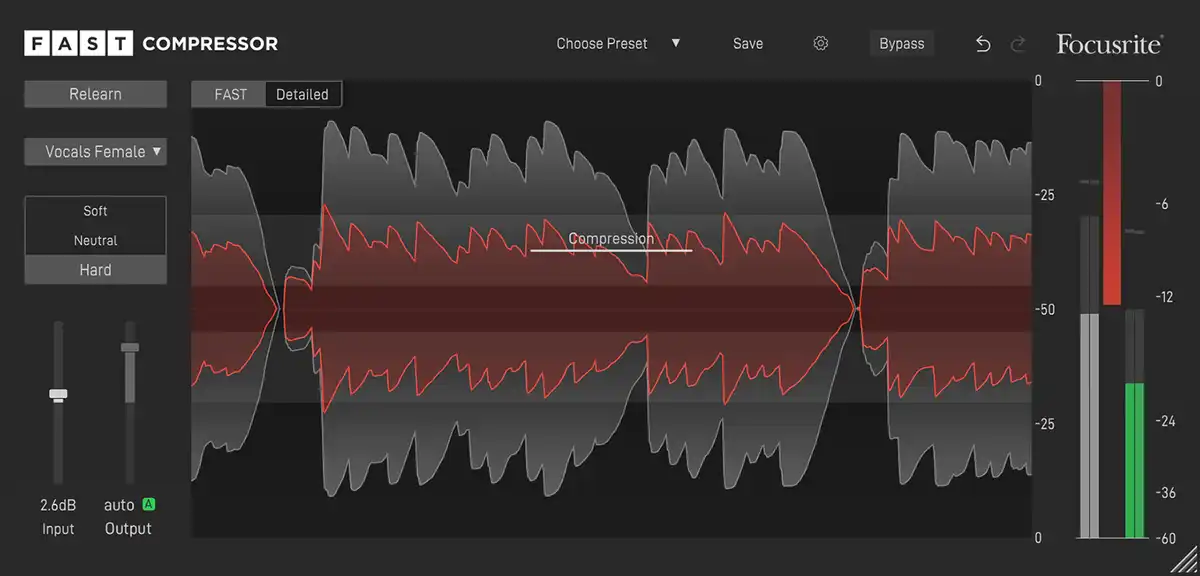
I have no idea what you might mean with that. This compressor is (AI aside) as straight-forward as it gets.BONES wrote: Mon Mar 06, 2023 4:21 amMaybe but not so easy to know what the settings are in that particular plugin. The reason I suggested an audio editor is that their compressors tend to be more standard affairs, with all the usual parameters and not a lot of extra bullshit to confuse the situation.jens wrote: Mon Mar 06, 2023 3:45 amAs I mentioned a few posts above yours, the Focusrite Fast Compressor does exactly that in realtime right in your host whereever you want it - colour-coded with both waveforms shown at once so it's much much easier to see the actual change.
The controls are input, output, threshold, ratio, attack, release, knee and dry/wet. It just doesn't get any more "standard" than that.
In addition to that there's only a "Spectral Balancing" on/off button (set to on by default), which you can safely ignore (at the very least in regards to the topic at hand).
-
- KVRian
- 596 posts since 28 Apr, 2004 from not where I want to be...
Recently stumbled upon this one:
I think it's pretty nice overview and gives a lot of history and background why we do compress.
I think it's pretty nice overview and gives a lot of history and background why we do compress.
-
- GRRRRRRR!
- 17853 posts since 14 Jun, 2001 from Somewhere you're not!
Can you show me where those controls are on the interface, because I can't see them -jens wrote: Mon Mar 06, 2023 12:00 pmI have no idea what you might mean with that. This compressor is (AI aside) as straight-forward as it gets.
The controls are input, output, threshold, ratio, attack, release, knee and dry/wet. It just doesn't get any more "standard" than that.
NOVAkILL : Legion GO, AMD Z1x, 16GB RAM, Win11 | Audient EVO 8 | Lumi Keys | Studio Pro 8
Korg Odyssey, bx-oberhausen, Proxima, PolyMax, GR8, JP6K, Union, Atomika,
Invader 2, Flow Motion, Olga, TRK 01, Thorn, Spire, VG Iron
Korg Odyssey, bx-oberhausen, Proxima, PolyMax, GR8, JP6K, Union, Atomika,
Invader 2, Flow Motion, Olga, TRK 01, Thorn, Spire, VG Iron
-
- KVRAF
- 25037 posts since 12 Jul, 2003 from West Caprazumia
You just need to click on "Detailed". 
-
- GRRRRRRR!
- 17853 posts since 14 Jun, 2001 from Somewhere you're not!
I know that but this is for someone who has no experience with compression, so it needs to be a bit more straightforward. It was a poor suggestion.
NOVAkILL : Legion GO, AMD Z1x, 16GB RAM, Win11 | Audient EVO 8 | Lumi Keys | Studio Pro 8
Korg Odyssey, bx-oberhausen, Proxima, PolyMax, GR8, JP6K, Union, Atomika,
Invader 2, Flow Motion, Olga, TRK 01, Thorn, Spire, VG Iron
Korg Odyssey, bx-oberhausen, Proxima, PolyMax, GR8, JP6K, Union, Atomika,
Invader 2, Flow Motion, Olga, TRK 01, Thorn, Spire, VG Iron
-
- KVRian
- 818 posts since 15 Jun, 2018
One of the hardest things to wrap your head around as a beginner is understanding when to use compression at all. Because for most processed samples and virtual instruments, there is hardly any need for track compression (compared to bus compression). So most producers' first contact with compression (besides sidechaining) is vocal compression.
And there something simple like RVox or any LA2A emulation with one or two knobs just works wonders. You don't need a gazillion parameters to stabilize a vocal recording's level.
And there something simple like RVox or any LA2A emulation with one or two knobs just works wonders. You don't need a gazillion parameters to stabilize a vocal recording's level.
-
- KVRAF
- 25037 posts since 12 Jul, 2003 from West Caprazumia
That's really the poorest attempt at sneaking out of a mistake I have ever seen in my entire-life - and by far!BONES wrote: Tue Mar 07, 2023 3:20 am I know that but this is for someone who has no experience with compression, so it needs to be a bit more straightforward. It was a poor suggestion.


You just don't have it in you to admit to others to have been wrong, do you? I feel sorry for you and for those around you.
And yes, your suggestion to instead use a Wave-Editor to compare the unprocessed waveform to waveforms of different compression settings would of course be much more straight-forward than having to click a button in order to see both the processed and unprocessed waveform superimposed with the changes being visible in realtime and color-coded.
-
- GRRRRRRR!
- 17853 posts since 14 Jun, 2001 from Somewhere you're not!
You're to going to let this go, are you? Your advice wasn't that good, get over it. It's not surprising, you clearly have no training or experience, certainly nowhere near as much as I do. You gave it a shot, which is more than most of the losers around here can be bothered doing, and I'd not have given your post a second thought if you hadn't kept banging on about it. Just get the f**k over yourself, it makes you look desperate and more than a little bit pathetic.
NOVAkILL : Legion GO, AMD Z1x, 16GB RAM, Win11 | Audient EVO 8 | Lumi Keys | Studio Pro 8
Korg Odyssey, bx-oberhausen, Proxima, PolyMax, GR8, JP6K, Union, Atomika,
Invader 2, Flow Motion, Olga, TRK 01, Thorn, Spire, VG Iron
Korg Odyssey, bx-oberhausen, Proxima, PolyMax, GR8, JP6K, Union, Atomika,
Invader 2, Flow Motion, Olga, TRK 01, Thorn, Spire, VG Iron