



Ultrano(s) Dreamer 1.5 Windows Free OT Sequencer-
-

- KVRian
- Topic Starter
- 869 posts since 23 Feb, 2023
Seems like there's no inbetween anymore... Things large on computers, things small on cellphones and I got laughed at when I discussed making music on a netbook back in 2009
One clincher for Ultrano is that the old Alpha Preview of Phrazor works well in it in both Sync & Clip modes so you can have MIDI style ableton-like abilities in Dreamer & since it scans it's own plugs whatever IT passes will work as well-

Here's a good wayback link...Not everything functional in it but plenty enough-
https://web.archive.org/web/20130509074 ... Beta5c.zip
One clincher for Ultrano is that the old Alpha Preview of Phrazor works well in it in both Sync & Clip modes so you can have MIDI style ableton-like abilities in Dreamer & since it scans it's own plugs whatever IT passes will work as well-
Here's a good wayback link...Not everything functional in it but plenty enough-
https://web.archive.org/web/20130509074 ... Beta5c.zip
-
- KVRian
- Topic Starter
- 869 posts since 23 Feb, 2023
BTW that preview has tutorials that use freeware VSTs that are not included, I have sourced them all out-
https://workupload.com/start/bnyCftwjxYV
OR
https://send.cm/d/mzXm
I don't think either hoster has any hentai or gay tranny porn to endure rest assured.
Just make a VST folder inside the Phrazor folder then you can utilize the tuts-
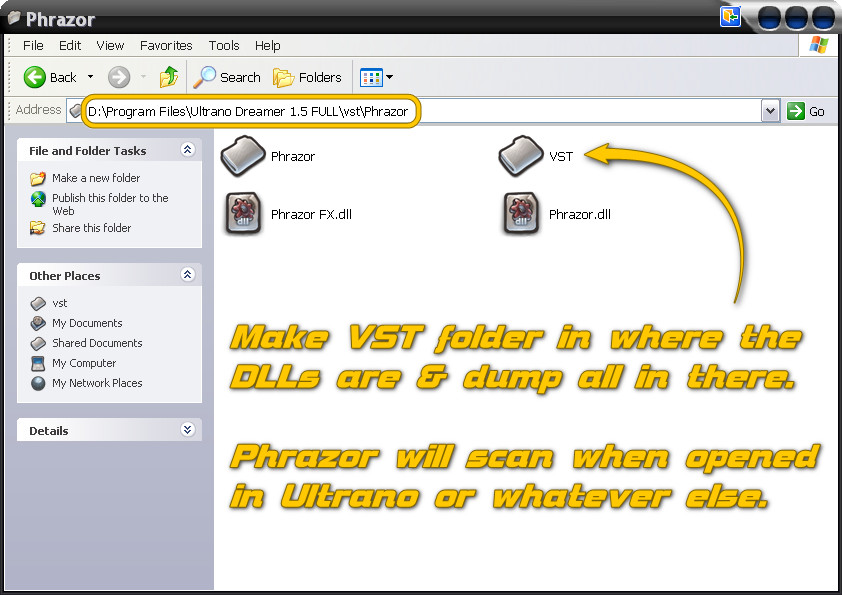
Just learned how to automate in Phrazor which is drawing out curves in the clip view down where the velocity lane is. Much better than a knob-turn scenario for sure if you need any precision at all
https://workupload.com/start/bnyCftwjxYV
OR
https://send.cm/d/mzXm
I don't think either hoster has any hentai or gay tranny porn to endure rest assured.
Just make a VST folder inside the Phrazor folder then you can utilize the tuts-
Just learned how to automate in Phrazor which is drawing out curves in the clip view down where the velocity lane is. Much better than a knob-turn scenario for sure if you need any precision at all
-

- KVRAF
- 8563 posts since 2 Aug, 2005 from Guitar Land, USA
I noticed I had to uncheck enable automation when playing a song so my vst effect didn't reset the audio inputs to 0.
Isn't it supposed to load Rebirth songs? It doesn't see them so I guess not.
I found that export saves as a wav, but if it's in loop mode it'll go forever so press stop.
Isn't it supposed to load Rebirth songs? It doesn't see them so I guess not.
I found that export saves as a wav, but if it's in loop mode it'll go forever so press stop.
The only site for experimental amp sim freeware & MIDI FX: http://runbeerrun.blogspot.com
https://m.youtube.com/channel/UCprNcvVH6aPTehLv8J5xokA -Youtube jams
https://m.youtube.com/channel/UCprNcvVH6aPTehLv8J5xokA -Youtube jams
-
- KVRian
- Topic Starter
- 869 posts since 23 Feb, 2023
OK More Ultrano, This thing is going from beta to alpha at an alarming rate-
Right-Click on Musashi GUI & in 'Patterns' there's the 303 RBS import-

Some will work other's won't If they don't you will get-
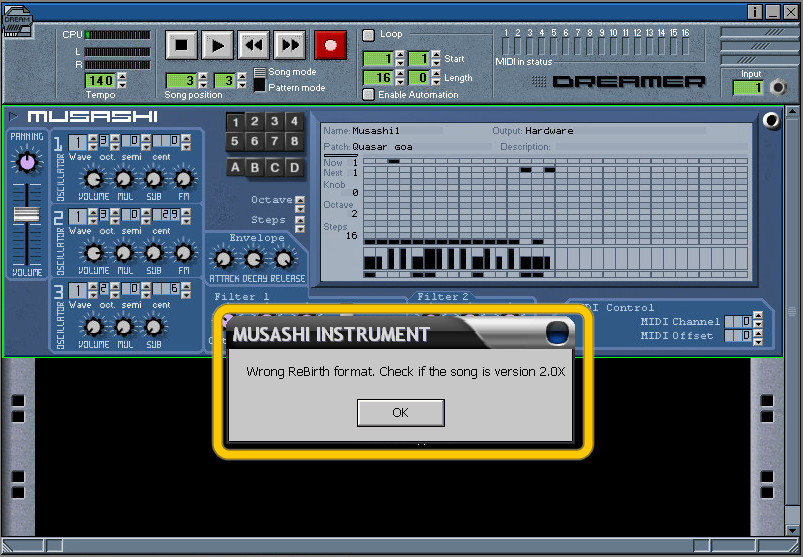
Have you tried 'Init from pattern view' before using automation?-

Hopefully that helps... What I am having problem is with makin' the Refills standalone. The Akemi patch is storing an absolute path to the used WAVs & NOT relative to the patch. Not understanding the gibberish way of explaining how to do it the correct way in the help file. Right now if I make a patch with WAVs in a folder I cannot move it as the patch will not find the WAVs yet the refills that come with it seem to have no problem being used no matter where they are. Opening an Akemi patch in notepad there's an absolute path to every WAV...
Quickly on the verge of heading back to Reason 3-
Right-Click on Musashi GUI & in 'Patterns' there's the 303 RBS import-
Some will work other's won't If they don't you will get-
Have you tried 'Init from pattern view' before using automation?-
Hopefully that helps... What I am having problem is with makin' the Refills standalone. The Akemi patch is storing an absolute path to the used WAVs & NOT relative to the patch. Not understanding the gibberish way of explaining how to do it the correct way in the help file. Right now if I make a patch with WAVs in a folder I cannot move it as the patch will not find the WAVs yet the refills that come with it seem to have no problem being used no matter where they are. Opening an Akemi patch in notepad there's an absolute path to every WAV...
Quickly on the verge of heading back to Reason 3-
-
- KVRAF
- 8563 posts since 2 Aug, 2005 from Guitar Land, USA
Ok it was inside a module, I have the 2 Rebirth synth parts working now. I still haven't tried the refills.
The only site for experimental amp sim freeware & MIDI FX: http://runbeerrun.blogspot.com
https://m.youtube.com/channel/UCprNcvVH6aPTehLv8J5xokA -Youtube jams
https://m.youtube.com/channel/UCprNcvVH6aPTehLv8J5xokA -Youtube jams
-
- KVRian
- Topic Starter
- 869 posts since 23 Feb, 2023
Well, I half-assed figured it out you first put all the samples into a folder in the 'refills' folder for your one to whatever many akemi patches you are going to make then make a refill of that folder of samples... THEN open Akemi & start loading in & key-splitting THOSE samples IN THE REFILL then save the patch in any convenient location-
Opening patch in notepad has correct relative path-
Dreamer's Akemi patch, dude! +7C d =- ( LLUF StratRotoWah.Refill?g2a.wav LLUF StratRotoWah.Refill?g3a.wav LLUF StratRotoWah.Refill?g4a.wav LLUF WWWW
As long as that refill of samples stays in the refill folder the patches will find the samples no matter where the patches are located you can opt to put them in a refill too but I think having them loose to examine or organize is much better=
If you try to use samples out in open without first packing them you get absolute paths which will be worthless-
Dreamer's Akemi patch, dude! +7CO =- ( LLUF H D:\Program Files\Ultrano Dreamer 1.5 FULL\Refills\STRAT ROTOWAH\g2a.wav LLUFH D:\Program Files\Ultrano Dreamer 1.5 FULL\Refills\STRAT ROTOWAH\g3a.wav LLUFH D:\Program Files\Ultrano Dreamer 1.5 FULL\Refills\STRAT ROTOWAH\g4a.wav LLUFH D:\Program Files\Ultrano Dreamer 1.5 FULL\Refills\STRAT ROTOWAH\g5a.wav WWWW
Hope that helps some as that seems to be the biggest pisser!
Opening patch in notepad has correct relative path-
Dreamer's Akemi patch, dude! +7C d =- ( LLUF StratRotoWah.Refill?g2a.wav LLUF StratRotoWah.Refill?g3a.wav LLUF StratRotoWah.Refill?g4a.wav LLUF WWWW
As long as that refill of samples stays in the refill folder the patches will find the samples no matter where the patches are located you can opt to put them in a refill too but I think having them loose to examine or organize is much better=
If you try to use samples out in open without first packing them you get absolute paths which will be worthless-
Dreamer's Akemi patch, dude! +7CO =- ( LLUF H D:\Program Files\Ultrano Dreamer 1.5 FULL\Refills\STRAT ROTOWAH\g2a.wav LLUFH D:\Program Files\Ultrano Dreamer 1.5 FULL\Refills\STRAT ROTOWAH\g3a.wav LLUFH D:\Program Files\Ultrano Dreamer 1.5 FULL\Refills\STRAT ROTOWAH\g4a.wav LLUFH D:\Program Files\Ultrano Dreamer 1.5 FULL\Refills\STRAT ROTOWAH\g5a.wav WWWW
Hope that helps some as that seems to be the biggest pisser!
-
- KVRian
- Topic Starter
- 869 posts since 23 Feb, 2023
OK, My previous post appears to be sound I moved a raw copy of Dreamer to a machine that has never even had it plus it is 'C' main HDD where this one is 'D' main HDD & placed copy in program files with StratRotoWah.refill which holds all the samples IN the refills folder then made an 'Akemi Patches' folder in the root directory of Dreamer & Put the 4 patches in there, fired it up & loaded each patch & they all 'found' the samples-
So that is the way I will be teaching it at Ultrano University & I thought AXS Tracker was hard. if you want to have patches INSIDE the refill I believe you'll have to start with the samples refill inside TWO subfolders & source it there & then save the Akemi patches to the PARENT folder THEN pack that parent folder & test...But that's theory for right now I like the patches loose for better organization, deletion, modification>>>
So that is the way I will be teaching it at Ultrano University & I thought AXS Tracker was hard. if you want to have patches INSIDE the refill I believe you'll have to start with the samples refill inside TWO subfolders & source it there & then save the Akemi patches to the PARENT folder THEN pack that parent folder & test...But that's theory for right now I like the patches loose for better organization, deletion, modification>>>

-
- KVRian
- Topic Starter
- 869 posts since 23 Feb, 2023
Some of the old Angular Momentum plugs that are synthmaker work just fine in Dreamer-
viewtopic.php?p=8796070#p8796070
viewtopic.php?p=8796070#p8796070
-
- KVRian
- Topic Starter
- 869 posts since 23 Feb, 2023
OK have made a good number of Refills & Akemi Patches... There be a problem>>>
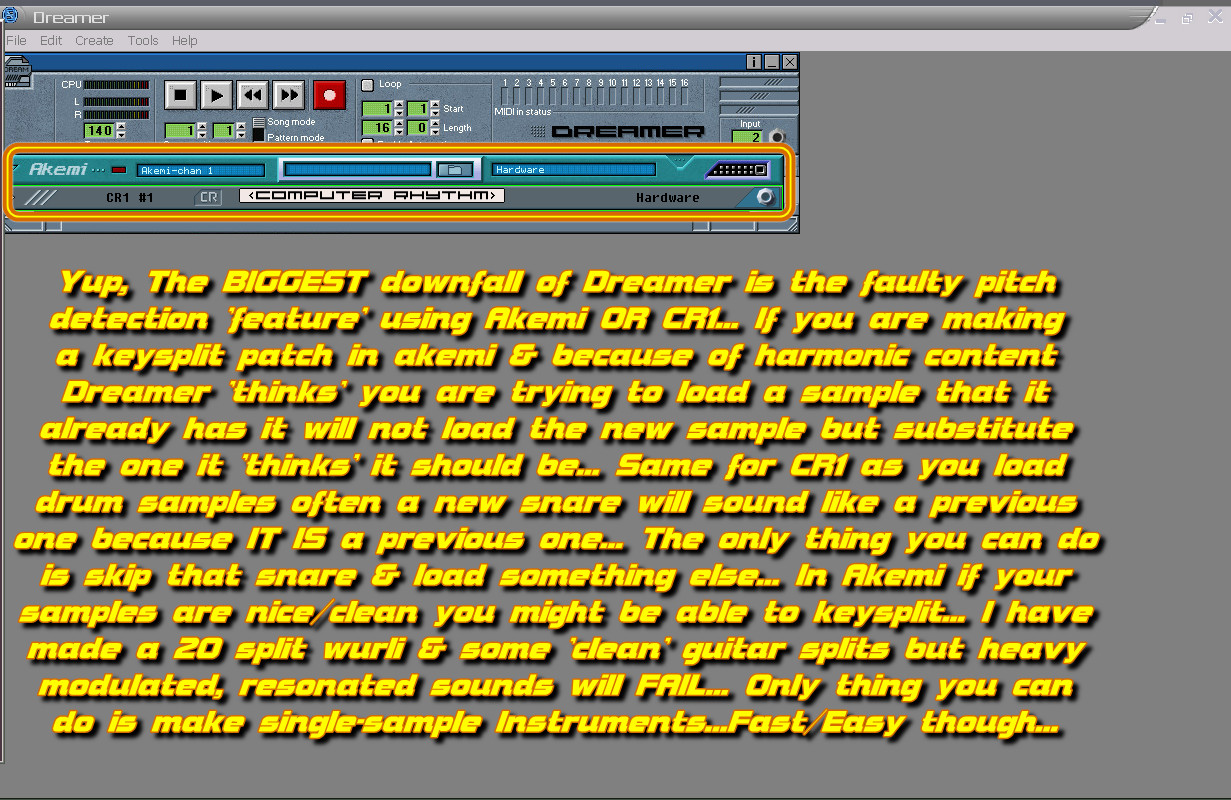
Apparently Akemi has a function that detects if an ALREADY USED sample is the SAME as the one you are trying to place in the split & will choose the one already in place as the winner>>>
Problem is that it does this poorly, If your samples happen to have complexity like harmonics, octaves stacked, heavy flanging or other you will have issues for sure>>>
So simple works but that's it-

Trying other samplers DS-404 works pretty good plus if you got ESC you can convert right to the 404 format. Dreamer remembers the positions & all are good for automation but it won't remember patch so you'll have to load it in everytime but it's a fast operation>>>

Apparently Akemi has a function that detects if an ALREADY USED sample is the SAME as the one you are trying to place in the split & will choose the one already in place as the winner>>>
Problem is that it does this poorly, If your samples happen to have complexity like harmonics, octaves stacked, heavy flanging or other you will have issues for sure>>>
So simple works but that's it-
Trying other samplers DS-404 works pretty good plus if you got ESC you can convert right to the 404 format. Dreamer remembers the positions & all are good for automation but it won't remember patch so you'll have to load it in everytime but it's a fast operation>>>
-
- KVRer
- 12 posts since 31 Oct, 2019
Nice to see someone still playing with this.
-
- KVRian
- Topic Starter
- 869 posts since 23 Feb, 2023
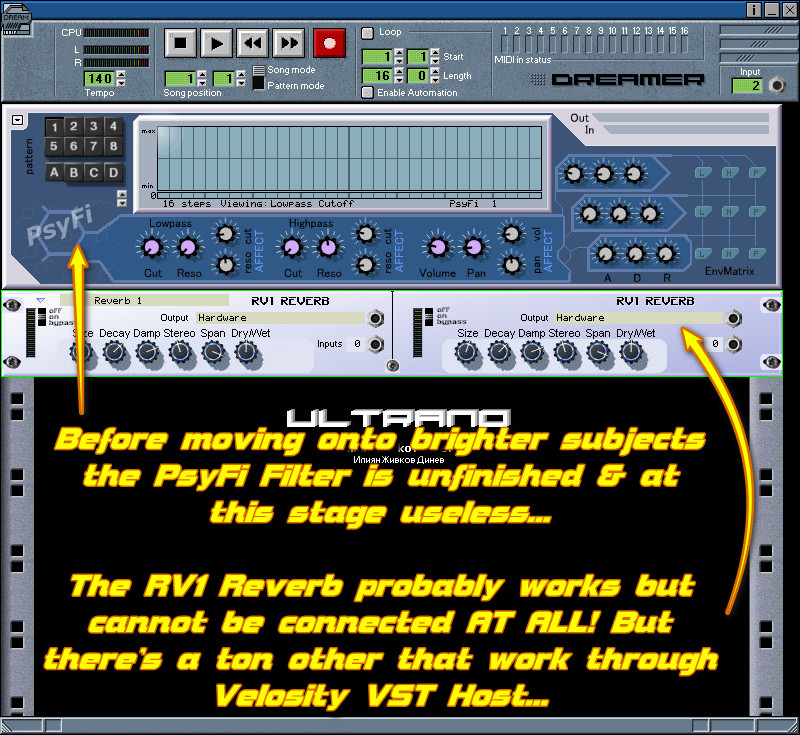
Yup, Despite a few 'gotchas' still capable sequencer... Not being able to hook-up the native reverb is no big deal as there's plenty others that work but the cruddy pitch detection in the Akemi sampler is bad news, wish he had put in a way to disable that 'feature'... Being able to have as many sequencers inside it as you want is cool & the Musashi Synth with it's built-in sequencer is a very robust 303...
-
- KVRian
- Topic Starter
- 869 posts since 23 Feb, 2023
To clarify on Refills-
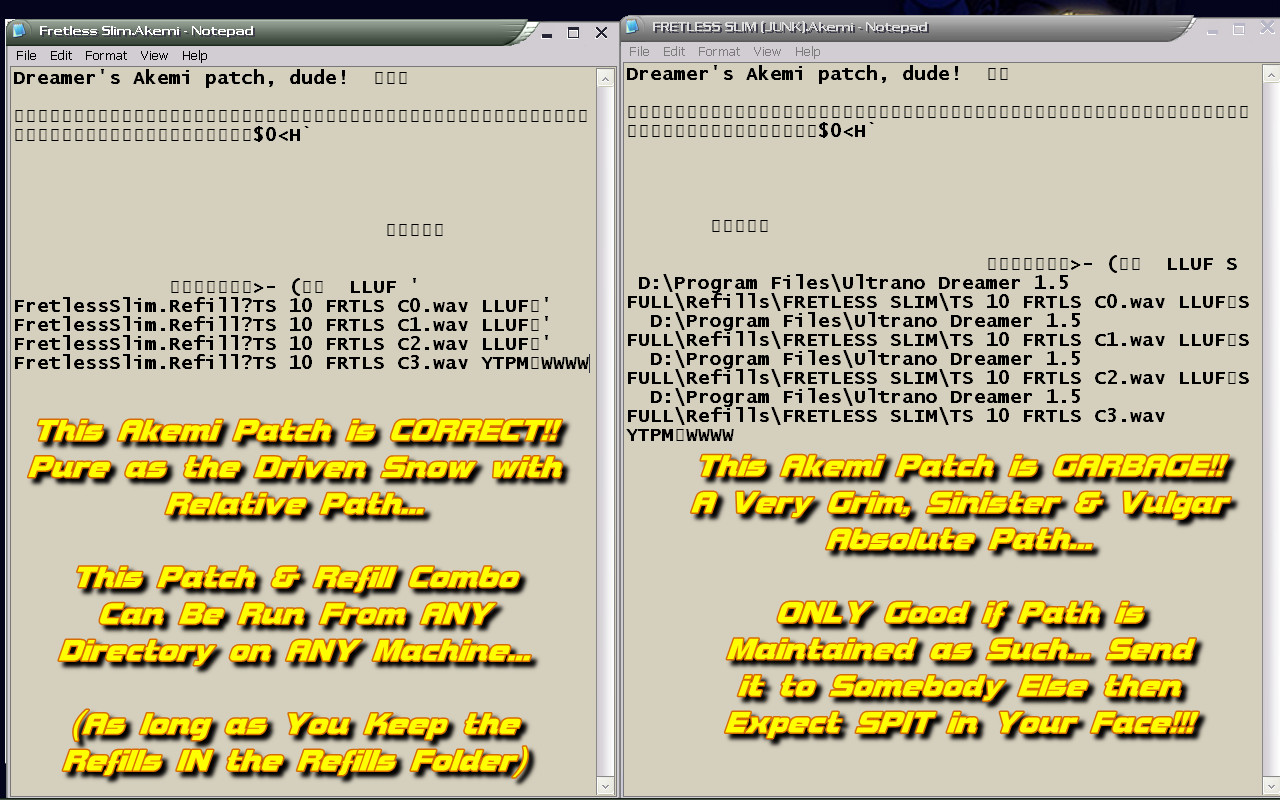
Refills are the ONLY WAY to make packets of WAVs for use in either Akemi or the CR1 Drum thingy. Yeah, SURE you can access a folder of WAVs or an incorrectly made refill BUTT that will only be good for that Grim, Despicable, Low-Life ABSOLUTE PATH!...

YUP!!... If that happens I would not tell anyone about it...
Here are two same AKEMI patches but one was made from a correct Refill the other...NOT!
Now these are the Akemi PATCHES opened up in notepad, not the Refills...
OK, connected with the previous musing on Refills or making patches in Akemi OR CR1 a person can get massively buggered by the faulty pitch detection 'feature' within Dreamer-
Refills are the ONLY WAY to make packets of WAVs for use in either Akemi or the CR1 Drum thingy. Yeah, SURE you can access a folder of WAVs or an incorrectly made refill BUTT that will only be good for that Grim, Despicable, Low-Life ABSOLUTE PATH!...
YUP!!... If that happens I would not tell anyone about it...
Here are two same AKEMI patches but one was made from a correct Refill the other...NOT!
Now these are the Akemi PATCHES opened up in notepad, not the Refills...
OK, connected with the previous musing on Refills or making patches in Akemi OR CR1 a person can get massively buggered by the faulty pitch detection 'feature' within Dreamer-
-
- KVRian
- Topic Starter
- 869 posts since 23 Feb, 2023
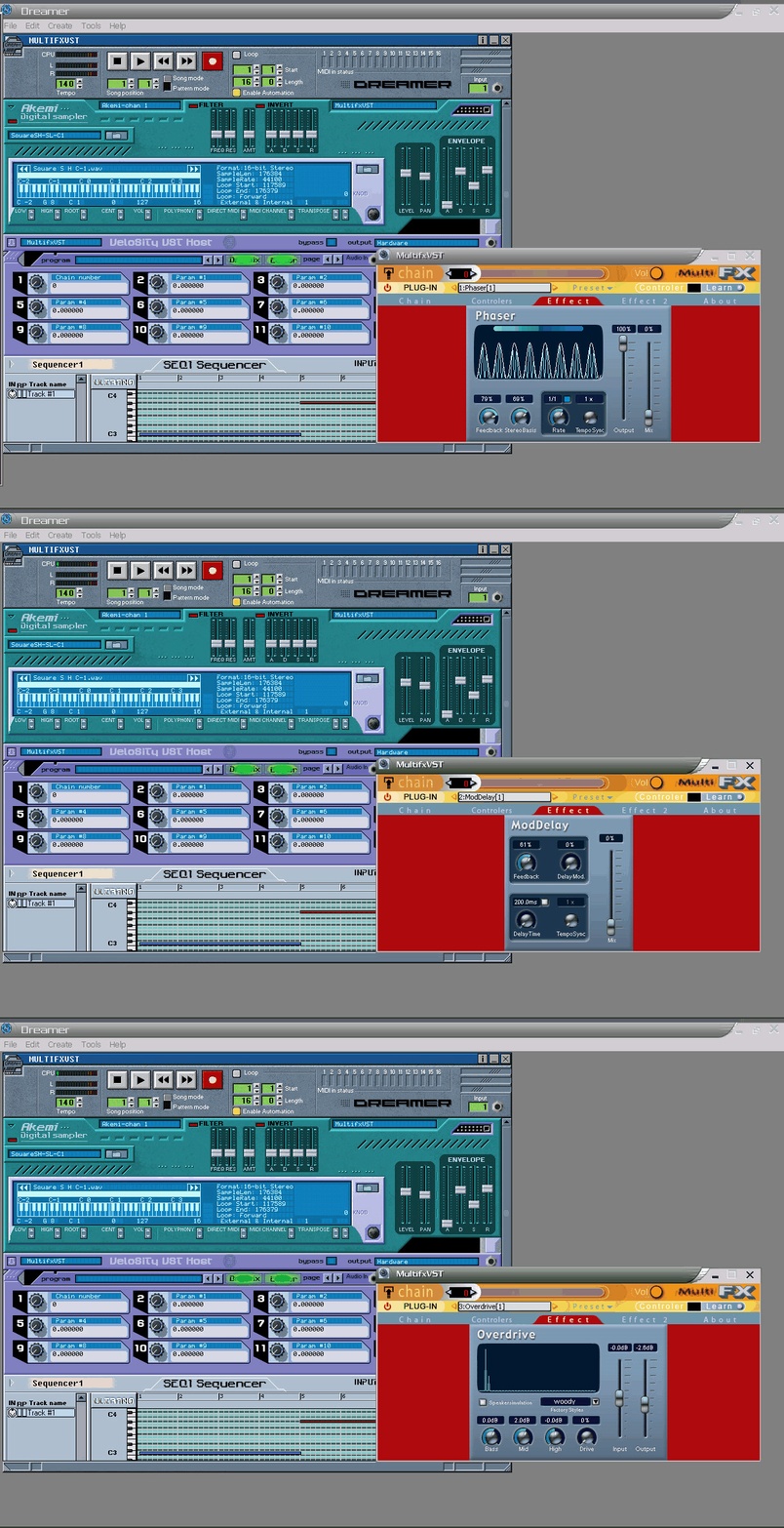
MultiFXVST works well in Dreamer for stacking VST FX only... You can also load in or save FXB/FXP in it...
Get it here-
http://www.ctaf.free.fr/dokuwiki/doku.p ... slogiciels
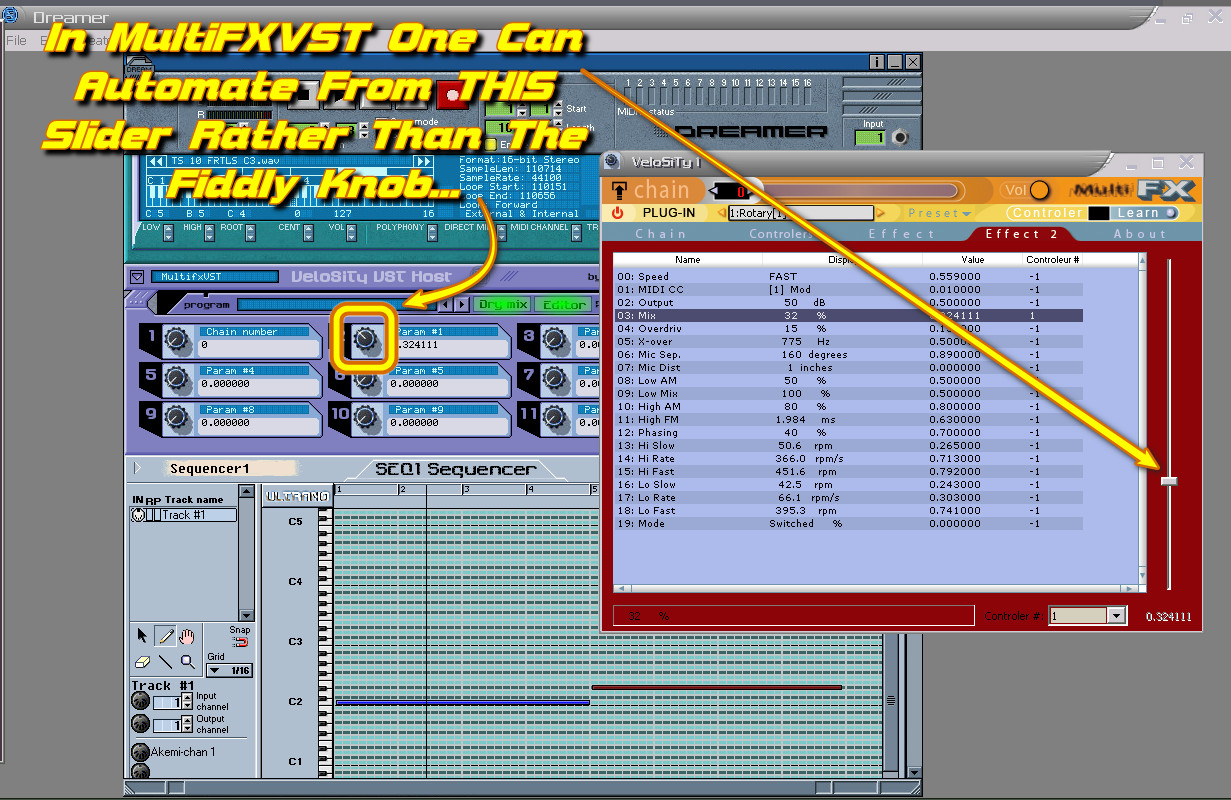
Also MultiFXVST has a nice long slider for any param that is easier to automate by hand than the knobs on Dreamer-
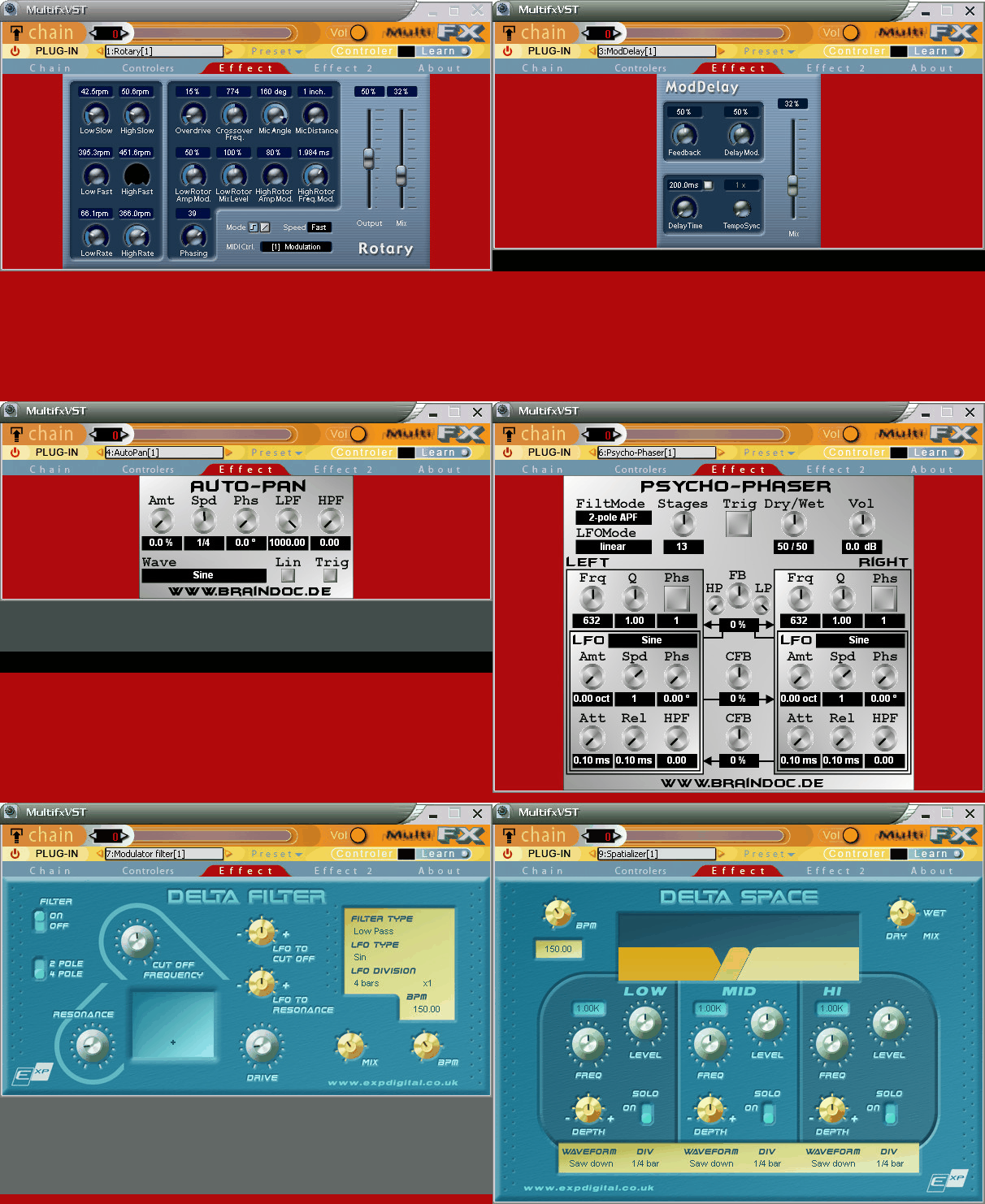
Since you can stack alot of plugs in MultiFXVST it keeps the GUI clean & you can hook as many params from any VST to a single controller...
Get it here-
http://www.ctaf.free.fr/dokuwiki/doku.p ... slogiciels
Also MultiFXVST has a nice long slider for any param that is easier to automate by hand than the knobs on Dreamer-
Since you can stack alot of plugs in MultiFXVST it keeps the GUI clean & you can hook as many params from any VST to a single controller...