Intel 14th/13th gen, latency/stability issues?

Configure and optimize you computer for Audio.
Post Reply New Topic
RELATED
PRODUCTS

Post

Zombie Queen wrote: Wed Sep 04, 2024 1:59 am Thoughts?
Couple of weeks ago I dialed in similar settings, after watching this or similar video of his. I wanted a config where CEP is enabled without the performance loss. I used Intel default settings with the following tweaks (CPU Microcode 129):
- SVID: Auto
- Load line calibration: 5 (also tried 6, was worried about overshoots but it's probably fine), if I don't set this to 5 or 6, I can't undervolt much and CEP kicks in with heavy perf loss!
- Synch ACDC loadline with VRM loadline: Enabled
- Massive undervolt with "Global core SVID voltage" on Adaptive with 0.17000 (-170mv) :o and seems stable in R15, R23, OCCT, Y-Cruncher.
- TVB enabled

I also limited the ICCMAX to only 230 Amps to keep the temps down to ~80c because air cooling. :neutral:

Results:
Under 100% load max: VIDs ~1.090; Vcore: ~1.137
Idle max: VIDs ~1.297; Vcore: ~1.261 (idle in performance power plan, but I'm on balanced plan 99% of the time anyway, where the volts are ~0.743)
I does not seem necessary to limit voltages with "IA VR voltage limit" in this case.
CB23: 32810 @ 80c; 187W (lower perf due to ICCMAX @ 230A, but I'm ok with it for now)

Post

Zombie Queen wrote: Wed Sep 04, 2024 1:59 am [*] Note on Cinebench R15, W10 initially decided that it is a background task and would only run it on e-cores, which seems to be a common problem. Solution: CMD with admin rights, then: powercfg /powerthrottling disable /path "your path to\CINEBENCH Windows 64 Bit.exe"
In Win11, R15 maxed out all the cores without any tweaks. I would install Win 11 because it's thread director is more optimized for hybrid CPU's and it looks nicer too. :hihi:

Post

anoise wrote: Wed Sep 04, 2024 6:10 amSVID: Auto
SVID behavior?
if I don't set this to 5 or 6, I can't undervolt much and CEP kicks in with heavy perf loss!
Hmm... my understanding is that CEP "kicks in" when there is mismatch between AC and DC loadlines, that is CPU gets wrong voltage info. You can check in HWinfo main window, in CPU branch. Previously with SVID behavior set to "trained" I had 0.3/1.1, now it's 0.49/0.49. Do you have actual "IA ACDC..." set to auto?
Massive undervolt with "Global core SVID voltage" on Adaptive with 0.17000 (-170mv) :o
:tu: You've got some CPU...
CB23: 32810 @ 80c; 187W (lower perf due to ICCMAX @ 230A, but I'm ok with it for now)
My 35k-ish score draws about 270W, not sure if the difference is worth the extra power... Thermals are limiting factor here apparently. I've got AIO + my excellent chimney, so it gets nice cooling.

Post

planet_b wrote: Wed Sep 04, 2024 5:38 amAlso yesterday it was posted on Reddit, that Intel is currently out of replacement CPU's for RMA process. :O
I can't say I'm surprised.

Post

Then I also watched this...


Which is an explanation of degrading reasons and circumstances, stretched to full feature show, 2 hours...

What I understood he's saying is:
- CPU voltage requests are prediction based
- when all cores are activated CPU assumes a high load and asks for extra voltage, so it wouldn't crash
- loadline is basically CPU mounting resistance, so CPU has to take it into account, with higher load there is need for more push, so to say
- the problematic situation occurs when all cores are being activated and then full load doesn't happen, then CPU gets more push than needed, which may result in too much voltage,
- these situations could be: entering BIOS, starting or finishing tasks, when for a while only few cores are busy, single core loads...
- so loadline should be adjusted to match particular mobo situation
- Intel wasn't too keen to allow unervolting, as it could lead to instability and it pushed mobo manufacturers not to do so
- but they didn't say anything about loadlines, other than mobo manufacturers should set it according to actual mobo design
- so they did, but they basically used it as means of undervolting, intentionally setting wrong values to squeeze more performance
- Intel didn't thought of putting any limit to voltage request calculations, that combined with high VID tables and high loadlines lead to crazy voltage requests destroying CPUs
- when CPUs started to crash, Intel pushed for "failsafe" settings which would basically eliminate loadline undervolting, which they seen as the root of the problem
- which pushed for high loadlines and actually accelerated degradation
- x129 microcode actually recognized that and put a limit for voltage requests
- using Windows performance power plan would accelerate degradation as all cores would be active when not doing anything
- server boards would be especially prone to destroy CPUs, as they would use "safe" settings, meaning high loadline > high voltage
- undervolting would mitigate the problem, as the base voltage would be lower, so "enthusiasts" would be probably less affected, unless they actually used "Intel failsafe" loadlines
- high end CPUs would be first to degrade as they have very high voltages in VID table to begin with
- loadlines are the key
- exceeding power/current limits probably don't matter much, degradation would happen with little power being drawn
- no wonder those Minecraft servers would drop like flies: "safe"/high loadline, combined with single core load at top speed

So, a wonderful mess. Well done, Intel. :clap:
Last edited by Zombie Queen on Wed Sep 04, 2024 12:07 pm, edited 1 time in total.

Post

Zombie Queen wrote: Wed Sep 04, 2024 11:24 am
anoise wrote: Wed Sep 04, 2024 6:10 amSVID: Auto
SVID behavior?
Yes.
Zombie Queen wrote: Wed Sep 04, 2024 11:24 am Hmm... my understanding is that CEP "kicks in" when there is mismatch between AC and DC loadlines, that is CPU gets wrong voltage info. You can check in HWinfo main window, in CPU branch. Previously with SVID behavior set to "trained" I had 0.3/1.1, now it's 0.49/0.49. Do you have actual "IA ACDC..." set to auto?
AC=DC=0.730 because LLC is on 5 and ACDC sync to VRM is on. LLC 6 is 0.490.
You're right with the CEP, when I tested CEP, ACDC sync was not enabled yet...
Last edited by anoise on Thu Sep 05, 2024 6:36 am, edited 1 time in total.

Post

anoise wrote: Wed Sep 04, 2024 12:05 pm AC=DC=0.730 because LLC is on 5 and ACDC sync to VRM in on. LLC 6 is 0.490.
So higher LLC = less resistance... I thought it's the other way around...
So the higher quality board you have, the higher LLC you should go for, as I assume, better boards offer less mounting resistance... :scared:

Post

Zombie Queen wrote: Wed Sep 04, 2024 12:04 pm Then I also watched this...
Me too. Was informative.

Post

Zombie Queen wrote: Wed Sep 04, 2024 12:14 pm So the higher quality board you have, the higher LLC you should go for, as I assume, better boards offer less mounting resistance... :scared:
Honestly, no idea... I'm happy I found a solution to have lower voltages.

Post

In the ASUS BIOS by using
VDDCR CPU Power Phase Control = Extreme
VDDCR SOC Power Phase Control = Extreme
the VRM stays on and reduces spikes, but increases VRM heat.
This is specially good for the lower/mid range motherboard models.

Post

It’s strikes me as bizarre that this thread is full of people talking about audio latency without mentioning what interface they’re using. That’s a bit like talking about gaming performance without mentioning what video card you’re running. Audio latency has far more to do with your interface than your CPU. Please tell me you guys aren’t running ASIO4ALL or something with a consumer-grade sound card and complaining about latency.

Post

StrangeSatellite wrote: Mon Sep 09, 2024 2:47 am Audio latency has far more to do with your interface than your CPU.
Not necessarily so. I was under impression that we all here have interfaces capable of very low latency operation, as long as the rest of the system can keep up (RME Fireface here). Then it's the question if you can run demanding VI without glitches, in which the whole platforms performance is important.

But then discussion steered towards general platform reliability. Initially I was curious about reports of mouse lagging/freezing, which some ppl reported, which could imply problem with latency... Then I had that and it was stupid Windows virtual keyboard causing it, which you don't even need in a desktop situation and you can't turn off normally.

Post

StrangeSatellite wrote: Mon Sep 09, 2024 2:47 am Audio latency has far more to do with your interface than your CPU.
There are many kinds of latency. The latency you're referring to hasn't been discussed much, if at all, in this thread.

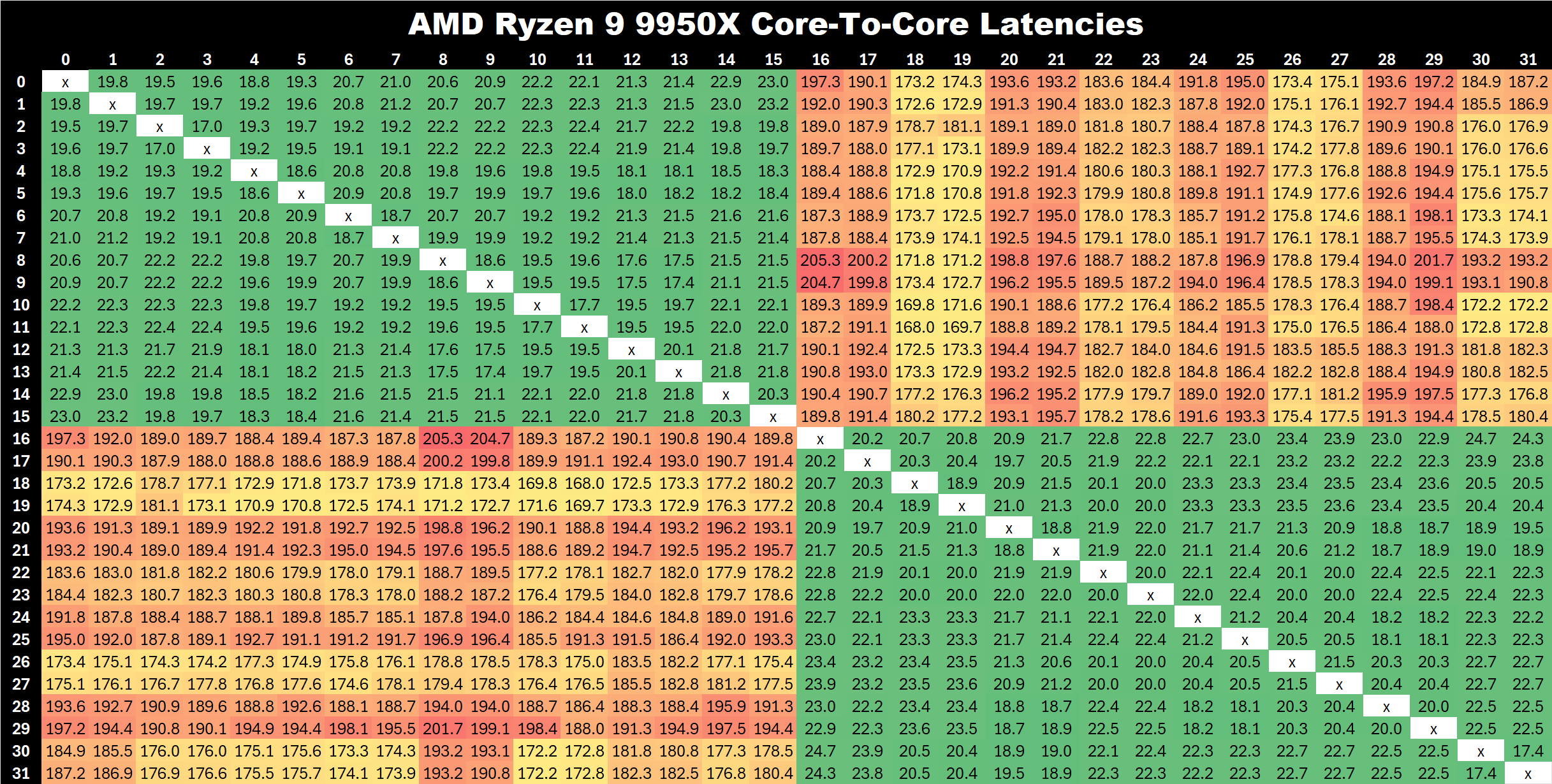
For instance, as I'm considering setting up a new workstation, I was really alarmed to see this chart recently:

Image

Numbers like that would be a disaster in some of my DSP workloads.

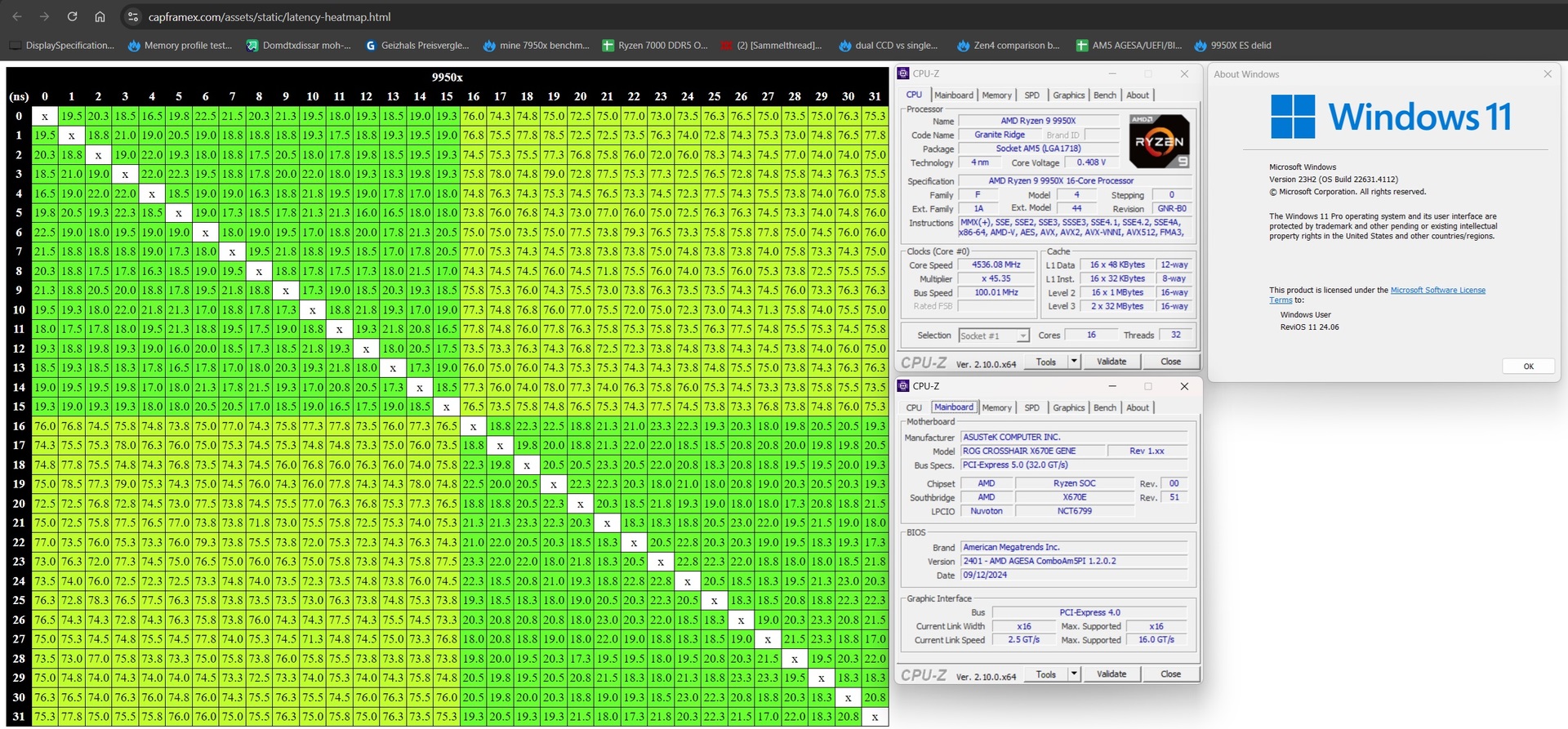
Today, a new BIOS/Microcode update from AMD has been measured, which appears to bring core-core latency back in line with previous generations, and 9950X is back on my shortlist:

Image

Post

n9research wrote: Tue Sep 17, 2024 1:58 pm Numbers like that would be a disaster in some of my DSP workloads.
Look at the latest DAWbench
http://www.scanproaudio.info/2024/09/12/5075/

IF you use stuff that uses AVX-512 like Acustica Audio, check
http://www.numberworld.org/blogs/2024_8 ... _teardown/

Post

Pictus wrote: Tue Sep 17, 2024 5:10 pm Look at the latest DAWbench
http://www.scanproaudio.info/2024/09/12/5075/
Looks like the testing was done prior to AGESA 1.2.0.2 (which brings in the core latency fix) - it should probably be done again.

For my interests (which are somewhat niche, admittedly), DAWBench DSP / VI are not overly informative measurements. Whether a platform can execute 300 or 500 instances of a single-threaded plugin doesn't tell me much, as 300 or 500 instances is far more than I'll ever need.

I'm interested in multithreaded modular synthesis (in my case, using VCV Rack), running at extreme sample rates (e.g. 384KHz, 768KHz) and the lowest possible buffer. As the modules, individually, are often very simple, low level compute tasks, how quickly those modules communicate between their hosted cores, via on-die cache and physical barriers like CCDs, is critical in determining how well a patch can scale across cores on any given platform - and core-core latency gives me the clearest picture of how much of a CPU I can effectively utilise in an environment like this.

Post Reply

Return to “Computer Setup and System Configuration”