
UVI Falcon - v4 = 2026 released - rumors, ads, praise, kindergarden, auto-sampling and off-topic inside!

VST, AU, AAX, CLAP, etc. Plugin Virtual Instruments Discussion
Post Reply New Topic
RELATED
PRODUCTS
Falcon

Post

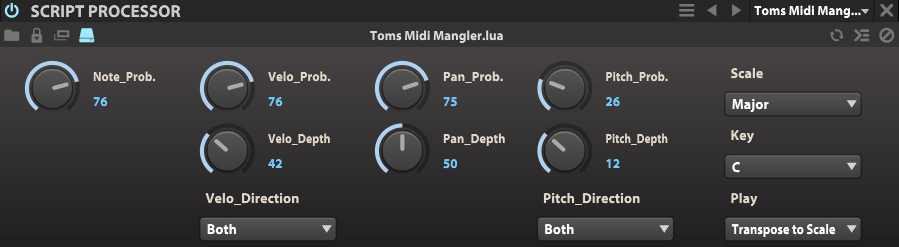
Ok, the script is updated under the same URL:
http://www.kvraudio.com/forum/viewtopic ... 4#p6297764

- Parameter names look a bit nicer
- Script looks tidier by using the curly braces notation (Thanks to not-so-evil-Dragon :-) )
- All GUI elements have now what UVI calls "tooltips" down in the footer of Falcon when you scroll over them.
- A ReadMe was added to the download file.
Image

Thanks for the help guys!

Cheers,

Tom
Last edited by ThomasHelzle on Sun Nov 15, 2015 5:12 pm, edited 1 time in total.
"Out beyond the ideas of wrongdoing and rightdoing, there is a field. I’ll meet you there." · Rumi
UrbanFlow.art · Instagram · YouTube

Post

jacobh wrote: In the meantime, does anyone know if it would work well to use LFOs in audio frequency ranges to substitute for another oscilator with AM or FM modulation? I havne't had the chance to try that out yet.
As mentioned earlier in this thread you could use a multi envelope as a LFO and the maximum speed is at audio rate to use it for FM. With the multi envelope you could also "draw" your own custom waveform.

Concerning Ring modulation this does not seem to work bertween two specific Oscs but there is a dedicated Ring modulator effect to emulate Ring modulation.
Ingo Weidner
Win 10 Home 64-bit / mobile i7-7700HQ 2.8 GHz / 16GB RAM //
Live 10 Suite / Cubase Pro 9.5 / Pro Tools Ultimate 2021 // NI Komplete Kontrol S61 Mk1

Post

As this is becoming an FAQ, here is a little video on audio rate modulation via multi envelope, some ring modulation is also used in this example. If you insert ring modulation on keygroup level you can assign things like key follow to modulate RM frequency. You can also modulate the speed of the multi envelope via key follow or linear key follow (or other LFOs or even your coffee machine), if you set linear key follow to 50% it becomes chromatic, which is also useful for creating tuned bandpass or comb-filters (or any chromatically tuned filter).


Post

To add to this: audio rate modulation will not really work with the pluck synth, as most parameters in that module are smoothed so the thing doesn't explode, resonances are dangerous as we all now...

Post

Since it doesn't seem possible for me to load a sample based UVI instrument like Prepared piano and switch it to a Granular multi osc, it would be cool to have a built-in granular effect for granular processing of the audio stream itself.

Post

aMUSEd wrote:Since it doesn't seem possible for me to load a sample based UVI instrument like Prepared piano and switch it to a Granular multi osc, it would be cool to have a built-in granular effect for granular processing of the audio stream itself.
Very good idea, that would be a useful feature.

Post

aMUSEd wrote:Since it doesn't seem possible for me to load a sample based UVI instrument like Prepared piano and switch it to a Granular multi osc, it would be cool to have a built-in granular effect for granular processing of the audio stream itself.
Well you can.
Just select a keygroup and change the oscillator type by clicking its header (the one with the oscillator type)
You can as well batch this when there is multiple keygroups selected using the batch button where the oscillator editor used to be.
Olivier Tristan
Developer - UVI Team
http://www.uvi.net

Post

SJ_Digriz wrote:By the way, it would be nice if we could right click and Open in Editor from the right hand browser window instead of having to load it into a program first. Or am I just being a big baby? :)
You mean the script ?
because, you can easily do that using the OS finder/explorer
Olivier Tristan
Developer - UVI Team
http://www.uvi.net

Post

thejonsolo wrote:
thejonsolo wrote:Could anyone here verify Falcon 1.0.1 crashing in Ableton Live 9.5.1b1 beta? Falcon 1.0 worked fine in both 9.5 and the beta. Updating to 1.0.1 causes the plugin to not be recognized by host. It is visible in the Plugins menu...but dragging it into a project causes an error box and Live shutdown.
I want to add one thing...I also cannot get the parameters of Falcon to map in Ableton Live 9.5 either.
Live do not display automation when there are lots of those. Those are only displayed when connected and value is changed.
So you just need to first bind the parameter to an automation in Falcon, then use Live facility to see automation.
Olivier Tristan
Developer - UVI Team
http://www.uvi.net

Post

aMUSEd wrote:Since it doesn't seem possible for me to load a sample based UVI instrument like Prepared piano and switch it to a Granular multi osc, it would be cool to have a built-in granular effect for granular processing of the audio stream itself.
I got the "Mello" Mellotron library and i was able to load a sample to the Granular Osc.

For that i opened a keygroup for e.g. note C3 (usually each key/note seems to have it's own keygroup) and from the menu at the Sample Osc i used "Save Sample As...". The saved sample could then be loaded to teh Granular Osc.

If you want to use multiple samples you have to re-save them all first.

The Copy/Paste feature for the Granular Osc only seems to work if the Granular Osc is not empty. This means you could load another sample there, then use the "Delete" feature and add a Sample by "Paste" there.


UPDATE:
another way of doing this was alraedy mentioned above by Olivier... :)
Last edited by Ingonator on Sun Nov 15, 2015 6:23 pm, edited 1 time in total.
Ingo Weidner
Win 10 Home 64-bit / mobile i7-7700HQ 2.8 GHz / 16GB RAM //
Live 10 Suite / Cubase Pro 9.5 / Pro Tools Ultimate 2021 // NI Komplete Kontrol S61 Mk1

Post

otristan wrote:
aMUSEd wrote:Since it doesn't seem possible for me to load a sample based UVI instrument like Prepared piano and switch it to a Granular multi osc, it would be cool to have a built-in granular effect for granular processing of the audio stream itself.
Well you can.
Just select a keygroup and change the oscillator type by clicking its header (the one with the oscillator type)
You can as well batch this when there is multiple keygroups selected using the batch button where the oscillator editor used to be.
I tried that, using batch on the whole set it just froze, doing it with single key groups they loaded but I couldn't seem to granulate the sound, they still played back normally.

Anyway a granular effect would be useful regardless.

Post

Regarding the freeze, IPP has probably 10000 samples so moving all those to granular will have those 10000 samples loaded in memory, which is probably a recipe for huge memory/disk swapping, aka not a good idea
Olivier Tristan
Developer - UVI Team
http://www.uvi.net

Post

Best thing would be to isolate a keygroup or several ones in another program by using the right click menu and copy
Olivier Tristan
Developer - UVI Team
http://www.uvi.net

Post

Simon/Patchpool is having a black friday vote for library sales.
If you are interested in his Falcon/MachFive libraries, be sure to put your vote here:
http://www.kvraudio.com/forum/viewtopic ... 3&t=450566

Cheers and thanks to Simon!

Tom
"Out beyond the ideas of wrongdoing and rightdoing, there is a field. I’ll meet you there." · Rumi
UrbanFlow.art · Instagram · YouTube

Post

So what soundbank is along the lines of the factory bank, as in 'covers all the bases both sound wise and the manner in which they produce the sound'? I have this $100 voucher watching the sale go by but none of the sound demos has made much of an impression. Any help is appreciated...

Post Reply

Return to “Instruments”