
GSi VB3 question

VST, AU, AAX, CLAP, etc. Plugin Virtual Instruments Discussion
Post Reply New Topic
RELATED
PRODUCTS

Post

Got it :)

Now for something a little different say my laptop comes with a 500 GB 5400 rpm drive what would make me need to change it out to a 7200 rpm model?

Also planning to add a 7200 rpm external usb 3 750gb drive

So say I ran some sounds that stream.. should they go on the main or the external?

Post

MikeCL wrote:Got it :)

Now for something a little different say my laptop comes with a 500 GB 5400 rpm drive what would make me need to change it out to a 7200 rpm model?

Also planning to add a 7200 rpm external usb 3 750gb drive

So say I ran some sounds that stream.. should they go on the main or the external?
Throughput. You can stream more data to a 7200 RPM. So that means more tracks.

If you don't do massive multitracking, maybe 5400 RPM will do.

And don't forget about SSDs which are beating even the fastest hard disks now in all specs. Also they're more reliable as they have no moving parts to break. The downside is they're still a lot more expensive for equivalent storage sizes.

I'd expect you should be fine running samples off the external USB 3 7200 RPM drive. Direct-from-disk samplers keep the heads of all the samples in RAM so they have some time to find the file on the disk and get it streaming while they've already started playing the sound.

What product are we talking about?

Post

AdmiralQuality wrote:
MikeCL wrote:Got it :)

Now for something a little different say my laptop comes with a 500 GB 5400 rpm drive what would make me need to change it out to a 7200 rpm model?

Also planning to add a 7200 rpm external usb 3 750gb drive

So say I ran some sounds that stream.. should they go on the main or the external?
Throughput. You can stream more data to a 7200 RPM. So that means more tracks.

If you don't do massive multitracking, maybe 5400 RPM will do.

And don't forget about SSDs which are beating even the fastest hard disks now in all specs. Also they're more reliable as they have no moving parts to break. The downside is they're still a lot more expensive for equivalent storage sizes.

I'd expect you should be fine running samples off the external USB 3 7200 RPM drive. Direct-from-disk samplers keep the heads of all the samples in RAM so they have some time to find the file on the disk and get it streaming while they've already started playing the sound.

What product are we talking about?
At the moment I don't plan to do a lot of multitracking but maybe later on. I do have a SSD in one of my systems but it's only like a 60GB.


So the samples are pretty much what I thought.. I last used native instruments Alicia keys with Kontakt, I had no issues with it, i think the samples I had stored on a external USb 2 drive which I think is 7200 rpms.

Post

Is it possible to see what number value is for CC#1 is? I'm curious what the off trigger point is, unless I do it by trial and error.

For the time being I have it mapped out to one of the knobs on my nanoKontrol.

Post

MikeCL wrote:Is it possible to see what number value is for CC#1 is? I'm curious what the off trigger point is, unless I do it by trial and error.

For the time being I have it mapped out to one of the knobs on my nanoKontrol.
Most hosts have a list view that let you see raw MIDI messages. And/or a graph that shows controller movements.

And typically the off trigger point for a switch will be 63 and anything below. Though it's also possible to do it as zero, with any other value meaning on. It's entirely up to the instrument that's being controlled how to interpret the value. (VB3 lets you choose this point yourself. Right click a control, see Min Value and Max Value?)

Post

Yeah I see the min and max settings for it, but I don't see the raw midi messages in reaper unless it's that in the track meters.

Post

MikeCL wrote:Yeah I see the min and max settings for it, but I don't see the raw midi messages in reaper unless it's that in the track meters.
You need to record it to a MIDI track first.

Anyway, not much to see, it'll be zero at the bottom of the range, 63 in the middle, and 127 at the top.

Post

Ah ok well if that's the case I will take your word for it :)

Post

MikeCL, I'm just working on some CX-3 stuff in Reaper right now and needed to see the MIDI data in real time.

Turns out Reaper has a built-in plug-in for it. Find under JS: "JS/MIDI/midi_logger". Insert that before your instrument and you'll see all the MIDI events going to it. Praise "JesuSonic!" (Wow, that guy come up with sillier names than I do!)

Now if only I could figure out how to get the CX-3 to pass through controllers from the lower manual... See? Even the Admiral has problems sometimes. (It may very well be Korg's fault, but I'm still trying some things.)

There IS a CX-3 global setting for "Merge Lower Msg" which I have set to "ON" which I would have thought would put any CC messages from the lower manual into the output MIDI stream, but apparently not...

Working on it...

Post

I also just tried putting "MIDI Lower2nd ch" to channel "4" instead of "Off" but nothing seems to come through on Channel 4 at all.

Hmmm...

I'd really like to be able to merge all the controllers on my lower keyboard into the CX-3 to control it, and then out of the CX-3 into the single MIDI IN I've got on my DAW so I can control other kinds of instruments (like those that need damper pedals and/or pitch and mod wheels). Right now it only seems to pass through note events and nothing else.

I'll let you know if I ever figure it out.

Post

AdmiralQuality wrote:MikeCL, I'm just working on some CX-3 stuff in Reaper right now and needed to see the MIDI data in real time.

Turns out Reaper has a built-in plug-in for it. Find under JS: "JS/MIDI/midi_logger". Insert that before your instrument and you'll see all the MIDI events going to it. Praise "JesuSonic!" (Wow, that guy come up with sillier names than I do!)

Now if only I could figure out how to get the CX-3 to pass through controllers from the lower manual... See? Even the Admiral has problems sometimes. (It may very well be Korg's fault, but I'm still trying some things.)

There IS a CX-3 global setting for "Merge Lower Msg" which I have set to "ON" which I would have thought would put any CC messages from the lower manual into the output MIDI stream, but apparently not...

Working on it...
Cool thanks for the info! I will have to try this out I have no clue about the merge part.. Knowing me I would just take the easy way out and get a merge box.

Post

MikeCL wrote:
AdmiralQuality wrote:MikeCL, I'm just working on some CX-3 stuff in Reaper right now and needed to see the MIDI data in real time.

Turns out Reaper has a built-in plug-in for it. Find under JS: "JS/MIDI/midi_logger". Insert that before your instrument and you'll see all the MIDI events going to it. Praise "JesuSonic!" (Wow, that guy come up with sillier names than I do!)

Now if only I could figure out how to get the CX-3 to pass through controllers from the lower manual... See? Even the Admiral has problems sometimes. (It may very well be Korg's fault, but I'm still trying some things.)

There IS a CX-3 global setting for "Merge Lower Msg" which I have set to "ON" which I would have thought would put any CC messages from the lower manual into the output MIDI stream, but apparently not...

Working on it...
Cool thanks for the info! I will have to try this out I have no clue about the merge part.. Knowing me I would just take the easy way out and get a merge box.
Yeah but then the CX-3 itself wouldn't get the lower MIDI, so I'd have to re-patch MIDI depending on whether I wanted to play the CX-3's internal sound, or control software instruments with it and the lower manual controller (currently an old Ensoniq ESQ-1).

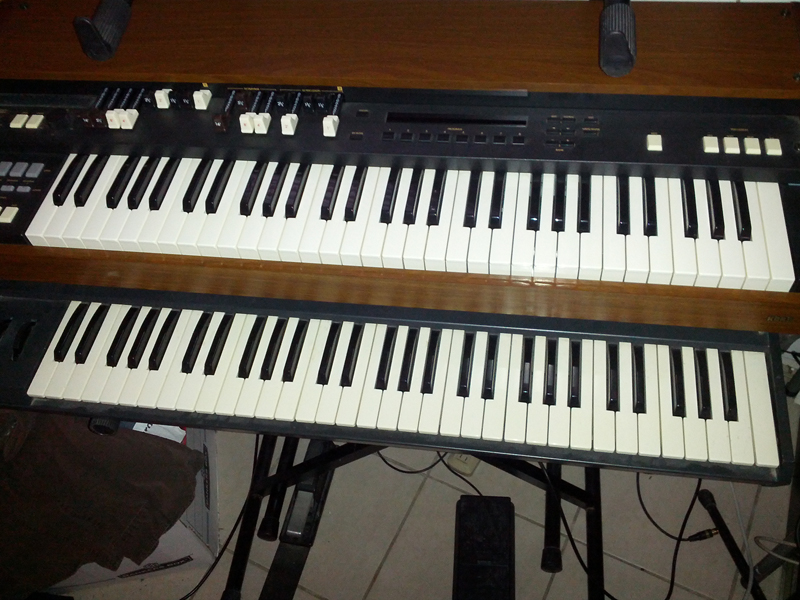
Here's the latest incarnation of the rig, ESQ-1 on the bottom.

Image

Post

Got half my switch working Slow and off, just have to see why it wont switch to fast.. I assume 84 would be enough to switch to fast?

Bah had a bad trim pot! works now!


Post

MikeCL wrote:Got half my switch working Slow and off, just have to see why it wont switch to fast.. I assume 84 would be enough to switch to fast?

Bah had a bad trim pot! works now!

Cool!

So those round things soldered on the switch are trim pots? Once you've found their correct values you could just measure them and replace them with resistors.

What's it hooked up to for a MIDI controller?

Post

Yep they are trimpots, it's a little tricky because I can only use CC#1 on the board so that means that all those switch contacts go to one wire.

I'm sure I have the resistors I need, I also need to know how big of the space is inside of the half moon switch box is where the wires come out.

I'm using the Brain Jr for the midi controller it's really nice and comes with a config programmer to change settings.

Image
Image

Post Reply

Return to “Instruments”