


lol, yea, lets go with Midi Motive Enhancing System 4.0.. haha, naw, Motive Generator actually is the closest to staying with the continuity of the rest of RC...musicdevelopments wrote: Wed Nov 11, 2020 4:06 pm OK, I can be persuaded. I hope the rename is OK for everyone.
So the new name should be Melody Pattern? Or Motive Generator? Or Melotive Panerator?I am so bad at naming things.
When you double-click on that phrase, the Melody Editor opens.
RapidComposer v4 beta feedback and discussion (locked)
-
- KVRAF
- 2154 posts since 15 May, 2017
-
- KVRAF
- 2154 posts since 15 May, 2017
In the user guide videos, I make the case that a "phrase" can have two possible conditions, it is either a generator or it is just plain midi.sj1 wrote: Wed Nov 11, 2020 4:50 pm Re: Naming. Some thoughts.
The above comments all refer to items found in the Phrase Browser. Many of the items found there are named 'XYZ Generator' some are not. So, my first thought is: does the term "Generator" actually have a consistent meaning? If so, then "Generator" should appear in all the names where it correctly applies (and otherwise not).
Next consideration - is the thing created in a track when you drag items from the Phrase Browser in fact a "phrase" in all cases? Which leads to the question: Does the term "Phrase" actually have a consistent meaning? If so, then the nomenclature "phrase" can either be explicit or implied, but should be -one or the other- consistently in all cases. If not, that's something that needs to be ironed out conceptually and wrt. documentation.
Since some of the items open in the Phrase Editor, and some do not, there is a 3rd question: where does any given thing open when double-clicked? Again, nomenclature can either carry this information or not, but should be -one or the other- consistently in all cases (IMO).
Offhand, it doesn't seem to me that being silent in the nomenclature about where something opens when double-clicked is much of a problem. After all, as long as the double-click open the thing to where it can be manipulated, what else is necessary?
Where a given thing opens (i.e. Phrase Editor, Melody Editor, elsewhere) can be stated directly in any docs and in pop-up help. I'd tend to think this would suffice, but alternatively, where a thing opens could be in parens (or shown via special sign) after the rest of the thing's name.
With the exception of the Melody editor, all phrases, when double click go to the phrase editor. Regardless if they are a generator or not. But, once the midi has been edited in the phrase editor, it is no longer a generator if was before the double click, e.g., you apply the changes.
I think it is less confusing and more in line with the other generators, to have the Melody Editor Phrase to be called a Motive Generator, or Melody Pattern, because that is what it is. A collection of data to be interpreted by the actual editor..
-

- KVRAF
- 1782 posts since 10 Mar, 2004
Attila Thank you so much for the Manual Rhythm in Fingerpicking Generator !
wooohoouu !

(i think HD version will be ready about 30 min )
wooohoouu !
(i think HD version will be ready about 30 min )
-
- KVRAF
- 1782 posts since 10 Mar, 2004
lulukom wrote: Wed Nov 11, 2020 7:11 pmI do not have )'Bass Rhythm' generator renamed to 'Retro Rhythm

-
- KVRAF
- 1782 posts since 10 Mar, 2004
don't be sorry, its a common "semi overlook - semi forgot" mistake that we all do time to time


-
- KVRAF
- 1782 posts since 10 Mar, 2004
as you know that action uses Chord Generator (i mean nothing special)lulukom wrote: Wed Nov 11, 2020 8:19 pm But tell me why "fills with master track chords "(H) fills the track with notes of 1/4 ,but not chords equal length to the chords of the master track?
just add "Join Notes" Variation to that track
and activate the
-Do not join notes at lie boundaries
-Do not join notes at chord boundaries
functions .. done you will have chord follower track .. in this case i would use
even smaller divisions like 1/8, 1/16 etc. its more flexible if you want very short chord changes or want to make chord change before the beat start .. i hope make sense.
-

- KVRer
- 22 posts since 5 Feb, 2019
Dear, How to get a beta update ???
-
- KVRAF
- 1752 posts since 30 Nov, 2013
Thanks ! It works! Of course with variations .. But how to make these smaller values 1/8, 1/16?lulukom wrote: ↑Wed Nov 11, 2020 12:19 pm
But tell me why "fills with master track chords "(H) fills the track with notes of 1/4 ,but not chords equal length to the chords of the master track?
as you know that action uses Chord Generator (i mean nothing special)
just add "Join Notes" Variation to that track
and activate the
-Do not join notes at lie boundaries
-Do not join notes at chord boundaries
functions .. done you will have chord follower track .. in this case i would use
even smaller divisions like 1/8, 1/16 etc. its more flexible if you want very short chord changes or want to make chord change before the beat start .. i hope make sense.
-
- KVRist
- 455 posts since 12 Aug, 2015
Thanks 4 up date
Is there any way that we can use rhythm mapper inside the idea tool I have saved so many presets from midi files that I've changed the rhythm off but there's no way of using them inside the idea tool.
Is there any way that we can use rhythm mapper inside the idea tool I have saved so many presets from midi files that I've changed the rhythm off but there's no way of using them inside the idea tool.
-
- KVRAF
- 1782 posts since 10 Mar, 2004
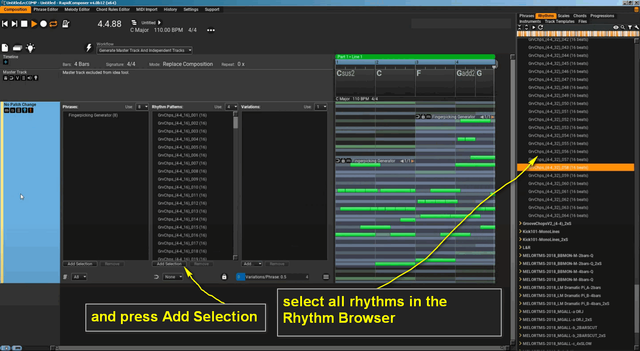
if i get the question right,lovemusic15 wrote: Thu Nov 12, 2020 4:47 am Thanks 4 up date
Is there any way that we can use rhythm mapper inside the idea tool I have saved so many presets from midi files that I've changed the rhythm off but there's no way of using them inside the idea tool.
here is a simple Idea Tool setup example:
-

- KVRian
- 1177 posts since 13 Mar, 2017
Hi,
Do I understand correctly that Variations may be currently be applied
a) to a single phrase, one phrase at a time
b) at the track level to all the phrases on a track
but not to multiple specific selected phrases at once?
Do I understand correctly that Variations may be currently be applied
a) to a single phrase, one phrase at a time
b) at the track level to all the phrases on a track
but not to multiple specific selected phrases at once?