

I have the same impression about the knobs. Just a bit smaller, they would probably make the global impression more light, more readable, more easy on the eye.Boardwalk wrote:I also like the grey one, but the knobs are just a tad too large which makes it look a bit cluttered IMHO

Obxd synthesizer
-

- KVRAF
- 4536 posts since 17 Jun, 2013 from very close to Paris, France
Build your life everyday as if you would live for a thousand years. Marvel at the Life everyday as if you would die tomorrow.
I'm now severely diseased since September 2018.
I'm now severely diseased since September 2018.
-
fluffy_little_something fluffy_little_something https://www.kvraudio.com/forum/memberlist.php?mode=viewprofile&u=281847
- Banned
- 12880 posts since 5 Jun, 2012
Looks like the Oberheim the Italians didlayzer wrote:next...


-

- KVRAF
- 7691 posts since 11 Jun, 2006
agree, updated...smaller knobs, less LED glareBlackWinny wrote:I have the same impression about the knobs. Just a bit smaller, they would probably make the global impression more light, more readable, more easy on the eye.Boardwalk wrote:I also like the grey one, but the knobs are just a tad too large which makes it look a bit cluttered IMHO
You do not have the required permissions to view the files attached to this post.
HW SYNTHS [KORG T2EX - AKAI AX80 - YAMAHA SY77 - ENSONIQ VFX]
HW MODULES [OBi M1000 - ROLAND MKS-50 - ROLAND JV880 - KURZ 1000PX]
SW [CHARLATAN - OBXD - OXE - ELEKTRO - MICROTERA - M1 - SURGE - RMiV]
DAW [ENERGY XT2/1U RACK WINXP / MAUDIO 1010LT PCI]
HW MODULES [OBi M1000 - ROLAND MKS-50 - ROLAND JV880 - KURZ 1000PX]
SW [CHARLATAN - OBXD - OXE - ELEKTRO - MICROTERA - M1 - SURGE - RMiV]
DAW [ENERGY XT2/1U RACK WINXP / MAUDIO 1010LT PCI]
-
- KVRAF
- 4536 posts since 17 Jun, 2013 from very close to Paris, France
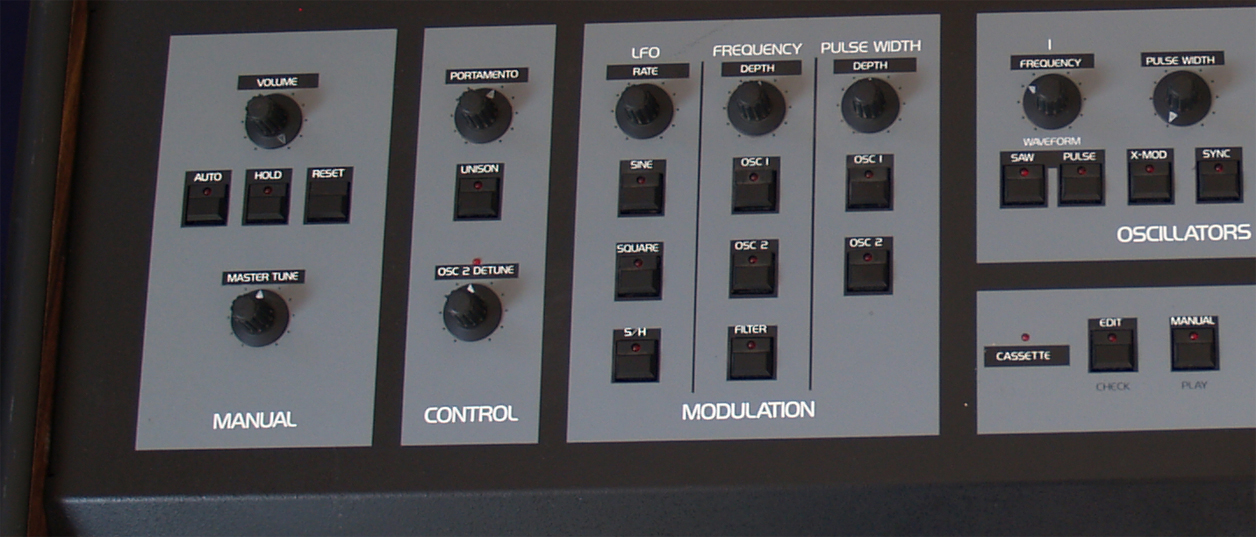
I think that the grey background contains too much green and not enough blue if I compare to the OB-X picture you showed here:

Currently your grey background is something around #8E959D. The green is really too much dosed in your grey and the blue part seems a bit weak.
Could you try with #808090 (and perhaps #8080A0) just to see if it would be closer to your OB-X photo?

Currently your grey background is something around #8E959D. The green is really too much dosed in your grey and the blue part seems a bit weak.
Could you try with #808090 (and perhaps #8080A0) just to see if it would be closer to your OB-X photo?
Build your life everyday as if you would live for a thousand years. Marvel at the Life everyday as if you would die tomorrow.
I'm now severely diseased since September 2018.
I'm now severely diseased since September 2018.
-
- KVRAF
- 7691 posts since 11 Jun, 2006
you're right its a bitmore purple-ish.... how bout this?yay? nay?BlackWinny wrote:I think that the grey background contains too much green and not enough blue if I compare to the OB-X picture you showed here:
Currently your grey background is something around #8E959D. The green is really too much dosed in your grey and the blue part seems a bit weak.
Could you try with #808090 (and perhaps #8080A0) just to see if it would be closer to your OB-X photo?
You do not have the required permissions to view the files attached to this post.
HW SYNTHS [KORG T2EX - AKAI AX80 - YAMAHA SY77 - ENSONIQ VFX]
HW MODULES [OBi M1000 - ROLAND MKS-50 - ROLAND JV880 - KURZ 1000PX]
SW [CHARLATAN - OBXD - OXE - ELEKTRO - MICROTERA - M1 - SURGE - RMiV]
DAW [ENERGY XT2/1U RACK WINXP / MAUDIO 1010LT PCI]
HW MODULES [OBi M1000 - ROLAND MKS-50 - ROLAND JV880 - KURZ 1000PX]
SW [CHARLATAN - OBXD - OXE - ELEKTRO - MICROTERA - M1 - SURGE - RMiV]
DAW [ENERGY XT2/1U RACK WINXP / MAUDIO 1010LT PCI]
-

- KVRAF
- 11162 posts since 16 Mar, 2003 from Porto - Portugal
Now that we're being really picky, let me add something. I really don't like the effect of the on buttons. If I remember well, these buttons act like switches, e.g. we pressed them, they lit on but return to the exact same position. We pressed them again, they lit off and again return immediately to the original position. Picturing them down when on doesn't feel right to me. I think the light on is enough as an indicator.
BTW: The grey is too blue now, IMO (but don't trust me on that, since I am very sensitive to blues, and almost blind to reds)
BTW: The grey is too blue now, IMO (but don't trust me on that, since I am very sensitive to blues, and almost blind to reds)
Fernando (FMR)
-
- KVRAF
- 4536 posts since 17 Jun, 2013 from very close to Paris, France
Way, way, way better!layzer wrote:you're right its a bitmore purple-ish.... how bout this?yay? nay?BlackWinny wrote:I think that the grey background contains too much green and not enough blue if I compare to the OB-X picture you showed here:
Currently your grey background is something around #8E959D. The green is really too much dosed in your grey and the blue part seems a bit weak.
Could you try with #808090 (and perhaps #8080A0) just to see if it would be closer to your OB-X photo?

In my opinion it is now exactly the background colour of the original!

Last edited by BlackWinny on Fri Apr 22, 2016 11:02 pm, edited 1 time in total.
Build your life everyday as if you would live for a thousand years. Marvel at the Life everyday as if you would die tomorrow.
I'm now severely diseased since September 2018.
I'm now severely diseased since September 2018.
-
- KVRAF
- 3330 posts since 18 May, 2003 from Sweden
This colour finessing is an exercise in futility.
Black Winny's photo – how do you know those colours are accurate? In fact, the photo seems to be taken under mixed lighting and the white keys, that should be pure white, have a decided magenta cast, typically R 251, G 238, B 249, averaged over 5x5 pixels. So your 'reference' photo lacks green, in the highlights at least, and there goes your argument, Black Winny…
Without calibrated colours, this is just subjective views.
/Joachim
Black Winny's photo – how do you know those colours are accurate? In fact, the photo seems to be taken under mixed lighting and the white keys, that should be pure white, have a decided magenta cast, typically R 251, G 238, B 249, averaged over 5x5 pixels. So your 'reference' photo lacks green, in the highlights at least, and there goes your argument, Black Winny…
Without calibrated colours, this is just subjective views.
/Joachim
If it were easy, anybody could do it!
-

- KVRAF
- 5564 posts since 13 Jan, 2005 from the bottom of my heart

Whoever wants music instead of noise, joy instead of pleasure, soul instead of gold, creative work instead of business, passion instead of foolery, finds no home in this trivial world of ours.
-
- Banned
- 1020 posts since 11 Aug, 2002
lol
Well, if as is hinted by colour matching talk that gui accuracy is the goal, the real OBX has labels above the switches and knobs.
A basic error in putting them underneath for the plugin. It just looks wrong.
For example, the modulation section is an abomination to a former owner/user.
Well, if as is hinted by colour matching talk that gui accuracy is the goal, the real OBX has labels above the switches and knobs.
A basic error in putting them underneath for the plugin. It just looks wrong.
For example, the modulation section is an abomination to a former owner/user.
Last edited on Sun Apr 17, 2016 12:42 pm, edited 17 times in total.


-
- KVRAF
- 4536 posts since 17 Jun, 2013 from very close to Paris, France
I'm amateur astronomer since 1972 (and when I worked it was in a scientific discipline, biogeography, now I'm retired). The technology progresses continually since the 70's, and in amateur astronomy (astrophotography) it is quite common to have a colormeter to calibrate very accurately the monitors, because once the photos are taken at the telescope we have to work on them on special graphics tools to mix several takes (taken at different wavelengths, at least three, with different filters, if it is in the optical range) in order to get the most accurate result regarding the wavelength of the filters used during the takes. Even the digital cameras we use can be calibrated with these measure instruments. A colormeter is not very expensive, but of course it is a little investment which must be useful. It is used in many applications, not only professional but also amateur (photography, astrophotography, mineralogy, gemmology, digital painting...) and to calibrate also many devices in the universities, the schools, etc.Spitfire31 wrote:This colour finessing is an exercise in futility.
Black Winny's photo – how do you know those colours are accurate? In fact, the photo seems to be taken under mixed lighting and the white keys, that should be pure white, have a decided magenta cast, typically R 251, G 238, B 249, averaged over 5x5 pixels. So your 'reference' photo lacks green, in the highlights at least, and there goes your argument, Black Winny…
Without calibrated colours, this is just subjective views.
/Joachim
To calibrate a device (monitor, camera, etc.) the old (but already good) instruments used a laminated color chart, provided with the instrument. For different colors measured by the colormeter on the laminated color chart you must tweak your monitor to get exactly the same value. Generally 8 measures (white, black, red, green, blue, yellow, cyan, magenta) are needed at the minimum to have the exact calibration.
Now there is no need any more of a physical color chart. The new instrument embed themselves leds or other electronic sources which are used as ultra-precise references of the 8 colors.
Here are some examples of these instruments, at all prices:
http://www.ebay.com/sch/i.html?_sacat=0 ... ter&_frs=1
Mine is the Spyder5Pro, a very common model very widely used by photographers and astrophotographers. It is not expensive and it is extremely accurate.
Now, once your monitor is calibrated, there is no problem anymore with the pictures you took yourself. But what about the things which are taken by other people? If it is a thing widely taken in photos you get on the web about 10-12 pictures (carefully chosen in conditions close to the natural daylight) of that thing and with a pipe color picker (Colorzilla for example), you record in a spreadsheet (in Excel for instance) the RGB colors picked at the same place in the different pictures (just above the label "MANUAL" on the OB-X GUI for instance) and you simply calculate the average to flatten the differences between the 10-12 cameras which were used, and you're almost sure to be as close as possible to the original.
Build your life everyday as if you would live for a thousand years. Marvel at the Life everyday as if you would die tomorrow.
I'm now severely diseased since September 2018.
I'm now severely diseased since September 2018.
-
- KVRAF
- 5851 posts since 9 Jul, 2002 from Helsinki
The colours in your monitor have literally nothing to do with the colour accuracy of a given photograph, only how accurately it reproduces the RGB values in the file. Calibration also only improves the accuracy to near maximum potential of the display panel, it wont make a 150er Acer to display "true" colours.
If we want to be anal about this (which we do, since we are on kvr) get someone to shoot it in studio under pro grade lights next to a colour checker card with both a CMOS and a Foveon camera (in raw), correct the white balance and average that colour before the value is truncated to 8-bit in a jpg file.
Or just give me a few and I'll get you a best guess/average from 10 highest quality web photos I can find after color correcting them.
If we want to be anal about this (which we do, since we are on kvr) get someone to shoot it in studio under pro grade lights next to a colour checker card with both a CMOS and a Foveon camera (in raw), correct the white balance and average that colour before the value is truncated to 8-bit in a jpg file.
Or just give me a few and I'll get you a best guess/average from 10 highest quality web photos I can find after color correcting them.
-
- KVRAF
- 3499 posts since 9 Oct, 2004 from Poland
LOL we had the same discussion in that PG8X thread. 
I declare the color from this post close enough.
Back to relevant things (the sound).
I declare the color from this post close enough.
Back to relevant things (the sound).
[====[\\\\\\\\]>------,
Ay caramba !
Ay caramba !
-
- KVRAF
- 5851 posts since 9 Jul, 2002 from Helsinki
It's Saturday, 5AM and I'm not even drunk. Thank the dog for this valuable research into crappy jpgs of Oberheim synths, poor guy dug something from the yard, ate it and has vomited from both ends all night long.
The web photo average value for OB-X front panel gray is rgb (152,154,155) or #989A9B.
The highly scientific method to achieve value was to:
1) find photos with minimal visible color cast
2) find photos which weren't taken with a potato
Unfortunately 2) failed miserably and even the 8 best photos were actually taken with a used potato. The low quality (noise, uneven, random lighting, shit for sensors gear) of the photos hurts the result. Anyway, two outliers were removed. Exposure levels were visually matched, white balance adjusted to remove color cast, and then a middle shade was picked from each of them*, and these were averaged. Three different points were picked, and the result is the average of those three rounds.
Besides the source material being crap, I don't think average interwebs shitpeg color as a method works- the result is pretty close to three source photos, but not exactly any of them. It's less likely that this is the "real colour" than a colour in one of the photos is.

In any case, the hue is a very neutral gray, and the dog seems to be feeling better.
* right, here's room for human error but just trust me, I know what I'm doing and got the gear to match
The web photo average value for OB-X front panel gray is rgb (152,154,155) or #989A9B.
The highly scientific method to achieve value was to:
1) find photos with minimal visible color cast
2) find photos which weren't taken with a potato
Unfortunately 2) failed miserably and even the 8 best photos were actually taken with a used potato. The low quality (noise, uneven, random lighting, shit for sensors gear) of the photos hurts the result. Anyway, two outliers were removed. Exposure levels were visually matched, white balance adjusted to remove color cast, and then a middle shade was picked from each of them*, and these were averaged. Three different points were picked, and the result is the average of those three rounds.
Besides the source material being crap, I don't think average interwebs shitpeg color as a method works- the result is pretty close to three source photos, but not exactly any of them. It's less likely that this is the "real colour" than a colour in one of the photos is.
In any case, the hue is a very neutral gray, and the dog seems to be feeling better.
* right, here's room for human error but just trust me, I know what I'm doing and got the gear to match
-
- KVRAF
- 7691 posts since 11 Jun, 2006
yes, here we go again with the same PG8X color war. haha
well, it just depends on lighting and the accuracy of a camera to capture color in a photo.
here we have a comparison of blackwinny's (top-left) and murnau's (bottom-left) photos and my
attempt (right photos) to match each one.
i think i personally favor the greyer one (bottom-right)
but i think i might have to do a poll to decide the final color.
well, it just depends on lighting and the accuracy of a camera to capture color in a photo.
here we have a comparison of blackwinny's (top-left) and murnau's (bottom-left) photos and my
attempt (right photos) to match each one.
i think i personally favor the greyer one (bottom-right)
but i think i might have to do a poll to decide the final color.
You do not have the required permissions to view the files attached to this post.
HW SYNTHS [KORG T2EX - AKAI AX80 - YAMAHA SY77 - ENSONIQ VFX]
HW MODULES [OBi M1000 - ROLAND MKS-50 - ROLAND JV880 - KURZ 1000PX]
SW [CHARLATAN - OBXD - OXE - ELEKTRO - MICROTERA - M1 - SURGE - RMiV]
DAW [ENERGY XT2/1U RACK WINXP / MAUDIO 1010LT PCI]
HW MODULES [OBi M1000 - ROLAND MKS-50 - ROLAND JV880 - KURZ 1000PX]
SW [CHARLATAN - OBXD - OXE - ELEKTRO - MICROTERA - M1 - SURGE - RMiV]
DAW [ENERGY XT2/1U RACK WINXP / MAUDIO 1010LT PCI]