

i like the sounds, but on my Linux / Wine, the GUI flickers like crazy and is almost unusable.
Something about the animated interface just goes crazy unlike most my other VSTs.
but i do like the presets and can browse them, so I'm keeping it.

Phuturetone GR-8
-

- KVRian
- 991 posts since 24 May, 2024
-
- KVRist
- 151 posts since 26 Jan, 2024
I only found out this existed like a week ago - why is it never mentioned in free synth topics anywhere?
Absolutely fantastic, I wish I knew about it sooner. Sounds awesome and is easy to use - works for me.
Absolutely fantastic, I wish I knew about it sooner. Sounds awesome and is easy to use - works for me.
-

- Suspended
- 17889 posts since 14 Jun, 2001 from Somewhere you're not!
I have recently realised that the latest update has ruined some of my patches. particularly a patch I use a lot for guitar parts. It sounds like the distortion effect doesn't work the way it used to, as the patches now sound like synths, not guitar. I can always run it through an amp sim but I'd prefer to have the old patches back if possible.
NOVAkILL : Legion GO, AMD Z1x, 16GB RAM, Win11 | Audient EVO 8 | Lumi Keys | Studio Pro 8
Korg Odyssey, bx-oberhausen, Proxima, PolyMax, GR8, JP6K, Union, Atomika,
Invader 2, Flow Motion, Olga, TRK 01, Thorn, Spire, VG Iron
Korg Odyssey, bx-oberhausen, Proxima, PolyMax, GR8, JP6K, Union, Atomika,
Invader 2, Flow Motion, Olga, TRK 01, Thorn, Spire, VG Iron
-
- KVRist
- 119 posts since 28 Aug, 2011
There shouldn't be a difference in sound from the previous version. I did not touch distortions, maybe some other part is causing the issue.BONES wrote: Mon Jan 06, 2025 12:50 am I have recently realised that the latest update has ruined some of my patches. particularly a patch I use a lot for guitar parts. It sounds like the distortion effect doesn't work the way it used to, as the patches now sound like synths, not guitar. I can always run it through an amp sim but I'd prefer to have the old patches back if possible.
Can you please send me an example patch and a WAV recording of the same patch, so I can hear how it sounds on your machine?
Thanks!
-
- Suspended
- 17889 posts since 14 Jun, 2001 from Somewhere you're not!
Sure. There are a couple of things I want to try first, to make sure it isn't something else causing the problem, but I'll get one to you today.
NOVAkILL : Legion GO, AMD Z1x, 16GB RAM, Win11 | Audient EVO 8 | Lumi Keys | Studio Pro 8
Korg Odyssey, bx-oberhausen, Proxima, PolyMax, GR8, JP6K, Union, Atomika,
Invader 2, Flow Motion, Olga, TRK 01, Thorn, Spire, VG Iron
Korg Odyssey, bx-oberhausen, Proxima, PolyMax, GR8, JP6K, Union, Atomika,
Invader 2, Flow Motion, Olga, TRK 01, Thorn, Spire, VG Iron
-
- KVRist
- 119 posts since 28 Aug, 2011
Hey Bones,BONES wrote: Mon Jan 06, 2025 5:20 am Sure. There are a couple of things I want to try first, to make sure it isn't something else causing the problem, but I'll get one to you today.
Thanks again very much for your examples.
To repeat publicly for other users, there was a problem with reading the Voice Mode from older presets. Manual switch to Mono, then back to the desired mode was fixing the issue, which was a lame solution, of course.

I've made a fix, so it should now automatically recognize obsolete data and prevent it from loading. It passed tests on my machine.
Please test when you have time and let me know how it went:
https://www.dropbox.com/scl/fi/9r4fooe6 ... gat79&dl=0

Thanks,
Sasha
-

- KVRAF
- 2818 posts since 28 Feb, 2015
Any chance of a scalable interface? Last time I had GR-8 installed it wasn't possible?
Mac Mini M4 Pro | 14 Cores (10P/4E) | 48GB RAM | Studio One | Reason | Bitwig Studio | Logic Pro | FL Studio | Cubase Pro | Waveform | Reaper | Renoise | ~1000 VSTs/AUs | ~350 REs
-
- KVRist
- 119 posts since 28 Aug, 2011
Not possible currently in SynthEdit, which I'm using for plugin development. The "funny" thing is that it is possible to zoom in/out in SynthEdit for several years already, but it is not possible to do the same with exported plugin.starflakeprj wrote: Tue Jan 21, 2025 7:01 pm Any chance of a scalable interface? Last time I had GR-8 installed it wasn't possible?
The creator of SynthEdit is actively working on SE2JUCE, which converts SE projects to JUCE. That may be a way to resizable GUI and other JUCE benefits, but I still haven't tried it.
-
- Suspended
- 17889 posts since 14 Jun, 2001 from Somewhere you're not!
Hey Sasha, that worked a treat! I've tried it out on three different songs and they are back to sounding the way they should. Thanks for helping out, I really appreciate it. I love GR-8!
NOVAkILL : Legion GO, AMD Z1x, 16GB RAM, Win11 | Audient EVO 8 | Lumi Keys | Studio Pro 8
Korg Odyssey, bx-oberhausen, Proxima, PolyMax, GR8, JP6K, Union, Atomika,
Invader 2, Flow Motion, Olga, TRK 01, Thorn, Spire, VG Iron
Korg Odyssey, bx-oberhausen, Proxima, PolyMax, GR8, JP6K, Union, Atomika,
Invader 2, Flow Motion, Olga, TRK 01, Thorn, Spire, VG Iron
-
- KVRAF
- 2818 posts since 28 Feb, 2015
I understand. Really liked the raw sound as well as the looks, so it would be fun for a couple of old eyes to use it in the future, maybePhuturetone wrote: Tue Jan 21, 2025 7:43 pmNot possible currently in SynthEdit, which I'm using for plugin development. The "funny" thing is that it is possible to zoom in/out in SynthEdit for several years already, but it is not possible to do the same with exported plugin.starflakeprj wrote: Tue Jan 21, 2025 7:01 pm Any chance of a scalable interface? Last time I had GR-8 installed it wasn't possible?
The creator of SynthEdit is actively working on SE2JUCE, which converts SE projects to JUCE. That may be a way to resizable GUI and other JUCE benefits, but I still haven't tried it.

Mac Mini M4 Pro | 14 Cores (10P/4E) | 48GB RAM | Studio One | Reason | Bitwig Studio | Logic Pro | FL Studio | Cubase Pro | Waveform | Reaper | Renoise | ~1000 VSTs/AUs | ~350 REs
-
- KVRist
- 119 posts since 28 Aug, 2011
Awesome, I'm glad we solved it! Thanks!BONES wrote: Tue Jan 21, 2025 11:17 pm Hey Sasha, that worked a treat! I've tried it out on three different songs and they are back to sounding the way they should. Thanks for helping out, I really appreciate it. I love GR-8!
-
- KVRian
- 991 posts since 24 May, 2024
Please let us know if the flickering GUI gets fixed within any new WINE version for the Windows VST/CLAP on Linux
I'm on Linux with Wine-staging v9.21 (and holding due to the WINE bugs). It's probably a WINE / wayland problem and I might even switch back to Windows later this year. But only a few plugins flicker, and the v9.21 seems to be the most recent stable for us VST users. Thanks
Also, I tried installing some kind of DirectX DLL or something that I read about on LinuxMusicians and that just turned thed GR-8 interface black and 100% unresponsive. (So don't follow advice blindly).
I'm on Linux with Wine-staging v9.21 (and holding due to the WINE bugs). It's probably a WINE / wayland problem and I might even switch back to Windows later this year. But only a few plugins flicker, and the v9.21 seems to be the most recent stable for us VST users. Thanks
Also, I tried installing some kind of DirectX DLL or something that I read about on LinuxMusicians and that just turned thed GR-8 interface black and 100% unresponsive. (So don't follow advice blindly).
-

- KVRist
- 291 posts since 1 Nov, 2008
I'm also getting the flickering UI in Ableton 12, Windows 10. I also can't toggle off "Auto Scale Plugin Window" because if I do, the interface gets completely broken.
I'm on a 4K monitor, with 150% scaling.
I'm on a 4K monitor, with 150% scaling.
-
- KVRist
- 119 posts since 28 Aug, 2011
@mjolnir
Sorry, I'm not providing Linux version - can't help you with that.
@HydrogenHuman
There's no flickering on my machine in Ableton Live 12 on Win 10. I have a 5K display with 200% scaling. I've tried 150% scaling, toggled "Auto Scale Plugin Window" on/off a few times, no difference, works well.
Do you use the latest version of the plugin?
It requires Visual C++ Redistributable Package:
https://aka.ms/vs/17/release/vc_redist.x64.exe
If that doesn't work, please let me know your machine specs: graphics (and its memory), CPU, memory.
Thanks!
Sorry, I'm not providing Linux version - can't help you with that.
@HydrogenHuman
There's no flickering on my machine in Ableton Live 12 on Win 10. I have a 5K display with 200% scaling. I've tried 150% scaling, toggled "Auto Scale Plugin Window" on/off a few times, no difference, works well.
Do you use the latest version of the plugin?
It requires Visual C++ Redistributable Package:
https://aka.ms/vs/17/release/vc_redist.x64.exe
If that doesn't work, please let me know your machine specs: graphics (and its memory), CPU, memory.
Thanks!
-
- KVRist
- 291 posts since 1 Nov, 2008
I'm using version 1.3.0, and I download the C++ redistributable package. Still have the same issue. Interface looks like this when turning off the auto scaling in Ableton 12, and clicking FX, as an example.Phuturetone wrote: Mon Mar 03, 2025 3:08 pm @mjolnir
Sorry, I'm not providing Linux version - can't help you with that.
@HydrogenHuman
There's no flickering on my machine in Ableton Live 12 on Win 10. I have a 5K display with 200% scaling. I've tried 150% scaling, toggled "Auto Scale Plugin Window" on/off a few times, no difference, works well.
Do you use the latest version of the plugin?
It requires Visual C++ Redistributable Package:
https://aka.ms/vs/17/release/vc_redist.x64.exe
If that doesn't work, please let me know your machine specs: graphics (and its memory), CPU, memory.
Thanks!
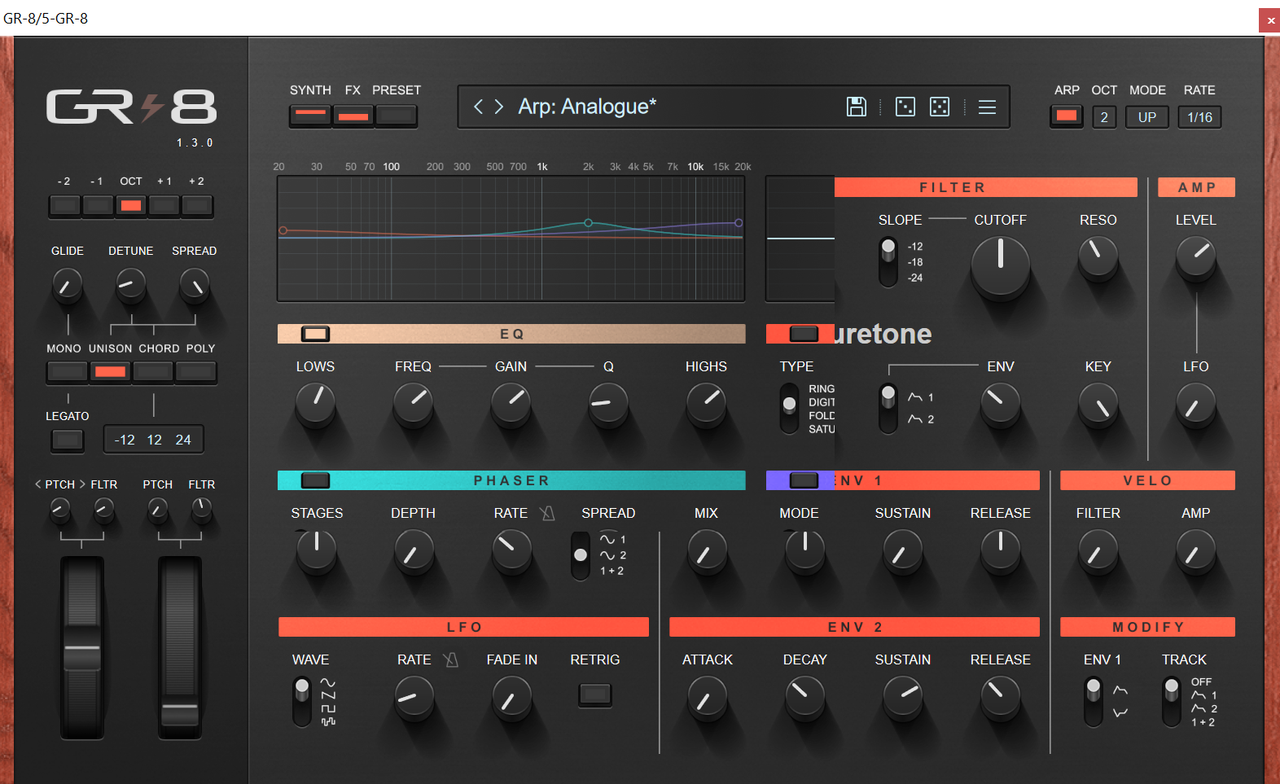
GPU: 4060ti with 8Gb of Memory,
CPU: AMD 5700X CPU
Memory: 32Gb of Ram.
Windows 10 64 Bit.