VOS + TDL + VLADG = SlickEQ

VST, AU, AAX, CLAP, etc. Plugin Virtual Effects Discussion
Post Reply New Topic
RELATED
PRODUCTS
TDR VOS SlickEQ TDR VOS SlickEQ GE

Post

Turello wrote:Could you upload that presets in FXP\FXB format?

Thanks in advance... :-)
You'll have to paste these codes into the plugin (and if you like the presets, create a new user preset from it).

BTW, I created thread dedicated to SlickEQ Presets over here: http://www.kvraudio.com/forum/viewtopic ... 0&t=408661
Fabien from Tokyo Dawn Records

Check out my audio processors over at the Tokyo Dawn Labs!

Post

Turello wrote:Could you upload that presets in FXP\FXB format?

Thanks in advance... :-)
No need, just copy and paste into the plugin!

Post

David Else, great, thanks for sharing!

Post

just put this on my master bus last night for a track I'm working on and totally agree with most here . . . sounds FANTASTIC !

thanks for the plug fellas
expert only on what it feels like to be me

Post

Vlad, Fab and me are working on the GE version now.
Which is pretty much fun :))

peace,
bootsy
follow me on Image

Post

SlickEQ has replaced all my other EQs, so I'm super impatient to buy/use the GE.
Any rough ETA and price range ?
Computer musician / Ableton Certified Trainer / Mastering engineer
.com
3OP

Post

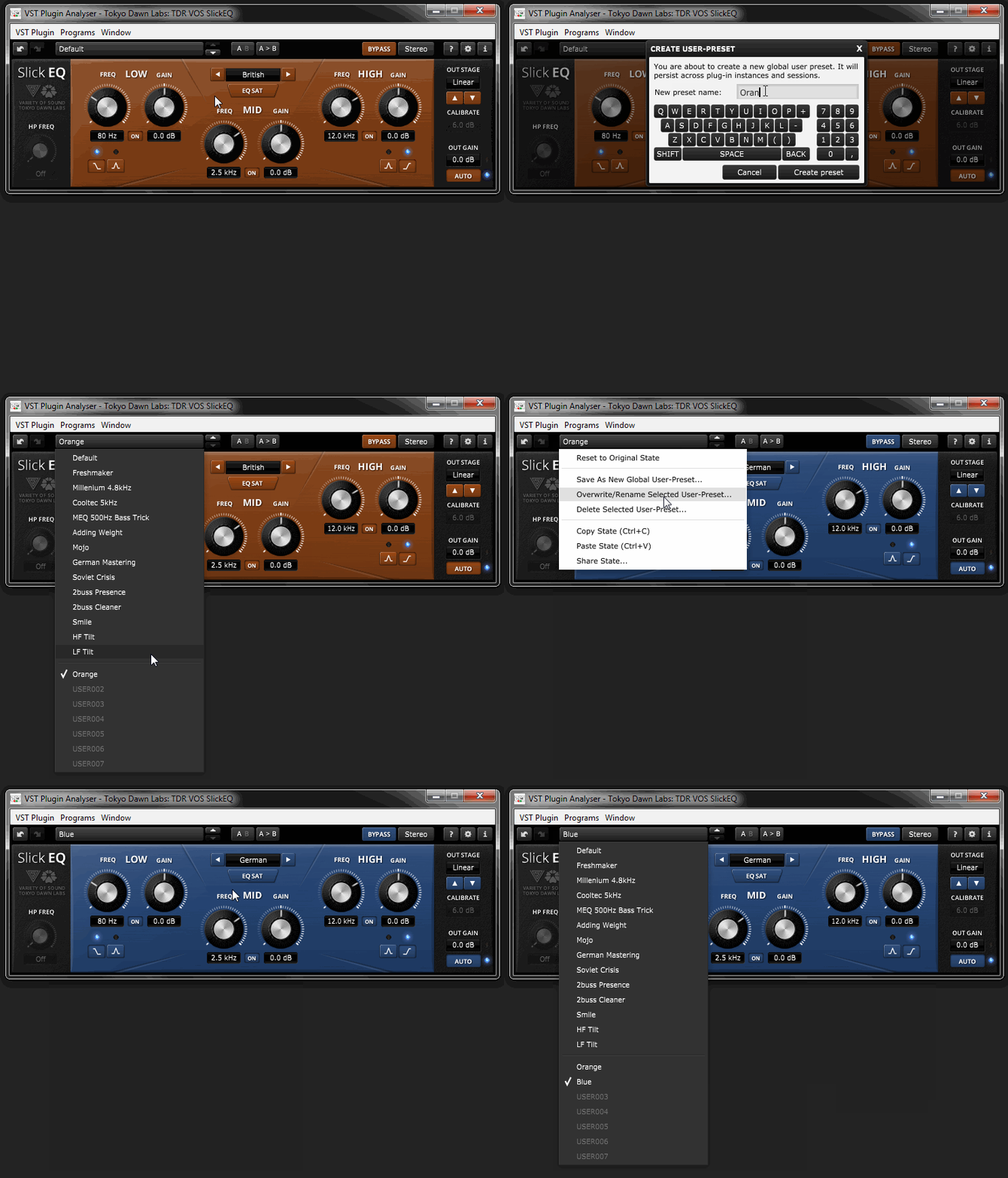
Sorry, but I can't get the user preset creation functioning as I imagine that it ought to.

When I select 'Save As New Global User-Preset', it always overwrites the first user preset in the list (underneath the factory ones). And I can't find any way to select another slot, such as 'USER002', etc.

It doesn't matter if the first user preset is already saved with some other name – it's always replaced, as if I had selected the second alternative in the contextual menu ('Overwrite/Rename Selected User-Preset…').

AU version, Mac OS 10.8.4, Live 9.1 and other hosts.

/Joachim
If it were easy, anybody could do it!

Post

Image
Fabien from Tokyo Dawn Records

Check out my audio processors over at the Tokyo Dawn Labs!

Post

I love these quick videos you guys are doing. World dominance seems only a matter of time.

Post

FabienTDR wrote:Image
Thank you for the movie, Fabien!

I have followed the exact same procedure, always selecting 'Save As New Global User-Preset'. But it always overwrites the first user preset in the list. It never creates a preset in a new, unused slot, such as 'USER002'.

It doesn't matter if I first select a factory preset or if I use a newly created preset in the first user slot.

It would be interesting to hear if anybody else on Mac ML (10.8) has the same experience.

Also, if I save a user preset in Live 9, it's not present when I open SlickEQ in Digital Performer 7.

EDIT: I just tested on my other Mac, running 10.9. On Mavericks, saving presets works just as shown by the video when I use the very same procedure that overwrites instead of creating a new preset in OS 10.8.

So, it seems that the preset problem I'm experiencing is specific for OS 10.8 Mountain Lion.

An unrelated detail: in the Mac AU and VST versions, the preset drop-down lists Copy State and Paste State as (Ctrl+C) and (Ctrl+V) respectively. On the Mac, that should be (Cmd+C) and (Cmd+V).

Best,

Joachim
If it were easy, anybody could do it!

Post

Thank you :)
[====[\\\\\\\\]>------,

Ay caramba !

Post

I really like this one:
Museq
Edited:twice:

<TDRVOSSlickEQ lowBandGainParam="0.0" lowBandFreqParam="80" lowBandShapeParam="Off" midBandGainParam="0.0" midBandFreqParam="320" highBandGainParam="0.0" highBandFreqParam="8157" highBandShapeParam="On" eqModelParam="American" eqSatParam="On" hpFreqParam="Off" outSatModelParam="Deep" outSatDriveParam="16.0" outGainParam="0.0" bypassParam="Off" modeParam="Stereo" lowBandBypassParam="Off" midBandBypassParam="Off" highBandBypassParam="Off" autoGainParam="Off"/>

I mean it is impossible to match the curves of these EQ's but the quality of the high's is close. Some models cannot be simulated at all. I can match the high's but in low mids is different sound. However this is just a fun!
Last edited by xtrax on Sun May 04, 2014 3:32 pm, edited 8 times in total.

Post

American + Deep is a pretty good sounding combo indeed, using that one myself a lot ! :tu:
Computer musician / Ableton Certified Trainer / Mastering engineer
.com
3OP

Post

nilhartman wrote:American + Deep is a pretty good sounding combo indeed, using that one myself a lot ! :tu:

Actually it is very close to MannyM EQ

<TDRVOSSlickEQ lowBandGainParam="0.0" lowBandFreqParam="140" lowBandShapeParam="Off" midBandGainParam="0.0" midBandFreqParam="400" highBandGainParam="0.0" highBandFreqParam="8000" highBandShapeParam="On" eqModelParam="British" eqSatParam="On" hpFreqParam="Off" outSatModelParam="Deep" outSatDriveParam="16.0" outGainParam="0.0" bypassParam="Off" modeParam="Stereo" lowBandBypassParam="Off" midBandBypassParam="Off" highBandBypassParam="Off" autoGainParam="Off"/>

But curves from British are more closer.
Last edited by xtrax on Wed May 28, 2014 11:14 am, edited 2 times in total.

Post

Neve 1073 Impossible to match the curves, and if you match the curves it will sound completely different.

<TDRVOSSlickEQ lowBandGainParam="0.0" lowBandFreqParam="80" lowBandShapeParam="On" midBandGainParam="0.0" midBandFreqParam="360" highBandGainParam="0.0" highBandFreqParam="4358" highBandShapeParam="Off" eqModelParam="German" eqSatParam="Off" hpFreqParam="Off" outSatModelParam="Deep" outSatDriveParam="15.5" outGainParam="0.0" bypassParam="Off" modeParam="Stereo" lowBandBypassParam="Off" midBandBypassParam="Off" highBandBypassParam="Off" autoGainParam="Off"/>

Neve 1081

<TDRVOSSlickEQ lowBandGainParam="0.0" lowBandFreqParam="100" lowBandShapeParam="Off" midBandGainParam="0.0" midBandFreqParam="390" highBandGainParam="0.0" highBandFreqParam="8186" highBandShapeParam="On" eqModelParam="American" eqSatParam="Off" hpFreqParam="Off" outSatModelParam="Mellow" outSatDriveParam="16.0" outGainParam="0.0" bypassParam="Off" modeParam="Stereo" lowBandBypassParam="Off" midBandBypassParam="Off" highBandBypassParam="Off" autoGainParam="Off"/>


SSL E Channel

<TDRVOSSlickEQ lowBandGainParam="0.0" lowBandFreqParam="130" lowBandShapeParam="On" midBandGainParam="0.0" midBandFreqParam="390" highBandGainParam="0.0" highBandFreqParam="7993" highBandShapeParam="On" eqModelParam="German" eqSatParam="On" hpFreqParam="Off" outSatModelParam="Mellow" outSatDriveParam="15.0" outGainParam="0.0" bypassParam="Off" modeParam="Stereo" lowBandBypassParam="Off" midBandBypassParam="Off" highBandBypassParam="Off" autoGainParam="Off"/>

SSL X-EQ

<TDRVOSSlickEQ lowBandGainParam="0.0" lowBandFreqParam="140" lowBandShapeParam="Off" midBandGainParam="0.0" midBandFreqParam="390" highBandGainParam="0.0" highBandFreqParam="8157" highBandShapeParam="On" eqModelParam="British" eqSatParam="Off" hpFreqParam="Off" outSatModelParam="Silky" outSatDriveParam="16.0" outGainParam="0.0" bypassParam="Off" modeParam="Stereo" lowBandBypassParam="Off" midBandBypassParam="Off" highBandBypassParam="Off" autoGainParam="Off"/>
Last edited by xtrax on Wed May 28, 2014 11:34 am, edited 6 times in total.

Post Reply

Return to “Effects”