


Couple other requests:
-When macros are assigned to sample and loop start or end points, it would be good if the display updated to reflect the current value of the ranges.
I wish the sample and loop start and end points were automatable directly but I understand that those exist for every sample so that would be hard. I like to use Tal Sampler as a single stretched sample per layer, and like to have those knobs available on hardware like Ableton Push. The way to do that currently is to assign these parameters to the macros. Unfortunately there are only 4.
-Therefor also please more than 4 macros. Even 8 would at least allow sample and loop start/end to be mapped for 2 layers.
A better solution to needing to use macros for these parameters is to do what many plugins do that are modular and can have many controls, and that is to right-click and and select "Add automation parameter", which exposes that specific parameter as an automatable parameter. This would be perfect and then you wouldn't have to waste the macros on them, which are useful for other things.
cheers
TAL Sampler 4, new look - free update!
-
Echoes in the Attic Echoes in the Attic https://www.kvraudio.com/forum/memberlist.php?mode=viewprofile&u=180417
- KVRAF
- 12037 posts since 12 May, 2008
-
- KVRAF
- 2772 posts since 28 Mar, 2007
Drag and drop from the arrange window seems a fundamental to me, but I seem to be in a minority. It did work in the previous version in Studio One and Cubase in Windows, so why it has stopped working now is a mystery. The obvious answer is to enable recording from within the sampler,but again, it seems that no one else needs that function any more.EmptyVessel wrote: Sun Sep 11, 2022 8:28 pmYou can still drag and drop from finder/explorer or the browser in your DAW. It used to be possible with recorded items from the arranger in Reaper but currently, on OSX, is not. This is related to Reaper and doesn't work in any sampler I've tried. I'm able to do it in Live Lite 11 just fine though.dellboy wrote: Sun Sep 11, 2022 8:49 am Can you no longer drag and drop a newly recorded audio wav file from the DAW audio track straight onto the sampler? Or do you now have to hunt around in the browser for your newly recorded audio file just like you have to in Kontakt?
-
- KVRAF
- 2436 posts since 5 Jan, 2006
Two features from TAL-Drum I wish to see in TAL-Sampler:
1. automatic slicing of samples by transients
2. stretching loops to host tempo
And one feature I wish for both TAL-Drum & Sampler: Rex file support
Cheers!
1. automatic slicing of samples by transients
2. stretching loops to host tempo
And one feature I wish for both TAL-Drum & Sampler: Rex file support
Cheers!
-

- KVRist
- Topic Starter
- 198 posts since 6 Sep, 2016 from Otago, New Zealand
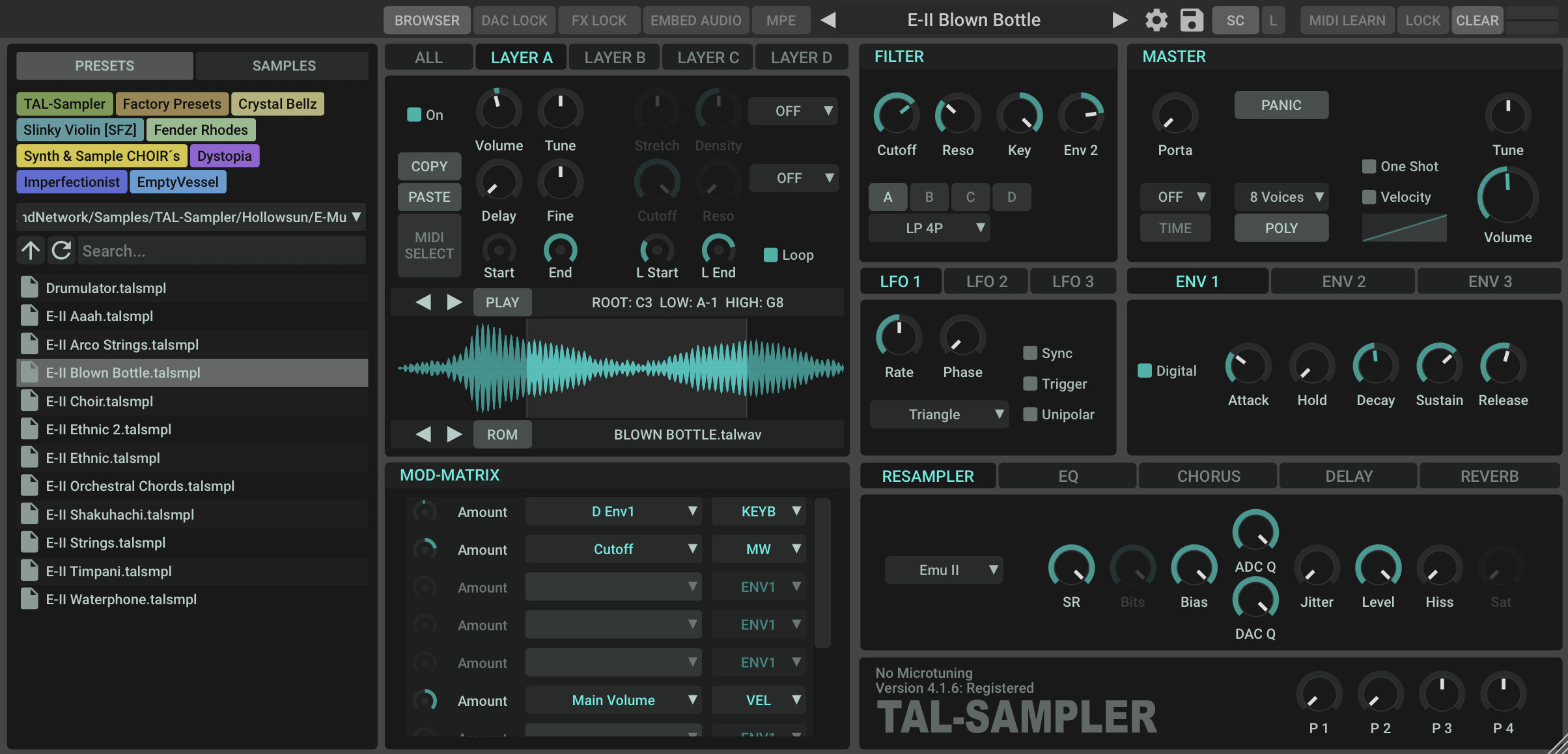
Not quite but close and I think you'll be happy with it (I hope!). Update imminent.Echoes in the Attic wrote: Wed Sep 14, 2022 5:12 pm Don't get too used to that! It's gonna move again, I think (hopefully) the Macros and ReSamp sections will swap.
Noted and passed on

emptyvessel
Professional sound design for manufacturers and composers
Sound Designer @ Novation.TAL.Arturia.UnfilteredAudio.Kilohearts.PaulHaslinger(composer).Tritik.Xils.AEModular.
https://store.emptyvessel.co.nz/
Professional sound design for manufacturers and composers
Sound Designer @ Novation.TAL.Arturia.UnfilteredAudio.Kilohearts.PaulHaslinger(composer).Tritik.Xils.AEModular.
https://store.emptyvessel.co.nz/
-

- KVRAF
- 2397 posts since 9 Jan, 2014 from Worldwide
It'll be like playing "where's wally" soon!Echoes in the Attic wrote: Wed Sep 14, 2022 5:12 pmDon't get too used to that! It's gonna move again, I think (hopefully) the Macros and ReSamp sections will swap.Biome_Digital wrote: Wed Sep 14, 2022 4:30 pm Don't worry I found it, it has moved to the far right.

Dune 3 presets! - https://newloops.com/collections/dune-presets
Diva, Hive, Repro, Presets - https://newloops.com/collections/u-he-synths-presets
185 Omnisphere Presets https://newloops.com/products/omnispher ... -2-presets
Diva, Hive, Repro, Presets - https://newloops.com/collections/u-he-synths-presets
185 Omnisphere Presets https://newloops.com/products/omnispher ... -2-presets
-

- KVRian
- 1448 posts since 17 Jul, 2007 from Riversland Valhalla
Fwiw, version 4.1.6 is out now.
Changelog:
Changelog:
- Horizontal mouse wheel scrolling in the waveform view.
- UI changes. (Relocation of Resample tab & macro knobs).


-
- KVRist
- Topic Starter
- 198 posts since 6 Sep, 2016 from Otago, New Zealand
Update available although not yet announced.Echoes in the Attic wrote: Wed Sep 14, 2022 5:12 pm Don't get too used to that! It's gonna move again, I think (hopefully) the Macros and ReSamp sections will swap.
https://tal-software.com/products/tal-sampler
emptyvessel
Professional sound design for manufacturers and composers
Sound Designer @ Novation.TAL.Arturia.UnfilteredAudio.Kilohearts.PaulHaslinger(composer).Tritik.Xils.AEModular.
https://store.emptyvessel.co.nz/
Professional sound design for manufacturers and composers
Sound Designer @ Novation.TAL.Arturia.UnfilteredAudio.Kilohearts.PaulHaslinger(composer).Tritik.Xils.AEModular.
https://store.emptyvessel.co.nz/
-

- KVRAF
- 3846 posts since 15 Mar, 2002 from Underworld
Unfortunately it's just the looks that's changed and yeah - it looks great. But I was desperately looking for separate outputs per layer and per mapping but couldn't find them. Still no separate outputs out of it. 
 I was actually like "finally! it's going to have multiple audio outputs just like every other great sampler on the market! YES!" hmmm
There's nice empty space in sample editor for an "output" option. It would be soooooooo useful to have at least that. Just like TAL-Drum which is incredible! If we had a separate output per layer also, we could even choose to put it through filter and envelopes. Layers should probably be able to respond to different MIDI channels, too. That would graaaately add to Sampler's usability.
The best option would be to have different complete programs per different output, on separate MIDI channels, like Kontakt has. In v5 maybe?
I was actually like "finally! it's going to have multiple audio outputs just like every other great sampler on the market! YES!" hmmm There's nice empty space in sample editor for an "output" option.
It would be soooooooo useful to have at least that. Just like TAL-Drum which is incredible! If we had a separate output per layer also, we could even choose to put it through filter and envelopes. Layers should probably be able to respond to different MIDI channels, too. That would graaaately add to Sampler's usability. The best option would be to have different complete programs per different output, on separate MIDI channels, like Kontakt has. In v5 maybe?
It is no measure of health to be well adjusted to a profoundly sick society. - Jiddu Krishnamurti
-

- KVRAF
- 9560 posts since 6 Jan, 2017 from Outer Space
Please don’t! These workflows come from ancient times and are useless today. It would prevent or at least complicate a proper MPE implementation. You can have the same results easily by loading multiple instances into your DAW…DuX wrote: Sun Sep 18, 2022 6:03 pm The best option would be to have different complete programs per different output, on separate MIDI channels, like Kontakt has. In v5 maybe?
-
- KVRian
- 1448 posts since 17 Jul, 2007 from Riversland Valhalla
Confirmed. In this version & the previous ones also happens, regardless of what DAW or OS, and can't really be sure what should to do to reproduce this bug, but it is definitely there.wvshpr wrote: Tue Sep 20, 2022 10:52 am Is the browser preview working for everyone in the newest version?
All I am getting is clicks when previewing samples.
This is under Bitwig Studio 4.3.4 on Mac.
-
- KVRist
- Topic Starter
- 198 posts since 6 Sep, 2016 from Otago, New Zealand
working fine for me right now, BW 4.3.4 and most recent Sampler version (4.1.7)wvshpr wrote: Tue Sep 20, 2022 10:52 am Is the browser preview working for everyone in the newest version?
All I am getting is clicks when previewing samples.
This is under Bitwig Studio 4.3.4 on Mac.
emptyvessel
Professional sound design for manufacturers and composers
Sound Designer @ Novation.TAL.Arturia.UnfilteredAudio.Kilohearts.PaulHaslinger(composer).Tritik.Xils.AEModular.
https://store.emptyvessel.co.nz/
Professional sound design for manufacturers and composers
Sound Designer @ Novation.TAL.Arturia.UnfilteredAudio.Kilohearts.PaulHaslinger(composer).Tritik.Xils.AEModular.
https://store.emptyvessel.co.nz/
-
- KVRian
- 528 posts since 27 Oct, 2004
-
- KVRist
- Topic Starter
- 198 posts since 6 Sep, 2016 from Otago, New Zealand
Florian, I think I edited your post in the mistaken thought that it was mine (they're very similar), I didn't know that I could do that as admin of this area. Es tut mir Leidfladd wrote: Tue Sep 20, 2022 9:04 pm Works fine here with the current version 4.1.7 (listed as 4.1.8 on the web site)
emptyvessel
Professional sound design for manufacturers and composers
Sound Designer @ Novation.TAL.Arturia.UnfilteredAudio.Kilohearts.PaulHaslinger(composer).Tritik.Xils.AEModular.
https://store.emptyvessel.co.nz/
Professional sound design for manufacturers and composers
Sound Designer @ Novation.TAL.Arturia.UnfilteredAudio.Kilohearts.PaulHaslinger(composer).Tritik.Xils.AEModular.
https://store.emptyvessel.co.nz/
-
Echoes in the Attic Echoes in the Attic https://www.kvraudio.com/forum/memberlist.php?mode=viewprofile&u=180417
- KVRAF
- 12037 posts since 12 May, 2008
Changes in latest version were good. That scroll bar for the matrix still seems really wrong. Just do a tab for 2 pages (slots 1-6, and 7-12)