

Ah, so it's good at editing piano rolls, but how good is it at editing midi notes?
Which DAW has the most advanced Piano Roll editor?
-

- KVRAF
- 8700 posts since 9 Jan, 2004 from leroyaumeuni
My other host is Bruce Forsyth
-
- KVRist
- 174 posts since 5 Jan, 2008 from Atlanta
I'm guessing between Cubase and FL.v1o wrote: Wed Oct 12, 2022 11:41 am I've been writing a jazz keyboard solo and trying to make it sound realistic. Most DAWs just have a pencil and an eraser tool for writing on the piano roll. Whilst this most basic toolset is all that's needed to write music, it would be nice to have other tools as well that help us get the job done faster without head scratching.
Look at Photoshop that has all kinds of different brushes and erasers. The different brushes in Photoshop pretty much act like presets and draw lines with customized shapes. You can draw the same lines with just the basic brush but it will take you much longer.
How about pen tool that only draws notes with the tiny timing variations, pitch and loudness inflections that give jazz music its feel? How about a tool for writing notes that have certain probabilities and conditions?
Cubase probably would be geared more to jazz, where FL I'd more EDM based.
Most old school DAWS (Cubase, Logic, DP, Cakewalk) have pretty sophisticated evolved editors but that said I would think all have their weaknesses.
FL is kind of geared for step sequencing. Where the others are more editors.
That said there will be fanboys of every piano roll but Cubase and FL I hear the least fuss about.
Actually as an FL Studio owner I don't care for its Piano Roll. it's kind of obtuse to me.
-
- KVRer
- 7 posts since 21 Dec, 2024
This must be a joke, right?Serhii Kot wrote: Wed Oct 12, 2022 4:04 pm Cubase, S1 goes second(because of not intuitive velocity transform tool).
Worst is FL, maybe if you work only in FL it is great, but in comparing to Cubase for example, it is nightmare to use.
-

- KVRian
- 843 posts since 23 Feb, 2023
I suppose if all someone ever tried was cubase & FLs piano rolls then they would think that's all there is but there are other piano rolls that do things neither of those two do... The world is larger than just a few DAWs...
I made this tut for a thread it covers using the 'echo' command in BUZE tracker's vertical piano roll but in frame '2' you see a list that goes way up-dn the screen FULL of commands that can be invoked on a selection in the piano roll

Making Waves has a number of toolboxes that can govern specific settings for individual or all notes... This can be performed on VSTi or simply any sample dragged onto a track in poly fashion-
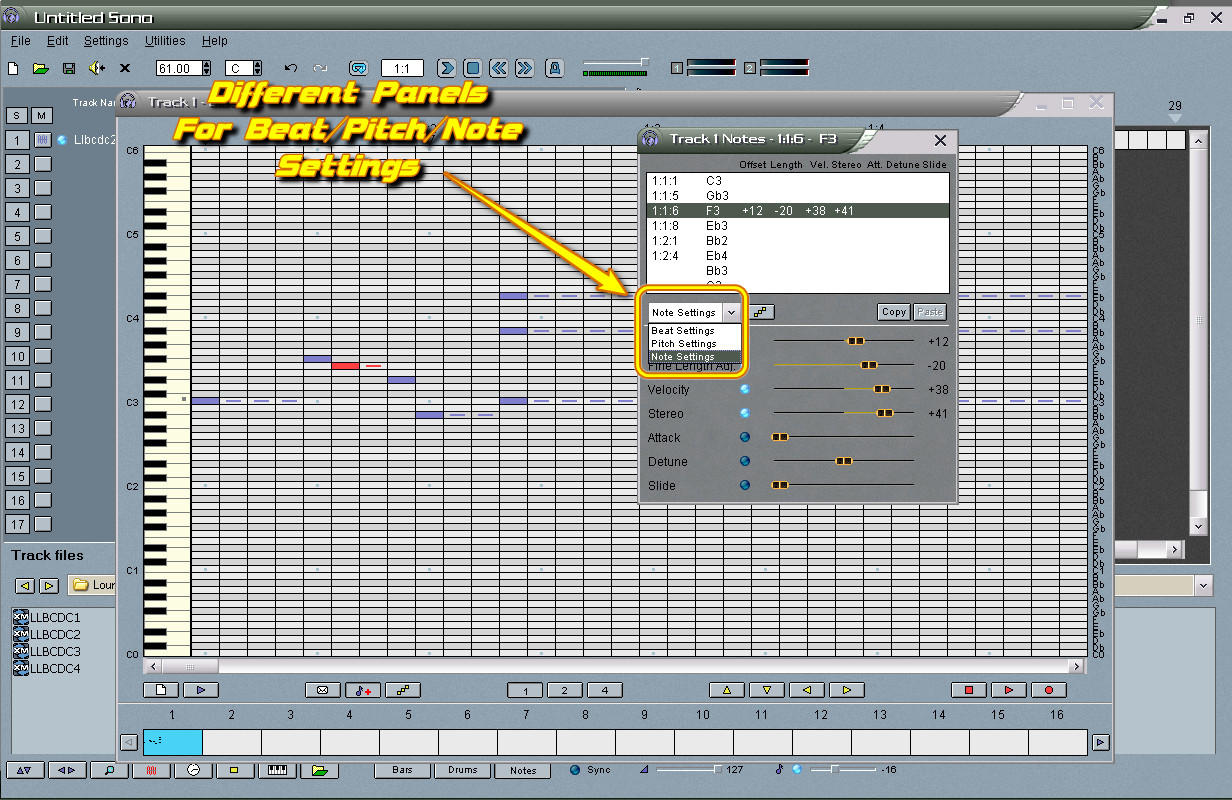

Also a notes toolbox for arpeggios-chords full-partial, any chord, durations standard or not like 1/5, 1/7 etc & on or off beat or random & much more...
Others out there pretty good too like Podium has a real good piano roll... For stored patterns & integrated arp as well as MFX plugin usage Project5 is real good... All of these are step recorders too (Like a tracker not a drum shittin' thing)...
I made this tut for a thread it covers using the 'echo' command in BUZE tracker's vertical piano roll but in frame '2' you see a list that goes way up-dn the screen FULL of commands that can be invoked on a selection in the piano roll
Making Waves has a number of toolboxes that can govern specific settings for individual or all notes... This can be performed on VSTi or simply any sample dragged onto a track in poly fashion-
Also a notes toolbox for arpeggios-chords full-partial, any chord, durations standard or not like 1/5, 1/7 etc & on or off beat or random & much more...
Others out there pretty good too like Podium has a real good piano roll... For stored patterns & integrated arp as well as MFX plugin usage Project5 is real good... All of these are step recorders too (Like a tracker not a drum shittin' thing)...
-

- KVRAF
- 7668 posts since 2 Sep, 2019
Studio One lets you overlay multiple MIDI tracks in the piano roll at once, so for example, you can see all four violin (family) instruments in a string quartet together in the editor while composing 4-part harmony.
It also lets you color-code the notes in the piano roll by velocity, track, or pitch. Coloring by track is good for working with multiple parts at once, so you can distinguish which instrument a note belongs to.
Coloring by pitch is good for working on drum sequencing, so you can easily determine which kit piece is being hit. This is particularly useful when you are working with a kit that uses multiple articulations for each kit piece. Example: set all hi-hat articulations to yellow. Set all snare articulations to red. Set all cymbals to orange.
I don't know if any of this makes it the most advanced piano roll editor, but it is very useful for composition.
It also lets you color-code the notes in the piano roll by velocity, track, or pitch. Coloring by track is good for working with multiple parts at once, so you can distinguish which instrument a note belongs to.
Coloring by pitch is good for working on drum sequencing, so you can easily determine which kit piece is being hit. This is particularly useful when you are working with a kit that uses multiple articulations for each kit piece. Example: set all hi-hat articulations to yellow. Set all snare articulations to red. Set all cymbals to orange.
I don't know if any of this makes it the most advanced piano roll editor, but it is very useful for composition.
THIS MUSIC HAS BEEN MIXED TO BE PLAYED LOUD SO TURN IT UP
-

- KVRAF
- 3817 posts since 20 Apr, 2005
What? You replying to a three year old post... Maybe.Samual wrote: Sun Jan 12, 2025 3:52 pmThis must be a joke, right?Serhii Kot wrote: Wed Oct 12, 2022 4:04 pm Cubase, S1 goes second(because of not intuitive velocity transform tool).
Worst is FL, maybe if you work only in FL it is great, but in comparing to Cubase for example, it is nightmare to use.
-

- KVRAF
- 2748 posts since 28 Feb, 2015
So, makes me wonder, do you draw, or do you play?SamDi wrote: Tue Jan 14, 2025 9:07 am Pros don‘t make music by drawing notes. Pros play them in. Go and get to become a pro!

Mac Mini M4 Pro | 14 Cores (10P/4E) | 48GB RAM | Studio One | Reason | Bitwig Studio | Logic Pro | FL Studio | Cubase Pro | Waveform | Reaper | Renoise | ~1000 VSTs/AUs | ~350 REs
-

- KVRAF
- 12190 posts since 7 Sep, 2006 from Roseville, CA
I play almost all of my parts (formally trained musician with a music degree), but I still make use of all the editing tools, including the draw tools for editing, adding, subtracting, and moving notes, fixing mistakes, etc.
Logic Pro | LUNA Pro | OB-X8 | Prophet 6 | OB-6 | Rev2 | TEO-5 | Pro 3 | SE-1X | Minitaur | Deepmind 12D | Integra-7 | TR-1000 | Analog RYTM mk2 | Digitakt 2 | TD-3 MO | TD-3 | Maschine+
-
- KVRAF
- 2748 posts since 28 Feb, 2015
So you are a pro? I'm not, I can't play at all, I'm a n00b/amateur....well, that's not far from the truth actuallycryophonik wrote: Tue Jan 14, 2025 4:13 pm I play almost all of my parts (formally trained musician with a music degree), but I still make use of all the editing tools, including the draw tools for editing, adding, subtracting, and moving notes, fixing mistakes, etc.
// The Eternal N00b

Mac Mini M4 Pro | 14 Cores (10P/4E) | 48GB RAM | Studio One | Reason | Bitwig Studio | Logic Pro | FL Studio | Cubase Pro | Waveform | Reaper | Renoise | ~1000 VSTs/AUs | ~350 REs
-
- KVRAF
- 12190 posts since 7 Sep, 2006 from Roseville, CA
There's nothing wrong with that. A lot of people who can't play an instrument or read a note make music. That's one of the great things about DAWs - they've made it easy for anyone with a computer, an idea, and the motivation to make music. You can take it as far as you want.starflakeprj wrote: Tue Jan 14, 2025 4:28 pmSo you are a pro? I'm not, I can't play at all, I'm a n00b/amateur....well, that's not far from the truth actuallycryophonik wrote: Tue Jan 14, 2025 4:13 pm I play almost all of my parts (formally trained musician with a music degree), but I still make use of all the editing tools, including the draw tools for editing, adding, subtracting, and moving notes, fixing mistakes, etc.
// The Eternal N00b
Logic Pro | LUNA Pro | OB-X8 | Prophet 6 | OB-6 | Rev2 | TEO-5 | Pro 3 | SE-1X | Minitaur | Deepmind 12D | Integra-7 | TR-1000 | Analog RYTM mk2 | Digitakt 2 | TD-3 MO | TD-3 | Maschine+
-

- KVRian
- 906 posts since 27 Apr, 2018
I am a drawer, who wants to be a playerstarflakeprj wrote: Tue Jan 14, 2025 3:57 pmSo, makes me wonder, do you draw, or do you play?SamDi wrote: Tue Jan 14, 2025 9:07 am Pros don‘t make music by drawing notes. Pros play them in. Go and get to become a pro!
