

I have downloaded a 1.6.6 Win installer and have found a threshold discrepancy (about 2 dB difference) between old and new versions. The attack shape also seems slightly different (attack is exaggerated when I try to subtract two versions).
The threshold discrepancy is only in VST3 version, regular VST nulls with the previous version perfectly.

Cytomic 'The Glue' Compressor
-
- KVRian
- 806 posts since 21 Sep, 2008
There was also a strange bug with VST3 version when it started to output very loud signal which triggered the automute on the channel (in REAPER), but I couldn't reproduce it.
-

- KVRAF
- 2819 posts since 3 Dec, 2008
Thanks for reporting this, I'll have a look into it. Are you using a stereo input signal?meloco_go wrote: Mon Jun 12, 2023 8:12 pm I have downloaded a 1.6.6 Win installer and have found a threshold discrepancy (about 2 dB difference) between old and new versions. The attack shape also seems slightly different (attack is exaggerated when I try to subtract two versions).
The threshold discrepancy is only in VST3 version, regular VST nulls with the previous version perfectly.
edit: can you please double check which versions your are comparing? There was a difference to the effective threashold and attack due to the dk solver in versions v1.6.0 to v1.6.5
The Glue, The Drop, The Scream - www.cytomic.com
-
Funkybot's Evil Twin Funkybot's Evil Twin https://www.kvraudio.com/forum/memberlist.php?mode=viewprofile&u=116627
- KVRAF
- 12447 posts since 16 Aug, 2006
Using 1.6.6, Reaper and the VST3 version on Windows, if I click the hamburger icon in the menu and select Save to save the current preset, nothing happens. I'm expecting a dialog box to pop up to ask me for a preset name and location. Same result with VST2.
Also, if I select 150% as the size, there's a white strip on the right of the GUI. This seems to be Reaper's plugin window not getting the correct size. That only happened with VST3. VST2 didn't seem to have that problem.
Final suggestion: does anyone need/use the 50% size option in the hamburger icon? That seems teeny-tiny. Maybe ditch 50% and add a 125% option, which I think would get used more. Note: I understand I can drag to resize, but the quick options are nice.
Also, if I select 150% as the size, there's a white strip on the right of the GUI. This seems to be Reaper's plugin window not getting the correct size. That only happened with VST3. VST2 didn't seem to have that problem.
Final suggestion: does anyone need/use the 50% size option in the hamburger icon? That seems teeny-tiny. Maybe ditch 50% and add a 125% option, which I think would get used more. Note: I understand I can drag to resize, but the quick options are nice.
-
- KVRAF
- 2819 posts since 3 Dec, 2008
Thanks, I'll check it out and fix it.Funkybot's Evil Twin wrote: Tue Jun 13, 2023 12:05 am Using 1.6.6, Reaper and the VST3 version on Windows, if I click the hamburger icon in the menu and select Save to save the current preset, nothing happens. I'm expecting a dialog box to pop up to ask me for a preset name and location. Same result with VST2.
Also, if I select 150% as the size, there's a white strip on the right of the GUI. This seems to be Reaper's plugin window not getting the correct size. That only happened with VST3. VST2 didn't seem to have that problem.
Final suggestion: does anyone need/use the 50% size option in the hamburger icon? That seems teeny-tiny. Maybe ditch 50% and add a 125% option, which I think would get used more. Note: I understand I can drag to resize, but the quick options are nice.
The Glue, The Drop, The Scream - www.cytomic.com
-
- KVRian
- 607 posts since 23 Jun, 2005
+1 on the 125% option - 10% increments between 100 and 150 would be even better.Funkybot's Evil Twin wrote: Tue Jun 13, 2023 12:05 am Using 1.6.6, Reaper and the VST3 version on Windows, if I click the hamburger icon in the menu and select Save to save the current preset, nothing happens. I'm expecting a dialog box to pop up to ask me for a preset name and location. Same result with VST2.
Also, if I select 150% as the size, there's a white strip on the right of the GUI. This seems to be Reaper's plugin window not getting the correct size. That only happened with VST3. VST2 didn't seem to have that problem.
Final suggestion: does anyone need/use the 50% size option in the hamburger icon? That seems teeny-tiny. Maybe ditch 50% and add a 125% option, which I think would get used more. Note: I understand I can drag to resize, but the quick options are nice.
-
- KVRAF
- 2819 posts since 3 Dec, 2008
I'm happy to change the items to 75%, 100%, 125%, 150%, and let people drag for the rest, does that sound good?Funkybot's Evil Twin wrote: Tue Jun 13, 2023 12:05 am Final suggestion: does anyone need/use the 50% size option in the hamburger icon? That seems teeny-tiny. Maybe ditch 50% and add a 125% option, which I think would get used more. Note: I understand I can drag to resize, but the quick options are nice.
The Glue, The Drop, The Scream - www.cytomic.com
-
- KVRAF
- 3125 posts since 6 Dec, 2002 from Ljubljana/ Slovenia
-

- KVRist
- 492 posts since 2 Mar, 2008
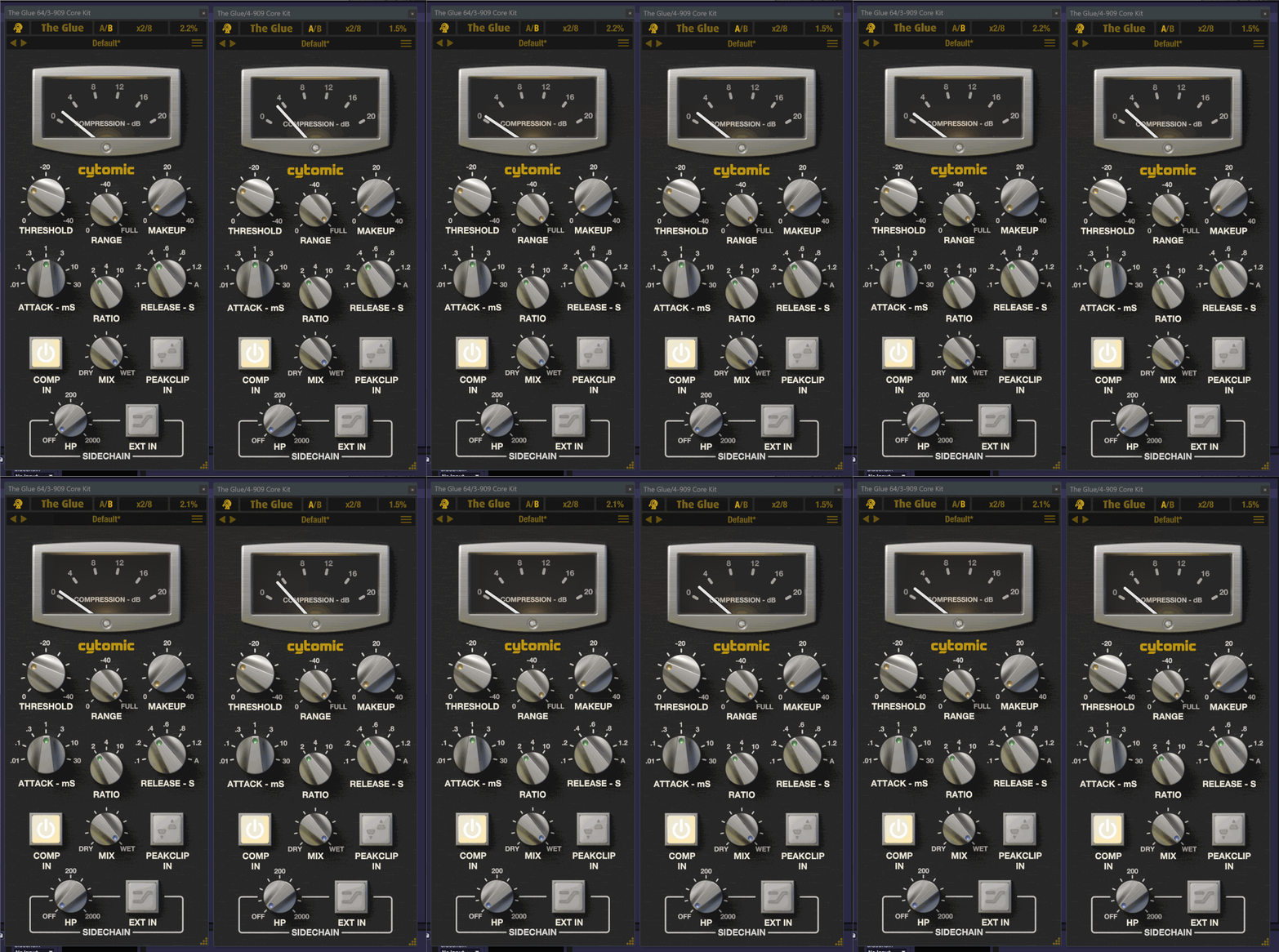
The difference in the threshold between the 1.6.5 & 1.6.6 vst3 is actually a fix. If you compare the vst2 to the vst3 now the thresholds match, where before the 1.6.6 vst3 they didn't. I brought this to Andy's attantion in an earlier post here:meloco_go wrote: Mon Jun 12, 2023 8:12 pm I have downloaded a 1.6.6 Win installer and have found a threshold discrepancy (about 2 dB difference) between old and new versions. The attack shape also seems slightly different (attack is exaggerated when I try to subtract two versions).
The threshold discrepancy is only in VST3 version, regular VST nulls with the previous version perfectly.
Peevy2000 wrote: Sun Jun 11, 2023 8:40 pmI've checked version 1.6.5 & it has fixed the GUI problem. But the difference in threshold between the vst2 & vst3 is still there. I might be imaging it but the character/response also seems to be affected, kinda feels like the sidechain is set differently when I tested on an earlier projects mix bus. (the below gif is from a different test project in Live 11, so no sidechain used)andy-cytomic wrote: Sat Jun 10, 2023 9:10 amOk, it looks like a DPI pixel offset thing. If you are running on Windows with HiDPI then the offset of the popup rename box, or if you double click on a knob to enter the value is off by the scaling factor of the HiDPI setting - easy fixed.andy-cytomic wrote: Sat Jun 10, 2023 9:07 am So it looks like the edit window is placed in the wrong position which is down and to the right of the actual window depending on your dpi settings. Try just typing the new name straight away, press enter, and it should work to change the name.
Here's a gif to show what's happening with the exact same settings on both:
Left VST2 - Right VST3
This was done by sending the audio to 2 separate bus tracks for vst2/vst3 simultaneously.
Should the vst2 not also be version 1.6.5 because it's still v1.5.11 here, or does the installer only install the newer vst3?
-
- KVRian
- 806 posts since 21 Sep, 2008
I tested v1.6.6. The affected format is VST3, regular VST behaves identically to v1.5.4. Yes, I tested on a stereo mix.andy-cytomic wrote: Mon Jun 12, 2023 9:47 pmThanks for reporting this, I'll have a look into it. Are you using a stereo input signal?meloco_go wrote: Mon Jun 12, 2023 8:12 pm I have downloaded a 1.6.6 Win installer and have found a threshold discrepancy (about 2 dB difference) between old and new versions. The attack shape also seems slightly different (attack is exaggerated when I try to subtract two versions).
The threshold discrepancy is only in VST3 version, regular VST nulls with the previous version perfectly.
edit: can you please double check which versions your are comparing? There was a difference to the effective threashold and attack due to the dk solver in versions v1.6.0 to v1.6.5
Also, I had an output overload on initializing again.
-
- KVRian
- 806 posts since 21 Sep, 2008
I didn't test prior versions of the new builds, started already @v1.6.6 and yet I have the difference.Peevy2000 wrote: Tue Jun 13, 2023 11:22 am The difference in the threshold between the 1.6.5 & 1.6.6 vst3 is actually a fix. If you compare the vst2 to the vst3 now the thresholds match, where before the 1.6.6 vst3 they didn't. I brought this to Andy's attantion in an earlier post here:

-
- KVRist
- 492 posts since 2 Mar, 2008
For some reason the installer chose common/vst2 to install the vst2 which meant my vst2 version never actually updated & was stuck at v1.5.11. So I reinstalled making sure the vst2 was also v1.6.6 ran the test & both vst3/2 null just as it did with vst3 v1.6.6 & vst2 v1.5.11. Tested in Reaper & Live 11.meloco_go wrote: Tue Jun 13, 2023 7:46 pmI didn't test prior versions of the new builds, started already @v1.6.6 and yet I have the difference.Peevy2000 wrote: Tue Jun 13, 2023 11:22 am The difference in the threshold between the 1.6.5 & 1.6.6 vst3 is actually a fix. If you compare the vst2 to the vst3 now the thresholds match, where before the 1.6.6 vst3 they didn't. I brought this to Andy's attantion in an earlier post here:
I know that this is of no help to you & there could be something else up but I thought I'd recheck with the proper v1.6.6 vst2 install, hopefully Andy can get to the bottom of it.
-
- KVRian
- 806 posts since 21 Sep, 2008
Interesting. Will try to do more checks in the evening.Peevy2000 wrote: Tue Jun 13, 2023 9:10 pmFor some reason the installer chose common/vst2 to install the vst2 which meant my vst2 version never actually updated & was stuck at v1.5.11. So I reinstalled making sure the vst2 was also v1.6.6 ran the test & both vst3/2 null just as it did with vst3 v1.6.6 & vst2 v1.5.11. Tested in Reaper & Live 11.meloco_go wrote: Tue Jun 13, 2023 7:46 pmI didn't test prior versions of the new builds, started already @v1.6.6 and yet I have the difference.Peevy2000 wrote: Tue Jun 13, 2023 11:22 am The difference in the threshold between the 1.6.5 & 1.6.6 vst3 is actually a fix. If you compare the vst2 to the vst3 now the thresholds match, where before the 1.6.6 vst3 they didn't. I brought this to Andy's attantion in an earlier post here:
I know that this is of no help to you & there could be something else up but I thought I'd recheck with the proper v1.6.6 vst2 install, hopefully Andy can get to the bottom of it.
-
- KVRAF
- 2819 posts since 3 Dec, 2008
News: The Glue v1.6.8 is released. I fixed a bug with the display of stepped knobs not showing the correct value for the parameter, added back the save dialogue box for presets, and changed the UI scale menu to use 75%, 100%, 125%, and 150%. I also improved automation when moving stepped controls on the UI to only send data when the step changes. Fingers crossed this is the last update for a little while and has fixed all the bugs with the update to Juce7 / VST3 / Apple Silicon 
The Glue, The Drop, The Scream - www.cytomic.com
