
Admiral Quality Poly-ana offers custom skinning (and win a free license)!

VST, AU, AAX, CLAP, etc. Plugin Virtual Instruments Discussion
Locked New Topic
RELATED
PRODUCTS
Poly-Ana

Post

Ingonator wrote:
fmr wrote:
Ingonator wrote: I SERIOUSLY recommend using the actual skin in the actual plugin...

WHAT? :o I thought the point of doing a new skin was exactly to NOT have to use THAT :hihi:
Ingonator wrote: ... Actually too few people posting seem to actually own a full license of Poly-Ana and have used the synth for a while (like e.g. me and Teksonik).
I wonder why :roll: Maybe because we didn't like it the way it is...
Hi Fernando,

please do not treat me like an idiot (same to others here).

I do not get your point. I meant it is better to use the skin i provided in the plugin (in "real life") instead of just discussing screenshots. IMO having an experience with the real skin is different.
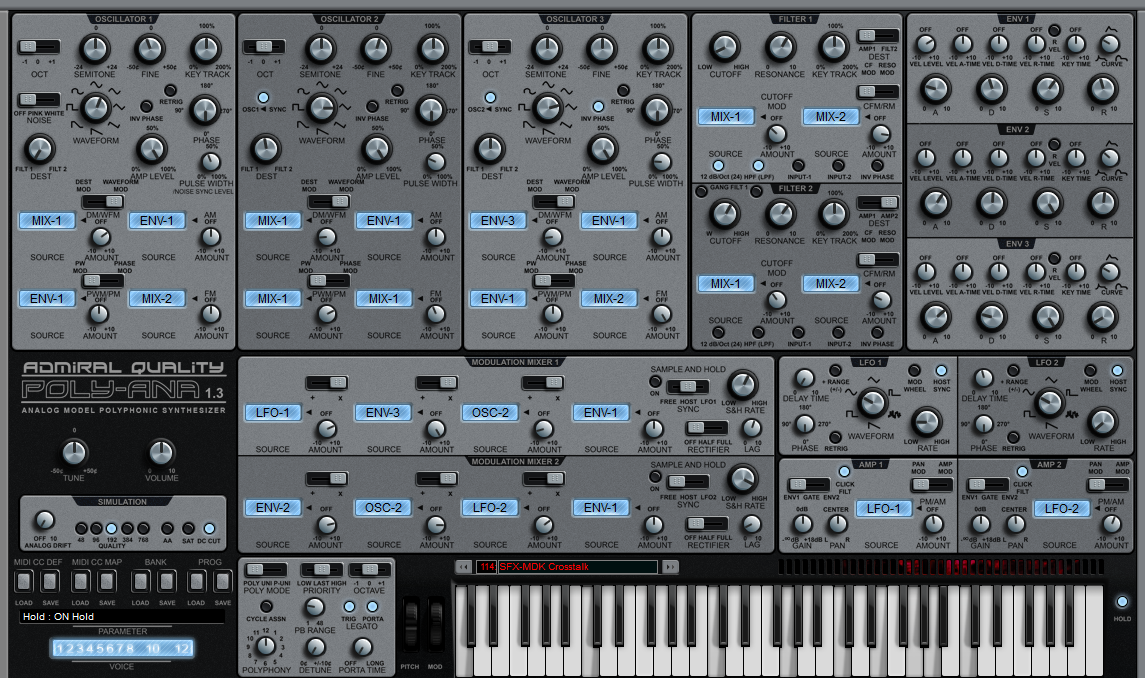
Hi Ingo. Didn't want to offend you, but let's see what are the facts: You created a skin that's almost twice the size of Norbz/H-Man one, yet looks more cluttered (in spite of the fact that the skin is the biggest of ANY plug-in I have - and I have many). And the labels are still small and hard to read, and yes, there are too many.
Ingonator wrote: Another point is that IMO too many people are involved in this discussion that never actually owned the plugin or did not even try the demo version and do not know how certain things work in the synth (e.g. that the OSC waveforms selection is continuous and not simple steps...).
I think the main issue here is that your skin doesn't address the concerns of those that wanted a new approach (and that includes me). And, frankly, it's hard to look at - I can't imagine myself looking at it for a considerable amount of time, as I also wasn't able to look at the original Poly-Ana for a considerable amount of time. And I don't need to try the plug-in to know that - it's enough to look at the picture.

i don't want to hurt you, I know it took you a considerable amount of time and energy, and even forced you to learn Gimp, etc., but the result simply isn't appealing to me (and to others) and doesn't seem to add anything to what I thinh was the initial problem with the approach (as the SEM inspired one also didn't).

Feel free to keep posting, and keep working on it, but the matter is - if this was the only alternative to the skin that came as an example, I would even prefer that one. :(

BTW - I am using the Norbz skin with the beta, and for the first time I am able to actually mess with Poly-Ana. I may end up buying it, if they keep working in the direction they are currently following (and Mike doesn't screw it in a next Beta).
Fernando (FMR)

Post

I have tried the Norbz one (and others too, inside the "real" plugin) but for me THAT one was hard to use and did not meet my own approach for the sections/knob positions. His white skin actually is better readable for me than the dark one. The contrast of the grey text on grey background is not so good IMO. Anyway the text colors do seem to have some differences. Some are closer to grey while others closer to white. Most of my texts are close to white while they are slightly darker than pure white. With that the contrast on a grey skin is better IMO. With that black color (opposing to the grey ones) of the mod mixers that one is too dominat IMO as if it would be the most important part of the skin. In mine the red borders /BTW i used less bright ones now) were used to mark the "audio path" which IMO is the most important part.
Maybe i'll give a try to add different colors to his skin which could be better for my taste.

Different approacheas/opinions, different skins. It's not like you are forced to use only a single one of those provided here.

I really do not want to participate in endless discusions about every detail of my skin. Those who do not like my one just use another or adjust mine to your liking. That's why in the ZIP i included all kinds of files including the Knob files and 4 different background files (1 of them included in the skin folder, others i nsub-folders).
Last edited by Ingonator on Thu Aug 06, 2015 11:34 am, edited 5 times in total.
Ingo Weidner
Win 10 Home 64-bit / mobile i7-7700HQ 2.8 GHz / 16GB RAM //
Live 10 Suite / Cubase Pro 9.5 / Pro Tools Ultimate 2021 // NI Komplete Kontrol S61 Mk1

Post

Just re-checked the Norbz skin (the "normal" size, not wide) and found a problem with the displays of the envelope times.

The times are exponential and not linear (opposing to Sustain) and the maximum is 60 seconds, not 10. This is why at my skin i added 60 as a maximum value there.

In the Norbz diplay at a real value of around 0.93 seconds the display shows "5" which corresponds to the center. This is why a display makes no sense. I tried to add an exponential display in Knobman but that one is not calibrated correctly which is why it makes no sense.

AFAIK there is no option for having a display of the "real" values readout in Knobman which could be a solution.
The plugin has two ways to dispaly the real values, one is a small box taht opens when you hover the mouse over it (or change a value) and the second the parameter display (usually found at the lower part of the GUI/skin). You have to define the value ranges in Knobman and if those fit the real ones you are lucky...

Details about text/number formats and formula strings for values in Knobman are found here:
http://www.g200kg.com/en/docs/knobman/dynamictexts.html
Ingo Weidner
Win 10 Home 64-bit / mobile i7-7700HQ 2.8 GHz / 16GB RAM //
Live 10 Suite / Cubase Pro 9.5 / Pro Tools Ultimate 2021 // NI Komplete Kontrol S61 Mk1

Post

Ingonator wrote:Just re-checked the Norbz skin (the "normal" size, not wide) and found a problem with the displays of the envelope times.

The times are exponential and not linear (opposing to Sustain) and the maximum is 60 seconds, not 10. This is why at my skin i added 60 as a maximum value there.

In the Norbz diplay at a real value of around 0.93 seconds the display shows "5" which corresponds to the center. This is why a display makes no sense. I tried to add an exponential display in Knobman but that one is not calibrated correctly which is why it makes no sense.

AFAIK there is no option for having a display of the "real" values readout in Knobman which could be a solution.
The plugin has two ways to dispaly the real values, one is a small box taht opens when you hover the mouse over it (or change a value) and the second the parameter display (usually found at the lower part of the GUI/skin). You have to define the value ranges in Knobman and if those fit the real ones you are lucky...

Details about text/number formats and formula strings for values in Knobman are found here:
http://www.g200kg.com/en/docs/knobman/dynamictexts.html
Probably that's why the last version of the skin don't have values in the envelope knobs, and no numbers, except 0 and 10 :wink: And I'm sure you're aware that it is very common that, especially in envelopes, values many times don't have a real meaning, just a reference for comparisons with other patches, and for patch recalling. For example, what is now being discussed regarding DeXed is exactly how to calibrate the envelopes to make them act more like the ones of DX7. And the real-life values of the envelopes of the DX7 have nothing to do with the 00-99 scale used.

But you are right, I am totally in favour of options. Gimme options :tu:
Fernando (FMR)

Post

I just removed the screenshot (the 3rd one at the previous page) of the skin with the experimental (!!) "Bump map" effect background image as this seemed to cause confusions.

As already mentioned there is also a folder with the earlier version without effects added in GIMP (except Anti-Aliasing which was added there AFAIK...).


PS:
Actually besides "basic" editing features the major effects i had used with GIMP so far are Anti-Aliasing, Color/white balance, sharpen and "Unsharp mask". The "Unsharp mask" was used with the current GUI and i also found a trick to do this without fu**ing up the colors.
Anyway this allows quite a big difference compared to the original picture and finding the perfect values is not so easy a tthe moment. Possible that you add too much "sharpness" with this. I'll try if i could do this better.
Ingo Weidner
Win 10 Home 64-bit / mobile i7-7700HQ 2.8 GHz / 16GB RAM //
Live 10 Suite / Cubase Pro 9.5 / Pro Tools Ultimate 2021 // NI Komplete Kontrol S61 Mk1

Post

deleted, as obviously posting my skins here makes no sense...
Last edited by Ingonator on Sat Aug 08, 2015 9:51 pm, edited 2 times in total.
Ingo Weidner
Win 10 Home 64-bit / mobile i7-7700HQ 2.8 GHz / 16GB RAM //
Live 10 Suite / Cubase Pro 9.5 / Pro Tools Ultimate 2021 // NI Komplete Kontrol S61 Mk1

Post

Ingonator wrote: UPDATE:
For those who are interested in an alternative background here is a new one that uses a "reverse Bump-Map" effect (has to be renamed to be used with the skin):
https://dl.dropboxusercontent.com/u/532 ... 0Map_1.png

Seems to look better than the "normal" Bump map screenshot that i posted today (screenshot deleted). This looks comparable to "engraving" texts/labels at a metal surface (or other materials).

This is the same inverted and changed to grey colors:
https://dl.dropboxusercontent.com/u/532 ... y_1%20.png

That one looks interesting too but i would have to change the labels at the knobs to black color for this (too light for the white labels). Ingo
Labels are much more readable now. I think that instead of a fixed colour for the background, a "texture" like brushed metal (in a lighter grey, maybe) would make wonders
Fernando (FMR)

Post

edited
Last edited by Ingonator on Fri Aug 07, 2015 4:25 pm, edited 1 time in total.
Ingo Weidner
Win 10 Home 64-bit / mobile i7-7700HQ 2.8 GHz / 16GB RAM //
Live 10 Suite / Cubase Pro 9.5 / Pro Tools Ultimate 2021 // NI Komplete Kontrol S61 Mk1

Post

http://www.admiralquality.com/products/ ... #Hoverland

New skin from Hoverland. Great work ! :tu:

Image
None are so hopelessly enslaved as those who falsely believe they are free. Johann Wolfgang von Goethe

Post

Ooh! I'm off to get that Hoverland skin…..

Post

Teksonik wrote:http://www.admiralquality.com/products/ ... #Hoverland

New skin from Hoverland. Great work ! :tu:

Image
Beautiful work :) Got me wishin' I spent less time on trying to redo the darn thing from scratch and just make skins with the current size/labels as they are. +1 Hov.
Get All My Free Plugins/Packs/Etc...
>> http://www.toneden.io/lofiradio >> :phones:

Post

Hoverland is the best yet in my opinion.

Post

Hoverland skin looks great. Check his Dune2 skin on his deviant acc btw.
Whoever wants music instead of noise, joy instead of pleasure, soul instead of gold, creative work instead of business, passion instead of foolery, finds no home in this trivial world of ours.

Post

Teksonik wrote:http://www.admiralquality.com/products/ ... #Hoverland

New skin from Hoverland. Great work ! :tu:

Image
beautiful :tu:

Post

Gosh wrote:
Teksonik wrote:http://www.admiralquality.com/products/ ... #Hoverland

New skin from Hoverland. Great work ! :tu:

Image
beautiful :tu:
Yeah nice work Hoverland :love:

Locked

Return to “Instruments”