

The installer indeed memorizes the locations of the last installation. Dunno how they do that. Urs always said that they don't write to the registry.fmr wrote: Wed Dec 30, 2020 11:36 amProbably the Registry memorized the last used location. Try choose manually a different location when installing. From then on, that location will be used.ReleaseCandidate wrote: Wed Dec 30, 2020 11:04 amI installed and removed the demos (Hive and Diva) yesterday. I do not recall pressing anything but 'next'.fmr wrote: Wed Dec 30, 2020 10:56 amThat's not the default directory.ReleaseCandidate wrote: Wed Dec 30, 2020 10:50 amNo, U-he installed in the 32bit VST directory and linked from all other plugin directories to that one.fmr wrote: Wed Dec 30, 2020 10:25 am First, NO, u-he doesn't install plug-in data in the VST directory.

Cubase 11 available now
-
- KVRAF
- 35729 posts since 11 Apr, 2010 from Germany
-
- KVRian
- 750 posts since 3 May, 2018
If its not in the registry, there will be a config file its written to -- though not all config files are easily found or editable (dev choice). Again all choices on the Developers part -- if they don't create an install today that doesn't give the user control of file locations, its either laziness or lack of user expectations, or both.chk071 wrote: Mon Jan 04, 2021 4:38 pmThe installer indeed memorizes the locations of the last installation. Dunno how they do that. Urs always said that they don't write to the registry.fmr wrote: Wed Dec 30, 2020 11:36 amProbably the Registry memorized the last used location. Try choose manually a different location when installing. From then on, that location will be used.ReleaseCandidate wrote: Wed Dec 30, 2020 11:04 amI installed and removed the demos (Hive and Diva) yesterday. I do not recall pressing anything but 'next'.fmr wrote: Wed Dec 30, 2020 10:56 amThat's not the default directory.ReleaseCandidate wrote: Wed Dec 30, 2020 10:50 amNo, U-he installed in the 32bit VST directory and linked from all other plugin directories to that one.fmr wrote: Wed Dec 30, 2020 10:25 am First, NO, u-he doesn't install plug-in data in the VST directory.
Last edited by Psuper on Mon Jan 04, 2021 5:14 pm, edited 1 time in total.
Have you tried Vital?
-
- KVRAF
- 35729 posts since 11 Apr, 2010 from Germany
Yeah, i also find it pretty annoying to repeatedly point the installers to the same location over and over again. The way u-he and some others do it is the way to go.
U-he should add uninstallers for their plugins though. That's lazy.
U-he should add uninstallers for their plugins though.
That's lazy.-
- KVRian
- 750 posts since 3 May, 2018
Yep, another easy implementation (both location and uninstall) via config or registry entry during the first install routine.chk071 wrote: Mon Jan 04, 2021 5:14 pm Yeah, i also find it pretty annoying to repeatedly point the installers to the same location over and over again. The way u-he and some others do it is the way to go.
U-he should add uninstallers for their plugins though.
Have you tried Vital?
-
- KVRAF
- 5144 posts since 3 Oct, 2013
just a quick question, does anybody got any solution to the plugin introduced latencies, this topic
seems C totally ignores the different plugin introduced latencies, can confirm it, https://steinberg.help/cubase_pro_artis ... ion_c.html solution: switch them off, well thanks
checked some topics but seems this is an x-file or terra incognita for everybody or does it have to be compensated manually "Yes, I’ve narrowed it down to a few plugins not playing nice with cubase. Will have to use track delay to compensate. I appreciate the feedback. Thanks!" - https://forums.steinberg.net/t/plugin-d ... /636663/13
ps. google says: record offset in S1
gonna try ...
- https://forums.steinberg.net/t/plugin-d ... /143983/10 or https://forums.steinberg.net/t/plugin-d ... pic/636663...I am having the same issue, on Cubase 10.5, when I add plugins (famous and known ones that I use on Cubase 5 without issues), like Waves, Antares etc…I get massive latency, I can see the delay that has been added by the plugin in Milliseconds in the mixer which is informative, then Cubase does not compensate for it! there must be a way to fix this...
...I have the same problem in Cubase Pro 10.5 specifically with Oeksound Spiff plugin: it adds hell of a lot of latency and Cubase does not care: that specific track where that plugin is inserted is delayed...
seems C totally ignores the different plugin introduced latencies, can confirm it, https://steinberg.help/cubase_pro_artis ... ion_c.html solution: switch them off, well thanks
checked some topics but seems this is an x-file or terra incognita for everybody or does it have to be compensated manually "Yes, I’ve narrowed it down to a few plugins not playing nice with cubase. Will have to use track delay to compensate. I appreciate the feedback. Thanks!" - https://forums.steinberg.net/t/plugin-d ... /636663/13
ps. google says: record offset in S1
gonna try ...
Last edited by xbitz on Mon Jan 04, 2021 5:35 pm, edited 3 times in total.
"Where we're workarounding, we don't NEED features." - powermat
-

- KVRAF
- 11162 posts since 16 Mar, 2003 from Porto - Portugal
But it's very easy to uninstall. Just delete the plug-ins (you just have to remember which formats you installed), and the data folder.chk071 wrote: Mon Jan 04, 2021 5:14 pm Yeah, i also find it pretty annoying to repeatedly point the installers to the same location over and over again. The way u-he and some others do it is the way to go.
U-he should add uninstallers for their plugins though.
In macOs there is an additional folder, because the presets don't go in the same folder as the rest of the data files, as is the case in Windows.
Fernando (FMR)
-
- KVRAF
- 35729 posts since 11 Apr, 2010 from Germany
It's a bit cumbersome, opposed to just have an uninstaller. The way it is now, I have to remove files from 2 deep folders manually. Not everyone can do that either. Most people won't have an idea where the VST3 is, for example, unless they RTFM. 
Seriously, every other plugin comes with an uninstaller. There's really no reason to not have one.
Seriously, every other plugin comes with an uninstaller. There's really no reason to not have one.
-
- KVRAF
- 9151 posts since 7 Oct, 2005
Do you mean the PDC in Cubase 10.5/11 is broken? Can you give us a step by step example to reproduce it?xbitz wrote: Mon Jan 04, 2021 5:21 pm just a quick question, does anybody got any solution to the plugin introduced latencies, this topic
- https://forums.steinberg.net/t/plugin-d ... /143983/10 or https://forums.steinberg.net/t/plugin-d ... pic/636663...I am having the same issue, on Cubase 10.5, when I add plugins (famous and known ones that I use on Cubase 5 without issues), like Waves, Antares etc…I get massive latency, I can see the delay that has been added by the plugin in Milliseconds in the mixer which is informative, then Cubase does not compensate for it! there must be a way to fix this...
...I have the same problem in Cubase Pro 10.5 specifically with Oeksound Spiff plugin: it adds hell of a lot of latency and Cubase does not care: that specific track where that plugin is inserted is delayed...
seems C totally ignores the different plugin introduced latencies, can confirm it, https://steinberg.help/cubase_pro_artis ... ion_c.html solution: switch them off, well thanks
checked some topics but seems this is an x-file or terra incognita for everybody or does it have to be compensated manually "Yes, I’ve narrowed it down to a few plugins not playing nice with cubase. Will have to use track delay to compensate. I appreciate the feedback. Thanks!" - https://forums.steinberg.net/t/plugin-d ... /636663/13
ps. google says: record offset in S1
gonna try ...
Using: Cubase Pro 15, Bitwig 5, Tascam US-4x4HR, MODX6, DM12D, LaunchKey 49 and some software instruments / synths.
-
- KVRAF
- 5144 posts since 3 Oct, 2013
^^^ just drop a plugin which introduces delay/latency into a chain (for ex. Imager https://steinberg.help/wavelab_pro_plug ... ger_r.html )
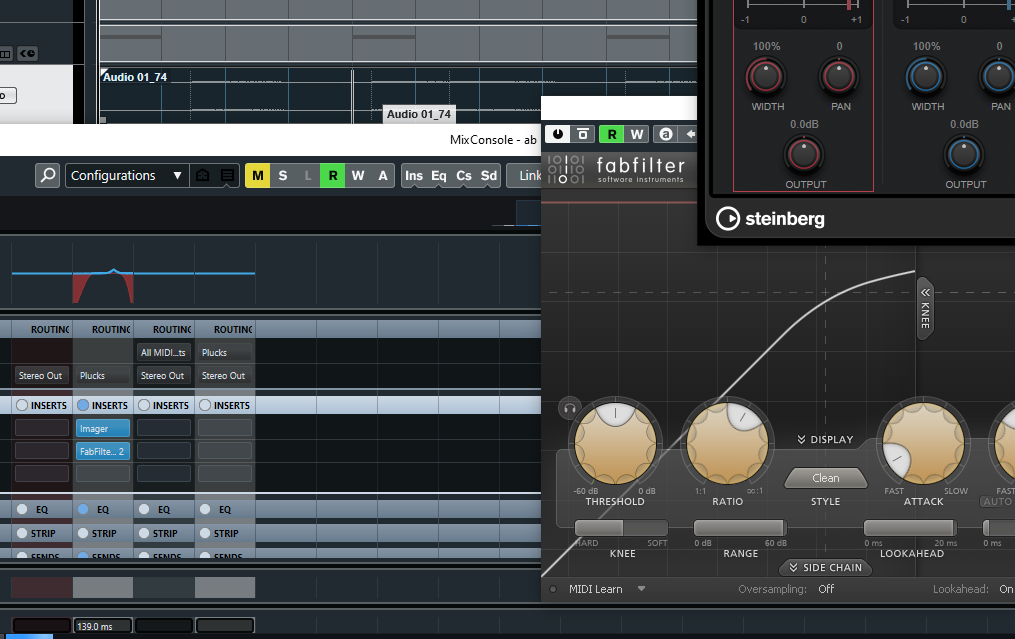
and record it back or check it on the master with some plugin which can display some grid you will able to see the offset or simply listen back together with the metronome
don't think it's 10.5/11 specific I can see forum post from 2014 with this issue, Bitwig, Reaper able to handle it as I've tried dunno the others
and record it back or check it on the master with some plugin which can display some grid you will able to see the offset or simply listen back together with the metronome
don't think it's 10.5/11 specific I can see forum post from 2014 with this issue, Bitwig, Reaper able to handle it as I've tried dunno the others
"Where we're workarounding, we don't NEED features." - powermat
-
- KVRAF
- 9151 posts since 7 Oct, 2005
Damn it! I've just added the imager and selected a preset then "poof"! The first crash I encountered in Cubase 11 
Anyway, I tried again with two plugins that I know have a latency (u-he Bazille and Arturia Chorus JUN-6). I have recoreded some notes in midi then render in place to audio. There is no latency! I also tried Bazille with Steinberg Imager. There is nothing wrong!
Have you tried it yourself? or you just depend on the forums talk? Can you post audio examples? To be honest, I don't use such plugins. I usually use the built-in Daw plugins or some light ones mainly Reverb, Delay, EQ, Compressor and Limiter. I don't hear a problem with the metronome playing!
Anyway, I tried again with two plugins that I know have a latency (u-he Bazille and Arturia Chorus JUN-6). I have recoreded some notes in midi then render in place to audio. There is no latency! I also tried Bazille with Steinberg Imager. There is nothing wrong!
Have you tried it yourself? or you just depend on the forums talk? Can you post audio examples? To be honest, I don't use such plugins. I usually use the built-in Daw plugins or some light ones mainly Reverb, Delay, EQ, Compressor and Limiter. I don't hear a problem with the metronome playing!
Using: Cubase Pro 15, Bitwig 5, Tascam US-4x4HR, MODX6, DM12D, LaunchKey 49 and some software instruments / synths.
-
- KVRian
- 550 posts since 15 Aug, 2011 from Teesside
Cableguys Shaper Box (Volume Shaper) on the master stereo buss set to 1/4, purely as a waveform display is the best way to see timing, latency PDC issues, due to how the wave is static, you'll see the same waveform shift back and forth. Cubase is spot on for me with all the plugins I use accept iZotope Neutron Compressor, which is a know issue by them, deactivating reacting each instance of Neutron every time you load the project fixes it. They didn't say if it would get an actual fix.
I used to have timing issues in Cubase rendering midi hardware but this is expected as midi isn't sample accurate, the device itself will swing. Some VST's also have unintended swing, such as Nexus (worse at certain bpms due to roundings). The M1 isn't sample accurate either but I haven't checked the newer update yet. Avenger had a PDC issue, related to lookahead of compressors but they had that fixed with in days of me pointing it out, I was very impressed. They even added a special feature in the settings specifically for it. Unlike Nexus who still refuses (although I've still bought more).
I used to have timing issues in Cubase rendering midi hardware but this is expected as midi isn't sample accurate, the device itself will swing. Some VST's also have unintended swing, such as Nexus (worse at certain bpms due to roundings). The M1 isn't sample accurate either but I haven't checked the newer update yet. Avenger had a PDC issue, related to lookahead of compressors but they had that fixed with in days of me pointing it out, I was very impressed. They even added a special feature in the settings specifically for it. Unlike Nexus who still refuses (although I've still bought more).
Click for music links... Eurotrash!
MSI z390, i7 9700k OC, Noctua Cooling, NVMe 970 Pro, 64GB 3200C16, BeQuiet PSU, W11, Cubase 13, Avenger, Spire, Nexus, iZotope, Virus TI (INTERGRATED).
MSI z390, i7 9700k OC, Noctua Cooling, NVMe 970 Pro, 64GB 3200C16, BeQuiet PSU, W11, Cubase 13, Avenger, Spire, Nexus, iZotope, Virus TI (INTERGRATED).
-
- KVRAF
- 5144 posts since 3 Oct, 2013
one track with Nora which emits MIDI notes to Kick2 through a proxy track which needs monitoring enabled(this is the root of the evil it introduces the uncompensated recording latency into the chain)EnGee wrote: Tue Jan 05, 2021 1:20 am Damn it! I've just added the imager and selected a preset then "poof"! The first crash I encountered in Cubase 11
Anyway, I tried again with two plugins that I know have a latency (u-he Bazille and Arturia Chorus JUN-6). I have recoreded some notes in midi then render in place to audio. There is no latency! I also tried Bazille with Steinberg Imager. There is nothing wrong!
Have you tried it yourself? or you just depend on the forums talk? Can you post audio examples? To be honest, I don't use such plugins. I usually use the built-in Daw plugins or some light ones mainly Reverb, Delay, EQ, Compressor and Limiter. I don't hear a problem with the metronome playing!
Bitwig, Reaper can handle this case(neither of them needs enabled monitoring for MIDI routing between tracks) and I can see the mentioned Live button in the Imager (https://steinberg.help/cubase_pro_artis ... ion_c.html) which removes the latency but this button does not exist on third-party plugins, so just wondering does it need manually compensation or do I something wrong that's why I've asked(started to googling)
Last edited by xbitz on Tue Jan 05, 2021 8:15 am, edited 4 times in total.
"Where we're workarounding, we don't NEED features." - powermat
-
- KVRAF
- 9151 posts since 7 Oct, 2005
Ok I tried with some similar setup (I don't have Nora, but I do have Imager which is here the main factor in this problem).xbitz wrote: Tue Jan 05, 2021 7:56 am one track with Nora which emits MIDI notes to Kick2 through a proxy track which needs monitoring enabled(this is the root of the evil it introduces the uncompensated recording latency into the chain)
Bitwig, Reaper can handle this case(neither of them needs enabled monitoring for MIDI routing between tracks) and I can see the mentioned Live button in the Imager (https://steinberg.help/cubase_pro_artis ... ion_c.html) which removes the latency but this button does not exist on third-party plugins, so just wondering does it need manually compensation or do I something wrong that's why I've asked(started to googling)
I did simple kick beats in a midi directed to MODX drums kit and then audio to record and monitor the beats. I also activated the metronome.
Now, I can hear the latency. Sure, but two things:
1. If I press the "Live" button, I don't hear the latency.
2. Even if I hear the latency, when recorded and played back, there is no latency!
I tried different presets from Imager, but it is always the same. There is no latency in recorded audio:
You do not have the required permissions to view the files attached to this post.
Using: Cubase Pro 15, Bitwig 5, Tascam US-4x4HR, MODX6, DM12D, LaunchKey 49 and some software instruments / synths.
-
- KVRAF
- 5144 posts since 3 Oct, 2013
^^^ "1. If I press the "Live" button, I don't hear the latency."
yepp, there is such a button so Steinberg knows the issue, I'm just worried about those third-party plugins which introduce latencies and don't have such a button (linear phase EQs, compressors with look-ahead etc.)...
yepp, there is such a button so Steinberg knows the issue, I'm just worried about those third-party plugins which introduce latencies and don't have such a button (linear phase EQs, compressors with look-ahead etc.)...
"Where we're workarounding, we don't NEED features." - powermat