

The object parts are not deleted, but using the triming-tool (not the menu command) cuts the workspace to the desired size - the export then does not include the outer object parts, hence has the correct dimensions.brok landers wrote:i know (that was what i meant, i just didn't remember the name of the command, i am not infront of skinman atm). the thing is, "trimming visible" actually _doesn't_ crop the portion outside.WOK wrote:>snip<
Isn't that what "Triming Visible" is expected to doalso one thing that always bothered me:
when a primitive partly leaves the workspace area and one wants to crop to the workspace area, the part of the out-of-workspace primitive is respected by the cropping (btw, aslo by rendering), hence the cropped workspace/rendering is always bigger than desired, as the primitive outside is fully respected...
i hope you understand what i mean...
You might use the Triming-Tool instead to draw a frame around the area which should be the new overall workspace.

SKINMAN, the new strike by g200kg (early early alpha)
-

- KVRAF
- 2117 posts since 24 Feb, 2004 from Germany


-
- KVRAF
- Topic Starter
- 6242 posts since 26 Sep, 2003 from right here, as you can see ...
i know i can use the trim tool, but it's impossible to be precise with it...WOK wrote:>snip< but using the triming-tool (not the menu command) cuts the workspace to the desired size - the export then does not include the outer object parts, hence has the correct dimensions.
a cool thing would be, that you could use the trim tool, but it doesn't crop right after mousebutton-release, but gives you the option to numerically set the exact dimension values before actually cropping... then it would be accurate...
regards,
brok landers
BIGTONEsounddesign
gear is as good as the innovation behind it-the man
brok landers
BIGTONEsounddesign
gear is as good as the innovation behind it-the man
-
- KVRer
- 19 posts since 2 May, 2007
I'm hoping one of the experts here can help me figure out how the lines tool is used. I'm attempting to draw a single line that will separate different areas of a panel. I'm trying to recreate the Waldorf Largo VST UI and I can't seem to get this line tool to work like I think it should.
Here's a link to a pic of the GUI.
http://www.musik-produktiv.co.uk/downlo ... 3221-b.jpg
I'm trying to recreate the red separation lines with a little bit of embossing. I've set the line to LineType: Vertical. If I set Vertex down to 1, I'd expect to have a single line in the middle, except I have none.
Any help would be appreciated.
Here's a link to a pic of the GUI.
http://www.musik-produktiv.co.uk/downlo ... 3221-b.jpg
I'm trying to recreate the red separation lines with a little bit of embossing. I've set the line to LineType: Vertical. If I set Vertex down to 1, I'd expect to have a single line in the middle, except I have none.
Any help would be appreciated.
-
- KVRAF
- Topic Starter
- 6242 posts since 26 Sep, 2003 from right here, as you can see ...
try a bit wider range and try to use negative embossing in _very_ small doses...Filch wrote:I'm hoping one of the experts here can help me figure out how the lines tool is used. I'm attempting to draw a single line that will separate different areas of a panel. I'm trying to recreate the Waldorf Largo VST UI and I can't seem to get this line tool to work like I think it should.
Here's a link to a pic of the GUI.
http://www.musik-produktiv.co.uk/downlo ... 3221-b.jpg
I'm trying to recreate the red separation lines with a little bit of embossing. I've set the line to LineType: Vertical. If I set Vertex down to 1, I'd expect to have a single line in the middle, except I have none.
Any help would be appreciated.
also try to use antialiasing off... just an idea...
regards,
brok landers
BIGTONEsounddesign
gear is as good as the innovation behind it-the man
brok landers
BIGTONEsounddesign
gear is as good as the innovation behind it-the man
-
- KVRer
- 19 posts since 2 May, 2007
I was actually having a problem getting Lines to only show a single line. At Vertex set to 3, I have 3 lines. I then changed the start/stop values to remove the left and right line, leaving only the center.
Antialias off works good here since I'm just trying to get a straight line. I get some blurring when depending on line width and position. Thanks for the tip.
I tried all sorts of different embossing values and it's not quite right. I can't quite get the line to look like it's sunk in. I think perhaps I should just make the grid with the lines, then add rectangles fills to the areas gridded off, and emboss those instead.
Antialias off works good here since I'm just trying to get a straight line. I get some blurring when depending on line width and position. Thanks for the tip.
I tried all sorts of different embossing values and it's not quite right. I can't quite get the line to look like it's sunk in. I think perhaps I should just make the grid with the lines, then add rectangles fills to the areas gridded off, and emboss those instead.
-
- KVRAF
- 2117 posts since 24 Feb, 2004 from Germany
The line tool is for repeated lines (knob dial, fader lines). Line type "radiate" with vertex 1 will give you a vert (-180/180) or hor (-90/90) line. But you won't get the emboss effect with that. Better use 2 rectangles of 1 or 2 point Y size and give it a black shadow up and the other a white shadow down.Filch wrote:I'm hoping one of the experts here can help me figure out how the lines tool is used. I'm attempting to draw a single line that will separate different areas of a panel. I'm trying to recreate the Waldorf Largo VST UI and I can't seem to get this line tool to work like I think it should.
I'm trying to recreate the red separation lines with a little bit of embossing. I've set the line to LineType: Vertical. If I set Vertex down to 1, I'd expect to have a single line in the middle, except I have none.
Any help would be appreciated.
Or you draw a rectangle as gray background plate with emboss W1.5 D4. Then you move the thin rectangle line over it in the object tree and set it's operation to shape-. That gives the emboss; place a normal copy of the line in red over it for the color.
-
- KVRist
- 485 posts since 22 May, 2004 from Yokohama, Japan
hello, 
how about laying bordered rectangles side-by-side?
just a sample:

how about laying bordered rectangles side-by-side?
just a sample:
-
- KVRer
- 19 posts since 2 May, 2007
Wow! You made it look exactly like the Largo. That is great work sir.g200kg wrote:hello,
how about laying bordered rectangles side-by-side?
just a sample:
Thanks for the advice Wok and g200kg.
Both using a rectangle as the line and also having the red border w/ embossed rectangles seems like an, "why didn't I think of that" moment.
I ended up laying the grid with individual red lines and then placing the gray rectangles into the grid. It worked out well.
I wanted to to keep the surface one big rectangle that was divided up by the lines so I could do a slight, and consistent specular light across the surface... but now that it's all individual objects, I'm not sure how I would go about that.
What emboss setting did you use on the text?
-
- KVRist
- 485 posts since 22 May, 2004 from Yokohama, Japan
hi,
placed large rectangle over the panel, white(alpha=0) to Black(alpha=64) gradation is applied.

the texts are not embossed. Arial, gray (64,64,64), antialias is used.
placed large rectangle over the panel, white(alpha=0) to Black(alpha=64) gradation is applied.
the texts are not embossed. Arial, gray (64,64,64), antialias is used.
-
- KVRer
- 19 posts since 2 May, 2007
g200kg wrote:hi,
placed large rectangle over the panel, white(alpha=0) to Black(alpha=64) gradation is applied.
the texts are not embossed. Arial, gray (64,64,64), antialias is used.
Ahh, trick of the eye. Thanks for the lessons. This panel is starting to look great.
-
- KVRist
- 485 posts since 22 May, 2004 from Yokohama, Japan
And now, updated to 0.999g
http://www.g200kg.com/en/software/skinman.html
0.999g 20110618
* BugFix: Primitives are not normally focused after paste (CTRL-C/CTRL-V)
* BugFix: Color value of the boundary pixel between PrimitiveBody&DropShadow is not correct
* BugFix: In some case, the position is not accurate (+-0.5pix) when primitive move by dragging
* BugFix: Menu item enable/disable control is wrong about 'Edit->Primitive->Extract Image'
* Support Texture rotation / scaleX,Y / OffsetX,Y
* Support Texture alpha to cut-out
* Add Textures 'Punching Metal' and 'Punching Slits'
* NOTE: from this version, SSE supported CPU is needed
Texture 'Punching Metal' & 'Punching Slits sample'.
may be fun
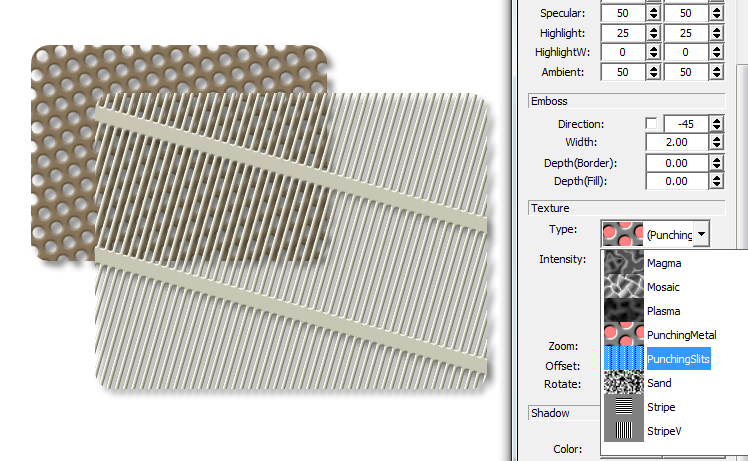
http://www.g200kg.com/en/software/skinman.html
0.999g 20110618
* BugFix: Primitives are not normally focused after paste (CTRL-C/CTRL-V)
* BugFix: Color value of the boundary pixel between PrimitiveBody&DropShadow is not correct
* BugFix: In some case, the position is not accurate (+-0.5pix) when primitive move by dragging
* BugFix: Menu item enable/disable control is wrong about 'Edit->Primitive->Extract Image'
* Support Texture rotation / scaleX,Y / OffsetX,Y
* Support Texture alpha to cut-out
* Add Textures 'Punching Metal' and 'Punching Slits'
* NOTE: from this version, SSE supported CPU is needed
Texture 'Punching Metal' & 'Punching Slits sample'.
may be fun
-
- KVRer
- 19 posts since 2 May, 2007
Hahaha... I've been noticing this one in particular all night. Was about to report it.g200kg wrote:And now, updated to 0.999g
http://www.g200kg.com/en/software/skinman.html
0.999g 20110618
* BugFix: Primitives are not normally focused after paste (CTRL-C/CTRL-V)
Love the new texture updates.
-
- KVRAF
- 2117 posts since 24 Feb, 2004 from Germany
Thank you very much!g200kg wrote:And now, updated to 0.999g
http://www.g200kg.com/en/software/skinman.html
0.999g 20110618
* BugFix: Primitives are not normally focused after paste (CTRL-C/CTRL-V)
* BugFix: Color value of the boundary pixel between PrimitiveBody&DropShadow is not correct
* BugFix: In some case, the position is not accurate (+-0.5pix) when primitive move by dragging
* BugFix: Menu item enable/disable control is wrong about 'Edit->Primitive->Extract Image'
* Support Texture rotation / scaleX,Y / OffsetX,Y
* Support Texture alpha to cut-out
* Add Textures 'Punching Metal' and 'Punching Slits'
* NOTE: from this version, SSE supported CPU is needed

Would it be possible to make the emboss border/fill function fully working on alpha textured objects?
-
- KVRAF
- 2117 posts since 24 Feb, 2004 from Germany
I think something has changed in the behaviour of the object tree.
I can't move groups any more in the correct way. Trying to place a group "between" two other groups always places the group under the last object of the upper group. The black line marker changes it's length when I move the mouse there, but the moved group is always placed "into" the other group, not seperately under it.
Edit/Add:
I don't know if this was before already: when making a soft color gradation, there is a color "step" at the beginning and end of the gradation (even when the Fill1 and Fill2 are the same, the gradation area is a little darker). This is best visible with gentle gradations or when the two colors are the same.
I can't move groups any more in the correct way. Trying to place a group "between" two other groups always places the group under the last object of the upper group. The black line marker changes it's length when I move the mouse there, but the moved group is always placed "into" the other group, not seperately under it.
Edit/Add:
I don't know if this was before already: when making a soft color gradation, there is a color "step" at the beginning and end of the gradation (even when the Fill1 and Fill2 are the same, the gradation area is a little darker). This is best visible with gentle gradations or when the two colors are the same.
Last edited by WOK on Sat Jun 18, 2011 2:22 pm, edited 1 time in total.
-
- KVRist
- 485 posts since 22 May, 2004 from Yokohama, Japan
WOK wrote:I think something has changed in the behaviour of the object tree.
I can't move groups any more in the correct way. Trying to place a group "between" two other groups always places the group under the last object of the upper group. The black line marker changes it's length when I move the mouse there, but the moved group is always placed "into" the other group, not seperately under it.
 sorry,
 simple bug because of too many things have been changed.
I would like to designate a stable version when settled these recent problems.
Fixed: 0.999h
http://www.g200kg.com/en/software/skinman.html