

Ok, thanks.
Also I found two problems (can't create official support message because i'm a not-registered beta user):
1) When FL Studio is launched and i open MacOS's launchpad cursor type still staying relative for FL (see attached video link)
2) You can't see this one on video but scroll bars on FL's Playlist are blinking. Speedy blinking. Unfortunately Quicktime can't record this effect.
I'm on Macbook Pro MD101, MacOS 10.13.2 and using latest FL Studio beta for mac.
Best,
Andrey.
FL Studio 12.9 Beta (inc. Time Signatures and macOS)
-
 Andrei Marchenko Andrei Marchenko https://www.kvraudio.com/forum/memberlist.php?mode=viewprofile&u=312360
 - KVRian
- 866 posts since 12 Sep, 2013
-

- KVRAF
- 26033 posts since 20 Oct, 2007 from gonesville
It's as though you have no awareness of music outside of coding a DAW. At all. One supposes you *don't* imagine how something happens where the_idea IS time signatures.Image-Line wrote:Technically, time signatures are just a GUI implementation. There is a ruler, representing time, BPM is how quickly the ruler is scanned. On that ruler are the instructions to trigger events. Time signatures are what's printed on the ruler. The underlying events and their timing stays the same no matter what you print on that ruler.jancivil wrote:and to turn me characterizing 'it's just a GUI issue' as 'dismissive' into me "interpreting", like I want that to be true doesn't work. "it's just _" is dismissive language. Time signatures are present in the vast majority of composed music that is written out. How do you imagine Le Sacre du Printemps happens without working it out in notation using time signatures? It's an ignorant view, I hate to have to point that out.
Regards Scott

-

- KVRAF
- 2772 posts since 22 May, 2017
Don't mind her, she seems to have a serious chip on her shoulder all the time.Image-Line wrote:How you perceive my posts, I can't control. But I certainly was not being dismissive. I was attempting to have a light-hearted conversationjancivil wrote:Now, the whole thing here that makes me say 'chasm', is your dismissive language 'just a GUI thing'. I do things which are more involved than this in improvisation. And I am interested to explore it.
However, from a technical perspective, time-signatures are grid spacing (inc. highlighting), metronome downbeat triggering and downbeat indications to plugins that can use it.
The good news is that FL Studio now implements time-signatures in a very flexible way.
Regards Scott
-
- KVRAF
- 2772 posts since 22 May, 2017
Looking forward to 12.9!
-

- KVRian
- Topic Starter
- 1052 posts since 2 Dec, 2010 from Belgium, EU.
Well I am a classical trombonist by training (specialty Bb Tenor Trombone). I had 15 years classical music education (sigh). I know what a time signature is, I can sight read bass, treble and tenor clefs in common key signatures. EDIT: Actually I am a bit rusty these days. But, with some practicejancivil wrote:It's as though you have no awareness of music outside of coding a DAW. At all. One supposes you *don't* imagine how something happens where the_idea IS time signatures.

Yet, I said what I said, in all sincerity
What exactly are you trying to get me to understand, that time signatures are important? Sure they are. Did FL Studio suck when you wanted to work in time signatures other than 4/4? For many people the answer was yes. That's why we fixed it. Did we get it wrong? Is there something about the current implementation that needs fixing? Let us know.
Regards Scott
-
- KVRian
- 524 posts since 26 Nov, 2009
Will FL 13 (?) get a way to switch between the different midi tracks inside the piano roll with just one click? Also, renaming and saving of the piano roll notes (useful not only for drum tracks, but also for microtonal scales).
-

- KVRian
- 1367 posts since 21 Dec, 2013 from USA
anomandaris1 wrote:Will FL 13 (?) get a way to switch between the different midi tracks inside the piano roll with just one click? Also, renaming and saving of the piano roll notes (useful not only for drum tracks, but also for microtonal scales).

-
- KVRAF
- 2636 posts since 17 Apr, 2004
You can download BRSO Articulate from the IL forum to rename piano roll notes. You need to create a text file and load that. I use a spreadsheet to create the file myself, because the order of the notes needs to be what I would consider back to front in the text file; using a spreadsheet makes it much easier to enter the notes from low to high MIDI number and then reverse the order.dandezebra wrote:Also, renaming and saving of the piano roll notes (useful not only for drum tracks, but also for microtonal scales).
If you need help doing this, I posted a YT video the other day and can post the link; it's also linked to from the IL forum in one of the recent topics about BRSO.
Note that you need to set up the MIDI port to route the notes from BRSO to your target plugin and do the programming in BRSO's piano roll to see the names.
Voted KVR's resident drunk Robert Smith impersonator (thanks Frantz!)
https://open.spotify.com/artist/2myYesRBRgQB3LkZzEYdt5 | https://soundcloud.com/steevm/
https://open.spotify.com/artist/2myYesRBRgQB3LkZzEYdt5 | https://soundcloud.com/steevm/
-
- KVRian
- 1367 posts since 21 Dec, 2013 from USA
Thanks for the info! I'll check when I get some time later!sjm wrote:You can download BRSO Articulate from the IL forum to rename piano roll notes. You need to create a text file and load that. I use a spreadsheet to create the file myself, because the order of the notes needs to be what I would consider back to front in the text file; using a spreadsheet makes it much easier to enter the notes from low to high MIDI number and then reverse the order.dandezebra wrote:Also, renaming and saving of the piano roll notes (useful not only for drum tracks, but also for microtonal scales).
If you need help doing this, I posted a YT video the other day and can post the link; it's also linked to from the IL forum in one of the recent topics about BRSO.
Note that you need to set up the MIDI port to route the notes from BRSO to your target plugin and do the programming in BRSO's piano roll to see the names.
There is an older post on Image Line forum that had a great idea of adding a visual instrument next to the piano roll as well.
http://forum.image-line.com/viewtopic.p ... 0&t=147479
Hope I'm allowed to post links to other forums...
This would be amazing for me! I am extremely visual and in the process of relearning music theory and such. Guaranteed there will be folks who think this is pointless, but they can go smell of elderberries!

-
- KVRAF
- 2636 posts since 17 Apr, 2004
You could create your own labels for the guitar like this, though you'd be restricted to text and can't have it next to the piano layout like in the screenshot.
But if all you want is to see note names with an extra indication of where each open string is, that should be easy enough... just download the example txt file from the BRSO thread (it's just the list of note names from top to bottom) and then replace the name of the 6 notes corresponding to open strings on the guitar with something else that is easily visible, like "Open G" so that it stands out visually from the other notes.
Download link:
http://forum.image-line.com/viewtopic.p ... 0&t=128904
Video:
Note that I created the video for someone who wasn't a spreadsheet user, so it might be a bit slow if you know what you are doing.
The very short version is to open Excel/Open Office, create an index column from 0 to 131 corresponding to the note numbers (the piano roll is 132 notes, not the 127 MIDI notes). Then I entered the names to display for each note in the second column, using the first column as an index. Most manuals will have a table or something; you rarely see note numbers from high to low, so I find it easier this way.
BRSO articulate unfortunately reads the note from top to bottom in the piano roll, not from low note to high note, which is why you need to reverse the order once you're done. So at the end I use the index to reverse the sort order of the entries, remove the first column and save as a text file.
But if all you want is to see note names with an extra indication of where each open string is, that should be easy enough... just download the example txt file from the BRSO thread (it's just the list of note names from top to bottom) and then replace the name of the 6 notes corresponding to open strings on the guitar with something else that is easily visible, like "Open G" so that it stands out visually from the other notes.
Download link:
http://forum.image-line.com/viewtopic.p ... 0&t=128904
Video:
Note that I created the video for someone who wasn't a spreadsheet user, so it might be a bit slow if you know what you are doing.
The very short version is to open Excel/Open Office, create an index column from 0 to 131 corresponding to the note numbers (the piano roll is 132 notes, not the 127 MIDI notes). Then I entered the names to display for each note in the second column, using the first column as an index. Most manuals will have a table or something; you rarely see note numbers from high to low, so I find it easier this way.
BRSO articulate unfortunately reads the note from top to bottom in the piano roll, not from low note to high note, which is why you need to reverse the order once you're done. So at the end I use the index to reverse the sort order of the entries, remove the first column and save as a text file.
Voted KVR's resident drunk Robert Smith impersonator (thanks Frantz!)
https://open.spotify.com/artist/2myYesRBRgQB3LkZzEYdt5 | https://soundcloud.com/steevm/
https://open.spotify.com/artist/2myYesRBRgQB3LkZzEYdt5 | https://soundcloud.com/steevm/
-
- KVRian
- 1367 posts since 21 Dec, 2013 from USA
Awesome and thanks again!
-
- KVRian
- Topic Starter
- 1052 posts since 2 Dec, 2010 from Belgium, EU.
I see sjm has covered renaming. But that is also on the to-do for the Piano roll.anomandaris1 wrote:Will FL 13 (?) get a way to switch between the different midi tracks inside the piano roll with just one click? Also, renaming and saving of the piano roll notes (useful not only for drum tracks, but also for microtonal scales).
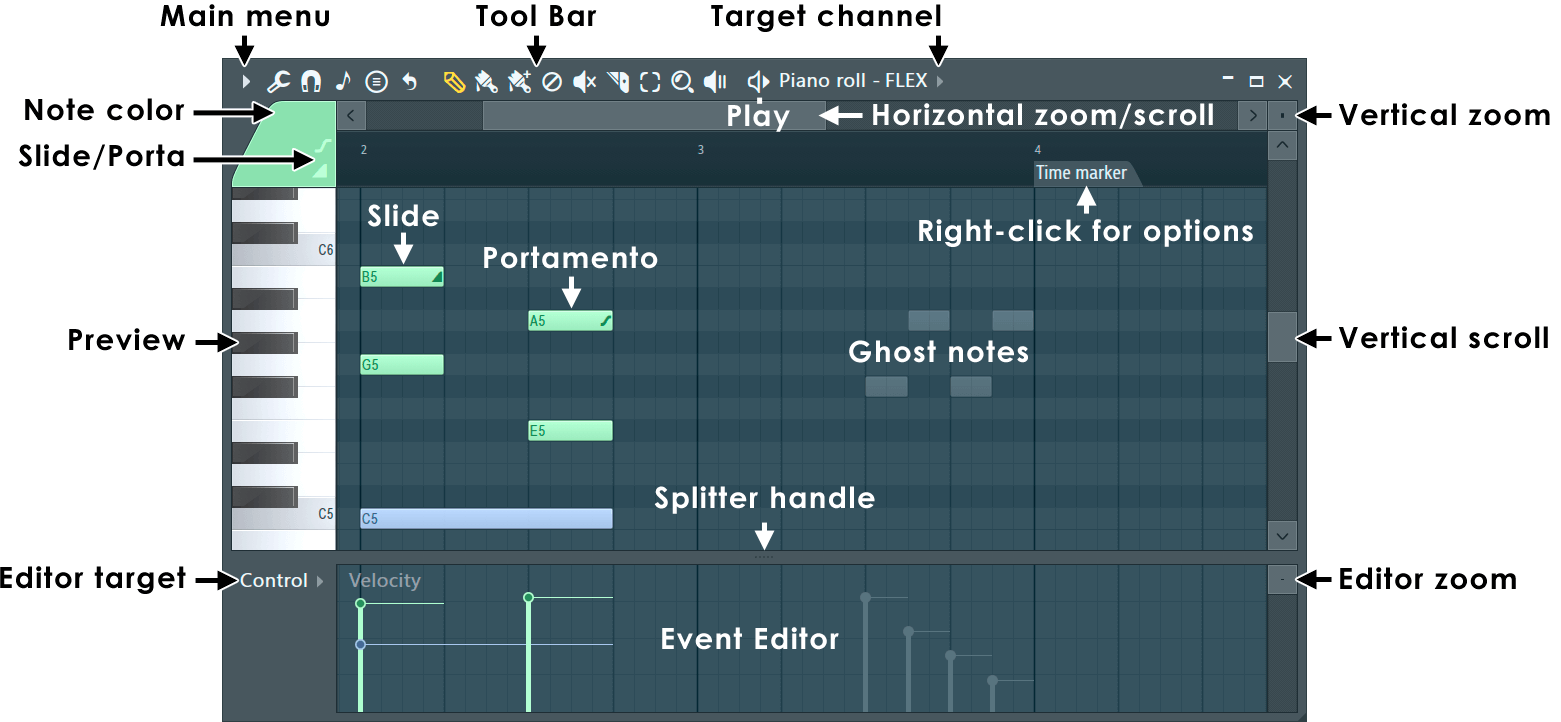
Re switching, you can do that now TARGET CHANNEL.
-
- KVRian
- 1367 posts since 21 Dec, 2013 from USA
Target switching hasn't ever been a problem for me. Thanks for the help!
Any chance of ever adding the visuals for stringed instruments? Would be so cool for bass and guitar!
Any chance of ever adding the visuals for stringed instruments? Would be so cool for bass and guitar!
-
- KVRian
- Topic Starter
- 1052 posts since 2 Dec, 2010 from Belgium, EU.
Please make feature requests in Looptalk http://support.image-line.com/redirect/LoopTalk now is the time, while we are developing FL Studio 12.9dandezebra wrote:Target switching hasn't ever been a problem for me. Thanks for the help!
Any chance of ever adding the visuals for stringed instruments? Would be so cool for bass and guitar!