

Yeah sure
They are "as is" though - some are better than others, some are quite similar (variations on a theme)

2CAudio B2: Full Body. Maximum Attitude.
-

- KVRAF
- 37409 posts since 14 Sep, 2002 from In teh net
-

- KVRAF
- Topic Starter
- 2621 posts since 12 Sep, 2008
aMUSEd wrote:Yeah sure
They are "as is" though - some are better than others, some are quite similar (variations on a theme)
OK, I will "editorialize"...

-
- KVRAF
- Topic Starter
- 2621 posts since 12 Sep, 2008
Galbanum wrote:I did think about this exact idea during development...trance_lucent wrote:Thank you for detailed answers!Galbanum wrote: ...but preset availability and handling will continue to evolve as well, so not all users need to be preset design rocket scientists... Just like most NI-Massive users to do make their own Massive presets from scratch... We designed B2 like a complex synth.
And, indeed, users who don't want / haven't time to design own reverb, can consider B2 as general reverb with presets instead of "algorithm" selection and tweak only Time, Size, Damp and Eq. But may be (although no) separate preset system for "geometry" section would be handy for them (with presets similar to classic "algorithms" like Hall, Chamber, Room etc).
Incidentally, it occurs to me I forgot to mention that this is also part of the B2 "Engine Preset" idea. Here you can set up templates for Hall, Plate, Chamber, etc. type presets and load them into a single engine separately without effecting the other engine, or the global controls, or the dynamics controls...
-
- KVRist
- 44 posts since 2 Apr, 2010
Bought B2. Sounds great, but really hard to use. Galbanum, just out of curiosity, what display do you use? I have Apple 27" and I have to move my face very close to display to be able to read fonts used in B2 
-
- KVRAF
- Topic Starter
- 2621 posts since 12 Sep, 2008
30" cinema displays (on OSX and Windows)... And recently a MacBook Pro 15" Retina Display as well. But I also check on other monitors while developing the GUI and we get guidance from a top GUI designer who worked inside the GUI teams Apple for many years.Moonlight wrote:Bought B2. Sounds great, but really hard to use. Galbanum, just out of curiosity, what display do you use? I have Apple 27" and I have to move my face very close to display to be able to read fonts used in B2
This is the first time we heard any comment like this. Font size is 11pt on the knobs and most other controls, which is not particularly small, and the font is bold. Is it the knobs specifically that are hard to read for you, or something else?
I may make a double size version of the GUI as an option for those who like things really big, but this will be 1920px wide, and thus will effectively be full screen for smaller monitors...
-
- KVRist
- 44 posts since 2 Apr, 2010
Yeah, it's easy to read on my MBPr as well. But 27" display has very small pixel pitch and there is no option on Mac to set custom DPI size as on Windows. The only things I can read is big knob values and labels. Other things like preset names in browser, displays and sliders labels, etc - is very hard too readGalbanum wrote:30" cinema displays (on OSX and Windows)... And recently a MacBook Pro 15" Retina Display as well.
Double size version would be great! This will help a lot. B2 sounds amazing and works really well and stable, but it's hard to use on my system, because of interface size.Galbanum wrote:I may make a double size version of the GUI as an option for those who like things really big, but this will be 1920px wide, and thus will effectively be full screen for smaller monitors...
-
- KVRAF
- Topic Starter
- 2621 posts since 12 Sep, 2008
You have the newest 27" iMac? You have a resolution of 2560*1440 px then in a 27" factor? This actually makes your monitor among the highest PPI traditional displays (prior to the whole "Retina Display" trend that is slowly taking place...) That is why things feel small to you...Moonlight wrote:Yeah, it's easy to read on my MBPr as well. But 27" display has very small pixel pitch and there is no option on Mac to set custom DPI size as on Windows. The only things I can read is big knob values and labels. Other things like preset names in browser, displays and sliders labels, etc - is very hard too readGalbanum wrote:30" cinema displays (on OSX and Windows)... And recently a MacBook Pro 15" Retina Display as well.
Double size version would be great! This will help a lot. B2 sounds amazing and works really well and stable, but it's hard to use on my system, because of interface size.Galbanum wrote:I may make a double size version of the GUI as an option for those who like things really big, but this will be 1920px wide, and thus will effectively be full screen for smaller monitors...
You can run you monitor at 1920*1200 or whatever the height is, if you like, and this will make things bigger, but you will loose screen real-estate.
If you want to see the future of displays, here is a step in the right direction:
I've been waiting for this to happen for like 5 years now. I ran three monitors at 1600*1200 in 1999 for pete's sake... If we can do 2560*1600 on a 10" tablet these days, why can't we do 4K, 5K, 6K, 8K, etc on a large format display for content creation pros??
Anyway, hopefully in a year or so 4K displays will come down to $2,000 or so like the 30" cinema display was initially...
-
- KVRAF
- Topic Starter
- 2621 posts since 12 Sep, 2008
Moonlight wrote:But 27" display has very small pixel pitch and there is no option on Mac to set custom DPI size as on Windows.
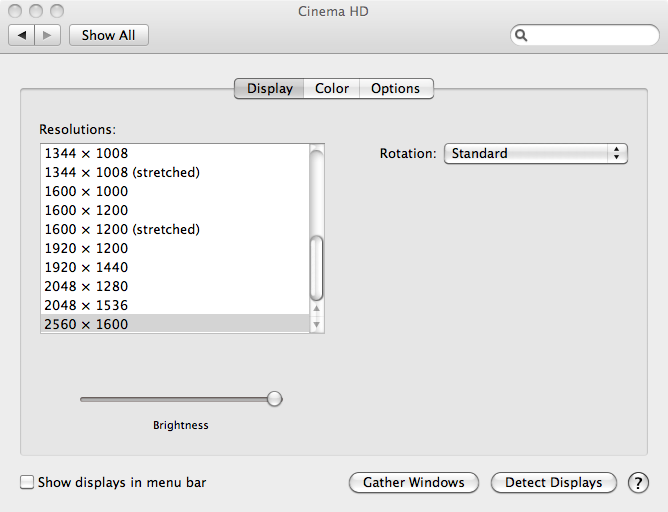
btw, this shouldn't be true... OSX has display prefs too:
-
- KVRist
- 44 posts since 2 Apr, 2010
It's true. I meant scaling (you can see this on MBPr). My studio computer is MacPro and Apple TB Display 27". There is no scaling option. What you showed on screenshot is resolution settings. If I set resolution different from 2560*1440 the picture will become very blurry and fonts will be less clear, so I better stay with native resolution. The only option for me is wait for Apple Retina Display 27", or wait for double size interface in B2, which would be much cheaper for meGalbanum wrote:btw, this shouldn't be true... OSX has display prefs too:
-
- KVRist
- 43 posts since 10 May, 2008
Hello all
I was trying to install the demo today but the installation process has failed numerous times ( i read the release notes and tried multiple ways to download, unzip and install) If anyone has a solution i would love to hear it.
mac 106.8
firefox 11 latest and safari latest - tried ...and tried
I was trying to install the demo today but the installation process has failed numerous times ( i read the release notes and tried multiple ways to download, unzip and install) If anyone has a solution i would love to hear it.
mac 106.8
firefox 11 latest and safari latest - tried ...and tried
macbook pro 2.4 c2duo, 4 g ram, 10.11.6/2x quad 2.8 xeon ghz 10.7.8 / 18g ram/cubase 6.53, 4.5.2, sx3.1.944, logic 8/ fface 800, mtp av,zebra 2.2/5,, NI komplete 8, waves v9 CLA classic compressers, SCC, yam fs1r, ex5, Linstrument
-
- KVRist
- 43 posts since 10 May, 2008
got it sorted -the installed primary folder in the application support folder showed no contents - so i 'got info' and it had a weird permissions account which i deleted and added my admin acount to the list and voila the folders contents appeared and were accessible
macbook pro 2.4 c2duo, 4 g ram, 10.11.6/2x quad 2.8 xeon ghz 10.7.8 / 18g ram/cubase 6.53, 4.5.2, sx3.1.944, logic 8/ fface 800, mtp av,zebra 2.2/5,, NI komplete 8, waves v9 CLA classic compressers, SCC, yam fs1r, ex5, Linstrument
-
- KVRAF
- 1895 posts since 13 Oct, 2002
While I don't have too much of a problem with B2's current GUI size, I'd welcome that. I find one of the smartest implementations of variable GUi size to be U-he's: they offer 5 different GUI sizes accross their entire plugin range which accomodates many different monitors and dot pitches.Galbanum wrote:I may make a double size version of the GUI as an option for those who like things really big, but this will be 1920px wide, and thus will effectively be full screen for smaller monitors...
My eyesight is not the best but I use a 30" 2560x1600 monitor daily. The problem with that resolution is that pixels are very small and a lot of older GUIs are really hard to read (especially the ones using single pixel text) so I've come to use the Magnifier included in Windows 7 when I work with those. Obviously this isn't an ideal solution especially if you need to toggle back and forth between the magnified plugin GUI and the normal sized DAW GUI, but for working exclusively with a plugin for a time it's fine.
At the 200% setting, the magnifier basically multiplies every pixel by 4 so the magnified GUI comes up crystal clear. This doesn't seem like a complex thing to implement and I've approached a few devs about implementing some kind of wrapper for older plugins to do this, but apparently it's not as simple as it sounds. I could even see this implemented in a DAW. But it's no one's priority and I'll have to stick to the clunky magnifier for now.
Maybe the coming ultra high res monitors will make OS's implement smooth built-in zooming technologies... or maybe it'll become more relevant as the current dev population ages...

-
- KVRAF
- Topic Starter
- 2621 posts since 12 Sep, 2008
Breeze wrote:While I don't have too much of a problem with B2's current GUI size, I'd welcome that. I find one of the smartest implementations of variable GUi size to be U-he's: they offer 5 different GUI sizes accross their entire plugin range which accomodates many different monitors and dot pitches.Galbanum wrote:I may make a double size version of the GUI as an option for those who like things really big, but this will be 1920px wide, and thus will effectively be full screen for smaller monitors...
My eyesight is not the best but I use a 30" 2560x1600 monitor daily. The problem with that resolution is that pixels are very small and a lot of older GUIs are really hard to read (especially the ones using single pixel text) so I've come to use the Magnifier included in Windows 7 when I work with those. Obviously this isn't an ideal solution especially if you need to toggle back and forth between the magnified plugin GUI and the normal sized DAW GUI, but for working exclusively with a plugin for a time it's fine.
At the 200% setting, the magnifier basically multiplies every pixel by 4 so the magnified GUI comes up crystal clear. This doesn't seem like a complex thing to implement and I've approached a few devs about implementing some kind of wrapper for older plugins to do this, but apparently it's not as simple as it sounds. I could even see this implemented in a DAW. But it's no one's priority and I'll have to stick to the clunky magnifier for now.
Maybe the coming ultra high res monitors will make OS's implement smooth built-in zooming technologies... or maybe it'll become more relevant as the current dev population ages...
The devil is is in the details as they say... "Smooth scaling" by the OS or by us when loading the images is not always ideal for anything that is image based such as 3D interfaces etc. Sometimes you want hard edges to be maintained for graphs etc. When we make the GUis we obsess over them at the pixel level, and auto-interpolating/resampling them to different sizes will not be quite as perfect. Simply rebuilding them at 2x the size and offering two different skins is fairly easy however...
-
- KVRAF
- Topic Starter
- 2621 posts since 12 Sep, 2008
Good news: we have 64-bit OSX VST working now here. We can finally see the light at the end of the tunnel... Should be only a few more days until you guys can try it (as VST and AU)...
-
 Sampleconstruct Sampleconstruct https://www.kvraudio.com/forum/memberlist.php?mode=viewprofile&u=191286
 - KVRAF
- 16748 posts since 12 Oct, 2008 from Here and there
YipeeeeeGalbanum wrote:Good news: we have 64-bit OSX VST working now here. We can finally see the light at the end of the tunnel... Should be only a few more days until you guys can try it (as VST and AU)...

