
ValhallaRoom 1.5.1 Released. New Electric Blue GUI

VST, AU, AAX, CLAP, etc. Plugin Virtual Effects Discussion
Post Reply New Topic
RELATED
PRODUCTS
ValhallaRoom

Post

themossinator wrote:Any plans for a "Wet lock" button? Kinda annoying the way the plugin goes 100% wet every time you change the preset
errrr....
valhallasound wrote: Image

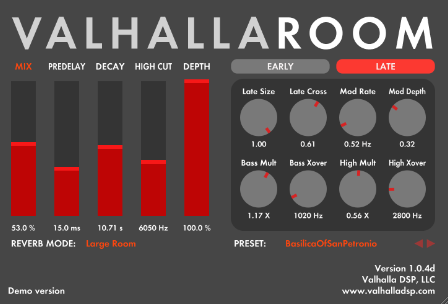
The red MIX label above the Mix slider is the Mix Lock button, which is used for determining whether presets change the mix level (unlocked) or whether the mix level stays the same regardless of the preset (locked). When the Mix slider is "locked" the user can still adjust the level by moving the slider or typing in a new value.
Post

standalone wrote: errrr....
valhallasound wrote: Image

The red MIX label above the Mix slider is the Mix Lock button, which is used for determining whether presets change the mix level (unlocked) or whether the mix level stays the same regardless of the preset (locked). When the Mix slider is "locked" the user can still adjust the level by moving the slider or typing in a new value.
The not so well hidden easter egg of ValhallaRoom. ;)

Post

themossinator wrote:Any plans for a "Wet lock" button? Kinda annoying the way the plugin goes 100% wet every time you change the preset
Click the MIX label above the mix slider. It is a mix lock button since 1.0.4.

Sean

Post

valhallasound wrote:
themossinator wrote:Any plans for a "Wet lock" button? Kinda annoying the way the plugin goes 100% wet every time you change the preset
Click the MIX label above the mix slider. It is a mix lock button since 1.0.4.

Sean
Not sure if I'm doing something wrong, but the lock button has no effect on my setup (even when it's grey, I'm able to drag the slider up and down with the mix being affected).

- OS X 10.6.7 / Logic Express 9.1.4 / ValhallaRoom 1.0.4

BTW, I love this reverb!

Edit: I've tried several versions... AU (Logic), VST (Reaper), and RTAS (Pro Tools). I'm not sure if this is a Mac issue yet.

Post

valhallasound wrote:
themossinator wrote:Any plans for a "Wet lock" button? Kinda annoying the way the plugin goes 100% wet every time you change the preset
Click the MIX label above the mix slider. It is a mix lock button since 1.0.4.

Sean
Ha! excellent, hadnt noticed that before, this reverb just gets better!!! Thanks all

Post

mgpqa1 wrote:Not sure if I'm doing something wrong, but the lock button has no effect on my setup (even when it's grey, I'm able to drag the slider up and down with the mix being affected).
That's the intended behavior
valhallasound wrote:When the Mix slider is "locked" the user can still adjust the level by moving the slider or typing in a new value.
It's there to keep the mix level as desired when you are changing presets, but you can modify it without the need of unlocking-changing mix level-locking again.

Post

standalone wrote:
mgpqa1 wrote:Not sure if I'm doing something wrong, but the lock button has no effect on my setup (even when it's grey, I'm able to drag the slider up and down with the mix being affected).
That's the intended behavior
valhallasound wrote:When the Mix slider is "locked" the user can still adjust the level by moving the slider or typing in a new value.
It's there to keep the mix level as desired when you are changing presets, but you can modify it without the need of unlocking-changing mix level-locking again.
I see, thanks for the clarification!

Post

standalone wrote:
mgpqa1 wrote:Not sure if I'm doing something wrong, but the lock button has no effect on my setup (even when it's grey, I'm able to drag the slider up and down with the mix being affected).
That's the intended behavior
valhallasound wrote:When the Mix slider is "locked" the user can still adjust the level by moving the slider or typing in a new value.
It's there to keep the mix level as desired when you are changing presets, but you can modify it without the need of unlocking-changing mix level-locking again.
Someone proposed this behavior in this thread, as opposed to the actual locking mix slider. It made a lot of sense to me. The user can still adjust the mix level, but the presets won't adjust the mix.

Sean Costello

Post

Hey Sean-

Sent an email through your website page. It came back with a message that the email was sent, and then came back with a 404 error. Website bug?

Post

krankyone wrote:Hey Sean-

Sent an email through your website page. It came back with a message that the email was sent, and then came back with a 404 error. Website bug?
Probably. This is a known error - my wife will be revisiting that code soon. Messages seem to be coming through just fine.

Sean Costello

Post

DF2R wrote:
Bronto Scorpio wrote:Thanks for this awesome update!
The new dark room algo is really great!

Just treid it on this "thing" I'm working on: http://www.bronto-scorpio-music.com/Mus ... m_Test.mp3

Really great for some "mysterious" spaces!

Edit: One of the great things about Vroom is that I can finally send sounds with really sharp transients (like the sound above) through a reverb. It did't sound that great with any other reverb I tried before.

Cheers
Dennis

I like your sound! The dark room algo rocks so far for me.
Thanks!

Cheers
Dennis

Post

valhallasound wrote:
standalone wrote:
mgpqa1 wrote:Not sure if I'm doing something wrong, but the lock button has no effect on my setup (even when it's grey, I'm able to drag the slider up and down with the mix being affected).
That's the intended behavior
valhallasound wrote:When the Mix slider is "locked" the user can still adjust the level by moving the slider or typing in a new value.
It's there to keep the mix level as desired when you are changing presets, but you can modify it without the need of unlocking-changing mix level-locking again.
Someone proposed this behavior in this thread, as opposed to the actual locking mix slider. It made a lot of sense to me. The user can still adjust the mix level, but the presets won't adjust the mix.

Sean Costello
Yes, Cubase's REVerence also does this and it is clearly the best solution.

Post

If messages are coming through, did you get my email to test the new version of room?

Post

The new algo is like having another reverb. It's that good. It opens up a completely new door and makes me a very happy to be working ITB


I made this some slow dark deep techno demo (suited genre IMO for the new algorithm)


First 4 bars whithout reverb, next with sounds put through 2 instances of VRoom on sends set on the new Dark algorithm.


http://soundcloud.com/mod-a/darkroom-valhallaroom-new

Post

Bronto Scorpio wrote: Just treid it on this "thing" I'm working on: http://www.bronto-scorpio-music.com/Mus ... m_Test.mp3
Very nice percussive sounds! What did you use to get that organic evolving envelope bouncing? Sounds granular like but with very sharp transients..

One way I did something similar was having a really snappy envelope and playing with the starting point through the sound... I'm curious of your approach.

Anyway great work!

Post Reply

Return to “Effects”