Is TrackComp 2 by DMG Audio the best compressor?

VST, AU, AAX, CLAP, etc. Plugin Virtual Effects Discussion
Post Reply New Topic
RELATED
PRODUCTS
TrackComp 2

Post

fese wrote: Tue Mar 22, 2022 7:29 am It feels rather small and crowded and I heartily dislike horizontal faders as controls.
I think if you consider the information design of switching those horizontal faders out with knobs you can see why we've done this. If we kept the same GUI size and switched the faders for knobs you would get a lot less visual feedback and make everything far more cramped. Also, there aren't many horizontal faders, it's mostly just values.
fese wrote: Tue Mar 22, 2022 7:29 am I think regular knobs work much better on plugin interfaces.
We've spent a lot of time studying this topic and I heartily disagree. Watching people use knobs on software made me realise it's an anachronism from hardware that serves very little purpose apart from making older users more comfortable by using a familiar analogy. Those faders give you a much better representation and are more efficient in terms of screen space, they're quicker to use and you don't start tracing a circle with your mouse, which is frankly just weird.

It's even true in the real world - consider the mixing desk. We cram the less important stuff on to a series of knobs because it's space efficient and leaves room at the bottom for a nice big fader, giving us more precision to adjust gain and better visual representation.
fese wrote: Tue Mar 22, 2022 7:29 am Also, it would be really usefull if there were simplified UI modes for the classic compressors (like the views in u-he Presswerk) that resemble the original layouts.
The Presswork GUI is far, far more complex than Trackcomp2 and requires a lot more mouse movement to get the result. I think we've simplified things to a point that you can make adjustments very quickly with minimal mouse movement, we'd be creating a new GUI element that really only hides 2 small elements (response and brightness). It's robbing Peter to pay Paul.

Post

One thing I'd love to see implemented is the ability to link INPUT gain with the main OUTPUT gain controls. This way we can much easier drive or under-drive the plugin to create exactly the amount of harmonics we want.

As for the UI.. I think it's almost perfect. It's a bit hard to see things in a bright environment but for a dimmed studio environment it's pretty much perfect.
"Wisdom is wisdom, regardless of the idiot who said it." -an idiot

"They don't ban hate speech; they ban speech they hate." -an oracle

Post

As for the knobs, I don't see it like that, I'm a younger user and prefer the knob mode mostly in Equilibrium because they are easier to grab when working quickly, especially on high resolutions, since the shape is more quadratic than the rectangular fader/number fields.

Anyway, for feature requests, I'd love a more visual indication of the faders. Like when holding ALT+ moving the mouse on the faders which sometimes have a raster, to have these ranges more visually visible. Also there's a reason why mastering equipment has stepped controls. I'd love a stepped mode or at least a visual indicator somehow, since setting these faders freely is the thing what held me away initially from these interfaces as a semi professional. Would love these range indicators on ratio, attack, release. (I know the red range indicator on some, but it could be done better I think)

Also I'd love a custom colored setting, like in TrackMeter, to customize the colors a bit (as bmanic mentioned).

Post

dermage wrote: Tue Mar 22, 2022 1:22 pm they are easier to grab when working quickly, especially on high resolutions, since the shape is more quadratic than the rectangular fader/number fields.
Disagree - to keep the GUI the same size you would have about a quarter of the area if they were knobs and you would have to guess where to click them to get any given value. With the faders you have a more direct representation of the range, you know left is minimum, right is maximum and you know where those points are. Those moments are variable on a knob, depending on how much dead zone is incorporated into the throw, if you annotate the dead zone you make the knob smaller again and so it becomes even harder to use. I don't see how having a quadratic shape helps you on a rectangular monitor either. Ever seen a user trying to rotate a knob on a touch screen?

This is a favourite topic of mine.
dermage wrote: Tue Mar 22, 2022 1:22 pm Also there's a reason why mastering equipment has stepped controls.
Very little modern mastering equipment has stepped controls. Generally mastering engineers demand precision. I think they're actually more useful for mix applications. Trackcomp was developed with help from several well respected ME's, nobody asked for stepped controls AFAIR, in fact I think this is the first request ever for them with TC.
dermage wrote: Tue Mar 22, 2022 1:22 pm I'd love a more visual indication of the faders. Like when holding ALT+ moving the mouse on the faders which sometimes have a raster, to have these ranges more visually visible.
I don't really understand what you're getting at, can you elaborate a bit more? Do you mean you'd like to be able to set the lowest value of the faders to increase the resolution?

Thanks for taking the time to elaborate on your experience with the plugin.

Post

Krzysztof Oktalski wrote: Tue Mar 22, 2022 11:38 am
This was intentional, if you have the gain the other way there's a tendency to yank it quickly and blow your speakers/ears. We tried it both ways and settled on pulling down, because it makes you think a bit longer and less likely to move it quickly to a potentially dangerous position.
I'm not sure I get why people would be more inclined to crank up the makeup gain by pushing it up versus pulling it down, but I'll trust you tried it both ways. I don't know fader down = increase in gain is horribly unintuitive though. Especially when the fader to the right of it works exactly as expected. I feel like if you ended up in that situation from a design perspective, it's maybe time to start over and rethink the implementation. Just my two cents.
Krzysztof Oktalski wrote: Tue Mar 22, 2022 11:38 am If it were default you'd often never see the incoming signal, the right hand section would seemingly do nothing until one of the two right hand faders were adjusted. I think that would be disconcerting for many users. I'll discuss some kind of preference for this, although there is no setup pane on TC2.
It's a compressor. The most important meter to me is the GR meter. Looking at my hardware comps, I never turn them off GR meter. I bet most folks feel the same. The most important meter in the compressor shouldn't be the smallest and most difficult to read IMO. Again...it feels like you got a little too married to some design decisions early at the expense of logic and usability. That sounds harsher than I mean it to, but I think a "rethink" of that section of the UI could improve things.
Krzysztof Oktalski wrote: Tue Mar 22, 2022 11:38 am The point of Trackcomp was to give a tonic to the complexity of Compassion. Having 2 GR meters would change that, can you show me an example where you think such a layout works well?
Just thinking out-loud: Softube does that thing with their new expandable side panels for input/output meters. I dig that. Maybe a different improvement would be to adjust the meter range. Maybe we don't practically need metering down to -107 and -inf in a track compressor. Maybe if the minimum value were -72 or -90db, that would make small amounts of GR more visible. That's really the issue IMO: sometimes you only want small amounts of GR but it's really hard to see that with the default scaling.
Krzysztof Oktalski wrote: Tue Mar 22, 2022 11:38 am Dave addressed this when he was talking about T4Bs. It's maybe outside of your T4B's lines, for the T4Bs we've got it makes sense.
I get that, but I took the lines to mean "this is the range LA-2A's will typically operate in" which, when understood that way, there are definitely lots of examples of way "faster" LA-2A's than these. Also, a 35ms release on the LA-2A model is nothing like a 35ms release on any other, which I get is due to the opto cells memory and dual stage release, but then how are we measuring release time? The time to recover 100% of the input signal? 80%? I'm guessing you guys just had to call the release times something and they're far from exact on the 2A model, but that just brings up why a wider range may be desired. Or why a "simple mode" as someone else suggested, may be interesting.

Anyway, I appreciate the thoughtful responses. This is just one customer's feedback. I really do love the product and appreciate all that's gone into it and been added to it over the years. I just feel like the interface has some improvement opportunities but I appreciate that's difficult with a product like this.

Post

Krzysztof Oktalski wrote: Tue Mar 22, 2022 1:51 pm
dermage wrote: Tue Mar 22, 2022 1:22 pm I'd love a more visual indication of the faders. Like when holding ALT+ moving the mouse on the faders which sometimes have a raster, to have these ranges more visually visible.
I don't really understand what you're getting at, can you elaborate a bit more? Do you mean you'd like to be able to set the lowest value of the faders to increase the resolution?

Thanks for taking the time to elaborate on your experience with the plugin.
What I'd love would be a more visual indication of the range as they're quite different in the separate models. So to know where a low attack is (in which range, eg 0-5ms) where a mid attack is (eg. 5-50) and where a high attack is. Same for a low ratio, mid ratio and release etc is could be visually displayed on the fader, similar to the red indicators which show the emulated unit's range we could see 3 ranges for low, mid, high settings. It would improve workflow I think.
That's what I think is missing inTrackComp: a bit more guide lining the users to make it quicker to setup and not too technical (eg. only numbers), as it is right now.
A different approach was my idea of the raster settings, they don't need to snap, but just visually make the fader a bit more intuitive to use. Currently you have to search for the setting instead of directly knowing to which range you want to set the fader too (eg. low/mid/high).

That's possibly another reason I like knobs. It's easier for my eye to estimate the range on a knob, than a fader.

Post

SamDi wrote: Mon Mar 21, 2022 10:16 pm 2.) It's not £75 anymore, because it was the introduction price - now it's £85 for UK
Indeed. Price went up £10 when we added 3 new models. Introductory price was more on top of that, but there wasn't an intro price between TrackComp1 and TrackComp2. I think we mailed everyone to advise that price was about to go up and now was a good time to buy if you wanted the new features for the old price. Do join the announcement list if you want to hear stuff like this. We mail once or twice per year. It's super non spammy.

Dave.
[ DMGAudio ] | [ DMGAudio Blog ] | dave AT dmgaudio DOT com

Post

I just want to say that Track Comp is probably my most used software compressor. Easy to use and sounds great.
I mostly use the DMG, 2A, Zener and 2K5 modes. I have some of the hardware compressors that Track Comp's modes are based on but honestly, I haven't done any comparisons. I just like that it's easy for me to get the results I'm looking for.

Post

Funkybot's Evil Twin wrote: Tue Mar 22, 2022 2:25 pm I get that, but I took the lines to mean "this is the range LA-2A's will typically operate in" which, when understood that way, there are definitely lots of examples of way "faster" LA-2A's than these.
Yeah totally! Those red lines are "if you bought an LA2A, the values are probably somewhere in here". But there was the silver face series, which came into existence when the T4Bs they got were suddenly INSANELY fast. To the point that an early bugfix for TC was to extend the accessible minimum times on the "timing" faders. FWIW, if you do find a silver face, it's great fun for drums. Just in case you can't be bothered to drive to the auction house with six grand in cash, after waiting 6months for one to come on the market, grab TC2 and stick attack+release at minimum on the LA2A. It's an acquired taste, but its interesting!
Also, a 35ms release on the LA-2A model is nothing like a 35ms release on any other, which I get is due to the opto cells memory and dual stage release, but then how are we measuring release time? The time to recover 100% of the input signal? 80%? I'm guessing you guys just had to call the release times something and they're far from exact on the 2A model, but that just brings up why a wider range may be desired. Or why a "simple mode" as someone else suggested, may be interesting.
(I may be repeating myself here.)
So, the truth is that the timings primarily depend on:
- the impedance of the light source (but really just resistance and inductance)
- the nonlinearity of the source and LDR
- the distance between source and LDR (for spread, not propagation time, thankfully!)
- the thermal mass of the light source
- any diffusion lens or covering that's in there between the two (usually a little plastic disc over the LDRs and a plastic film over the source)
- the doping of the LDR strip, which is its own world of hell, but this is fairly minor.

We boiled it down to two controls that gets you close-enough-that-nobody-can-hear-a-difference with two sliders. But I'd love to give you a T4B designer. You just probably wouldn't let me. But since the T4B appears very cleanly as a component in the SPICE modelling, and I've optimised the crap out of the rest of the circuit, I can totally make the T4B more adjustable. I've been pondering making a T4B measuring testbed like Kenetek has, but finding a way to make them for cheaps, and giving them some firmware so you can automate sweeping them. Then that can render off a model that loads nicely into TC2. But sadly, this is of interest to only three people, and I'm one of them. So the better solution is for both of those other people to post me a T4B and I'll do the legwork.

Anyway, because the thing is a mess of a device, the timings are just entirely signal dependent, thanks to the nonlinearity, which means that attack/release vary depending on how hard we're hitting, and on the spikeyness we can get out of the GR signal (which is, of course adjustable with that HF emphasis). It's just beyond meaningless to try and talk about percentages here I'm afraid. So we just made what is effectively a 2D space with the attack/release sliders that let you dial in likely parameters for your LA2A. Bash the same signal into the hardware and the plugin, make sure the plugin matches any screw adjustments you've done on the hardware (specifically if you did the HF one) get the same GR reading at steady state, then bash something in like a vocal or some drums. Set TC2 release to get you in the ballpark, set TC2 attack so they line up. Done.

Point is, there are no wrong answers with the T4B. The production was sufficiently inconsistent that whatever values you pick, you could probably find a unit that was similar to that.

Set the sliders to what suits your source, save it as a preset so you can try it later, and feel no guilt.

Dave.
[ DMGAudio ] | [ DMGAudio Blog ] | dave AT dmgaudio DOT com

Post

For a while, Audioscape had T4B's listed on their website but I never actually saw any in stock. They make them in-house down in Florida from what I understand for their highly regarded LA-2A clone. If I had one, I'd consider popping it out and sending it over. Maybe you can get them to set one aside for you. I've got a Stam clone, one of the very early ones, but honestly, the one TrackComp2 is just as good if not better with the right settings.

Post

Funkybot's Evil Twin wrote: Tue Mar 22, 2022 2:25 pm I'm not sure I get why people would be more inclined to crank up the makeup gain by pushing it up versus pulling it down, but I'll trust you tried it both ways. I don't know fader down = increase in gain is horribly unintuitive though.
Completely agree, but that's kind of why it works. It stops you doing anything too crazy too quickly, if you reverse it there's a tendency to yank up to what looks like unity with the others and that's an unpleasant experience. Dave and I spent ages arguing about it, I think I originally held your viewpoint until I confronted the alternatives so we accepted this strange anomaly because it felt better in use.
Funkybot's Evil Twin wrote: Tue Mar 22, 2022 2:25 pm Just thinking out-loud: Softube does that thing with their new expandable side panels for input/output meters. I dig that. Maybe a different improvement would be to adjust the meter range
Then we'd create a new GUI configuration in order to avoid right clicking on the meter, so we're increasing complexity. Maybe just having two representations simultaneously helps. Can you send me a link to a link to what you mean with Softube? It's good to see different approaches but we really wanted to avoid TC2 being too configurable and fiddly.

I think we could improve the meter law and that might mitigate your concerns a little, nobody really needs to know what's happening at -107dB on a compressor. I'll talk to Dave about that, I think that might make a bigger improvement than we realise in the first instance.
Funkybot's Evil Twin wrote: Tue Mar 22, 2022 2:25 pm I just feel like the interface has some improvement opportunities but I appreciate that's difficult with a product like this.
It is difficult, people have all sorts of subjective views on these things so the best we can hope for is to find meaningful improvements without adding more GUI/complexity. You only get there by having these sorts of discussions.

Post

Krzysztof Oktalski wrote: Tue Mar 22, 2022 5:40 pm I think we could improve the meter law and that might mitigate your concerns a little, nobody really needs to know what's happening at -107dB on a compressor. I'll talk to Dave about that, I think that might make a bigger improvement than we realise in the first instance.
Yeah, as I was writing that out I think I was leaning that way too. Maybe even playing with the scaling some more too where the first 20db or so are larger. Some fine tuning with the existing metering might just do the trick.

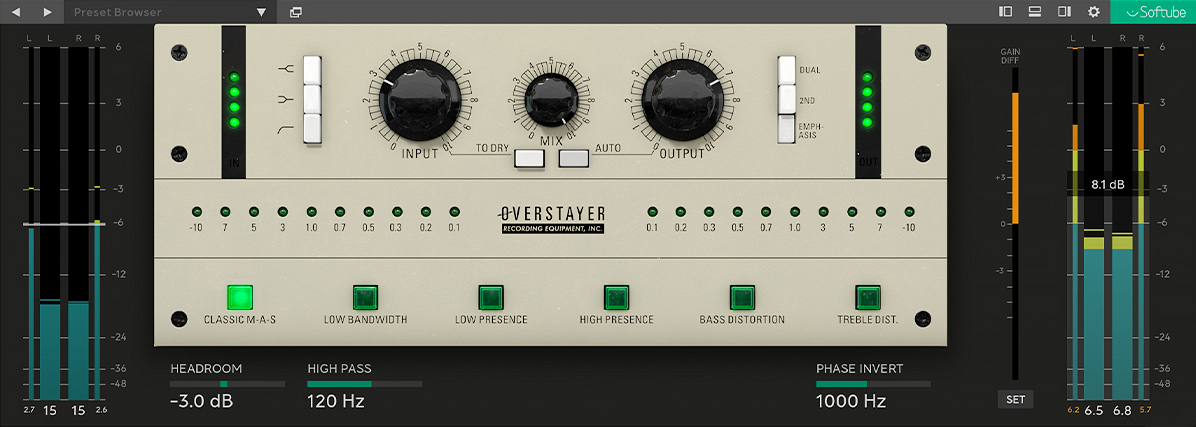
The Softube thing can be seen here:

Image

...those side and bottom panels kind of "pop out" if you chose to enable them. Most of the time, I'm happy with just seeing a GR meter, but it's nice to be able to see in the input / output with gain difference on those interfaces. Different design philosophy though and might not work for TC2.

Post

Krzysztof Oktalski wrote: Tue Mar 22, 2022 11:42 am
We've spent a lot of time studying this topic and I heartily disagree. Watching people use knobs on software made me realise it's an anachronism from hardware that serves very little purpose apart from making older users more comfortable by using a familiar analogy. Those faders give you a much better representation and are more efficient in terms of screen space, they're quicker to use and you don't start tracing a circle with your mouse, which is frankly just weird.

It's even true in the real world - consider the mixing desk. We cram the less important stuff on to a series of knobs because it's space efficient and leaves room at the bottom for a nice big fader, giving us more precision to adjust gain and better visual representation.
Those are vertical faders. Vertical faders are absolutely fine, e.g. with synth envelopes or graphic equalizers they definitely have an advantage. But imagine a console where all the level faders would be horizontal, stacked in one column…
With the horizontal faders on a computer screen UI I am always tempted to make a left/right mouse movement, which feels uncomfortable to me. I know I can also drag up and down in TC, but then there is a disconnection between the mouse movement and the movement of the fader. With knobs I just drag up and down (and never in circles. I don’t have any plugin where I’d have to do that. That really would be insane).

It might just be me, I am aware of that, but for me horizontal sliders are the worst option for a plugin UI. I’d even prefer just a value field that I can drag up or down (like the other, “minor” controls in TC).

Weirdly enough, I have absolutely no problem with the makeup gain going down. I mostly use auto gain on the output fader anyway. Works great.
But +1 on the scaling on the GR meter. Maybe some “zoom modes” which you can cycle through on mouse click.

Post

all this dev responses prompted me to demo it again. 123€ tho...
Image

Post

Ploki wrote: Tue Mar 22, 2022 8:29 pm all this dev responses prompted me to demo it again. 123€ tho...
Just keep requesting demo extensions until you either fall in love and decide you have to have it, or decide you can live without it. We’re super quick with demo extensions.

Dave.
[ DMGAudio ] | [ DMGAudio Blog ] | dave AT dmgaudio DOT com

Post Reply

Return to “Effects”