

Reason 13 Announced- Sequencer updated!
-
- KVRAF
- Topic Starter
- 12093 posts since 2 Dec, 2004 from North Wales
I think this would have been an excellent free update for 12 users (12.5 or something) to keep everyone happy and get a bit of positive buzz about Reason...subscribers would have got it free any way and it would have generated a lot of good will for those of us that paid for 12. I wonder how many people, have actually paid the $200 upgrade from 12 to 13 verses good will and good publicity (the upgrade cost from 12 to 13 seem to be very negative on most forums).
X32 and 24C mixers, S88MK3, Live + PUSH 3, Osmose, RedShift 6, Pro3, S4, Tempera, Syntakt, Digitone, OP1-F, OPXY, TR-1000, Eurorack, TD27 Drums, Guitars, Basses, Amps and of course lots of pedals!
-

- KVRAF
- 2784 posts since 18 Apr, 2001
That is the work-around I'm using so far, combined with a directory structure, but that is very cumbersome to maintain. It is also difficult to combine tags because the name search cannot find terms when there is other info between them. It is basically a single text-string search.Cavey Arrgh wrote: Fri Jun 28, 2024 4:36 pm ... if tags is your primary issue, is there a reason you can't use a tagging "hack", like putting the tag search terms in the name of the saved preset?
CrimsonWarlock aka TechnoGremlin, Moved to Reason and Rack Extensions exclusively (from Reaper and VSTs) several years ago.
-
- KVRAF
- 2784 posts since 18 Apr, 2001
Yep, you are basically using blocks to replicate the functionality of arrangement tracks (as I suspected).hurricaneaudiolab wrote: Fri Jun 28, 2024 5:52 pm Well I'd be interested to hear what that is because I just use Reason blocks at their most basic level, and that is, define each section of your song as a block, then move around and copy/delete blocks to create different arrangements. Logic does that. I don't see anything particularly unique about Reason's blocks.
First of all, the arrangement track in Logic is a marker track, it does not contain the actual clips. You use it to basically copy parts and move them around easily. I don't use Logic, but this is what I got from some tutorial videos on arranging in Logic. It's not clear to me if those copied parts are ghost-copies, but it wasn't mentioned, so I guess not. Blocks are in fact ghost copies, where you can edit a block and the edit is replicated in all the parts of the song where that block is placed.
The second thing, and this is where the big difference is, is that blocks are a 'layer' under the song window. Meaning, you can place clips in the song window, on top of clips that are in the blocks, temporarily overruling the block content. This means you can, for example, have a piano part in your chorus-block, but in the last chorus have a different part for, say, the last two bars, maybe as a lead-in for a solo or such, by recording those two bars in the song window on top of the block. And you can still edit the underlying part in the block for all choruses, without messing up that lead-in part.
CrimsonWarlock aka TechnoGremlin, Moved to Reason and Rack Extensions exclusively (from Reaper and VSTs) several years ago.
-
 hurricaneaudiolab hurricaneaudiolab https://www.kvraudio.com/forum/memberlist.php?mode=viewprofile&u=424432
 - KVRist
- 440 posts since 15 Aug, 2018
I don't like blocks. Never really used them as intended, used them as markers instead.crimsonwarlock wrote: Fri Jun 28, 2024 6:55 pm Yep, you are basically using blocks to replicate the functionality of arrangement tracks (as I suspected).
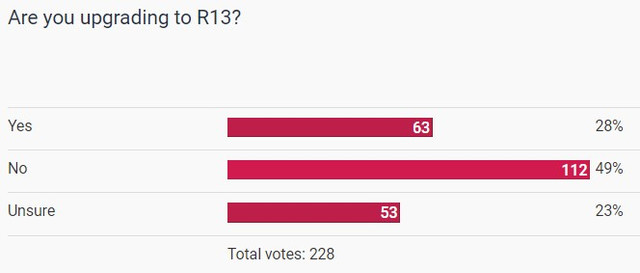
Updated Poll:
-
 gentleclockdivider gentleclockdivider https://www.kvraudio.com/forum/memberlist.php?mode=viewprofile&u=203660
 - Banned
- 6787 posts since 22 Mar, 2009 from gent
But you can't even quickly copy-paste between blocks , you need to select the whole content .
Eyeball exchanging
Soul calibrating ..frequencies
Soul calibrating ..frequencies
-
- KVRAF
- 2784 posts since 18 Apr, 2001
You obviously need to use them as intended, to get the benefits of the underlying philosophy. But, workflows are personal, so I get that not everyone uses it as intendedhurricaneaudiolab wrote: Fri Jun 28, 2024 7:41 pm I don't like blocks. Never really used them as intended, used them as markers instead.

Yet, when you use blocks to their full potential, you can do things in Reason, that no other DAW is capable of. Anyone who likes to see what blocks can do, I suggest to look at some of Adam Fielding's (older) music making livestreams on YT, where he creates fully arranged compositions from scratch in about two hours, (mostly) using blocks.
Yes, there are all kinds of things that would be nice to have in blocks. But that doesn't diminish the unique functionality that is there. You can copy parts of blocks to anywhere you like, but you have to go into blocks-mode to do so. It would be great if we could 'push down' clips from the song window into the underlying block. Or 'lift' clips from the underlying block into the song track that is on top of it.gentleclockdivider wrote: Fri Jun 28, 2024 8:11 pm But you can't even quickly copy-paste between blocks , you need to select the whole content .
CrimsonWarlock aka TechnoGremlin, Moved to Reason and Rack Extensions exclusively (from Reaper and VSTs) several years ago.
-

- KVRAF
- 25015 posts since 12 Jul, 2003 from West Caprazumia
Blocks is for me one of the best things about Reason - mops the floor with usual arrangers...
-
- KVRian
- 1072 posts since 30 Nov, 2004
is it just me or does the new browser have tremendous trouble reading a sample folder from google drive?
Also, how do you cancel the browse window? You cannot seem to click away from it
Also, how do you cancel the browse window? You cannot seem to click away from it
-
- KVRist
- 208 posts since 28 Apr, 2022
Its truly a disaster....but totally justified if you do not serve one single new sequencer feature (!) users begged for nearly 3 years. Or better said for nearly 15 years?hurricaneaudiolab wrote: Fri Jun 28, 2024 7:41 pmI don't like blocks. Never really used them as intended, used them as markers instead.crimsonwarlock wrote: Fri Jun 28, 2024 6:55 pm Yep, you are basically using blocks to replicate the functionality of arrangement tracks (as I suspected).
Updated Poll:
-
- KVRAF
- 5144 posts since 3 Oct, 2013
The trick is that instead of adding to the arrangement, we can also subtract from it, so it's a mixed additive/subtractive technique. The philosophy is a bit different; the article on edmprod described itcrimsonwarlock wrote: Fri Jun 28, 2024 8:27 pmYou obviously need to use them as intended, to get the benefits of the underlying philosophy. But, workflows are personal, so I get that not everyone uses it as intendedhurricaneaudiolab wrote: Fri Jun 28, 2024 7:41 pm I don't like blocks. Never really used them as intended, used them as markers instead.
Yet, when you use blocks to their full potential, you can do things in Reason, that no other DAW is capable of. Anyone who likes to see what blocks can do, I suggest to look at some of Adam Fielding's (older) music making livestreams on YT, where he creates fully arranged compositions from scratch in about two hours, (mostly) using blocks.
Yes, there are all kinds of things that would be nice to have in blocks. But that doesn't diminish the unique functionality that is there. You can copy parts of blocks to anywhere you like, but you have to go into blocks-mode to do so. It would be great if we could 'push down' clips from the song window into the underlying block. Or 'lift' clips from the underlying block into the song track that is on top of it.gentleclockdivider wrote: Fri Jun 28, 2024 8:11 pm But you can't even quickly copy-paste between blocks , you need to select the whole content .
https://www.edmprod.com/subtractive-music-production/
also don't know other DAW that support it,
ps but in short, the idea is that within each section's block, all the sources are present, and you can use the mute tool in the arranger to remove parts from it (this is the subtractive part), they also can be overridden with different elements in the arranger because they exist in an upper layer on top of the blocks (this is the additive part)
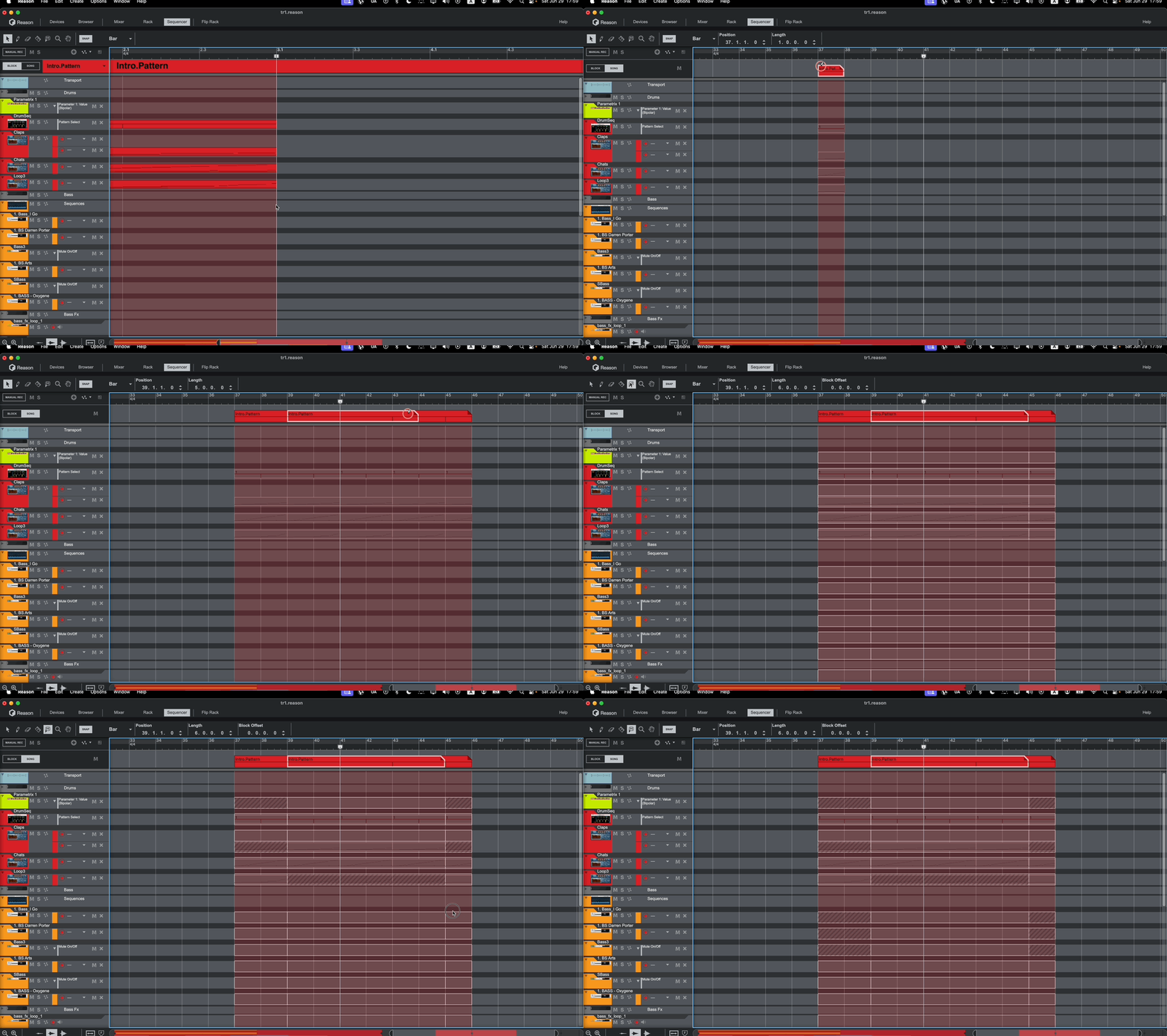
needs a bit of different thinking
"Where we're workarounding, we don't NEED features." - powermat
-
gentleclockdivider gentleclockdivider https://www.kvraudio.com/forum/memberlist.php?mode=viewprofile&u=203660
- Banned
- 6787 posts since 22 Mar, 2009 from gent
The visibllity of these grey washed out blocks in arange view is a total disaster .
And I don't know if the "subtract" technique is ecxlusive to blocks , that's how I work all the time in renoise , cirklon .
And I don't know if the "subtract" technique is ecxlusive to blocks , that's how I work all the time in renoise , cirklon .
Eyeball exchanging
Soul calibrating ..frequencies
Soul calibrating ..frequencies

-

- KVRAF
- 4066 posts since 3 Jul, 2022
You don't have it in your DAW?sQeetz wrote: Sat Jun 29, 2024 5:03 pm The new Sidechain Tool is awesome. I'm using it as RRP all the time now
With bitwig you can sidechain at project level. You set a sidechain at the kick for example and the modulator will be available on all tracks, to duck the volume, duck a frequency range, open a filter on a pad, change the panning of an arpegiated melody, .... This is the apogee of sidechaining.... Available since V5, less than one year ago, and I don't remember how I was doing before.
-
- KVRian
- 1076 posts since 27 Nov, 2003 from UK, Polegate
They haven't really got rid of the favourites have they ? Did I read that or dream it ?