
OMBRES is born !

VST, AU, AAX, CLAP, etc. Plugin Virtual Effects Discussion
Post Reply New Topic
RELATED
PRODUCTS

Post

Thank's, Fabi and laputa_sync :wink:

Teemu, from finland has asked to me to create other way fot the send reverbs.
If I've understood, when the instruments are far from you, the reverb is more important., as natural sounds.
I'm working. Not easy. :? :D

Daniel

Here, you can listen a song of mine, AILES, new mix with OMBRES (sweet jazz electric guitars and piano)
http://www.pompougnac-daniel.com/06tele ... /ailes.mp3

Post

Daniel, take your time, no stress! ;) By the way, too bad if Synthedit makes it difficult/impossible to fix the mouse cursor not following the movement of the icons... :?

-X

Post

Version 1.50
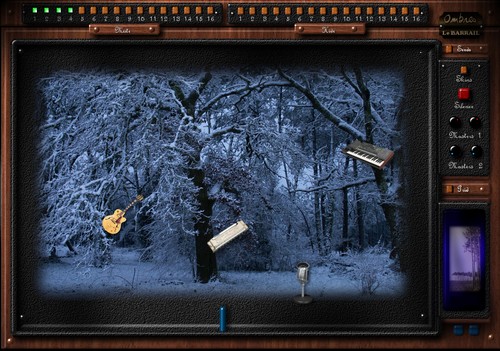
Now, you can load your background. The guitar is on the tree :)
Not important feature. For fun only.

Image

Xenakios, the cursor follows the movement of the icons, but the cursor in movement is not permanently ON the icon, like when you turn a vst knob.
It's not disturbing for me, but though, I understand you may have a bad feeling about this.
I work, I work. :) :wink:

Daniel
Here, you can listen a song of mine, AILES, new mix with OMBRES (sweet jazz electric guitars and piano)
http://www.pompougnac-daniel.com/06tele ... /ailes.mp3

Post

daniel- wrote:Version 1.50

Xenakios, the cursor follows the movement of the icons, but the cursor in movement is not permanently ON the icon, like when you turn a vst knob.
It's not disturbing for me, but though, I understand you may have a bad feeling about this.
I work, I work. :) :wink:

Daniel
Yes, I am sorry. I chose the words badly. The icons follow the mouse cursor but don't stay under it. It's quite a silly bug in Synthedit, I would have to say. Should be fixable by the developer of it by very few changes in the code. (When I write my own mouse dragging-code, I almost always end up making the same mistake myself first with the mouse behavior... ;) )

-X

Post

Waow, Xenakios, I'd not understood that you dev' also.
Maybe,we can dev together ? :wink:
Daniel

Here, you can listen the part 1 of a song of mine, DEDE le DRAGON. I sing ! :(
http://www.pompougnac-daniel.com/06tele ... dragon.mp3

Post

Now, version 1.52
Do somebody uses XT ? Maybe a problem (file SEM appears ?). Say me.

Daniel

Here, you can listen the part 1 of a song of mine, DEDE le DRAGON.
http://www.pompougnac-daniel.com/06tele ... dragon.mp3

Post

Version 1.55
Bugs deleted with some hosts.

Daniel
http://www.pompougnac-daniel.com
Image

Post

where to get it ? Do we have to send an email at each update ?

Post

No mails anymore.
Go to >
http://www.pompougnac-daniel.com/04page ... ixersb.htm
then direct links. :)

Daniel

Here, you can listen a song of mine, AILES, new mix with OMBRES (sweet jazz electric guitars and piano)
http://www.pompougnac-daniel.com/06tele ... /ailes.mp3

Post

merci daniel ;)

Post

cor!
merci.:)
(just noticed 'cor!' was mean to be an english expresion,like 'wow!',but babelfish just told me it's french for 'horn!' which is in turn english for 'hardon' which i guess is similar to 'cor' :hihi:
all confusing stuff,serves me right for trying to speak half-french half-english.

Post

:lol: :shock:

Daniel
Here, you can listen a song of mine, AU BORD (sweet classical and dreaming music with acoustic guitars and clarinet)
http://www.pompougnac-daniel.com/06tele ... aubord.mp3

Post

Thank you daniel :)

Post

Thank's to you for your "thank you". :) :wink:
Daniel


Here, you can listen a song of mine, CHANTS D'HIVERS (haunthing about endless snow fields, here or on other planets…)
http://www.pompougnac-daniel.com/06tele ... hivers.mp3

Post

OMBRES racking with Tracktion :
example with 4 tracks.

- Install the « ombres.dll » in your Tracktion plugins directory.
- Open Tracktion
- Go to « Settings », « plugins », « rescan plugins directory », « just look for plugins that are news or have changed »
- Return to « projects »
- Create a new project.
- Go to the edit page of your new project.
- Create for example 4 tracks with 4 different audio clips.
- Click on « racks »
- Click on « new rack », « create new empty rack »
Name it « ombres »
- You have at the left two inputs, so create 6 inputs more.
- Name the 8 inputs : L1, R1, L2, R2, L3, R3, L4, R4.
- Now you have 8 inputs.
- Click on new filter, choose « ombres » and put « ombres in the rack.
- A windows is opening and ask « do you want auto-connect this filter », say « yes ».
- OK, « Ombres » is here.
- Click on a blank place of the rack.
- There's is under the reack a little module saying « drag here to insert an instance of this rack ».
- Put this module to the track 1, before the left-pan module of the track.
- Click on this new module on the track and affect the left input to L1 and the right imput to R1.
- Same way for the three tracks, but every time, you change the inputs.
- All is OK.
- Click on « Ombres », the plugin appears.
- You can add effects connecting as the picture.

Good stuff !

Daniel

http://www.pompougnac-daniel.com
Image
Here, you can listen the part 1 of a song of mine, VATICANE.
http://www.pompougnac-daniel.com/06tele ... ticane.mp3

Post Reply

Return to “Effects”