VST like Paul's Stretch

VST, AU, AAX, CLAP, etc. Plugin Virtual Effects Discussion
RELATED
PRODUCTS
PaulXStretch

Post

Optomadic wrote:You shouldnt have to drag it down, it should automatically load in the 1st arranger slot. To get it to 'reload' just press Lock to loop. Or turn down the slices to 1, press Add Track and then drag to that one. Just remember Lock to loop is your friend in LS!
Ah ha. I just realized that it does indeed drop into arranger, but I don't see the waveform that shows up in slicer, so I assumed it wasn't there. Then, by changing to 1 slice in slicer, it seems to automatically lock to loop and changed the arranger to 1 event.

The manual doesn't even cover the stretching functions, but when clicking on stretch I see a purple bar at the bottom of arranger that can be slid upward. But, when I right-click in arranger the speed seems the same no matter where the bar is. And what does autostretch do? Are the two stretch functions unconnected? :help:
We escape the trap of our own subjectivity by
perceiving neither black nor white but shades of grey

Post

I don't recommend scrubber. Great idea, but beyond crashy.

Post

shamann wrote:I don't recommend scrubber. Great idea, but beyond crashy.
It hasn't crashed yet, in the little while I had to play with it. Seems to play wav files in reverse, right to left, which is interesting but would mean reversing the files first in SoundForge and then loading them. It seems not to work when using higher midi notes. Still, an interesting plug such as it is. I've only loaded it in eXT.
We escape the trap of our own subjectivity by
perceiving neither black nor white but shades of grey

Post

That's lucky. Has always been very unstable for me, on several different systems over the years.

Post

i often use Ambience reverb and a file player inside a modular environment like Bidule. i set the file player to play a short burst of audio and then send a midi signal to trigger the Hold function in Ambience - then back and forth between those two processes. with some crossfading it actually sounds pretty smooth.

Post

eduardo_b wrote:when I right-click in arranger the speed seems the same no matter where the bar is. And what does autostretch do? Are the two stretch functions unconnected? :help:
Thats because the stretching algo is a forward reverse tail type lengthen and not really a stretch at all. That means the "stretching" does not occur until the end of the (n)slice. It closely resembles the algo in Recycle that takes each slice's wav tail (or end), reverses it -> forwards it -> reverses it, all while fading down the volume. FL (slicer) also uses a similar algo (fill gaps) as does BeatQuantizer (Generate tail Fill Gaps) and some other slicer tools. It creates the illusion of a longer tail while keeping the initial transient untouched and intact. Not a very effective method to achieve long or infinite stretches. You'd be better off using smoothed cross faded sustain loops found in some samplers (imo ofcourse ;))
drjohnny79 wrote:A what? Feel free to tell us more about your bot.
eduardo_b wrote:...Is the "bot" a preset/patch that can be invoked as wanted? Can you post it, along with instructions? Geez, another plug to learn. :)
Now this might all sound a tad scary but its not a plugin a preset or anything along those lines...

The bot is just that, a robot application I created that acts a virtual person that creates the super long stretching for me in Melodyne (sa & plugin). I call him er her uhh it, Melodyne SnagBot. It works by 1st measuring the section of audio it will super stretch, calculates or allows me to input the smaller sections to be recorde, plays the parts (blobs) very very slowly and records them into successive sections. While it all sounds simple, it took me weeks to code it and even more weeks to get it working. Its about 75% sentient now (75% working :hihi:), which is enough to get the desired lengths from Melodyne. My goal it to have it working live by the summer.

I'm planning to use SB to create amazing ethereal voice$ and $ound$cape$ which will be available $oon. I was not going to release it as it still needs a lot of work and new taming directives (it can get disgruntled very easy if it feels abused in anyway, dam robot'titude). Seriously though, perhaps I will let it out once the new Melodyne DNA to come out 1st. It would have to be recalibrated for any new features the new version has.

Just to prove I shit you not, heres a sneak peak:

Image

I wasnt bullshiting when my sig said Busy working on my own personal Sinistar :hihi:
Image
stay juicy!

Post

Optomadic wrote:You'd be better off using smoothed cross faded sustain loops found in some samplers (imo ofcourse ;))
Not seeing how this will work. Stretching totally changes the sound itself, which could be recorded and become a loop. What samplers are you thinking of.
I call him er her uhh it, Melodyne SnagBot. It works by 1st measuring the section of audio it will super stretch, calculates or allows me to input the smaller sections to be recorde, plays the parts (blobs) very very slowly and records them into successive sections. While it all sounds simple, it took me weeks to code it and even more weeks to get it working.
Is there a manual way to accomplish some of this. I can piece the results together if need be, but a long sustained stretch on a one-time basis would also work for me.
We escape the trap of our own subjectivity by
perceiving neither black nor white but shades of grey

Post

Optomadic wrote:
eduardo_b wrote:when I right-click in arranger the speed seems the same no matter where the bar is. And what does autostretch do? Are the two stretch functions unconnected? :help:
Thats because the stretching algo is a forward reverse tail type lengthen and not really a stretch at all.
Okay, that explains why my expectations were not realized. It is looking like I'll have to give Melodyne a try...but without a bot. :)
We escape the trap of our own subjectivity by
perceiving neither black nor white but shades of grey

Post

Optomadic wrote:eduardo_b I still say the Melodyne plugin is the best way to go for this.
Okay, I've tried using the tempo to modify the stretch, but the best I can do is reduce the tempo by half. Any suggestions?
We escape the trap of our own subjectivity by
perceiving neither black nor white but shades of grey

Post

eduardo_b wrote:Not seeing how this will work. Stretching totally changes the sound itself, which could be recorded and become a loop. What samplers are you thinking of.
Well I sometimes use Vsampler because it allows me to select a whole instrument and apply a auto cross fade loop. Tends to sound pretty smooth imo depending on the samples ofcourse.
eduardo_b wrote:Is there a manual way to accomplish some of this. I can piece the results together if need be, but a long sustained stretch on a one-time basis would also work for me.
My bot utilizes Windows dlls, internal clocks and the Melodyne timestretching engine to accuratly play and record the stretches one after the other. I'm not too sure of how you'd do it manually. If I think of something I'll let you know.
eduardo_b wrote:Okay, I've tried using the tempo to modify the stretch, but the best I can do is reduce the tempo by half. Any suggestions?
Are you using the plugin or the standalone app? In the app you can get way down to 15 bpm (make sure Autostretch is checked!) . That should be slow enough no? The only thing I can suggest is stretching the blobs 1st or after you've slowed the tempo ;)!
Image
stay juicy!

Post

Optomadic wrote:
eduardo_b wrote:Okay, I've tried using the tempo to modify the stretch, but the best I can do is reduce the tempo by half. Any suggestions?
Are you using the plugin or the standalone app? In the app you can get way down to 15 bpm (make sure Autostretch is checked!) . That should be slow enough no? The only thing I can suggest is stretching the blobs 1st or after you've slowed the tempo ;)!
Yeah, down to 15, which seems like it should do it, I realize, but it was actually about half speed from the original. I think the plug/sa misread the tempo because there are no beats in the wav, so if I could move the tempo up toward 120 bpm first, then autostretch, 15 bpm would probably be totally cool.

I thought of stretching the blobs, but have figured out how to do it and haven't looked this up in the manual yet. Can they all be streched simultaneously?

I used the sa this time but have looked at the plug. You recommend one over the other?
We escape the trap of our own subjectivity by
perceiving neither black nor white but shades of grey

Post

Caco wrote:
justin3am wrote:After searching for quite a while I haven't found the paul's stretch VST shell or any thread that resembles what I thought I had remembered. I guess I was tripping. I did find in the original thread from 2006 that someone had built support for it into Audacity.
Justin, are you are thinking of Scuzzphut's shell for the SoundTouch library?

http://www.kvraudio.com/get/3343.html
That is exactly what I was thinking of! Thank you, that would have driven me crazy forever.

Post

justin3am wrote:
Caco wrote:
justin3am wrote:After searching for quite a while I haven't found the paul's stretch VST shell or any thread that resembles what I thought I had remembered. I guess I was tripping. I did find in the original thread from 2006 that someone had built support for it into Audacity.
Justin, are you are thinking of Scuzzphut's shell for the SoundTouch library?
a
http://www.kvraudio.com/get/3343.html
That is exactly what I was thinking of! Thank you, that would have driven me crazy forever.
Thats not a bad sounding lib! Thanks for the link.
eduardo_b wrote:I thought of stretching the blobs, but have figured out how to do it and haven't looked this up in the manual yet. Can they all be streched simultaneously?

I used the sa this time but have looked at the plug. You recommend one over the other?
If you detect the audio in polyphonic mode it will separate the blobs properly then you just stretch them all or each piece individually. The good thing is you can cut after the main transient and then just stretch the tail.
Image
stay juicy!

Post

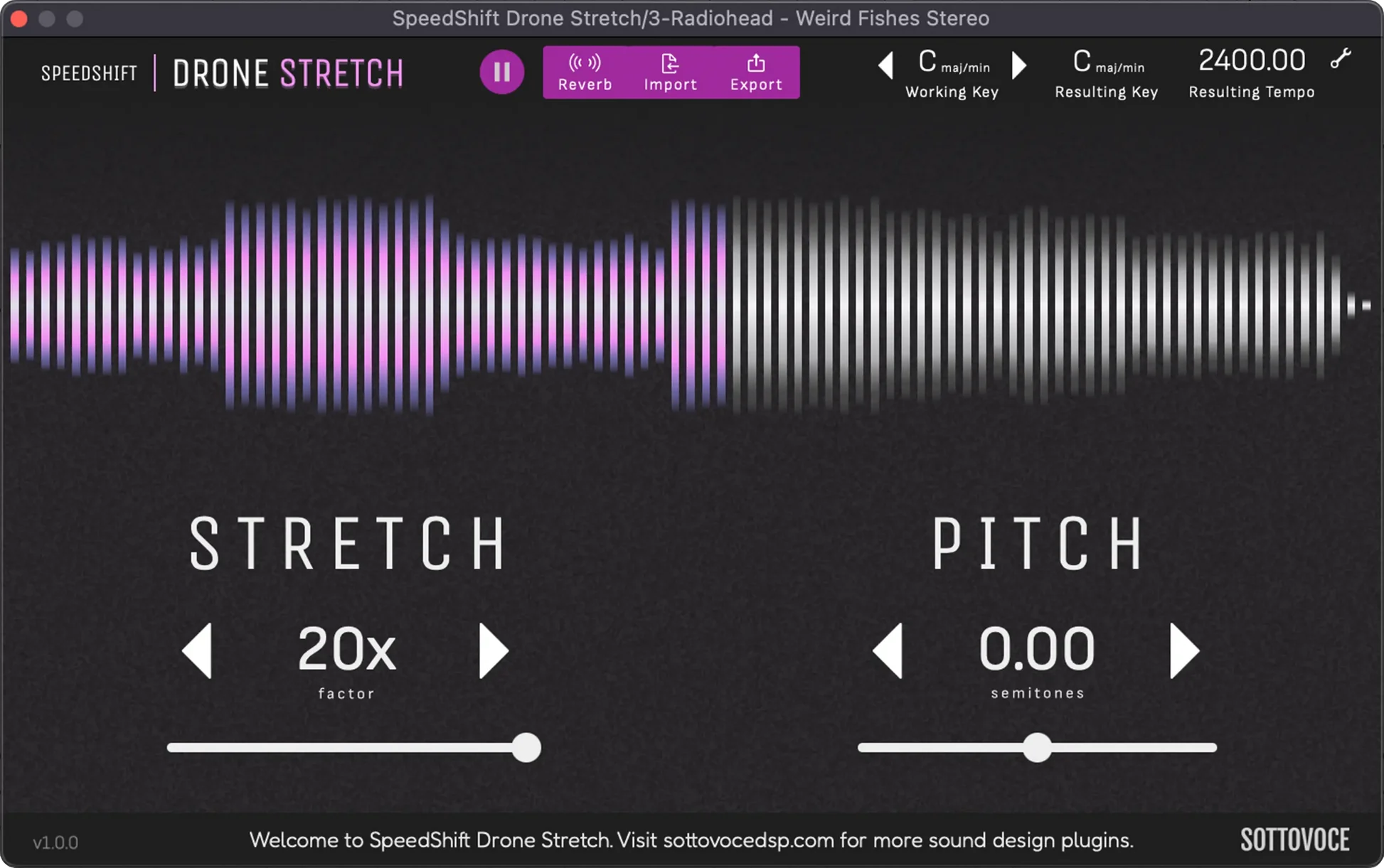
We recently put out a vst plugin which does exactly what Paul Stretch does. It's called SpeedShift Drone Stretch

Image

Post

Anemond Sloom "Extreme Timestretcher" is another interesting variation on this type of effect.

Post Reply

Return to “Effects”