
Which DAW Has the Best GUI?

Audio Plugin Hosts and other audio software applications discussion
Post Reply New Topic

Which DAW Do You Like the Look of Best?

Poll ended at Mon May 25, 2020 9:03 pm

Ableton Live
70
16%
Acoustica Mixcraft
0
No votes
Apple Garageband
2
0%
Apple Logic Pro X
63
15%
Avid Pro Tools
2
0%
Bitwig Studio
78
18%
Cakewalk By Bandlab
13
3%
Cockos Reaper
20
5%
Image-Line FL Studio 20
21
5%
Magix Acid Pro
0
No votes
Magix Samplitude
3
1%
Motu Digital Performer
6
1%
MuTools MuLab
5
1%
Ohm Studio
1
0%
Presonus Studio One
63
15%
Reason Studios
21
5%
Steinberg Nuendo
4
1%
Steinberg Cubase
47
11%
Tracktion
5
1%
UAD Luna
2
0%
 
Total votes: 426

RELATED
PRODUCTS

Post

lessera wrote: Tue May 05, 2020 12:37 pm
jamcat wrote: Tue May 05, 2020 11:05 amStudio One 4.6:
Image
Looks quite nice. One question though... I cannot seem to find any info on setting the meters on the mixer channels to 'post panner'. Is it possible? The above pic seems to show the meters being unaffected by the panning.

It's really not a deal breaker. But if I pan my instruments within the mixer (like I do in Cubase), I would really like the meters to adjust to the panning. Makes it a bit easier to identify (at a glance) where my tracks sit within the stereo field.
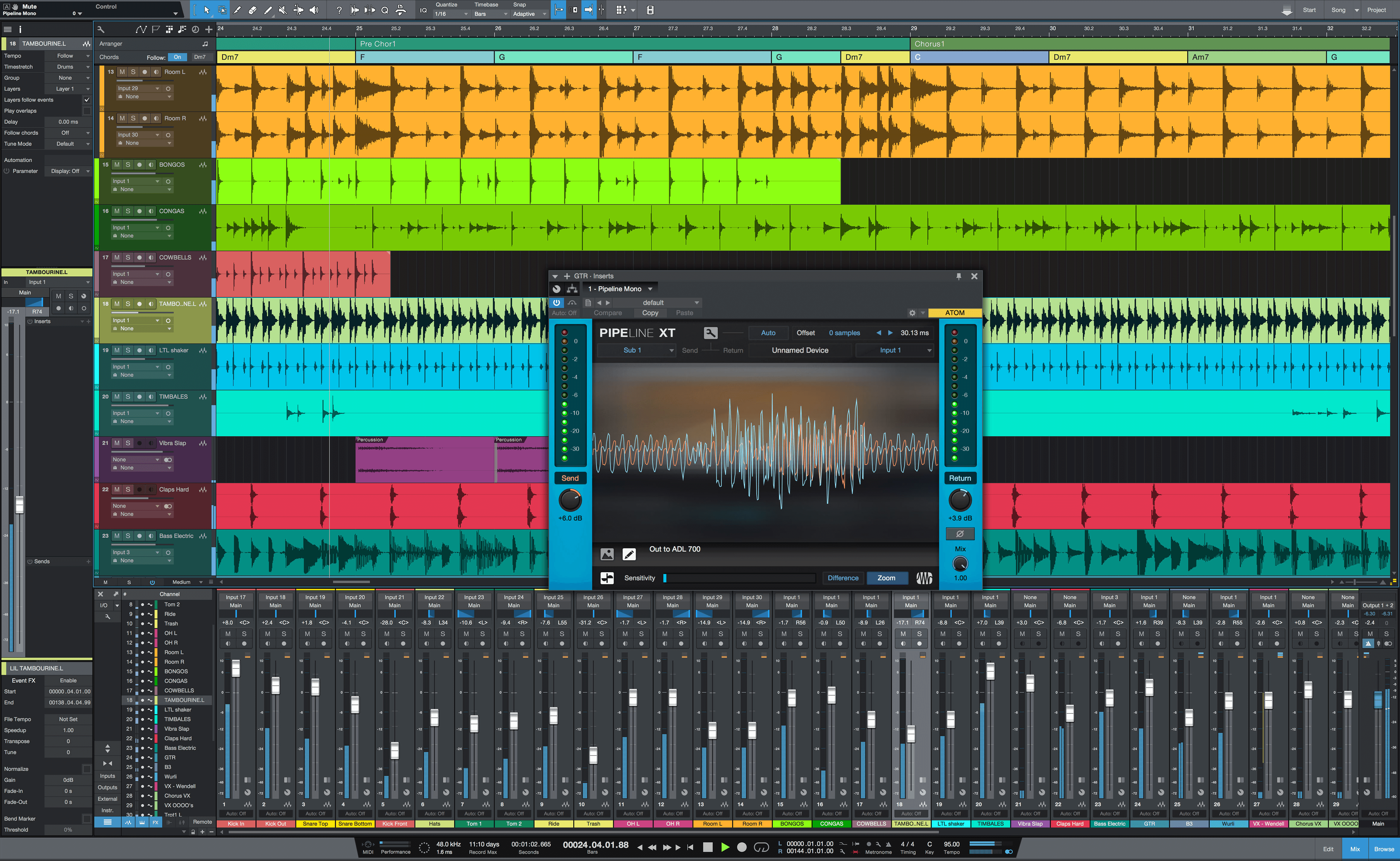
I think Studio One's meters only do post-fader, pre-panner, currently. Post-panner metering has been requested by users, so hopefully we'll see that at some point. I also like Cubase's 3 different panning options: Stereo Dual, Combined, and the standard Balance.
Image

I am hoping PreSonus adds something like that as well, though it is currently possible to accomplish with plugins or aux sends.
THIS MUSIC HAS BEEN MIXED TO BE PLAYED LOUD SO TURN IT UP

Post

Interesting topic.
By GUI I take it to mean both UI and UX.
I would not be using Cubendo if I didn't think it give me the best User Experience for my own workflow. If there was one I thought give me a better UX I would switch immediately. But I definitely do not think it is the best aesthetic looking DAW (that for me would be Bitwig with Pro Tools a very close second).
rsp
sound sculptist

Post

Edited
Last edited by Vortifex on Sun Apr 16, 2023 11:18 am, edited 1 time in total.

Post

jamcat wrote: Tue May 05, 2020 11:05 am But version 4 really matured and perfected the look of Studio One, and I can honestly say I like how it looks better than Cubase. Studio One just looks more refined than Cubase now.

Studio One 4.6:
Image


Cubase 10.5:
Image
Don’t like either of those UIs. From the screenshot, there’s not much difference anyway. Background too black, colors too bright. Don’t like.
Studio one was OK in version 2.x when I tested it last, but then switched to a dark UI. Cubase too. I cannot work with that. I wish I could configure Cubase to a light gray color scheme like back in Version 6.

Post

For me Bitwig Studio has the best interface. It's nice, clean and easy to learn. As I mentioned several times, my "old age love" was Project 5 from Cakewalk. Bitwig studio has the same "feel" as that golden oldie.

For the more traditional type of DAW I prefer Cubase. A I am a long time users of this DAW, it feels comfortable for me. I just like the interface more than others.

Other DAW's I used (and sometimes still use) are interesting, but they do not get high prices for interfacing to me (I do not say anything about other users. This is just my personal take on it). For instance - Reason is a nice DAW, but the interface should be scalable (no pixel art, but vector art). Sometimes it's just too uncomfortable to keep working long times with it. Another example is FL Studio. It's a nice DAW, but it's just a all separate window mess. I like to have all my stuff in one simple window (that excludes plugins of course). As said - These are all nice DAW's, but they just won't fit my needs.

Post

I would have voted for Renoise if that had been an option, but I went with Ableton Live instead, which is also an amazing looking DAW. The only problem with Ableton is that it's almost too tasteful; it's like it belongs in tastefully lit photo in a fashion magazine and feels out of place in my crummy apartment.

I also have a softspot for MuLab, which has a very simple and clean interface, while still feeling comfortably nerdy.

Post

I voted Bitwig
:borg:

Post

Ableton Live by a big margin, it's inspiring and highly usable yet doesn't get in your face. Bitwig takes the runner-up spot, it's very neat and nice to look at, but it's a bit too shouty.

Post

Fruity Gooey - it tastes sooo good!

Post

I have to go with Bitwig here. The more time spent in Bitwig the more dated and sometimes clunky other DAWs look.
Bitwig Certified Trainer

Post

Logic 7&8, Cubase 6 and Bitwig

Post

As I mentioned several times, my "old age love" was Project 5 from Cakewalk.
I truly loved P5, especially v2.5! :love:
I think i wouldn't even have left it for other DAW(s) if it was better at utilizing multiple core CPUs and wasn't crashing that often on my then new bought system.

But having googled images of it i must say that the color choices are not that tasteful to me, to consider it having some of the most beautiful looking GUIs by today's standards.
Call me boring, but i'm more a fan of grey anyway.
Oh and somehow Sound Forge get away with it's utilititarian Windows 3.1 look for forever, as far as i'm concernen. Dunno why, but i like this look there.
But hopefully (not too likely though) Magix will lower it's update prices by a good margin at some point
The GAS is always greener on the other side!

Post

jamcat wrote: Mon May 04, 2020 10:20 pm
chk071 wrote: Mon May 04, 2020 10:12 pm
jonljacobi wrote: Mon May 04, 2020 10:10 pm Having the best GUI is not necessarily the same thing as being the best looking. The one I find the fastest and most efficient is not the one I find the best looking.
True. Struggled a bit with that too. I think both Cubase and Logic have a nice looking AND usable GUI though. The most usable/fastest GUI for me is Studio One's, but, it's not the prettiest. It's rather functional.
Also, Studio one went fully scalable vector/high dpi in v3.0. It was kind of ugly, though. Version 4 is still scalable, but they managed to make it look good, too.

A GUI should have a good balance of looking tactile and aesthetically pleasing, but not cluttered or cartoonish. Studio One is one of the few DAWs that meet all points. Some, like Reaper, meet none of them.
I find Studio One very cluttered.

Post

fese wrote: Tue May 05, 2020 3:12 pm
jamcat wrote: Tue May 05, 2020 11:05 am But version 4 really matured and perfected the look of Studio One, and I can honestly say I like how it looks better than Cubase. Studio One just looks more refined than Cubase now.

Studio One 4.6:
Image


Cubase 10.5:
Image
Don’t like either of those UIs. From the screenshot, there’s not much difference anyway. Background too black, colors too bright. Don’t like.
Studio one was OK in version 2.x when I tested it last, but then switched to a dark UI. Cubase too. I cannot work with that. I wish I could configure Cubase to a light gray color scheme like back in Version 6.
Studio One has a colour scheme mixer in Preferences > Appearance. You can give the whole interface a light grey colour scheme by increasing the background Luminance.

The colours for parts are limited though, and gives you a 8 x 11 matrix of mostly useless and ugly colours to colour code your audio and MIDI parts with, and create associated individual mixer channel colours. The ability to create your own custom palette for that is one of the most requested features, and there is an unofficial user made script ("trackcolors.package") that adds a colour mixer to the Studio One toolbar to do just that.
THIS MUSIC HAS BEEN MIXED TO BE PLAYED LOUD SO TURN IT UP

Post

jamcat wrote: Tue May 05, 2020 1:50 pmI think Studio One's meters only do post-fader, pre-panner, currently. Post-panner metering has been requested by users, so hopefully we'll see that at some point. I also like Cubase's 3 different panning options: Stereo Dual, Combined, and the standard Balance.
Image

I am hoping PreSonus adds something like that as well, though it is currently possible to accomplish with plugins or aux sends.
Thanks for the reply.

I will keep my fingers crossed for implementing an option for post panner metering in version 5. Again, it's a relatively small issue, but I've become so used to having it available in other hosts I use.

Cheers.

Post Reply

Return to “Hosts & Applications (Sequencers, DAWs, Audio Editors, etc.)”