Bitwig Studio 4.3 Released!

Audio Plugin Hosts and other audio software applications discussion
Post Reply New Topic
RELATED
PRODUCTS
Bitwig Studio 6$399.00Buy

Post

pdxindy wrote: Sat Jul 16, 2022 12:50 am
EnGee wrote: Sat Jul 16, 2022 12:09 am I don't have a touch screen though, I wonder how that will change my workflow! But I think I would hate my fingers prints all over the place and keep wiping the screen like with my phone!
A touch screen would not work for me in my studio. My monitor screen sits about 3 feet in front of me. Right in front of me are my two controllers.

My experience indicates that placing a monitor such that it is most comfortable for neck, posture and eyes when using for extended periods, then it is not so comfortable or precise for my hands and also tiring.
Yes I agree. Finding the most comfortable position for body and hands is very important for long sessions. I did all my setup according to that. I have my monitor about 1 metre from my eyes which I can see perfectly without my glasses. I like Bitwig and Studio one panels management. Everything fits nicely on one monitor.
All these small things add up for a pleasant experience in the end :)
Using: Cubase Pro 15, Reason 13, Tascam US-4x4HR, MODX6, DM12D, LaunchKey 49, Yamaha guitar(Pacifica 612v) and bass (BB234) and some virtual instruments and synths.

Post

EnGee wrote: Fri Jul 15, 2022 11:56 pm
Trensharo wrote: Fri Jul 15, 2022 11:30 pm It's objective when I'm spending my money on it, as that choice is based on my preferences. My preferences are the law as regards to my purchasing decisions. What you like literally is irrelevant to me, so I don't know why you seem so invested in debating my reasons for spending my money a specific product.
Well, I already said it is subjective! You are the one who generalizing things and insists on one size fits all!

Oh! I understand now! You are God! You decide what is right or wrong for us because it depends on what fits your needs.

I also have no debates with gods because they are the centre of the universe and it is hard to discuss anything with them :) So, to each his own ;)
What a ridiculous troll attempt. Just going to block you.

If I said you are blocked, I won't see your posts. Please kindly refrain from quoting or replying to me.
"Notifications for Nothing" are annoying. Blocking me in return is a good way to avoid this.


Post

Trensharo wrote: Sat Jul 16, 2022 12:22 pm
EnGee wrote: Fri Jul 15, 2022 11:56 pm
Trensharo wrote: Fri Jul 15, 2022 11:30 pm It's objective when I'm spending my money on it, as that choice is based on my preferences. My preferences are the law as regards to my purchasing decisions. What you like literally is irrelevant to me, so I don't know why you seem so invested in debating my reasons for spending my money a specific product.
Well, I already said it is subjective! You are the one who generalizing things and insists on one size fits all!

Oh! I understand now! You are God! You decide what is right or wrong for us because it depends on what fits your needs.

I also have no debates with gods because they are the centre of the universe and it is hard to discuss anything with them :) So, to each his own ;)
What a ridiculous troll attempt. Just going to block you.
Objectivity refers to a something that is true or valuable for everyone, not just me or not just you. Your preferences are the very essence of subjective value. And that’s perfectly fine until you attempt to enforce your subjective preferences on someone else, which to be clear I am not alleging you are doing, hey it could appear that way, implicitly, by claiming that your preferences are objective.

Post

SamDi wrote: Fri Jul 01, 2022 11:51 am
Not sure, what you exactly mean. Like opening 2 instances, one for 4.2, one for 4.3 and then do copy paste? This wouldn't work, because I can open just one instance of Bitwig. Yeah quite silly from me. Started this with Beta 1 and thought release versions will be reached till run-out of old plan. And I did not know, that Beta Versions expire then.
_leras wrote: Fri Jul 01, 2022 6:00 am Was there something specific in 4.3 you wanted for your template?
No, not at all, no fancy stuff from Bitwig, just Track and Clips with 3rd party instruments and Fx.
You should just be able to launch two versions on Bitwig at the same time.

Don't activate any audio, and you should be able to cut and paste between the two.

I've definitely done this to open an earlier version after ive accidentally removed a part and saved.

Post

BenfordLaw wrote: Wed Jul 13, 2022 3:33 pm Does the piano roll compare to FL Studio's yet?
Bitwig has a perfectly useable piano roll.

What specifically are you after from FL?

Post

_leras wrote: Tue Aug 02, 2022 9:06 pm
BenfordLaw wrote: Wed Jul 13, 2022 3:33 pm Does the piano roll compare to FL Studio's yet?
Bitwig has a perfectly useable piano roll.

What specifically are you after from FL?
Its pretty bare bones. Now I personally don't think FL Studio has the best PR as people seem to hype it to be (my personal favorite is S1 and Logic actually), but Bitwig's is as rudimentary as it comes. I would consider it the bare minimum of what I'd want in a PR. I also don't like the automation workflow in general in Bitwig.

Ableton has taken a quite a few steps over the years to make their PR more useful. Bitwig could stand to do the same imo.
Studio One // Bitwig // Logic Pro // Ableton // Reason // FLStudio // MPC // Force // Maschine

Post

apoclypse wrote: Wed Aug 03, 2022 1:52 am
_leras wrote: Tue Aug 02, 2022 9:06 pm
BenfordLaw wrote: Wed Jul 13, 2022 3:33 pm Does the piano roll compare to FL Studio's yet?
Bitwig has a perfectly useable piano roll.

What specifically are you after from FL?
Its pretty bare bones. Now I personally don't think FL Studio has the best PR as people seem to hype it to be (my personal favorite is S1 and Logic actually), but Bitwig's is as rudimentary as it comes. I would consider it the bare minimum of what I'd want in a PR. I also don't like the automation workflow in general in Bitwig.

Ableton has taken a quite a few steps over the years to make their PR more useful. Bitwig could stand to do the same imo.
Now, I don't disagree - but what are these things - maybe nudge and paint?

anything else?

Post

_leras wrote: Wed Aug 03, 2022 4:03 am
Now, I don't disagree - but what are these things - maybe nudge and paint?

anything else?
Well, Scales and filter (snap to, or fold to) to scales in piano roll seem obvious, right? I am somewhat pretty sure Bitwig team is already developing something like that in their one way and I am sure it will be awesome.

For now, to solve this one would need to keep a bar at the beginning of your track where you can place the notes in that are contained in your scale so then inside the second view just the scale notes are available to use.

(update: here is the video on what I am saying)


Eventually, one can drop in Diatonic Transponse before instrument and draw whatever in Piano Roll and notes will eventually snap to the scale of your choice, however, "seeing" scales in piano roll and folding to a specific scale could be cool.

None of these "missing" features are showstoppers for the Bitwig piano roll - imho. Perfectly usable as it is.

Btw (seeing someone mentioned touch screens) I use monitor arms and Iiyama touch screens and can work really really long sessions in Bitwig. Actually, as a DAW, Bitwig has the best touch screen support out of all DAWs out there. Yes, I tried them all.

Post

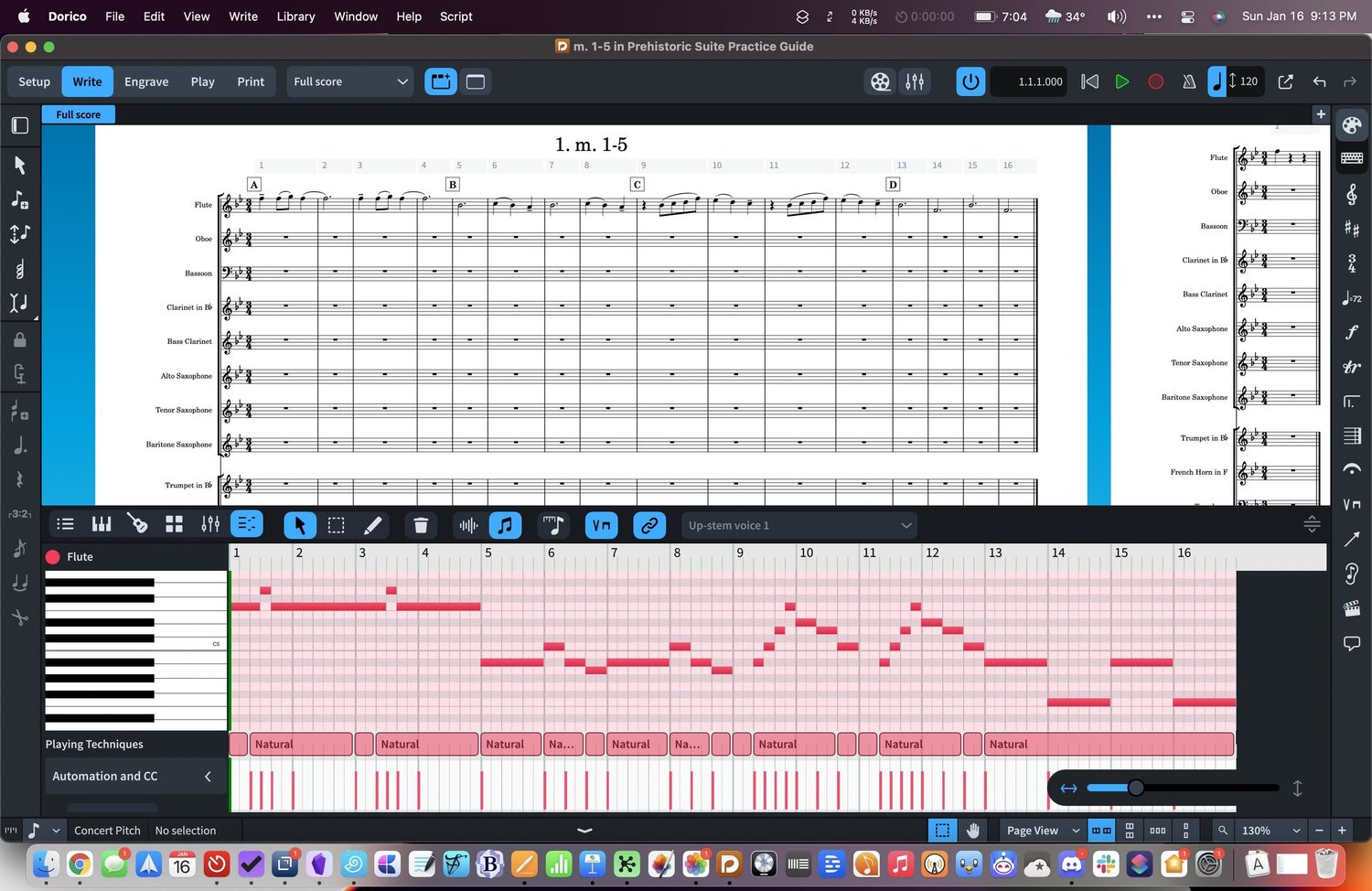
I would rather go to MIDI capture-comping/sheet-piano combo view direction, like Dorico4

Image

the recording part is easier with/from MIDI keyboards, reading-playing back is easier from music sheets and the small timing issues can be fixed on PR easiest
"Where we're workarounding, we don't NEED features." - powermat

Post

xbitz wrote: Wed Jul 13, 2022 5:31 pm ^^^ chord note highlight of Cubase missing from both FL/S1

pretty fun if you're tired otherwise and just would like to play with some simple rhythm-based solid structures/counter-melodies etc.. and with sound designing a bit just for fun in BWS

so I've found the Cubase+Bitwig (with a MIDI keyboard) combo the most usable one (I wouldn't even start to play with synths in Cubase in the CLAP era :) )
Hi Xbitz… this looks like the kind of workflow I am after. I am a Cubase user so I’m familiar with generating chords. How to use this data in Bitwig? Any videos where I can see that side of the workflow?
My milkshake brings all the girls to the yard

http://soundcloud.com/the-boogee-man

Post

_leras wrote: Tue Aug 02, 2022 9:06 pm
BenfordLaw wrote: Wed Jul 13, 2022 3:33 pm Does the piano roll compare to FL Studio's yet?
Bitwig has a perfectly useable piano roll.

What specifically are you after from FL?
To bust this myth for all time that FLS´PR wouldn´t be special:

Bitwig´s PR functionality is now perhaps at 20% what in this case FLS offers...
While it does many things much much better it lacks i.e. of:

- multi tool operations... FLS can do every operation without changing tools or hitting other keyboard shortcuts (apart from modifier keys)...
While Bitwig´s PR can be better controlled via keyboard it´s light years behind what is FLS via the mouse

- Advanced quantize... FLS is not complete on par with Abletons Groove pool but with saveable user presets very close and a bit more editable in certain situations... no way for Bitwig

- As already mentioned: Scale highlighting and the the Stamp tool to insert quickly any kind of chord or scale one or multiple times...
FLS does Scale highlighting the right way: the scale highlighting changes the grid colors/brightness and not such a nonsense like Reaper or S1 where you got just some indicators on the PR keys...while it falls a bit behind too as it hasn´t got scale snapping atm...
In Bitwig... nothing as wonky workarounds

- tons of different selecting options for notes including random selection... very very handy

- User note colors schemes...

- as already mentioned: 2 different kinds of painting notes

- a of course very individual feature which cannot be explained: the editing feeling is completely different... the looks, the feeling when editing, how the programm reacts...etc... is a different world to most others...

- last but not least of the obvious features (I am sure I forgot to mention a whole lot of stuff):
The other tools...
Chop and arpeggiate are a league of it´s own... there is absolutely nothing comparable on the whole DAW market other than realtime plugins...
But as well Randomizer, Articulate, Strum, Flam, Claw machine, Limit, Flip are second to none...

Sometimes you find similar features in realtime plugins but the clue of the integration of this tools in FLS is that every tool, every parameter change reflects non destructive on the notes in realtime while you are listening to this pattern...
Once you hit ok, the changes become permanent and are printed directly to the notes...
Everything editable with tons of parameters and the most important tools with user defineable presets...
Second clue: The presets are not for the parameters but for the pattern how note positions/length/pitch are changed...
So you can build your own arps, with which rhythm sustained notes/chords are chopped with one click, as already said your own quantizing...etc...
The tools can work on everything or just the selected notes... try that with a plugin!!
This is super super powerfull and much more comprehensible than the use of any realtime plugin

These tools alone blow every other PR editor of any DAW out of this universe...

If I see how users show in videos how they chop up chords and trying to come up with some syncopation rhythm and how long this takes with cutting notes, duplicating, positioning and finally after 5 minutes of work they were ready what took me in FLS just 1 second... this was always very funny to watch how capable of suffering some people are... :D

It´s perhaps hard to trace if you never have worked seriously with this programm but imho this PR Editor is claimed as best for very very good reasons and is the biggest thing you miss when leaving FLS for something else...

Of course it depends your needs...
I repeat what I have said already in the past...
If you belong to the "boring" muscians (even if you will probably see it exactly the other way round because of your limited thinking), just use what comes to your mind by recording a bit of stuff in and just make perhaps 2-3 edits like removing some recording mistakes or a bit of basic quantizing Bitwigs PR is most likely absolutely fine...

But if you are really into note mangling this PR editor can still not be beaten and is really a masterpiece which is really fun to use...

I write this as a former FLS user who has made his transition to Bitwig... so what I wrote has nothing to do with fanboyism...
I see Bitwigs development and what they have achieved so far as absolutely the future and as I already said Bitwig does a ton of stuff better but the PR editor sadly still doesn´t belong to that and cannot compete the slightest with the one of FLS... :tu:

Post

Trancit wrote: Wed Aug 03, 2022 10:43 am - last but not least of the obvious features (I am sure I forgot to mention a whole lot of stuff):
The other tools...
Chop and arpeggiate are a league of it´s own... there is absolutely nothing comparable on the whole DAW market other than realtime plugins...
But as well Randomizer, Articulate, Strum, Flam, Claw machine, Limit, Flip are second to none...

Sometimes you find similar features in realtime plugins but the clue of the integration of this tools in FLS is that every tool, every parameter change reflects non destructive on the notes in realtime while you are listening to this pattern...
Once you hit ok, the changes become permanent and are printed directly to the notes...
I'm pretty happy with the tools for note generation/manipulation in Bitwig... but it is clumsy to have to bounce to a new track to print to midi. I'd love to see a method to efficiently print directly like FL has.

Post

pdxindy wrote: Wed Aug 03, 2022 1:21 pm I'm pretty happy with the tools for note generation/manipulation in Bitwig... but it is clumsy to have to bounce to a new track to print to midi. I'd love to see a method to efficiently print directly like FL has.
Exactly this... The tools in FLS already print everything to midi either as a non destructive preview or permanent if you click OK...
And they can work with just a selection of the notes in your clip and do not process automatically everything like a plugin ... it´s quite some work to filter out notes for plugin processing to be able to do the same if it´s even possible

Post

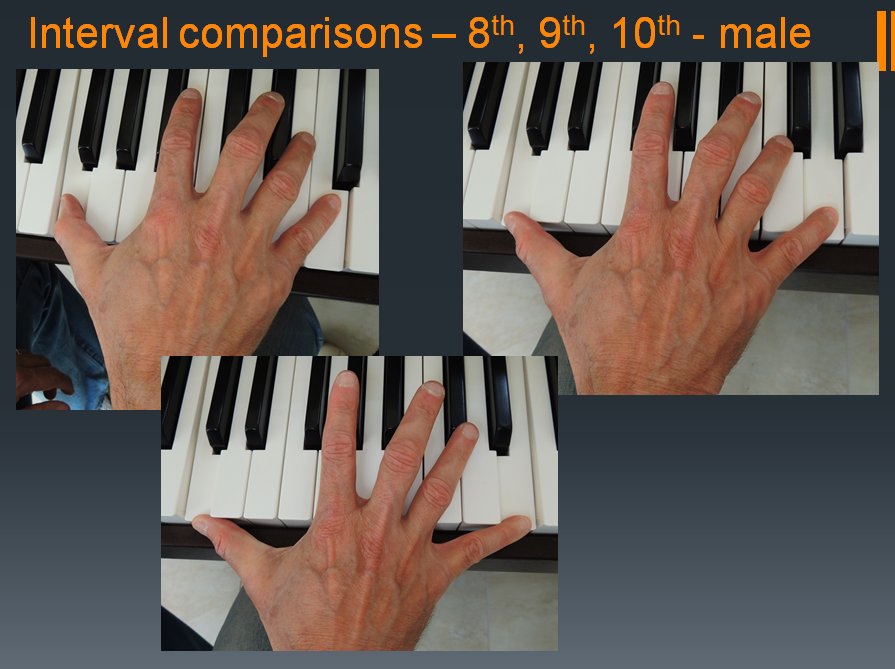
after you memorized your hand <> intervals mapping (no needs to think about keyboard positions anymore) MIDI keyboard will become similarly as comfy as the pr+mouse combo
Image
if don't have to press the record button constantly ... so please drop a vote to MIDI capture https://bitwish.top/votes as everybody else ... :)
"Where we're workarounding, we don't NEED features." - powermat

Post

kev2525 wrote: Wed Aug 03, 2022 10:28 am
xbitz wrote: Wed Jul 13, 2022 5:31 pm ^^^ chord note highlight of Cubase missing from both FL/S1

pretty fun if you're tired otherwise and just would like to play with some simple rhythm-based solid structures/counter-melodies etc.. and with sound designing a bit just for fun in BWS

so I've found the Cubase+Bitwig (with a MIDI keyboard) combo the most usable one (I wouldn't even start to play with synths in Cubase in the CLAP era :) )
Hi Xbitz… this looks like the kind of workflow I am after. I am a Cubase user so I’m familiar with generating chords. How to use this data in Bitwig? Any videos where I can see that side of the workflow?
I'm using simple drag and drop(don't know other DAW which supports this on windows, FL/S1/BWS/Reason needs Files.../MIDI export AFAIK not sure about Reaper) between Cubase and the clip launcher area of Bitwig

ps. and using only u-he synths in Cubase too so able to develop my initial sound design idea further in BWS
"Where we're workarounding, we don't NEED features." - powermat

Post Reply

Return to “Hosts & Applications (Sequencers, DAWs, Audio Editors, etc.)”