First of all, I tried finding this subject/issue but nothing came over here, so apologies if I'm duplicating.
I'm BERY frustrated on something happening to me since a couple of month ago. I have a Steinberg UR242, a Rode NT1 (1st gen) and I use Logic Pro X latest version...
I hear my microphone ALL THE TIME, whether I have the monitoring ON or OFF. If I have it on, then ofc I want to hear myself, BUT EVEN THOUGH I HAVE IT OFF, I STILL HEAR MYSELF.
And that's not the worst part... IF I PUT VST'S ON THE TRACK, I HEAR THE MONITORING WITH THE EFFECTS!!!! Imagine the latency... I can barely sing ;(
I tried uninstalling Logic couple of times, and nothing... I don't know what else to do.
Just In case, nothing has changed from my setup (I think...), I even updated the Logic Pro from the 10.0 to this latest 10.7 one. I'm going crazy, for real... I need some help. How is this possible? hearing myself even though having monitoring off...
I have to say that I think I've "always" heard myself with this mic, but it was waaaaaay lower than this time. From one month to other, I started hearing myself A LOT.
Dust? It's because I stay a lot without using it?
Permanent Monitoring On Logic Pro X Help!
-
qtheerearranger qtheerearranger https://www.kvraudio.com/forum/memberlist.php?mode=viewprofile&u=325452
- KVRian
- 926 posts since 26 Mar, 2014 from Denver, Co
sounds like your interface has direct monitoring on the interface turned on. just to clarify when you say you have monitoring off the r on the track is red with a black background correct and its not the R is default font color ( i use logic pro colorizer so mine is white idk if your font will be white) but if the background is red you have the monitor on. you just want the R to be red. if you post on a website called logic pro help u will get an answer right away. logic users here are low. i use studio one for example but im trying to help.
Bitwig 6 • Diva, Dune, Serum, and UVI Falcon are my Daily Drivers • Drum Machines • Harrison 32c + DSM 3 + American Class A Enjoyer • Apple M4 Max • Apollo User • DJ • Dance Music is life
-

- KVRer
- Topic Starter
- 9 posts since 28 Oct, 2023
Many thanks for the reply!! Well... I actually downloaded Reaper, and guess what? SAME THING HAPPENED! It is something from my interface? if its the case, how can I disable it?qtheerearranger wrote: Sat Oct 28, 2023 3:25 pm sounds like your interface has direct monitoring on the interface turned on. just to clarify when you say you have monitoring off the r on the track is red with a black background correct and its not the R is default font color ( i use logic pro colorizer so mine is white idk if your font will be white) but if the background is red you have the monitor on. you just want the R to be red. if you post on a website called logic pro help u will get an answer right away. logic users here are low. i use studio one for example but im trying to help.
Regarding your reply, No matter the R is red or not, I still hear myself in the mic... ;(
-
qtheerearranger qtheerearranger https://www.kvraudio.com/forum/memberlist.php?mode=viewprofile&u=325452
- KVRian
- 926 posts since 26 Mar, 2014 from Denver, Co
yeah i would say you have direct monitoring on your interface enabled. is there some switch that isnt phantom power that you can click somewhere? I cant find your interface on sweetwater i think its older but do you have a mix between input and daw/master? Try that mix knob.
Bitwig 6 • Diva, Dune, Serum, and UVI Falcon are my Daily Drivers • Drum Machines • Harrison 32c + DSM 3 + American Class A Enjoyer • Apple M4 Max • Apollo User • DJ • Dance Music is life
-
Karbon L. Forms Karbon L. Forms https://www.kvraudio.com/forum/memberlist.php?mode=viewprofile&u=29033
- KVRian
- 1414 posts since 10 Jun, 2004 from Inverness, Scotland
From Google...
https://forums.steinberg.net/t/disable- ... 242/671147
"I simply turned of the fader in the UR242 soft mixer and it resolved the problem.
The UR242 does not have the physical button unlike most of the audio interfaces. It should be controlled in the DSP mixer."
https://forums.steinberg.net/t/disable- ... 242/671147
"I simply turned of the fader in the UR242 soft mixer and it resolved the problem.
The UR242 does not have the physical button unlike most of the audio interfaces. It should be controlled in the DSP mixer."
.................................
"Hell is other People" J.P.Sartre
.................................
"Hell is other People" J.P.Sartre
.................................
-
- KVRer
- Topic Starter
- 9 posts since 28 Oct, 2023
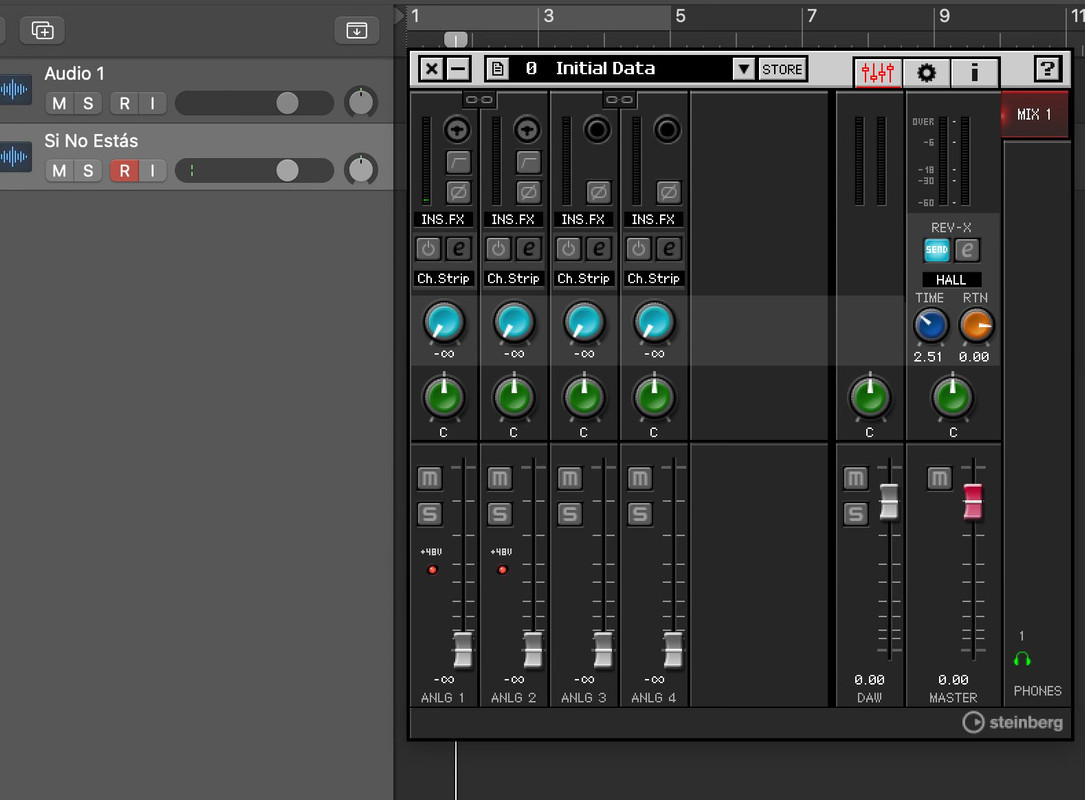
I do not want to look st*pid or something... But I already saw that answer on google, and maybe I am really st*pid but I have no idea what else to do because I still hear everything. Here's the screenshot where I turned down the fader for the 4 tracks. If I turn the fader down on the DAW or Master, I do not hear a thing, bc I am actually using headphones plugged into my Steinberg so I use it as an inbound and outbound too...Karbon L. Forms wrote: Sat Oct 28, 2023 5:27 pm From Google...
https://forums.steinberg.net/t/disable- ... 242/671147
"I simply turned of the fader in the UR242 soft mixer and it resolved the problem.
The UR242 does not have the physical button unlike most of the audio interfaces. It should be controlled in the DSP mixer."
As you can see on Logic Pro, I don't have the monitoring on, only the RECORD on, and I hear myself as if I had the "I" turned on...