



https://vst.saschart.com/ycompressor_co ... side_chain
yCompressor is a minimalist, classic audio compressor focused on precision, sound quality,
and performance efficiency. Designed for producers and audio engineers who value clarity and speed,
it delivers professional dynamic control without unnecessary complexity.
The plugin offers only the essential parameters required for high-quality compression, allowing
fast and intuitive operation while remaining extremely light on system resources.
Features
- Threshold – sets the level at which compression starts
- Detection (Linear/Logarithmic) – selects how the input signal level is detected
- Attack – controls how fast the compressor responds to transients
- Release – defines how quickly gain reduction is released
- Ratio – determines the amount of compression applied
- Stereo – controls stereo channel linking and behavior
- Gain – output level compensation
- Mix – dry/wet balance for parallel compression
- Side Chain – enables compression triggered by an external or filtered signal
yCompressor is built around the idea of doing exactly what is needed—and nothing more.
Its clean interface and streamlined signal path keep the focus on sound rather than settings.
The processing engine is carefully optimized to deliver transparent and predictable compression,
minimal latency, and extremely low CPU consumption. There are no gimmicks or unnecessary features—
just a solid, reliable compressor that integrates seamlessly into any workflow.
yCompressor delivers classic compression in its purest form: focused, efficient, and optimized.
Requirements:
DAW (VST2 or VST3 host), Windows 32/64bits

 or MacOS (Intel & Silicon) VST2, VST3 and AU

Changelog:
1.0 (2026-01-24)
- Initial release
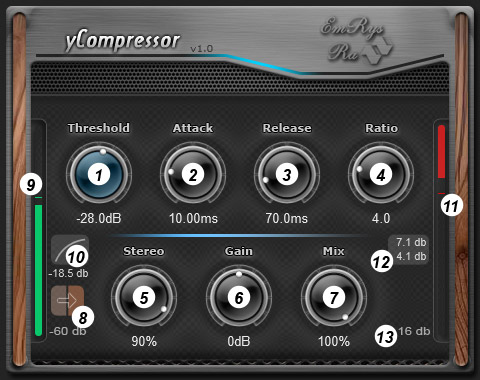
- Threshold – sets the level at which compression starts.
- Attack – controls how fast the compressor responds to transients.
- Release – defines how quickly gain reduction is released.
- Ratio – determines the amount of compression applied.
- Stereo – controls stereo channel linking and behavior.
- Gain – output level compensation.
- Mix – dry/wet balance for compression.
- Side Chain - selects the signal used by the compressor detector: input or the external sidechain signal.
- Bar with level of the input audio signal.
- Switch detection (linear/logarithmic) – selects how the input signal level is detected.
- Bar with level of the gain reduction.
- Maximum and instantaneous gain reduction values.
- Maximum gain reduction which can be displayed.
- You can also discover valuable information by hovering over the knobs with the mouse.
- For keyboard input: hover over the knob, right-click, input the value from the keyboard, then press enter.
- To reset to the default value: double-click on the knob.