



So, enough was enough and I built this tool AFTS Context Conversion Tool.
A tiny, 100% portable right-click tool for Windows 10 and 11 only that makes some very simple audio chores quick and easy, without ever opening a sample editor or DAW.
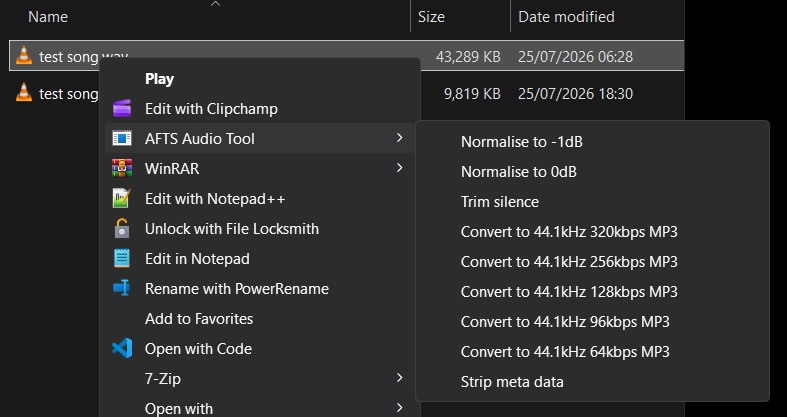
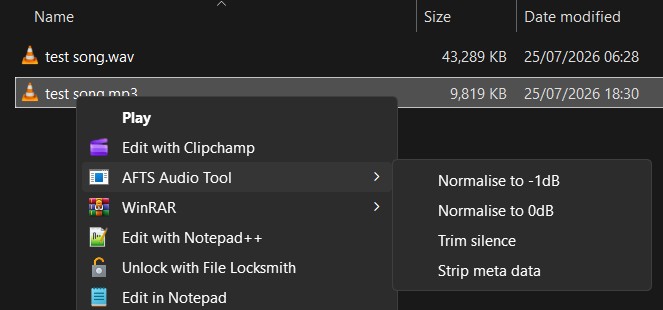
NOTE: Most features are NON DESTRUCTIVE.
Meaning? The original file is never replaced just encase something goes wrong. So if you normalise a wav or mp3 a new file using the name of the file you normalised will appear with "-normalised" appended to it's name and similar for various other features.
Strip META data is DESTRUCTIVE. It works on the target file and doesn't create a copy.
Hope you find it useful. Git repo and installer location is below.
AFTS Context Conversion Tool
Download the windows installer from:
https://github.com/DarceyLloyd/AFTS-Con ... tag/v1.0.4
How to use it
- Right-click any .wav, .flac or .mp3 → AFTS Audio Tool
- Normalise to -1dB or 0dB (true two-pass peak)
- Trim silence from the start and end
- Convert WAV/FLAC → 44.1kHz (320 / 256 / 128 / 96 / 64 kbps) MP3
- Strip metadata bit-exact — no re-encode, your audio untouched
- Mono stays mono, stereo stays stereo
- Download the installer from https://github.com/DarceyLloyd/AFTS-Con ... tag/v1.0.4
- Run the installer (one UAC prompt, done).
- Right-click a .wav, .flac or .mp3 file.
- On Windows 11, click Show more options (Windows 10 skips this step).
- Open AFTS Audio Tool and pick an action — the result lands right next to the original.
Free and open source (MIT) — grab it over on GitHub:
https://github.com/DarceyLloyd/AFTS-Con ... rsion-Tool