
| Operating System | Latest Version |
|---|---|
| 2.0 | |
| 2.0 |
We previously mentioned that "Pro" versions of the plugins in the XM family were on the way.
Now, here it is: XMLimiter 2 — the most transparent and loudest mastering peak/brickwall limiter currently available.
Attention! XMLimiter, the Free version included in the XM Mastering Bundle, and XMLimiter 2 are two separate products with completely different algorithms.
There is a reason we call XMLimiter 2 the "Most Transparent Mastering Peak/Brickwall Limiter."
XMLimiter 2 is not a classic look-ahead limiter. It does not rely on time-constant parameters such as Attack or Release.
Instead, XMLimiter 2 watches and reads your entire signal like a detective — at every single moment.
This atomic-level tracking allowed us to achieve one thing above all else: no sense of dynamic suppression, no stereo narrowing, no transient smearing, no pumping... Just transparent limiting.
That said, we should be clear: depending on the source material, some reaction is unavoidable. For example, certain solo instruments such as piano may respond differently. Some of your 808s or sub-bass instruments may work perfectly, while others may distort. This depends entirely on the material.
However, the feedback we received from the audio engineers who supported us during the beta phase helped us realize something important: if you place XMLimiter 2 as the final limiter on your master output and you hear distortion at certain points while pushing to your desired level, then there is likely a problem in your mixing stage.
In that case, we recommend placing an EQ right before XMLimiter 2 and applying the necessary balancing. Or use it however you want — the choice is yours.
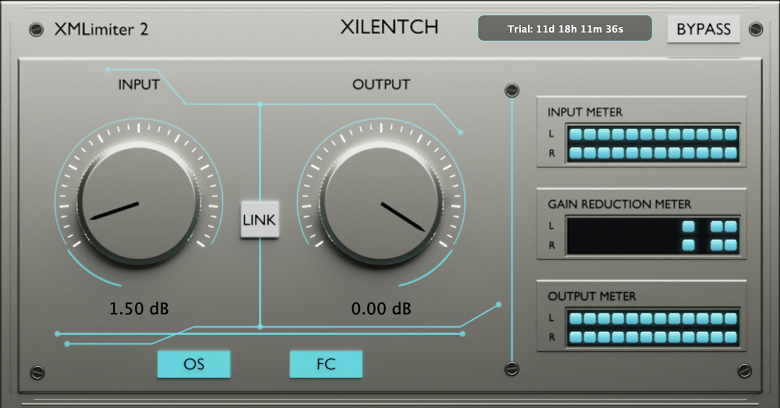
OS Button.
By default, x16 oversampling is enabled. This outstanding filter type is one of our latest technologies. We recommend keeping it enabled during mastering. For individual tracks, it can remain disabled.
At this stage, ISP — Inter-Sample Peak — protection is maintained. However, dBTP is a different matter. We did not want to compromise signal transparency or add extra processing load in the name of "True Peak."
FC Button.
FC stands for the Final Ceiling stage. If you are not using serial limiting, we recommend keeping it enabled at all times. Otherwise, peak points may escape.
If you are using serial limiting, disable it and let XMLimiter 2 do its job within the intermediate signal chain.
But we should also point out that the FC stage is unique. We developed it specifically for XMLimiter 2. It is designed to catch overshoots.
LINK Button.
The LINK button is located between the two knobs. When enabled, LINK allows you to adjust the Input and Output knobs in opposite directions at the same time, helping you maintain a balanced overall level.
Demo Mode / Buy Button.
The "Buy" button in demo mode will redirect you here.
After completing your payment here, please send the username and email address you created on the license entry screen, together with your exported license file, to:
xilentchmecan@hotmail.com.
When making the payment, do not forget to include the username and email address you used during registration in the body of your email. Please also include your Order ID.
If you purchased XMLimiter 2 from another platform, please do not forget to include your purchase history. Please also include your Order ID.
Officially, only purchases made through Patreon, KVRAudio and, in the future, PluginBoutique will be accepted.
Your license will be sent back to the email address you provided. License delivery may take some time, so please do not worry. Any delay is simply due to our current workload.
 $209.00Diva
 $499.00FX Collection 6 Pro
 $149.00Bazille$99.00B-3 V2
Submit: News, Plugins, Hosts & Apps | Advertise @ KVR | Developer Account | About KVR / Contact Us | Privacy Statement | Sell @ KVR | KVR Marketplace Terms & Conditions
© KVR Audio, Inc. 2000-2026
