Mini PCs and NUCs for Music Production
![Nate [KVR]](https://www.kvraudio.com/forum/download/file.php?avatar=506958_1768372953.jpeg) By Nate [KVR] on
By Nate [KVR] on
Looking to build a powerful yet compact music production studio? Mini PCs and Intel's Next Unit of Computing (NUCs) have become increasingly popular choices for musicians and producers seeking a balance between performance, portability, and a clutter-free workspace and are some of the best budget PCs for music production. This guide explores the benefits of using mini PCs and NUCs for music production and highlights key considerations when choosing the right one for your needs.
NUC systems (a term officially coined by Intel that has is sometimes loosely adopted for other brands within this segment) or Mini PCs are intended to provide a small-form-factor computing solution, leveraging laptop-derived technologies for efficient, compact and high-performance builds.
Within the music production community in particular, Apple’s excellent Mac Mini M4, a powerhouse of a computer with a competitive price tag, has become increasingly popular. For Windows users, the pickings have been slimmer in the past, however developments in CPU design, better power efficiency and performance in mobile chips as well as an ever expanding range of new models is providing much needed choice for the PC music market. Lets take a look at the advantages of using Mini PCs for music, focusing on Windows NUCs with both Intel and Ryzen architectures.
So why get a Mini PC?
Mini PC’s offer a number of benefits as the centerpiece of a studio.
- Size - You no longer need to invest in expensive rack enclosures, or be distracted by a glaring tower of RGB taking up valuable desk space (which could be occupied by more synths.). Many a small form factor PC will ship with a VESA mount solution on the underside of the chassis too, so it can easily be mounted out of the way to the back of a monitor.
- Noise - Because of the size constraints, many Mini PC’s opt for mobile or laptop chips, chosen for their power efficiency. Power efficient chips typically need less cooling, and less cooling means less fan noise. This varies from brand to brand, but most offer performance settings for fine tuning fan usage right down to near silent operation, making them ideal for a recording environment. This gives a quiet mini PC for music production an edge over big desktops sporting huge fans and even water cooling options.
- Cost - Mini PC’s are incredibly good value for money. Assuming you already have a monitor and peripherals, they’re much less than a dedicated laptop. If you aren’t subject to Apple’s exorbitant add-ons and upgrades, most are also very cheap to beef up to a higher spec. On that note, we won't indulge in the age-old argument of whether Mac or PC is better. They are both equally capable and chances are, your decision as to what hardware you get will be largely dictated by whatever platform you are already invested in. If you are a Windows or Linux user and have been eyeing a Mac Mini M4 though, you may want to consider the additional costs of purchasing one. While the base model Mac Mini is very well priced, speccing a machine with more RAM and a larger SSD is going to drastically increase the cost. The Mac Mini M4 with 32 Gigs of RAM and a 256 Gig SSD will set you back around $999, a $300 increase from the $699 base model. While the M4 currently outperforms many of it’s PC counterparts, those on a budget will be able to find suitable options with far more storage for much, much less, along with options to upgrade down the line (although soldered RAM is becoming increasingly popular now even in Intel and Ryzen based Mini PC's).
Choosing the Right Mini PC or NUC for Your Music Production Setup
The requirements for music production have plateaued somewhat over the last few years. There are niche cases, such as servers running huge collections of sampled instruments, certain types intensive real time processing, or for systems that are required to double up as video editing workstations where you may want to consider higher specs. For the most part, most producers will be quite at home on a decent mid tier machine. Here’s a few considerations to aid you on your journey:
- CPU: DAW’s and plugins are mostly CPU intensive. Generally speaking (although dependant on how your software is optimized), a high core count will help with higher numbers of channels, whereas single core speed is applicable for longer chains with more CPU intensive plugins. Most offerings from either Intel or AMD will suffice, and even cheaper processors in the Core i5 or Ryzen 7 range should be enough to comfortably run most DAW’s. It should be noted, there are murmurs of Qualcomm’s Snapdragon CPU’s making their way to the Mini PC market soon. Currently, users of Steinberg Cubase, Bitwig or Cockos Reaper should have no issues operating on ARM64 chips, however it is still in its infancy and has a long way to go in terms of general compatibility for many apps and drivers.
- RAM: We’d recommend 16 gigs as a minimum, however the sweet spot is probably around 32 gigs for most users. Large sample libraries could benefit from more, however streaming direct from disk is much more viable now too due to the current speed of SSD drives. Make sure you double check how the RAM is implemented though on any PC you’re considering to buy, as more and more are opting for soldered on RAM, meaning you won’t be able to upgrade easily at a later stage.
- SSD: Solid State M.2 drives are lightning fast and relatively cheap nowadays. To accommodate large instrument and sample libraries, you’ll probably want to opt for a 1tb system drive at least. Many Windows PC’s though will be easily upgradable though with secondary or even tertiary slots for additional M.2 drives.
- Connectivity: Most will offer an array of ports including ethernet, USB-C, USB-A and HDMi outputs. For those wanting a more serious display card, a number of Mini PC's or NUC’s can be found that include OCulink ports for attaching an eGPU. If Thunderbolt is a requirement, you may find support in some Intel powered machines, but not with offerings from AMD.
Buyers Guide
Below we'll check out a range of options for Mini PCs suitable for music production.
High Spec AMD Ryzen Option
 The Beelink SER9 Pro AI Mini PC features AMD's Ryzen AI 9 HX 370 found in the latest high-end AMD based Windows laptops. It is a beast of a processor with respectable power efficiency, and stacks up very well against Apple's 10 Core M4 chips. The comparison at nanoreview.net shows both almost neck and neck, with the AMD just ahead in multi-core performance, and the M4 better in single-core and power efficiency.
The Beelink also sports a Radeon 890M GPU and XDNA 2 NPU, and the top spec model currently ships with 32GB of 3200MHz DDR4 RAM and a 2TB PCIe Gen 4 SSD, with a free slot for an additional drive. Plenty of connectivity is on hand with a display port and HDMI port capable of supporting a multi monitor setup.
Price: $999.00
High Spec Intel Option
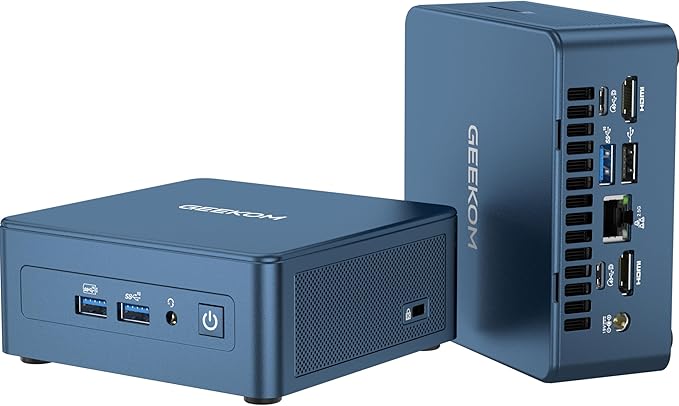 Those looking for an intel option can consider the GEEKOM Mini PC Mini IT13. This machine gets you a 13th Gen Intel i9-13900H featuring 14 Cores (20 Threads). The top spec includes 32GB DDR4 and 2TB PCIe Gen 4 SSD.
The Intel Iris Xe Graphics, 2 x USB4.0 ports (up to 8k) and 2 x HDMI 2.0 ports (4k@60Hz) can support up to 4 displays at once.
Price: $849.00
Budget Option
 While the KAMRUI Mini PC won't win any awards for performance, the perfectly respectable AMD Ryzen 7 5800U should provide more than enough horsepower for your music productions. The 16GB of RAM and 512GB SSD are on the small side, however it is upgradable to 64GB and a 2TB SSD, plus it's hard to argue with the price tag of less than $300.
Price: $279.00
Read More Buying Guide

Discussion

I don't see much value in these things. They aren't a whole lot cheaper than a decent laptop but they are a lot less portable. Intel's own NUC machines are, in fact, bloody expensive for what they are.

I recently bought an Asrock X600 (AMD Ryzen 5 8600G). It wasn't more expensive than a custom-built machine, it's small, relatively quiet, and definitely suitable for solo VSTi purposes (Arturia and Cherry heavy-load plugins).

I bought a NUC for this purpose back in 2017. I had a custom second fan installed into the top. It has worked well for me, but I honestly don't think I would buy one again. There just aren't enough USB ports on these devices to get everything added to your machine. You then have to install a hub and add your devices there. Before you know it, you look as silly as these Mac devices that only have a couple of ports. It's much cleaner to buy a slightly bigger device, and then (if needed), add an additional USB card to get the number of ports you need without having to add to the web-like mess of all of the cables. Also, I work where lots of NUCs are used all the time, and they are constantly dying because of heat problems. There isn't much space in these little devices to push the heat through efficiently. I suspect the reason mine has lasted as long as it did, was that I chose to add a custom second fan (built into the lid) to my NUC. I like these devices, but I don't know if I would buy them again because of these problems. Finally, apparently these devices are no longer even being built by Intel, but are being produced by ASUS. I liked Intel for the Linux support, but I don't know if ASUS has the same commitment to Linux. It leaves questions for me.
What stops me buying one is that they aren't silent judging from reviews. I'd rather a larger system that has the space and flexibility to choose a silent cooling system. It also gives more options for storage, ports and an optional GPU. The downside is higher idle power consumption.
Please log in to join the discussion