
5 KVR members have added E-StereoMaster200 (JSFX) to 5 MyKVR groups 6 times.
Download KVR Studio Manager (FREE)
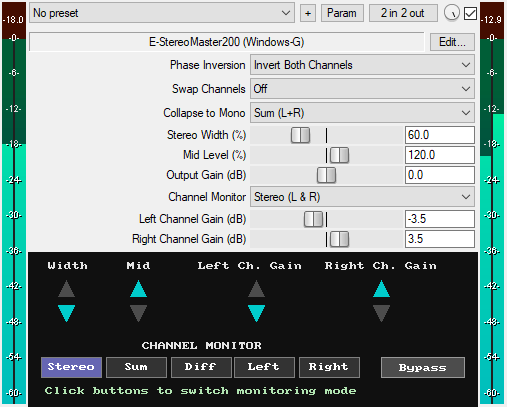
A JSFX stereo channel utility plugin for REAPER that offers:
* Phase Inversion: Invert left channel, right channel, or both channels
* Channel Swapping: Instantly swap left and right channels
* Mono Conversion: Choose from four modes: Sum (L+R), Left, Right, and Difference (L-R).
* Stereo Width Control: Adjust the stereo width of the input signal from 0% (fully mono) to 200% (extra wide). 100% is the default, with no effect applied
* Mid Level Control: Adjust the level of the mid or mono content of the signal from 0% (fully removed) to 200% (overkill). 100% is the default, with no change
* Output Gain (-20dB to +20dB): Sets the final output level of the plugin to compensate for volume changes
* Channel Monitoring: Monitor both channels, left only, right only, the sum of both channels, or the difference between both channels in mono. You can use the slider menu or click the GUI buttons to select monitoring modes. The Sum and Difference modes are useful for checking mono compatibility and detecting phase issues
* Individual Channel Gain Control: Apply independent gain adjustments to the left and right channels
* Zipper-Noise-Free Operation: Advanced smoothing prevents audio artifacts during real-time adjustments of the gain sliders
* Visual Feedback: Triangular indicators show when Width, Center, and Channel Gain are increased or reduced
* GUI Bypass Button: A smooth bypass button for toggling the effect on or off without audio clicks. Available for automation as "Bypass (Smooth)" in the parameter list
* Minimal CPU usage
You can grab it for free.
Email Support: info.windowsg@gmail.com
==================================================
Using This JSFX Plugin in Other DAWs:
If you want to use this JSFX plugin in other DAWs, you can do so using the open-source YSFX plugin.
YSFX is available in VST3, AU, and CLAP formats for Windows, macOS, and Linux.
Download your preferred version of YSFX from here (Click on "Assets" for the downloads to appear):
https://github.com/JoepVanlier/ysfx/releases
YSFX comes in two versions:
* ysfx-s FX (for JSFX effects).
* ysfx-s instrument (for JSFX instruments).
1. Open ysfx-s FX in your DAW,
2. Then click "Load", find your "E-StereoMaster200_Windows-G" file, and click "Open."
The JSFX plugin will now run inside the YSFX host, working perfectly in any DAW that supports VST3, AU, or CLAP plugins.

Please log in to join the discussion
Submit: News, Plugins, Hosts & Apps | Advertise @ KVR | Developer Account | About KVR / Contact Us | Privacy Statement | Sell @ KVR | KVR Marketplace Terms & Conditions
© KVR Audio, Inc. 2000-2026

