
6 KVR members have added E-SubkickSimulator300 (JSFX) to 7 MyKVR groups 8 times.
Download KVR Studio Manager (FREE)
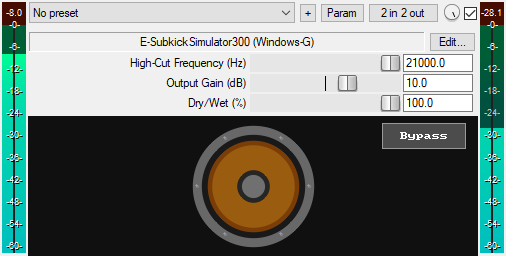
A JSFX sub-bass enhancer plugin for REAPER that emulates the tone of a subkick speaker-microphone through a clean EQ curve. This means it preserves the original sound character while adding sub-bass enhancement through EQ shaping. Simply route your kick drum, bass, 808s, toms, or any source needing sub-bass weight to a parallel track. Insert the E-SubkickSimulator300 on that parallel track and use the output gain to blend in the desired amount of sub-bass weight. You can then use the high-cut filter to shape it further. You may also insert it directly on the main track and use the dry/wet control to blend in the right amount of subkick effect. Oh, and that animated speaker cone moving with the audio is something I enjoy watching, just for the eyes.
Features:
* Adds clean, sub-bass enhancement (no synthesis)
* Provides dry/wet control for parallel blending
* Includes a low-pass filter to remove highs
* Smooth Bypass button for toggling the effect on or off without audio clicks. Available for automation as "Bypass (Smooth)" in the parameter list
* Features an animated speaker cone
* Apply in parallel or directly to kicks, bass, 808s, toms, or any track that needs sub-bass weight
You can grab it for free.
Email Support: info.windowsg@gmail.com
================================================.
Using This JSFX Plugin in Other DAWs:
If you want to use this JSFX plugin in other DAWs, you can do so using the open-source YSFX plugin.
YSFX is available in VST3, AU, and CLAP formats for Windows, macOS, and Linux.
Download your preferred format of YSFX from here (Click on "Assets" for the downloads to appear):
https://github.com/JoepVanlier/ysfx/releases
YSFX comes in two versions:
* ysfx-s FX (for JSFX effects).
* ysfx-s instrument (for JSFX instruments).
1. Open ysfx-s FX in your DAW,
2. Then click "Load", find your "E-SubkickSimulator300_Windows-G" file, and click "Open."
The JSFX plugin will now run inside the YSFX host, working perfectly in any DAW that supports VST3, AU, or CLAP plugins.

Please log in to join the discussion
Submit: News, Plugins, Hosts & Apps | Advertise @ KVR | Developer Account | About KVR / Contact Us | Privacy Statement | Sell @ KVR | KVR Marketplace Terms & Conditions
© KVR Audio, Inc. 2000-2026

