



ChordSpace. Something from nuffink.
-
- KVRAF
- Topic Starter
- 6519 posts since 13 Mar, 2002 from UK
More than kinda.3*s wrote:cool, nice to see I was kinda right

Now with improved MIDI jitter!
-
Colonel Flashback Colonel Flashback https://www.kvraudio.com/forum/memberlist.php?mode=viewprofile&u=57766
- KVRian
- 898 posts since 12 Feb, 2005 from Green Man Inn
still looking for an Ableton Live workaround... 
-
- KVRAF
- Topic Starter
- 6519 posts since 13 Mar, 2002 from UK
Sorry Colonel,Colonel Flashback wrote:still looking for an Ableton Live workaround...
Time pressure. I'm on it.
Now with improved MIDI jitter!
-
Colonel Flashback Colonel Flashback https://www.kvraudio.com/forum/memberlist.php?mode=viewprofile&u=57766
- KVRian
- 898 posts since 12 Feb, 2005 from Green Man Inn
VERY cool, that's all i wanted to hear. Thanks! I'll just wait patiently from now on...
-
- KVRAF
- Topic Starter
- 6519 posts since 13 Mar, 2002 from UK
Bad news I'm afraid,Colonel Flashback wrote:VERY cool, that's all i wanted to hear. Thanks! I'll just wait patiently from now on...
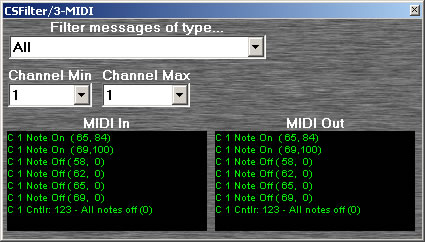
I knocked up a little filter in SE to see how Live is handling the midi channel from ChordSpace and, as you can see from the MIDI In below, it isn't. Or rather it's setting the channel to 1 whatever ChordSpace sends...
Compare this to the same setup in Ext, where the channel is being interpreted correctly and filtered out...
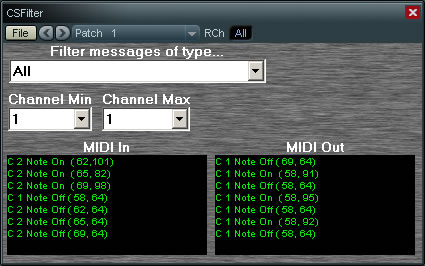
So I'm afraid that the filter approach won't work.
I'll have to think about it.
Now with improved MIDI jitter!
-
Colonel Flashback Colonel Flashback https://www.kvraudio.com/forum/memberlist.php?mode=viewprofile&u=57766
- KVRian
- 898 posts since 12 Feb, 2005 from Green Man Inn
Ah well, stupid Live...Thanks for trying! I'll have to take a closer look at EnergyXT.
-
- KVRian
- 693 posts since 21 Oct, 2003 from Madrid
Might be one of the best things you take a closer look at in your lifeColonel Flashback wrote:Ah well, stupid Live...Thanks for trying! I'll have to take a closer look at EnergyXT.

I just love EXT and FL so it could be said I am biased.
The Germinator

-
- KVRist
- 309 posts since 4 Feb, 2005 from uk
just tryed to get this to work in sx 2(the non sonar dll),it loads but im unable to set the midi channels for the chord output,the buttons dont work,and also the arp settings(mode,range etc)....:-(oh well
Tangent's tracks on myspace
"I wish there were a knob on the TV to turn up the intelligence. There's a knob called "brightness, but that doesn't work." - Author Unknown
"I wish there were a knob on the TV to turn up the intelligence. There's a knob called "brightness, but that doesn't work." - Author Unknown
-
- KVRAF
- Topic Starter
- 6519 posts since 13 Mar, 2002 from UK
Try this...tangentmusic wrote:just tryed to get this to work in sx 2(the non sonar dll),it loads but im unable to set the midi channels for the chord output,the buttons dont work,and also the arp settings(mode,range etc)....:-(oh well

Now with improved MIDI jitter!
-
- KVRist
- 309 posts since 4 Feb, 2005 from uk
thank you!!!
very handy ,fair play...thanks again
very handy ,fair play...thanks again
Tangent's tracks on myspace
"I wish there were a knob on the TV to turn up the intelligence. There's a knob called "brightness, but that doesn't work." - Author Unknown
"I wish there were a knob on the TV to turn up the intelligence. There's a knob called "brightness, but that doesn't work." - Author Unknown
-
- KVRist
- 272 posts since 17 Jun, 2004 from Chicago, IL
Hi,
I downloaded ChordSpace after reading this thread and looking forward to trying it. I use Sonar 2.2 with Cakewalk’s VST adapter. I loaded the CS.dll into the VST folder and brought it into Sonar in an audio track as an FX plug-in. I then brought a soundsource in (Mr. Tramp – Wurly Piano VST) after CS.
In the midi track I have “Midi In” as Omni or Channel 1, “Midi Out” as ChordSpace, “Bank” as 0 and “Patch” as Patch 1. Using the mouse or midi keyboard I click on one of the hexagons and nothing sounds. If I deselect CS I hear the VST piano.
I also tried the same sequence with ChordSpace DO and no luck. From reading this thread it sounds like everyone is having good success with ChordSpace. I can’t figure it out.
I’d appreciate any thoughts on how to get this to work. Thanks for your help.
Cj58
I downloaded ChordSpace after reading this thread and looking forward to trying it. I use Sonar 2.2 with Cakewalk’s VST adapter. I loaded the CS.dll into the VST folder and brought it into Sonar in an audio track as an FX plug-in. I then brought a soundsource in (Mr. Tramp – Wurly Piano VST) after CS.
In the midi track I have “Midi In” as Omni or Channel 1, “Midi Out” as ChordSpace, “Bank” as 0 and “Patch” as Patch 1. Using the mouse or midi keyboard I click on one of the hexagons and nothing sounds. If I deselect CS I hear the VST piano.
I also tried the same sequence with ChordSpace DO and no luck. From reading this thread it sounds like everyone is having good success with ChordSpace. I can’t figure it out.
I’d appreciate any thoughts on how to get this to work. Thanks for your help.
Cj58
-
- KVRAF
- Topic Starter
- 6519 posts since 13 Mar, 2002 from UK
Sorry Cooljazz,cooljazz58 wrote:Hi,
I downloaded ChordSpace after reading this thread and looking forward to trying it. I use Sonar 2.2 with Cakewalk’s VST adapter. I loaded the CS.dll into the VST folder and brought it into Sonar in an audio track as an FX plug-in. I then brought a soundsource in (Mr. Tramp – Wurly Piano VST) after CS.
In the midi track I have “Midi In” as Omni or Channel 1, “Midi Out” as ChordSpace, “Bank” as 0 and “Patch” as Patch 1. Using the mouse or midi keyboard I click on one of the hexagons and nothing sounds. If I deselect CS I hear the VST piano.
I also tried the same sequence with ChordSpace DO and no luck. From reading this thread it sounds like everyone is having good success with ChordSpace. I can’t figure it out.
I’d appreciate any thoughts on how to get this to work. Thanks for your help.
Cj58
ChordSpace DO is a workround for Sonar 5. I can't vouch for it working in v2.2
You could try wrapping it in EnergyXT.
Now with improved MIDI jitter!
-
- KVRer
- 13 posts since 8 Jun, 2004
Hi Nuffink,
I can't get ChordSpace DO to make a sound in Cakewalk Sonar 5. Would you (or anyone else) please post a step-by-step procedure to using ChordSpace DO in Sonar 5? Something like,
1. Copy chordspaceDO.dll to the VST plugins folder and run the VST wizard.
2. Open Sonar. Create an audio track and a midi track.
3. In the audio track FX bin, insert Chordspace DO and enable it. Insert a soft synth plugin in the same audio track's FX bin under Chordspace.
4. In the midi track, set input to MIDI omni, set output to chordspace,...
Thanks!
Brubart
I can't get ChordSpace DO to make a sound in Cakewalk Sonar 5. Would you (or anyone else) please post a step-by-step procedure to using ChordSpace DO in Sonar 5? Something like,
1. Copy chordspaceDO.dll to the VST plugins folder and run the VST wizard.
2. Open Sonar. Create an audio track and a midi track.
3. In the audio track FX bin, insert Chordspace DO and enable it. Insert a soft synth plugin in the same audio track's FX bin under Chordspace.
4. In the midi track, set input to MIDI omni, set output to chordspace,...
Thanks!
Brubart