The Yamaha EZ-EG Guitar Midi Controller Thread

Anything about MUSIC but doesn't fit into the forums above.
Post Reply New Topic
RELATED
PRODUCTS

Post

bastien wrote:Sorry if this is a really vague query but... Has anyone else succesfully recorded the AG into Tracktion 2? It sounds fine when you play it, but then when you play back the midi recording, something ain't right...
You need to set latency, on the midi input, forward about 10-15ms.

By the way from what I understand Marc's new proposed VST plugin is suppose to lower this latency.

Right Marc?

Post

AndrewSimon wrote:
bastien wrote:Sorry if this is a really vague query but... Has anyone else succesfully recorded the AG into Tracktion 2? It sounds fine when you play it, but then when you play back the midi recording, something ain't right...
You need to set latency, on the midi input, forward about 10-15ms.

By the way from what I understand Marc's new proposed VST plugin is suppose to lower this latency.

Right Marc?
If I record both ports, from the ez and from the script, the notes are recorder about 4 -10 msec later (script using sysex). Both ports ignore the timestamp, so it's the time the host receives the message. (1/128 at 120 BPM is 16 msec.)
So yes, this should be eliminated when using mixed input (note and sysex).
Off course, using a small asio/wdm buffer helps too.

Post

"If you still have the EG open, could you compare the pin-outs between the two? I'm hoping that the boards are secretly identical, and hopefully there's an unused connector for the whammy on the AG that we could just hook up to a knob."

Hey Markleford,

The EG has already gone back today, but I took pictures of its works while I was in there. I just opened up my AG and the circuit boards are different. There doesn’t seem to be any open pinouts where you could connect something for a wammy bar. There is nothing on the circuit board where the two control knobs are on the body of the EG either.

I was using your app for playing with tapping on the fretboard today. Thanks again for that.

Kevin

Post

Ah well, back to dreaming for the pro model... ;)

Anyway, enjoy your new setup! I love our little secret weapons! :D

- m
Markleford's band, The James Rocket: http://www.TheJamesRocket.com/
Markleford's tracks: http://www.markleford.com/music/
Markleford's free MFX, DXi2, DR-008 modules: http://www.TenCrazy.com/

Post

marc,

i wanna buy the plugin if it works the way i expect it to do. thats why i wanted the demo version.the videos would be cool as well but there´s the latency issue wich, i think, should be properly tested only once the user gets his hands on the EZ and the plugin. its a critical point, i know, but i think the way to sell your plugin is releasing a demo. i dont think nobody would crack it, if you are afraid of that. anyway, if they do, i´d still want to buy the plugin if it performs correctly :)
Last edited by eddu on Wed Nov 23, 2005 7:29 pm, edited 2 times in total.

Post

I'd buy the program in a heartbeat. I've already spent the money on the guitar and would glady support the continued development.

Also, I have a second EZ-EG that I'm selling for $200 plus shipping from the US if anyone's interested. It's in new condition and comes with everything except the original box (but still packed well). PM if you're interested.

Thanks,
Matt

Post

> .. but there´s the latency issue ..
When using the EZ without the scripts, do you still have a latency problem ?

Post

If i send MIDI directly to the inputs of the sequencer i dont. If i use the scripts i have a bit more latency. Anyway the pull off and other things behaviour a bit weird, so these things would be nice to be improved with the VST version. Thanks for your quick replies marc.

Post

I'm not sure what people are referring to when they're saying "latency". If you are dealing with a computer studio with soft synths, the delay you are experiencing is most likely coming from the plug-in synthesizers, not the guitar controller or its corresponding software. There is nothing that can be changed in the guitar set up that is going to make a virtual synth respond faster, except maybe getting a faster computer.

I have both the aps that were developed here for the EZ's. Admittedly, I had a confusing time installing them and getting them set up. The first night I almost gave up because I kept getting doubled notes, with a huge amount of latency, and some strange echo effects going on with my playing. Finally I figured the whole thing out, and have everything working together as a system now.

There is a little bit of delay coming from the virtual synths in my 3 gigahertz notebook, but it's the same as when I use my keyboard or drum pad triggers. You just tend to notice it more coming from a guitar.
However, when using the EZ through the controller software in my system directly out to my MIDI hardware synthesizers, there is NO perceptible delay at all! In fact the system is so fast, it's pretty amazing while I'm playing it. If your system is set up correctly, you should not be experiancing any additional timing delay when using the EZ controller apps.

Actually, personally I don't really see any reason to develop a new controller application that runs inside of VST. What we have now actually works perfectly transparently - not that I wouldn't like a few more features and refinement. :)

Here's how my system is set up, and it took me a while to figure this out:

Just say I'm rebooting my system and starting from scratch.
Turn on the AG, or EG (and set it up for local off, and external synchronization, so it isn't constantly streaming sys-x time code. This will also significantly speed up your system.)
Launch MIDI-Ox.

Strum the guitar strings to make sure MIDI-Ox is receiving a signal. Then, close and exit MIDI-Ox. (This is very weird I know, but it is essential to shut down MIDI-Ox, otherwise you'll be running double triggers and strange MIDI feedback effects will start happening in your system.)

Here's another aside: it wasn't in explained in any of the startup material, but I finally figured this out on my own. Along with installing MIDI-Ox, you also need to go on the net and install its brother program called MIDI-YOKE. Make sure you get the right one for Windows XP. Once it's installed in your system, you don't really have to do anything with MIDI-YOKE, it just runs behind the scenes as a virtual cabling system, and handshakes with MIDI-Ox. You have to start MIDI-Ox, when you start your computer, and then immediately close it, but you don't have to do anything with MIDI-YOKE. Weird and confusing, I know! :(

Start either one of Mark or Markleford's EZ controller applications.

Select the MIDI Input to point to the hardware that the EZ is connected to. (Example "USB MIDI Input 1").

Select the MIDI output as "MIDI YOKE NT: 1".

Start your sequencing application. My notes refer to Cubase.
Select a MIDI track, and choose an output that is either a virtual instrument, or a MIDI channel out to your synth hardware.

It's also important to make sure that Cubase, or whatever sequencer your are using, has been set up so that it knows MIDI-YOKE is part of its MIDI input menu. It's also important that Cubase is set up so that its internal timing and virtual delay structure are as efficient as possible. In my case, I downloaded a free ASIO application called ASIO4ALL v2. When it's all set up correctly, it makes a HUGE difference in reducing latency.

Anyways, I've got all this stuff working together beautifully now. It sounds really long-winded and confusing when you read the directions above, but in practice it's pretty simple, and only takes me about 2 minutes to set everything up from scratch. When it's all working correctly, the EZ guitar is a dream controller come true. Fun! Fun! Fun! :)

Kevin

Post

It's true that we can't do anything about the EZ to MIDI port latency.
I just tested my MIDI hardware (MPU-64) wire connecting an input and an output and using SX I get about 3-7 msec delay, so one way is 1.5-3.5 msec, which isn’t too bad.
Now the script takes about 3-10 msec (at least with mine) due to the fact of using only the sysex and the processing time (scripting is much slower than C/C++). And things get even worst when I use the foot pedal being handled by the script as well.
If the host is not too much loaded I use a 5 msec asio buffer, but as the song is growing I set it to 10 msec.
So that means that from the time the EZ sends a note, the synth (VSTi) will play it as early as about 5 msec and as late as about 24 msec (or 19 msec with a 5 msec buffer).
Sure we can compensate for latency, as long it's always the same, but mixing note on and sysex, and having the app in C/C++ would almost bring a speed increase of 3-10 msec, which is getting better.

I would also enhance some parts of the app, like sending pitch wheel on Hammer On, adding glissando in certain situations, even when we are not holding 2 frets a the same time, removing the extra short note off-note on with hammer on, as very often I still hit the string, or when finger picking, the EZ will send two events, one when I play the string with the finger, and once when I hit the string with the nail (this one kills me).
And lots of other stuff, but scripting has it's limits, a real pain to maintain, and a little slow (when I do some heavy strumming, the CPU usage, just for the script, can go very high, I could use this power for plugs and synths).

Now, the idea of having the app as a plug makes it really easy to change settings after recording. This is especially true when selecting another instrument, or if you want to try different settings afterwards. An example , I did some recordings using a single channel, and now I would like to use 6 channels, well to late. Also it is very often much easier to tweak some settings, like the string velocities, when playing back from a track.

Anyway, I’m currently working on the VSTi in the mixed note-on/sysex mode, which is actually all I need as SX supports VST-MIDI and sysex ;)

Post

My soundcard has a 10ms latency. I'm fine with playing at that speed. My brother, on the other hand, says he can sense the delay. I just can't.

Then again, I can use up to 40-50ms if necessary and still perform well enough for later quantizing: it's annoying, but isn't impossible for me.

I also haven't noticed my EZ setup adding any additonal latency above that 10ms. Or perhaps my brain just learns to adapt quickly and automatically plays early: human Plugin Delay Compensation! :lol:

- m
Markleford's band, The James Rocket: http://www.TheJamesRocket.com/
Markleford's tracks: http://www.markleford.com/music/
Markleford's free MFX, DXi2, DR-008 modules: http://www.TenCrazy.com/

Post

Most of the time latency is ok, but it's mainly on fast strumming that it bothers me.
I made a special strumming-quantize script, but when it's really fast it's not working very well, so I wouldn't mind a tighter timing.
Hmm, that silly Doobie Brothers tune .. :lol:

Post

hi everybody,
I only found this thread today. funny place to sqeeze an entire user community into a single KVR-thread. Anyway it looks like you are all feeling fine here. Hope it is ok when I join the party.

here is a little gift for all reaktor users among the crowd:

http://www.soundbytes.de/stuff/pluck_ez-ag.zip

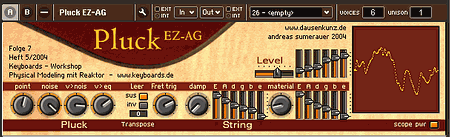
Don't expect too much though. This synth was meant as a simple example to explain some basic priciples. nothing too fancy. On the other hand it has some nice control features that make it worth being taken out of the dust bin:
- Portamento control for the notes played on the fretboard (with adjustable trigger noise for these notes)
- Pull off to an empty string is possible with this synth. Something I missed from day one.

Image

History:

The Pluck_EZ-AG is a Reaktor based physical modeling synthesizer. It is built around the Pluck Synth that came as example with an article series that I wrote for the german Keyboards magazine in 2003/2004. Pluck_EZ-AG was intended to be published as part of this series but as far as I am aware it never made it into the magazine.
This synthesizer was initially created using Reaktor4. A Reaktor5 compatible version is supplied with the package.

Controls:

point:
Plucking point

noise:
Noise amount in the initial pluck sound

v>nois:
velocity control of pluck noise

v>eq:
velocity control of low pass applied to the pluck sound.

leer:
this button determines how Pluck behaves when a fret button is lifted to an empty string (pull off):
sus - the empty string is vibrating when the hold pedal is pressed
inv - the empty string is vibrating when the hold pedal is released

fret trig:
Amount of trigger noise when notes are played using the fretboard.

damp:
linear damping controls the string decay. Use the sliders to the right of the button to adjust the setting for each single string.

material:
String material varying from gut/nylonlike to brilliant/metallic

Level:
output level

have fun

Andreas Sumerauer

Post

Hi, Marc, Markleford.
1.How many ms do I "drop" switching to external clock on EZAG? (SYSX streaming!)
2.Seems like normal to "feel" delay even with 6ms ASIO latency set on my Audiophile 24/96, right?(Specially fast passages) Yet, playing midi keyboard on the same MIDI IN port, bypassing EZAG SW, feels "right on time".
3.Marc, how are we doing with pre-orders? :)
4.Marc, can we expect any significant trigger quality improvement with your to-be-written software?

Midiboss

IT'S SO EZ :love: TO FALL IN LOVE....

Post

midiboss wrote:1.How many ms do I "drop" switching to external clock on EZAG? (SYSX streaming!)
When the clock is set to internal, the EZ will send 24 clock messages every beat (quarter note), so it's a good idea to set the clock to external, this will also prevent from starting the demo or play modes accidentally.
But this has nothing to do with sysex ;)

When you turn Local Control to off, the EZ will also send a little less events to the pc, and turn off the internal speaker at the same time.

So it's a good idea, when using the scripts, to set the clock to external (tempo+volume + '-') and turn off Local Control (capo + tuning + '-')

This way, I can 'see' a 2-3% cpu load difference, but it's hard to say, really.

Now what is really important when using my script, is to make sure to hide the fretboard, very hungry beast.
midiboss wrote:2.Seems like normal to "feel" delay even with 6ms ASIO latency set on my Audiophile 24/96, right?(Specially fast passages) Yet, playing midi keyboard on the same MIDI IN port, bypassing EZAG SW, feels "right on time".
Do you mean playing a 'real' keyboard or playing with the EZ ?
midiboss wrote:3.Marc, how are we doing with pre-orders? :)
Forget about the pre-orders for now, the DDk isn't available from MS at this time.
midiboss wrote:4.Marc, can we expect any significant trigger quality improvement with your to-be-written software?
I cannot make it better than using the EZ without the scripts. Off course now that I kind of know where I'm going and using C/C++ instead of scripting should avoid any overhead from the plug.
Once the events are in the plug the processing is 'masked' by the audio buffer size, all events will make it to the synth in the same call. But compared to even the lightest audio plug the overhead will be negligible.
So globally it should be the same than connecting the EZ directly to the host. If you have too much latency this way, you may want to check your MIDI and/or AUDIO hardware.

marc

Post Reply

Return to “Everything Else (Music related)”