

I use Xt Too...sampletank has an onboard keyboard but itsa little big for this simple use...there must be another simple vst with an onboard keyboard...i'll chek this out..Derek up North wrote:Nice idea! I'm sure there must be a VST out there already which can read a MIDI stream and show you the chord - you could just chain it after Chordspace (I'm using eXT as my main host - the possibilities with Chordspace and eXT are endless and easy to implement!).EkleipSiS wrote:I'm not sure this has been requested i assumed in 22 pages surely but ill take a chance...
It would be VERY cool to have a little keyboard on the gui just for highlighting the chords heard for the moment...would be handy to see what are the chords on the keyboard for people like myself who doesnt know much about theory....
Regards,
Derek.

ChordSpace. Something from nuffink.
-
- KVRian
- 546 posts since 19 May, 2005 from KanaDA
[-'/_-O-_\'-]
-
- KVRian
- 546 posts since 19 May, 2005 from KanaDA
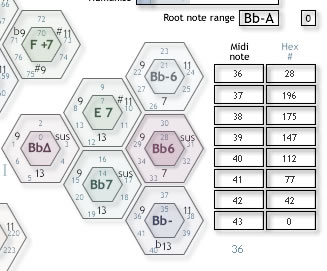
Press on "Hex #" and youll get it all!Purna wrote:I would like to play chosen hexes on midi keyboard. Is there any easy way to find out the hex number and choose it in the "Hex #" column on the right? Or it is a hit and miss method?
[-'/_-O-_\'-]
-
- KVRist
- 58 posts since 11 Nov, 2003 from Helsinki
I know but it's not what I mean. I would like to know which Hex # in the drop down menu in the column on the right corresponds to the chord hex without using "hit or miss" method.EkleipSiS wrote:Press on "Hex #" and youll get it all!
-
- KVRian
- 546 posts since 19 May, 2005 from KanaDA
If you press "Hex #" just over the slots where you choose the hex associated with the key all the hex related to the chords will show up on the screen ...Purna wrote:I know but it's not what I mean. I would like to know which Hex # in the drop down menu in the column on the right corresponds to the chord hex without using "hit or miss" method.EkleipSiS wrote:Press on "Hex #" and youll get it all!
im not sure if i make myself clear...
[-'/_-O-_\'-]
-
- KVRAF
- Topic Starter
- 6519 posts since 13 Mar, 2002 from UK
As EkleipSiS says, click the Hex # heading and...

Now with improved MIDI jitter!
-
- KVRist
- 58 posts since 11 Nov, 2003 from Helsinki
Yes, I've got it. Thanks!EkleipSiS wrote:If you press "Hex #" just over the slots where you choose the hex associated with the key all the hex related to the chords will show up on the screen ...
im not sure if i make myself clear...
 There is a genius behind it.
-
- KVRian
- 546 posts since 19 May, 2005 from KanaDA
NuffinK any chance of adding more midi notes to control hex? or maybe a switch to repeat them through the keyboard at different octave?
ex: G has always the same chords but at different octave G3,G4 etc...
i think it would be very cool...
ex: G has always the same chords but at different octave G3,G4 etc...
i think it would be very cool...
[-'/_-O-_\'-]
-
- KVRian
- 588 posts since 14 Feb, 2003 from Rural splendour (Up North, England)
Left click on the "Hex #" column header and your wish will be grantedPurna wrote:I would like to play chosen hexes on midi keyboard. Is there any easy way to find out the hex number and choose it in the "Hex #" column on the right? Or it is a hit and miss method?
Regarding seeing the keyboard view of the chords, I've just done this by feeding the output from Chordspace into Sytrus so I'm sure a number of VSTs with built in keyboards will do the same job.
Regards,
Derek.
Less than 1000 posts and writer's block has set in 
-
- KVRian
- 588 posts since 14 Feb, 2003 from Rural splendour (Up North, England)
Damn I'm slow!
Regards,
Derek.
Regards,
Derek.
Less than 1000 posts and writer's block has set in
-
- KVRAF
- Topic Starter
- 6519 posts since 13 Mar, 2002 from UK
It's another good idea.EkleipSiS wrote:NuffinK any chance of adding more midi notes to control hex? or maybe a switch to repeat them through the keyboard at different octave?
ex: G has always the same chords but at different octave G3,G4 etc...
i think it would be very cool...
To be honest, an updated ChordSpace isn't looking like a good bet at the moment.
Now with improved MIDI jitter!
-
- KVRer
- 5 posts since 15 Aug, 2005
Hey nuffnik,
I know you planned on going retail w/ChordSpace. If you ever wanted to go open source with it. I'd be glad to maintain the code. Or maybe I can just help with porting: DXi, VST2, StandAlone....etc.
I havent been keeping up with this great plugin...sad to hear that there might not be any future updates.
I know you planned on going retail w/ChordSpace. If you ever wanted to go open source with it. I'd be glad to maintain the code. Or maybe I can just help with porting: DXi, VST2, StandAlone....etc.
I havent been keeping up with this great plugin...sad to hear that there might not be any future updates.
-
- KVRer
- 13 posts since 8 Jun, 2004
If I can get it to work in SONAR with MIDI Yoke, I'll write the idiot's guide. I'm a tech writer -- and an idiotnuffink wrote:If somebody could write up and post an idiots guide to setting-up ChordSpace in Sonar I'd be most grateful.

brubart
-
- KVRer
- 13 posts since 8 Jun, 2004
I installed MIDI Yoke, and tried every combination of SONAR audio tracks/midi tracks and ins/outs I could think of, but still no sound from ChordSpace.brubart wrote:If I can get it to work in SONAR with MIDI Yoke, I'll write the idiot's guide. I'm a tech writer -- and an idiotnuffink wrote:If somebody could write up and post an idiots guide to setting-up ChordSpace in Sonar I'd be most grateful.
brubart
My SONAR MIDI input devices are my soundcard MIDI IN and MIDI Yoke 1, and my MIDI output devices are my soundcard MIDI OUT and MIDI Yoke 1. I set the Chordspace MIDI track OUTPUT to MIDI Yoke 1, and set the soft synth MIDI track INPUT to MIDI Yoke 1 so that ChordSpace connects to the soft synth via the MIDI Yoke 1. Is that correct?
If anyone is using Chordspace successfully in SONAR, please tell us how you are doing it. What MIDI and audio tracks do you have on screen, what are their ins and outs set to, what are the audio-track FX bins set to, and how are your SONAR MIDI devices set up?
Thanks for your help. I want to promote ChordSpace to a SONAR user's group, but not until I've proven that it works.
brubart
-
- KVRAF
- Topic Starter
- 6519 posts since 13 Mar, 2002 from UK
Did you use the Sonar specific version ChordSpaceDO?brubart wrote:I installed MIDI Yoke, and tried every combination of SONAR audio tracks/midi tracks and ins/outs I could think of, but still no sound from ChordSpace.brubart wrote:If I can get it to work in SONAR with MIDI Yoke, I'll write the idiot's guide. I'm a tech writer -- and an idiotnuffink wrote:If somebody could write up and post an idiots guide to setting-up ChordSpace in Sonar I'd be most grateful.
brubart
My SONAR MIDI input devices are my soundcard MIDI IN and MIDI Yoke 1, and my MIDI output devices are my soundcard MIDI OUT and MIDI Yoke 1. I set the Chordspace MIDI track OUTPUT to MIDI Yoke 1, and set the soft synth MIDI track INPUT to MIDI Yoke 1 so that ChordSpace connects to the soft synth via the MIDI Yoke 1. Is that correct?
If anyone is using Chordspace successfully in SONAR, please tell us how you are doing it. What MIDI and audio tracks do you have on screen, what are their ins and outs set to, what are the audio-track FX bins set to, and how are your SONAR MIDI devices set up?
Thanks for your help. I want to promote ChordSpace to a SONAR user's group, but not until I've proven that it works.
brubart
Now with improved MIDI jitter!
-
- KVRer
- 13 posts since 8 Jun, 2004
Yes. Nuffink, how do you set up ChordSpaceDO in SONAR, as far as tracks, ins-outs, midi devices, FX bins?nuffink wrote:
Did you use the Sonar specific version ChordSpaceDO?
Thanks,
brubart