ChordSpace. Something from nuffink.

VST, AU, AAX, CLAP, etc. Plugin Virtual Instruments Discussion
Post Reply New Topic
RELATED
PRODUCTS

Post

brubart wrote:
nuffink wrote:
Did you use the Sonar specific version ChordSpaceDO?
Yes. Nuffink, how do you set up ChordSpaceDO in SONAR, as far as tracks, ins-outs, midi devices, FX bins?
Thanks,
brubart
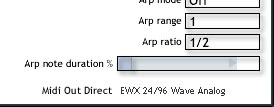
It has a direct Midi Out Direct drop down ...

Image

...from where you can pick a midi yoke port.
After which midi yoke's loopback facilities will allow you to route the midi anywhere. Hopefully.

Image
Now with improved MIDI jitter!

Post

Thanks, Nuffink! I'll try it out.

With that setup, the signal flow should be:

ChordSpace MIDI direct out > MIDI Yoke 1 > MIDI Yoke 1 > MIDI track IN > MIDI track OUT > soft synth MIDI IN > soft synth audio track > soundcard out.

The steps will be:
1. Insert an audio track. Insert ChordSpace in the audio track FX bin as a VST synth.
2. Open the ChordSpace GUI. Assign its MIDI direct out to MIDI Yoke 1.
3. Insert a new audio track. Insert a soft synth in the new audio track's FX bin. Set that audio track's OUT to soundcard out.
4. Insert a MIDI track. Set the MIDI track IN to MIDI Yoke 1. Set the MIDI track OUT to the soft synth you inserted in the new audio track.

I'll try it tonight.
brubart

Post

SETTING UP CHORDSPACE IN CAKEWALK SONAR
by brubart

This procedure will enable ChordSpace to play chords in a soft synth of your choice in SONAR.

DOWNLOADING PROGRAMS

1. Download ChordSpaceDO.zip from www.chordspace.com. Extract its file, chordspaceDO.dll.

2. Copy or move chordspaceDO.dll to your VST plugins folder (e.g., c:\program files\cakewalk\VST plugins). ChordSpace is a VSTi instrument.

3. Open SONAR and select Tools > VST Configuration Wizard so that SONAR will recognize ChordSpace. Close SONAR.

4. Download and install MIDI loopback (MIDI patch cable) software, such as MIDI Yoke, LoopBe1, or Maple MIDI. This will let you "connect" ChordSpace MIDI out to your soft synth MIDI in.


SETTING UP CHORDSPACE

1. Open SONAR.

2. Select Options > MIDI Devices. For Inputs, select your MIDI loopback program, such as MIDI Yoke 1. Unselect other options. Do NOT select the MIDI loopback program in MIDI Devices > Outputs. Click OK.

Image

3. In SONAR, select File > New. Name the new project and select a Normal template.

4. Select Insert > Audio Track. Name it "ChordSpace". Right-click in the FX bin, and select Soft Synths > VST > ChordSpace DO. Wait.

Image

5. The ChordSpace GUI will open. Click the bottom-right of the screen to open a drop-down list of MIDI devices. Select your MIDI loopback program. Close the window.

Image

NOTE: SONAR will operate slower when ChordSpace is in use. There will be a delay after some keypresses.

6. Back in SONAR, select Insert > Soft Synth. Select one. An audio track and MIDI track appear.

7. Set the audio track's OUT to your soundcard output. Set the MIDI tracks's IN to your MIDI loopback program, MIDI omni. Set the MIDI track's OUT to the soft synth.

Image

Image

8. In the MIDI track, set the channel, bank and patch as desired.

9. Double-click on ChordSpace to open its GUI. Click on any hexagram to hear a MIDI-generated chord played by your soft synth.

10. If you want to record the chords that you click on, close the ChordSpace GUI window. Turn off the audio metronome if it's on. Enable Record mode in the soft-synth MIDI track (click the R button), and press the R key on your keyboard.

Double-click ChordSpace to open its GUI. Click on the desired chords. The piano-roll view will show all the MIDI notes of each chord you click on in ChordSpace. You can play back the recorded sequence.

If you delete the ChordSpace track, SONAR will respond faster.


SAVING AND RELOADING

Type Ctrl - S to save the project. The next time you open the project, you must reset your soft synth MIDI track IN to "none", then set it to your MIDI loopback program - omni, in order for ChordSpace to work. Also, you might need to reset Options > MIDI Devices > Inputs to your MIDI loopback program.
Last edited by brubart on Tue Jan 24, 2006 1:38 pm, edited 11 times in total.

Post

Bingo! I got ChordSpace to work in SONAR, and have posted an idiot's guide. Thanks everyone for your help.

The clues I needed were
1. Use a MIDI loopback (virtual patch cord) program.
2. Assign the loopback port to ChordSpace in the ChordSpace GUI. Actually, the MIDI direct out selection in ChordSpace is so subtle, it's like an Easter egg!

Wow, ChordSpace is one classy, enlightening program. Great job Nuffink.

One problem: When I insert a MIDI track in SONAR to control ChordSpace from a MIDI keyboard, I get the dreaded MIDI feedback. I'll work on it. Any suggestions? I'm setting up ChordSpace as described in my idiot's guide.

Nuffink, I'll email you a file with graphics that show how to set up ChordSpace in SONAR.

brubart

Post

brubart, you're a star. That setup info is exactly what I needed. Unfortunately I can't help with the midi feedback. I don't have a copy of Sonar and there's no demo so, despite havibg written ChordSpaceDO, I've no experience of it working.
Image
Now with improved MIDI jitter!

Post

nuffink wrote:brubart, you're a star. That setup info is exactly what I needed. Unfortunately I can't help with the midi feedback. I don't have a copy of Sonar and there's no demo so, despite havibg written ChordSpaceDO, I've no experience of it working.
Thanks, man. Maybe others in the forum have suggestions on preventing MIDI feedback in SONAR.
Whyterabbyt said "Make sure Sonar is set up to ignore the loopback IN itself." What are the specific steps to do that?

brubart
Last edited by brubart on Mon Jan 23, 2006 1:40 pm, edited 1 time in total.

Post

This weekend I experimented with ChordSpace in SONAR. Here's what I found out:

1. ChordSpace works with MIDI Yoke in SONAR but does not work with LoopBe1 MIDI loopback software unless you do NOT select LoopBe1 in SONAR's MIDI Devices > Outputs. (I revised the instructions post accordingly).

2. ChordSpace can either play a soft synth when you click on the hexagram chords, or it can receive MIDI notes from a MIDI keyboard, but it can't do both at the same time.

If you set up ChordSpace in SONAR to play a soft synth, then you add a MIDI track whose input is MIDI omni and whose output is ChordSpace, then ChordSpace no longer plays the soft synth.

If you first set up ChordSpace to receive MIDI signals, then you add a soft synth yoked to ChordSpace, ChordSpace no longer receives MIDI signals.

That stuff happens even though there is no MIDI feedback. If anyone has an idea what's going on, please let me know.
Thanks,
brubart
Last edited by brubart on Tue Jan 24, 2006 1:41 pm, edited 1 time in total.

Post

brubart wrote:
SETTING UP CHORDSPACE

1. Open SONAR.

2. Select Options > MIDI Devices. For Inputs and Outputs, select MIDI Yoke 1. Unselect other options. Click OK.
Thanks brubart for the tutorial. There's one thing however that didn't worked for me. In my case I use Maple Midi Driver (similar to MidiYoke) and I had to select Maple Midi 1 as input but when choosing Maple Midi 1 as output, the softsynth used gave no sound.

I then unselected Maple Midi 1 as output in the midi config page of Sonar and the sound was back. I guess then there's no need to select Midi Yoke 1 (or Maple Midi 1) as output in the midi devices.

Could you confirm that it work also with MidiYoke (unselecting the port 1 as output in Sonar)?

Also, there's a simpler way to select a softsynth: just use the Dxi rack and this way, the audio and midi tracks are automatically generated. After the fact, you just have to change the midi input on the midi track.
Patrice Brousseau

Post

Patrice Brousseau wrote:
brubart wrote:
... I guess then there's no need to select Midi Yoke 1 (or Maple Midi 1) as output in the midi devices.

Could you confirm that it work also with MidiYoke (unselecting the port 1 as output in Sonar)?

Also, there's a simpler way to select a softsynth: just use the Dxi rack and this way, the audio and midi tracks are automatically generated. After the fact, you just have to change the midi input on the midi track.
Thanks, Patrice. If you do NOT select a MIDI loopback program in SONAR's MIDI Devices > Outputs, then you can use MIDI Yoke, LoopBe1, or MIDI Maple to connect the ChordSpace MIDI direct output to the soft synth MIDI input. I revised the instructions. Thank you!
brubart

Post

I got weird freeze on Sonar with Chordspace yesterday: first, when pushing the pads on the Chordspace GUI, everything was ok. Then, I switched to the synth track (the one controlled by Chordspace), thus playing it directly via my keyboard. It was fine but I was then unable to have sound again when I hit the pads after that.

Ok, so I deleted all the tracks and started again... and Sonar freeze each time I do this routine.

Please note that my setup is a little bit strange because I control midi data via MidiOx (Korg M-1 in to Maple Midi 1 out to Maple Midi 1 in in Sonar Midi devices). It is a trick to circumvent some timing troubles I had when directly going to Sonar...
Patrice Brousseau

Post Reply

Return to “Instruments”