
announcing: SCAMP 1.0 - Six Channel Analog Model "Philter"

VST, AU, AAX, CLAP, etc. Plugin Virtual Effects Discussion
RELATED
PRODUCTS

Post

Here it is folks...

http://www.admiralquality.com/products/SCAMP/?fxb1

SCAMP is a resonant low/high-pass filter plug-in VST effect for Windows with a very convincing, classic sound. SCAMP features a separate envelope follower for each of 6 channels, a host-syncable LFO with multiple waveforms, as well as our special Gliss-quanti feature for creating staircased LFO waveforms from the basic waveshapes. Also supported is full automation and MIDI CC control of all parameters. SCAMP provides for a fully functioning 7 day free evaluation period, and is available for download exclusively from www.AdmiralQuality.com
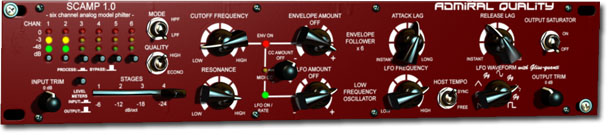
Image

Thanks everyone for all the encouragement, advice, testing and help! Really hope you like it.

Note that this is a brand new website, so you shouldn't experience the same slowness you may have had on the old one.

Needless to say, we could really use a good response for this, our first for-sale product. That'll mean we can afford this webserver, and that I can justify working on audio stuff 24/7 instead of having to hit the street and find a real job. ;) And that'll mean more products, sooner, for all of you (including more free products!) So if you like what you're seeing here, buying a copy is the best way you can help.

The other way to help is to tell everyone you know. So spread the word!

OK, now I can finally get back to work on the soft-synth... :D
Last edited by AdmiralQuality on Thu Mar 02, 2006 10:25 pm, edited 3 times in total.

Post

F F F F - (i was working on an effect last night called "skamp" believe it or not!!!! ARGH... what do i call a scampering effect now?

Post

!!! Sorry about that! It's been "coming soon" for a month or so now though. But if you want to use "skamp", go ahead. Not a problem here. :)

(BTW, what's "scampering"? I'm imagining little gerbils in there... )

Post

Fantastic! I loved the other filer you put out..it was called naive or something correct? I remember it having a very lush sound. I'll try the demo of Scamp out tomorrow when i'm in the studio. :)

Peace

Post

So is this meant for surround use? Or what practical application is the 6-channels?

GUI looks quite nice and the price is reasonable. I'll check out the demo tomorrow if I get a chance.

Post

Yup. Surround. Or any other combination -- say you only want to process the sub woofer... you can bypass each channel selectively to process whichever tracks you want.

But yeah, for most of us, most of the time, it's a stereo or mono effect (the bypassed or unconnected channels don't use any extra processing power, so it's 6 channel capable, but certainly doesn't need 6.)

But the other channels are there if you can use them. Looking forward to hearing from anyone that uses it for surround applications!

And yes, Naive LPF was the progenitor to this plug-in. SCAMP is the "big brother" version. Naive LPF is still there too, still free, but lacks the LFO and other niceties of SCAMP. Same lush sound though! :)
Last edited by AdmiralQuality on Sun Feb 19, 2006 2:56 am, edited 1 time in total.

Post

Holy smokes that sounds FAT.

I bow to thee :hail: (plz send me free stuff)

Post

haha just kidding. Is the LFO supposed to pop like it does? Using the sawtooth wave and a one beat LFO makes it pop very loudly everytime the LFO wave's cycle completes. Kinda annoying but I think I can work around it.

Post

Try a little less LFO depth? Also the position of the cutoff may affect the "poppiness". The two controls together control the entire range of the LFO sweep so if you tweak one, the other will probably need some too.

But, yes, it's meant to LFO like it LFOs... there's a sine or triangle wave there too if you don't want sharp edges. Also... beware the gliss-quanti!

:)

Post

ONE SUGGESTION: Maybe increase the range of the LFO speed control. 8 beats is waaaay too short. Maybe an option to track the resonance to the LFO also. These two things would make this my dream filter. :D

Post

*Thinks*

Sure, why not? v1.0.1 will go to 16 beats (what, you want 32? 64? The problem is, then I'm tempted to do all the numbers in between too and then it gets to be all too much.)

(You could change the tempo of your project if this was really killing you.)

As far as reso mod... well, you're free to MIDI CC or Automate it... also note that in the upper range of cutoff frequencies the resonance automatically fades out anyway (just like real filters need to) so you can kind of "push against the top" to achive a bit of the effect you're looking for. (See the "Grungifier" preset)

Classically though, not many devices (if any) that I can think of had resonance modulation. I'll think about it... wouldn't be hard to add... just would require another 3 mod-amount knobs (read: won't be coming soon.)

Post

AdmiralQuality wrote:!!! Sorry about that! It's been "coming soon" for a month or so now though. But if you want to use "skamp", go ahead. Not a problem here. :)

(BTW, what's "scampering"? I'm imagining little gerbils in there... )
hmmmm. when the audio skitters out with little modulations on the pitch as it does. it's the pleasure of suround sound and glitch, brought together.

Post

First of all Scamp sounds great !

I also often use your free Naive LPF filter.

The only negative thing: On my computer Pentium 4 , 2,4 GHz scamp hits the cpu really hard 45 %

When I load the preset Ottawa and turn the cutoff knob I hear a
really loud crackle noise Bug ?

best regards

Reinhard

Post

Glad you like it.

What host are you using?

Make sure you're only running on 2 channels. In some hosts it runs on all 6 channels even if it seems to only be a stereo track. Just bypass the unused channels or set NUMCHANNELS 2 in the SCAMP.ini file.

You might also want to try the econo setting.

It IS a processor heavy effect, but 2 channels shouldn't use that much of your processor.

:)

Post

Thanks, did`t see it first that all channels are active.
2 Channel cpu usage is Ok.

Playing around with scamp tommorow again.

Reinhard

Post Reply

Return to “Effects”
