

Hi,
I'm looking for a plug in to speed up audio over a period of time (maybe called a varispeed?) I have 20 seconds of audio and want to speed it up from slow to fast linear over that period. Any suggestions,
thanks

Plug in to spped up audio
-
- Banned
- 12367 posts since 30 Apr, 2002 from i might peeramid
unplug to slow down typing?? 
the trouble with these kinds of things is that w/o plug-sequencer integration that i am unaware of, you can't go faster than regular playback with a vst effect?? :p
the simplest workaround for this is to load your audio into a sampler plugin and use an envelope, lfo or other modulator (automation.. pitch wheel.. or mod wheel...) routed to pitch
the trouble with these kinds of things is that w/o plug-sequencer integration that i am unaware of, you can't go faster than regular playback with a vst effect?? :p
the simplest workaround for this is to load your audio into a sampler plugin and use an envelope, lfo or other modulator (automation.. pitch wheel.. or mod wheel...) routed to pitch
you come and go, you come and go. amitabha neither a follower nor a leader be tagore "where roads are made i lose my way" where there is certainty, consideration is absent.
-
- KVRAF
- 12235 posts since 18 Aug, 2003
The only way to do that reliably is off-line in an audio editor that lets you change playback speed with an envelope/drawn curve. You can do it in Sound Forge, I can only assume you can do it in Wavelab and Audition.
-
experimental.crow experimental.crow https://www.kvraudio.com/forum/memberlist.php?mode=viewprofile&u=6258
- KVRAF
- 6895 posts since 9 Mar, 2003 from the bridge of sighs
yes , audition will cover that , as well ...shamann wrote:The only way to do that reliably is off-line in an audio editor that lets you change playback speed with an envelope/drawn curve. You can do it in Sound Forge, I can only assume you can do it in Wavelab and Audition.

-
- KVRAF
- 3369 posts since 16 Jan, 2005 from Ottawa, Ontario
...what about just changing/automating the pitch of the sample as you like? Wouldn't that work as well? ...if you didn't maintain pitch and tempo with regions, like you can in ACID? 
I just tried it in FL and it's as clear cut as can be, if I understand you correctly. On the other hand, you haven't described how you want to speed it up. Would you like to maintain pitch as you increase/decrease the speed, for example ...or are you after an effect similar to slowing down and speeding up a record player?
I just tried it in FL and it's as clear cut as can be, if I understand you correctly. On the other hand, you haven't described how you want to speed it up. Would you like to maintain pitch as you increase/decrease the speed, for example ...or are you after an effect similar to slowing down and speeding up a record player?
Last edited by Debutante on Thu Jul 20, 2006 5:04 am, edited 1 time in total.
-

- KVRAF
- 10286 posts since 17 Sep, 2004 from Austin, TX
dover666's ez-warp can be made to do this.
Though obviously you'd have to render it at 100% wet and also delete the silence at the beginning of the resulting new audio because, so far as I know, the VST standard does not allow for you to violate the rules of space/time and actually make audio happen faster than is playing.
And welcome to kvr
Though obviously you'd have to render it at 100% wet and also delete the silence at the beginning of the resulting new audio because, so far as I know, the VST standard does not allow for you to violate the rules of space/time and actually make audio happen faster than is playing.
And welcome to kvr
-
- KVRAF
- 2029 posts since 21 Jul, 2004
Maybe you could override the internal soundcard settings and clock and the tempo and pitch would change accordingly? But rendering this would be useless, unless you recorded to tape or something.
Do not lick the fablanky
-
- KVRist
- 256 posts since 23 May, 2006
-
- KVRer
- Topic Starter
- 2 posts since 13 Sep, 2005
Wow, thanks for all your advice...lots to try out! Think the easiest solution is to export audio to a 2 track tape machine and use varispeed...only does +5/-5% so i might try some of these solutions and see what works best...thanks again for all your advice
-
- KVRian
- 1422 posts since 16 Jan, 2004 from Minneapolis, MN.
runagate wrote:...the VST standard does not allow for you to violate the rules of space/time and actually make audio happen faster than is playing.

I've recorded over 400 answering machines - the Best Of recordings are available for use and can be found here:
https://answerphone.tumblr.com/
https://answerphone.tumblr.com/
-
- KVRAF
- 12235 posts since 18 Aug, 2003
This would probably be the simplest way, now that I think of it.xoxos wrote:the simplest workaround for this is to load your audio into a sampler plugin and use an envelope, lfo or other modulator (automation.. pitch wheel.. or mod wheel...) routed to pitch
Try this:
- Load your 20 second sample into a sampler.
- Assign an envelope to the sample's linear playback rate.
- Set the envelope's attack to run the full length of the sample.
- Set the envelope depth to 200%.
- Play the sample one octave below its root key.
That'll give you a 2-octave playback sweep, so will go from 50% playback to 200%.
Really easy to do in a sampler like shortcircuit, which will look like this:
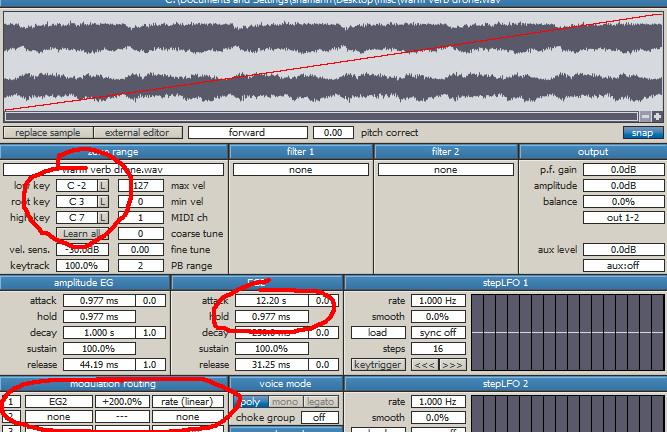
And will sound something like this on a 12-second clip:
http://www.sighup.ca/misc/slow2fast.mp3