
Oatmeal skin discussion - What you think?

VST, AU, AAX, CLAP, etc. Plugin Virtual Instruments Discussion
RELATED
PRODUCTS

Post

Firstly, I say thanks for aiming your talented effort towards improving this plugin. TBH, based on the GVST suite and Wusikstation etc, I don't care what you do because it will be good all the same :D suggestions and all.

I like the functional approach you stress before cosmetic appeal. Oatmeal is indeed quite congested, but I actually find the original skin to be quite well organised for something that small and complex at the same time. As long as it can fit in the screen then it's no problem. Something on the scale of Voyager or ugo's Motion is too big. I can't see all the controls in those plugins because my host doesn't allow scrolling. I think the size of Superwave P8 might be a good size for Oatmeal.

The seperating into sections you outlined as Modulation, Effects, Osc's etc should be mandatory for all complex synths :hihi: If the original skin had a colour, texture, or border scheme that worked with that in mind, it would immediately be 75% more workable IMO. Things are so much easier when you have a good cue to ignore (or concentrate on) certain parts of the GUI from time to time. The hardware look is usually very functional albeit very boring. I agree that Oatmeal could do with a little more 21st Cen. zip.

The two skin idea is pretty good, with the (darker :wink: ) gol-ish one being aimed for people like myself, and another more aesthetically pleasing one for those requiring visual synth appeal to get their creative juices running :lol: .

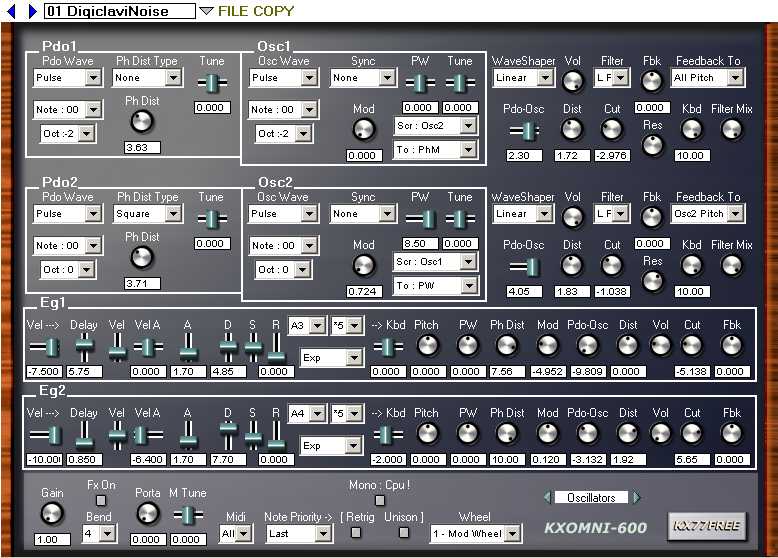
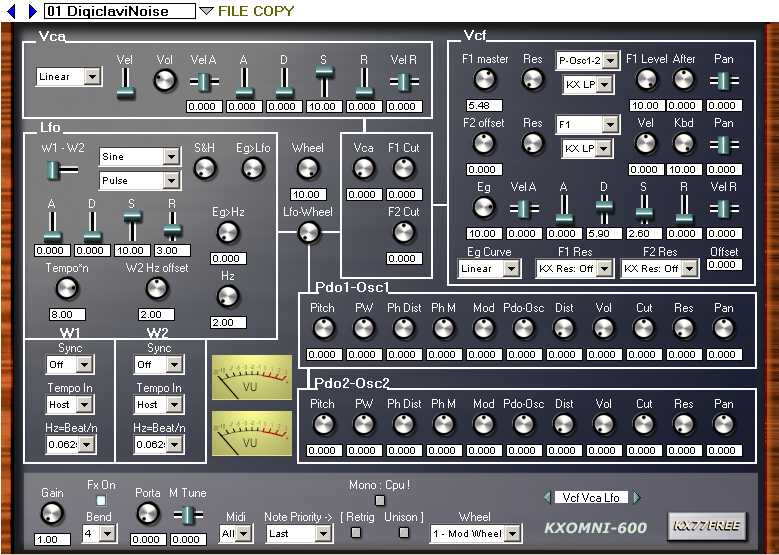
I've had GUI beef with only 2 synths to date and Oatmeal was not one of them. One was very recent and petty, and I can't remember what it was, but the big other was KX77FREE's Omni-600. These are the first two pages:
Image


Image

It has terrible workflow despite being a good aggressive and highly configurable PD synth. Even after I'd worked it for some time and learnt to use it, it's the organisation, not the simplistic look, that I find most difficult to work with; like the controls were kept where they landed, and the different parts could have used a little seperation, but even still, I use it all the same... so nothing like that please :lol: One is enough.


Bastions of clean and well organised synths among freebies:

- Alot of Synthmaker stuff - Anna, the Angular Momentum series, for example, are fantastic templates for exoteric and simplistic design.

- Boris K. as everyone would agree, organised some of the coolest looking, highly functional GUI's easily at par with or beyond anything I've seen in the realm of payware or otherwise.

- odo doesn't really have anything I can think of as complex as Oatmeal, but his synths never need any kind of explaining. And even when they're totally simple and monochrome, he has a way with those wicked metallic textures.

- Novakill, like BONES or not, always has highly functional GUI's that don't leave you guessing what's where. Simple and effective.

With their kind of functionality, you could hardly go wrong. Other than that, I say go nuts!!!

Post

Here is my 2 cents:
I found the original skin unusable, but with the bigger ones, the size is fine. I am currently using it with the red/white skin that looks like Albino (is it Yeager's?).
One more thing, I found the original positions of the save/load/skin..etc. buttons way too all-over-the-place. Putting all of these on top was certainly an excellent idea.
And if I have to add a 'cosmetic' wish here, what about something similar to Surge's interface? I find it both highly functional and nice looking at the same time.

Best.

Post

Looking good GJ, maybe I'll be able to finally ditch that godawful skin i designed... :D

Cygnus makes a good point about the buttons, they really need to be grouped together somewhere.

I know your feelings about having sliders for the envelopes :) so I'm not going to argue for knobs, I'll only mention I still have doubts about the sensitivity of the sliders in Oatmeal; they need a lot of mousing...

One other point, I think highlighting different functions within sections is important. For example a couple of the Yeager skins (mixed knobs one I think...) have a different background for the random/phase knobs, makes thins a lot easier. And bigger knobs for the important functions. I overlooked this and still have trouble quickly locating the filter cutoff (for instance...)

.g

Post

grymmjack wrote:

Code: Select all

[SOUNDSOURCE]
1. OSCILLATOR 1
  waveform menu
  edit button
  pulse width knob
  pwm rate knob
  pwm depth knob
  amp knob
  vel/at->pitch knob
  detune knob

2. OSCILLATOR MIX
  oscmix knob
  vel/at->amp knob

3. OSCILLATOR 2
  waveform menu
  edit button
  pulse width knob
  pwm rate knob
  pwm depth knob
  amp knob
  vel/at->pitch knob
  detune knob
  transpose knob

4. NOISE GENERATOR
  amp knob
  vel/at->noise amp knob
  resonance knob
  transpose knob

5. FILTER
  filter type menu
  cutoff knob
  resonance knob
  x2 parallel switch
    split knob
    mix knob
    speed ratio knob
  keytrack knob
  vel/at->cutoff knob
  envelope mod knob
  vel->env mod knob

6. FILTER ENVELOPE
  attack knob
  hold knob
  decay1 knob
  breakpoint knob
  decay2 knob
  sustain knob
  release knob

7. AMP ENVELOPE
  attack knob
  hold knob
  decay1 knob
  breakpoint knob
  decay2 knob
  sustain knob
  release knob


[EFFECTS]
8. DISTORTION
  type menu
  mode menu:
    global
    per voice (post-filter)
    per voice (pre-filter)
    double    (x2 pre and post filter)
  oversampling switch
  pre-gain knob
  limit knob
  post-gain knob

9. CHORUS
  mode menu:
    sine
    ramp
    fm
  width menu:
    mono
    stereo 1
    stereo 2
  rate knob
  delay knob
  delay range knob
  feedback knob
  mix knob
  voices knob

10. DELAY
  on/off toggle switch
  unit menu
  quantize switch
  input pan knob
  feedback rotation knob
  dry knob
  wet knob
  left:
    length knob
    feedback knob
    reverse switch
  right:
    length knob
    feedback knob
    reverse switch
  delay filter:
    lowpass knob
    highpass knob

11. REVERB
  on/off toggle switch
  room size knob
  decay time knob
  pre-delay knob
  early reflections knob
  dullness knob
  brightness knob
  parameters:
    1 knob
    2 knob
    3 knob
    rotate knob
  dry knob
  wet knob

12. EQ
  band 1:
    switch: off, peak/notch, low/high shelf
    freq knob
    amp knob
    q knob
  band 2:
    switch: off, peak/notch, low/high shelf
    freq knob
    amp knob
    q knob
  band 3:
    switch: off, peak/notch, low/high shelf
    freq knob
    amp knob
    q knob
  band 4:
    switch: off, peak/notch, low/high shelf
    freq knob
    amp knob
    q knob
  band 5:
    switch: off, peak/notch, low/high shelf
    freq knob
    amp knob
    q knob


[MODULATION]
13. PITCH ENVELOPE
  on/off toggle switch
  start knob
  attack knob
  peak knob
  decay knob
  sustain knob
  release knob
  vel->mod depth knob

14. MODULATION ENVELOPE 1
  attack knob
  hold knob
  decay 1 knob
  breakpoint knob
  decay 2 knob
  sustain knob
  release knob
  modulation target depth knob
  modulation target menu
  vel->mod depth knob

14. MODULATION ENVELOPE 2
  attack knob
  hold knob
  decay 1 knob
  breakpoint knob
  decay 2 knob
  sustain knob
  release knob
  modulation target depth knob
  modulation target menu
  vel->mod depth knob

15. LFO 1
  shape menu:
    sine
    saw
    square
    triangle
    smooth random
    stepping random
    user
  edit shape button
  mode menu:
    global
    per voice
  quantize toggle switch
  rate unit menu
  rate knob
  lfo1->cutoff knob
  lfo1->cutoff (x2) knob
  lfo1->resonance knob
  lfo1->pitch knob
  lfo1->pan knob
  mod lfo2 rate knob

16. LFO 2
  shape menu:
    sine
    saw
    square
    triangle
    smooth random
    stepping random
    user
  edit shape button
  mode menu:
    global
    per voice
  quantize toggle switch
  rate unit menu
  rate knob
  lfo2->cutoff knob
  lfo2->cutoff (x2) knob
  lfo2->resonance knob
  lfo2->pitch knob
  lfo2->pan knob
  mod lfo1 rate knob

17. X|Y PAD
  crosshair pad area
  1:
    modulation target depth knob
    modulation target menu
  2:
    modulation target depth knob
    modulation target menu
  3:
    modulation target depth knob
    modulation target menu
  4:
    modulation target depth knob
    modulation target menu
  5:
    modulation target depth knob
    modulation target menu
  6:
    modulation target depth knob
    modulation target menu
  7:
    modulation target depth knob
    modulation target menu
  8:
    modulation target depth knob
    modulation target menu
  midi cc->x menu
  midi cc->y menu
  random:
    radius knob
    rate knob

18. ARPEGGIATOR
  16 pattern slots
  pattern length slider under slots
  pattern types (fit inside of slot):
    off
    up, wrap to lowest
    up, no wrap
    down, wrap to lowest
    down, no wrap
    continue
    continue direction wrap
    continue direction bounce
    return to previous
    return to previous and go up
    go to highest held note
    go to lowest held note
    randomly go up or down wrap
    randomly go up or down no wrap
    random any note
  mode menu:
    pattern (multi subsequence)
    pattern (one subsequence)
    chord pattern
    chord
    transposed chords
  slot unit menu
  quantize toggle switch
  slot step rate knob
  note seq:
    1 toggle switch
    1 note pitch
    2 toggle switch
    2 note pitch
    3 toggle switch
    3 note pitch
    4 toggle switch
    4 note pitch
    5 toggle switch
    5 note pitch
    6 toggle switch
    6 note pitch
    7 toggle switch
    7 note pitch


[MASTER]
19. MASTER
  output gain knob
  velocity sensitivity knob
  aftertouch mode menu:
    polyphonic
    monophonic
  max poly knob
  poly mode menu:
    polyphonic
    monophonic
    legato
  glide knob
  glide mode scale menu
  pitch bend range knob
  global transpose knob
  key follow->pan knob
  key follow->pitch env
  random panning/voice knob
  random frequency/voice knob
  random amp/voice knob
  phase:
    osc:
      retrigger toggle switch
      initial phase knob
      phase range knob
    PWM:
      retrigger toggle switch
      initial phase knob
      phase range knob
    LFO:
      retrigger toggle switch
      initial phase knob
      phase range knob
  tuning:
    tune knob
    octave knob
    key follow->filter cut ref
    key follow->pan ref
    note a pitch knob
    note b pitch knob
    note c pitch knob
    note d pitch knob
    note e pitch knob
    note f pitch knob
    note g pitch knob


[MIDI CONTROL]
  channels:
    channel 1 toggle switch
    channel 2 toggle switch
    channel 3 toggle switch
    channel 4 toggle switch
    channel 5 toggle switch
    channel 6 toggle switch
    channel 7 toggle switch
    channel 8 toggle switch
    channel 9 toggle switch
    channel 10 toggle switch
    channel 11 toggle switch
    channel 12 toggle switch
    channel 13 toggle switch
    channel 14 toggle switch
    channel 15 toggle switch
    channel 16 toggle switch
  sustain toggle switch
  velocity ramp box
  aftertouch ramp box
  cc control slot 1:
    cc number menu
    modulation depth knob 1
    modulation target knob 1
    modulation depth knob 2
    modulation target knob 2
    modulation depth knob 3
    modulation target knob 3
    modulation depth knob 4
    modulation target knob 4
  cc control slot 2:
    cc number menu
    modulation depth knob 1
    modulation target knob 1
    modulation depth knob 2
    modulation target knob 2
    modulation depth knob 3
    modulation target knob 3
    modulation depth knob 4
    modulation target knob 4
  cc control slot 3:
    cc number menu
    modulation depth knob 1
    modulation target knob 1
    modulation depth knob 2
    modulation target knob 2
    modulation depth knob 3
    modulation target knob 3
    modulation depth knob 4
    modulation target knob 4
  cc control slot 4:
    cc number menu
    modulation depth knob 1
    modulation target knob 1
    modulation depth knob 2
    modulation target knob 2
    modulation depth knob 3
    modulation target knob 3
    modulation depth knob 4
    modulation target knob 4
  cc control slot 5:
    cc number menu
    modulation depth knob 1
    modulation target knob 1
    modulation depth knob 2
    modulation target knob 2
    modulation depth knob 3
    modulation target knob 3
    modulation depth knob 4
    modulation target knob 4
  cc control slot 6:
    cc number menu
    modulation depth knob 1
    modulation target knob 1
    modulation depth knob 2
    modulation target knob 2
    modulation depth knob 3
    modulation target knob 3
    modulation depth knob 4
    modulation target knob 4


[INTERFACE BUTTONS]
  about button
  skin button
  random button
  previous program button
  next program button
  panic button
  init patch button
  load bank button
  save bank button
  load patch button
  save patch button
  MIDI button
  MAIN button
now that just looks fugly

wheres the knobs?


:hihi:

Sorry :oops:

Post

Updated first post in this thread with recent version.

Oh yeah and I'm thinking of doing the mac thing and offering flavors ;)

Maple & Cinnamon, Apple, Blueberry, Mixed Fruit, etc.

Colors for each will be different according to the theme (maple/cinnamon = current, apple = green, blueberry = blue, mixed fruit = pastel? (not sure))

Post

Looking pretty slick so far.

Post

I :love: Oatmeal!
The first impression looks great already. I mostly hit the random button on Oatmeal and tweak the results, partly because I'm lazy, party because I'm a bad preset programmer and party because the results can be so refreshing and original.
But certainly a new layout with a clearer workflow will be a great help. Can't wait, I know it's going to be great! :hug:
Rekkerd.org the latest news on audio plugins, sample libraries & virtual instruments, synth presets & more.
Don't click here if you can't control yourself!

Post

OMG OMG OMG!!!! grymmjack is making a gui for oatmeal!!!!

that wip looks great already....

oh and i love the oatmeal logo u made - awesome!

Post

we will finish eventually the current project no worry.
Ok great, thanks rick :D :tu:
Image

Post

I'm already excited that you are doing an oatmeal skin grymmjack.
You seem to have the knack of not only making things pleasing on the eye, but also laying them out in such a way that they are a pleasure to use.
Luverly Jubberly :D

Post

grymmjack wrote: Here is the most recent rendition of the UI:
Image
Looks great :tu:

Post

the size, the font, the color scheme is really fine to me ;)

Post

:lol:

man I don't need to skin Oatmeal after all - except for the bold type that's just awesomely perfect. The big type is too blurry.

Post

@jon; Thanks! Yeah I know label text is a bit blurry. I need to pixel by pixel them once everything is ready right now it's my own version of Bitsumishi called Grymmsumishi (yes lame) which is a pixel only version of Bitsumishi and sized way way down.

I'll fix before release don't worry.

Post

fixed the text. :)

Post Reply

Return to “Instruments”