New (or rather, very old :-) Synth in town

VST, AU, AAX, CLAP, etc. Plugin Virtual Instruments Discussion
Post Reply New Topic

Would you consider buying a complete version of this?

No. Old crap. Who needs it?
18
12%
No. Got the original. Much better 8)
2
1%
Maybe, but I don't see the sense in emulating old technology, with so many better VSTis around
13
9%
Maybe, but I don't see the sense in emulating old technology, with so many better VSTis around
13
9%
Maybe.
32
21%
Maybe, but only if you shell out the bucks 'n' build a Mac version
14
9%
Yes, unless the price tag is outrageous for my taste,
47
32%
Definitely!
10
7%
 
Total votes: 149

RELATED
PRODUCTS

Post

arakula wrote:
fmr wrote:Are you planning to create a Waveterm simulation that works together (or better yet - INSIDE) your WaverSim?
Works together - yes. Works inside - presumably not.
When will this version be ready? And will it read WAV files, or do we have to record them, as we had in the real Waveterm? Can we also create waves using Additive Synhtesis?
arakula wrote:
fmr wrote:The current Waveterm software you created doesn't seem to work this way, right?
Oh, it does... with the right drivers (not included in the Wave 2.2 V6 bundle), Waveterm C can already work with the simulation. It's not absolutely satisfactory yet (presumably the same problem as with the EVU simulation), but I've had much fun with T040 already 8-)
I tried with the Waveterm C Demo nd the WaveSim that comes bundled with it, and I wasn't able to do very much. But I never worked with a Waveterm, so, I must confess I was completely lost. I saw options for recording, but nothing for creating waves. Anyway, I would love a complete system in software, but with the ability to work with the mouse too - no need to exaggerate in the emulation ;-)
(even the Fairlight already allowed us to work with a light pen directly on the monitor, right?)
Fernando (FMR)

Post

Thank you, Hermann!

I noticed one small problem in my host (Cubase SL 1.06). WaveSim presents two stereo outputs, "Stereo L" and "Stereo R". Both channels work on Stereo R, but only the left channel works on Stereo L. In other words, the right channel of Stereo L is missing.

Post

logicgate wrote:Thank you, Hermann!

I noticed one small problem in my host (Cubase SL 1.06). WaveSim presents two stereo outputs, "Stereo L" and "Stereo R". Both channels work on Stereo R, but only the left channel works on Stereo L. In other words, the right channel of Stereo L is missing.
... ah. Looks like I have to have a test session with Cubase <sigh>... that's an area where the VST SDK documentation is definitely not good enough.
Thanks for telling me!
"Until you spread your wings, you'll have no idea how far you can walk." Image

Post

fmr wrote:
arakula wrote:
fmr wrote:Are you planning to create a Waveterm simulation that works together (or better yet - INSIDE) your WaverSim?
Works together - yes. Works inside - presumably not.
When will this version be ready? And will it read WAV files, or do we have to record them, as we had in the real Waveterm? Can we also create waves using Additive Synhtesis?
It does read .wav files, and you can record them, too, if you really want to. "Additive Synthesis"... you can create your own wavetables with it. Creating a wavetable works by first defining a set of single Waves (a "Wave" is a single period of a sound), which are defined by setting up their partials. Then, you can put these single waves into specific positions in a Wavetable. You don't have to fill every slot in the Wavetable, the empty ones are interpolated.
fmr wrote:
arakula wrote:
fmr wrote:The current Waveterm software you created doesn't seem to work this way, right?
Oh, it does... with the right drivers (not included in the Wave 2.2 V6 bundle), Waveterm C can already work with the simulation. It's not absolutely satisfactory yet (presumably the same problem as with the EVU simulation), but I've had much fun with T040 already 8-)
I tried with the Waveterm C Demo nd the WaveSim that comes bundled with it, and I wasn't able to do very much. But I never worked with a Waveterm, so, I must confess I was completely lost. I saw options for recording, but nothing for creating waves. Anyway, I would love a complete system in software, but with the ability to work with the mouse too - no need to exaggerate in the emulation ;-)
(even the Fairlight already allowed us to work with a light pen directly on the monitor, right?)
You might want to take a look at the Waveterm A/B documentation. It helps. Unfortunately, I don't have that on my web site, since this only hosts the documents that I scanned and processed myself - a relatively good one can be found on Paul Maddox' PPG CD-ROM, however.

First of all, please make sure to use Waveterm C in the Waveterm B mode. The A mode is OK, too, but only for people who are experienced with it - it mimics a computer that was built in 1980 or so. Not really for the faint of heart. The B mode is better insofar that the Waveterm B already had a rather elaborate concept of input and display fields on the screen. Waveterm C in B mode is "mouse-enabled" to a high degree - you can, for example, click on an input field to go there and enter values there. Drawing a wave with the mouse works, too. Input fields are using the mouse wheel to change their values, and so on.

That said, I know that it's not even remotely complete yet, and I can't really give a time frame for this.
"Until you spread your wings, you'll have no idea how far you can walk." Image

Post

great stuff, sounds good. Cpu usage hits around 20 % when heavily automated in Renoise 1.8 + playing 4 note chords. Doesn't really seem to make a big difference tho wether I play chords or have randon automation assigned to all the parameters (cpu without automation & chords = 19 % :).

btw running PIV 3.6 ghz, echo indigo i/o asio (+ a bunch of torrents in the background)

Post

Scot Solida wrote:
arakula wrote:I've just uploaded a new version, together with 12 Wave 2.3 sound banks converted into WaveSim's bank format, and a conversion program that can convert between PPG Wave V8 SysEx files, Waldorf PPG Wave 2.V banks (Steinberg version only, haven't got the new one yet), WaveSim banks plus some other formats. Have fun!
Wow! This is some really good work you are doing! I am definitely going to put the PC back into my studio rack this afternoon just to make some use of this stuff.
Now this is really an endorsement.
I reckon if Scot Solida is ready to do something like this then you must be on the right track somewhere.

:hihi:

Regards
Caleb
Happiness is the hidden behind the obvious.

Post

noizetronic wrote:+1 for 'things on gui are difficult to read'.
+1

this sounds really amazing. I dont own an original, but I've always regarded Waldorf's as one of my favorites, so this one is a welcomed change for that PPG sound.

Post

Compyfox, Are you out there? It looks like you have another good VSTi to add to your page of re-creations/clones. :-)

Post

arakula wrote:
bmanic wrote:This is quite interesting but didn't the real PPG wave have an analogue filter and output path? That surely must be a big part of the color of the sound as well.
Yep, and that's where I'm not absolutely satisfied with my recreation yet. But - don't overestimate it. The Wavetable (in the PPG/Waldorf sense) sound generation is much more important for this distinctive "this is a PPG" sound.

[Edit:] oh yeah... and if someone has an accurate mathematical or pseudocode description of a SSM2044 VCF or CEM 3360 VCA, that would make me really, really, really happy! 8-)
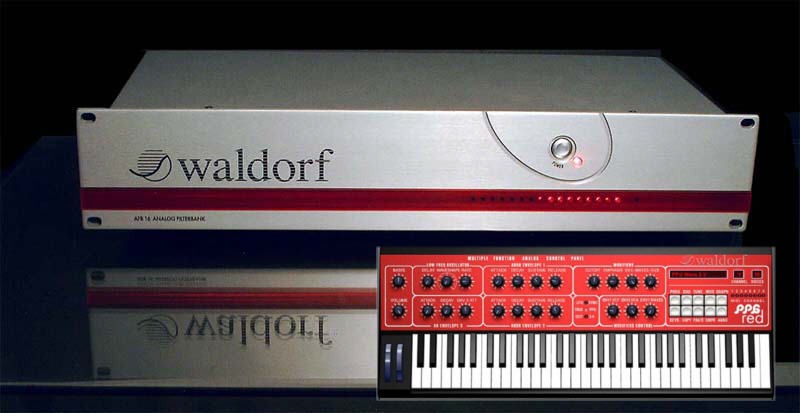
Waldorf made a one space rack unit that contains 16 (i think?) analog filters that would mate up to the PPG 2.V... so it integrates into your software via USB.

it was called the AFB16...

Post

dirty oscillators wrote:Waldorf made a one space rack unit that contains 16 (i think?) analog filters that would mate up to the PPG 2.V... so it integrates into your software via USB.

it was called the AFB16...
16 Analog Filters, yes. 2 rack units.

Unfortunately, the price was very high, and the compatibility was relatively restricted (only worked reliably with some NEC USB chips, IIRC). Only a few of these ever made it to the market. With the package, there came a special version of the 2.V - the "PPG Wave Red" (red UI instead of the standard blue one) that used the AFB-16's filters.

If this Web Archive thingie worked reliably, you could find a description here. Sometimes the link works, sometimes it doesn't.

[Edit:] here's a little image to show you the thing and the PPG Red:

Image
"Until you spread your wings, you'll have no idea how far you can walk." Image

Post

Hi, just trying this now. Wow, this is really good! I have the Waldorf emulation which is great, never been able to get a hardware PPG (but always wanted one, bit put off by warning of unreliability). This one seems les clinical than the Waldorf emulation, I think I can hear small drifts..but that might just be a fantasy on my part.

Someone mentioned stereo in Cubase. I have Cubase SX3 and although it appears in the mixer as "stereo L" with the bias full up it's panning as I would expect.

I think the GUI needs a little work, as others have said the writing is a bit small and it's very flat.

As to functionality, as it is it emulates the Wave? I think you were saying the future it may be able to import the waveterm samples (I think I got mine from Til Kopper).

Edit: just noticed it doesn't seem to save the sounds with Cubase SX3, ie it reverts to the first sound. It doesn't seem to store presets either.

You also mentioned documentation. I have a pdf copy of Dominic Milano's manual for the 2.3 in English. I cannot remember where I got it from, but Arakula, if you want it I'm happy to send a copy to you for your website. I've also sent a small donation and look forward to further developments.
Pastoral, Kosmiche, Ambient Music https://markgriffiths.bandcamp.com/
Experimental Music https://markdaltongriffiths.bandcamp.com/

Post

ChamomileShark wrote:Hi, just trying this now. Wow, this is really good! I have the Waldorf emulation which is great, never been able to get a hardware PPG (but always wanted one, bit put off by warning of unreliability). This one seems les clinical than the Waldorf emulation, I think I can hear small drifts..
Might well be... the oscillators are not synchronized, just like the original. IIRC, the Waldorf Wave 2.V does roughly the same in "True PPG" mode.
ChamomileShark wrote:Someone mentioned stereo in Cubase. I have Cubase SX3 and although it appears in the mixer as "stereo L" with the bias full up it's panning as I would expect.
Next version should simply give 2 channels, which should work in every host.
ChamomileShark wrote:I think the GUI needs a little work, as others have said the writing is a bit small and it's very flat.
Yep. But, as I have to admit, GUI polishing isn't my top priority with this thing. It has to WORK first.
ChamomileShark wrote:As to functionality, as it is it emulates the Wave?
Yes - a PPG Wave 2.2 with V6 operating system. As precisely as I can manage.
ChamomileShark wrote:I think you were saying the future it may be able to import the waveterm samples (I think I got mine from Til Kopper).
Yes and no - not from the original Waveterm, that would mean to create a hardware adapter, but from a Waveterm emulation.
ChamomileShark wrote:You also mentioned documentation. I have a pdf copy of Dominic Milano's manual for the 2.3 in English. I cannot remember where I got it from, but Arakula, if you want it I'm happy to send a copy to you for your website.
Thank you, but I'm owner of (and contributor to) the PPG CD-ROM, which contains this manual... and I have about 3 or 4 original PPG documentations (the paper ones) 8-)
On my web site, I only offer documents that I scanned and processed (or wrote) myself; I think it would be unfair to use other people's work, unless the authors/creators explicitly allow me to do so.
"Until you spread your wings, you'll have no idea how far you can walk." Image

Post

arakula wrote:
dirty oscillators wrote:Waldorf made a one space rack unit that contains 16 (i think?) analog filters that would mate up to the PPG 2.V... so it integrates into your software via USB.

it was called the AFB16...
16 Analog Filters, yes. 2 rack units.

Unfortunately, the price was very high, and the compatibility was relatively restricted (only worked reliably with some NEC USB chips, IIRC). Only a few of these ever made it to the market. With the package, there came a special version of the 2.V - the "PPG Wave Red" (red UI instead of the standard blue one) that used the AFB-16's filters.
yeah, and from what i read it was only useful with a couple Waldorf VST's... it's a great idea and it compliments the digital realm of VST's. i think if they priced it lower, allowed it to patch up with any VST(i), and had a little better marketing plan it would have been superb. and maybe i'd be able to have one in my studio!

Post

absolute fantastic stuff !!!

keep on !

Post

Thanks arakula, you probably didn't see my edit..I found that the sound programdoesn't save in Cubase SX3, when the project comes back up it reverts to the first sound in the bank. I usually create my own presets and just hit store preset, that doesn't seem to work in Cubase..but I may not be using it correctly, it just acts differently to the other vsts i have.

It does sound lovely, though!
Pastoral, Kosmiche, Ambient Music https://markgriffiths.bandcamp.com/
Experimental Music https://markdaltongriffiths.bandcamp.com/

Post Reply

Return to “Instruments”