


What the !!! Has anyone even seen this!!??

-
- KVRAF
- 6242 posts since 26 Sep, 2003 from right here, as you can see ...
hmmm ... that could be a good info for wallander, maybe he can track down that issue within the plugin, so it will eventually work without problems on matrox cards, as these cards are still used a lot ... we'll see ...MaxSynths wrote:Brok Landers: "well, it could be that my card is the issue ... it's a matrox g550"
Well mine is a Matrox G400 Dual Head. So now we know it's something related with Matrox cards.
regards,
brok landers
BIGTONEsounddesign
gear is as good as the innovation behind it-the man
brok landers
BIGTONEsounddesign
gear is as good as the innovation behind it-the man
-

- KVRian
- 759 posts since 10 Aug, 2004 from Fredericton NB
Could someone point me to the demo?

-
- KVRAF
- 6242 posts since 26 Sep, 2003 from right here, as you can see ...
products > scroll down to the bottom ...
regards,
brok landers
BIGTONEsounddesign
gear is as good as the innovation behind it-the man
brok landers
BIGTONEsounddesign
gear is as good as the innovation behind it-the man
-
- KVRian
- 759 posts since 10 Aug, 2004 from Fredericton NB
Oh k, it was just a little conspicuous 
-

- KVRist
- 91 posts since 13 May, 2007
Hmm, what kind of error do you get? If DirectX 9 isn't found, WIVI will automatically prompt you about this and revert to OpenGL mode, in which it doesn't depend on DirectX. If the error is displayed by Direct3D/DirectX, you do have the necessary DirectX software installed, but your graphics card driver don't support DirectX 9 and higher (typically).MaxSynths wrote:Well I can remember the WIVI instrument is something has been already discussed here... Anyway I'm unable to try the demo, as I load the instruments it prompt me with an error message about Direct3D and the loading is aborted...I have the latest DirextX installed etc. etc. I remember I had some talking with the author but I can't still try this baby.
Have you too tried running "WIVI settings" and switched graphics driver to OpenGL or Software rendering? Only the Direct3D mode is dependent on DirectX. Also in WIVI settings, make sure that "texture compression" is turned off. WIVI should handle this automatically, but just in case your card reports that it handles it when it shouldn't.
About tracking down the error for Matrox cards (if that's the problem), unfortunately WIVI has little control over issues like that. Applications communicate with Direct3D independently of your graphics card, and your graphics card driver takes care of all that happends after that. Not a very satisfying answer I know, sorry. This is why an OpenGL driver and a Software driver was included with WIVI. At least the Software renderer should work on any graphics card, because it doesn't use hardware acceleration.
Unfortunately it's not that easy. There's a special integration between the reverb and the instruments in WIVI, and all instruments are inherently multi-channeled. One major reason why the reverb sounds as it does is that the spatial properties are calculated accurately for all instruments separately, and there are also filters, stereo widths, etc used on these separate layers to more truthfully model the behavior of a real acoustic environment.brok landers wrote:that reverb sounds just great, at least from what i could hear from the instrument!
it's well known here on kvr that i'm a real reverb enthusiast, so i'm not easy with statements like this ... Wink seriously, you should consider to make the reverb availlable for purchase individually ...
of course i can say more, if i can try the reverb isolated on whatever inputsignal ... so the final judge is about to be given after that of course ... but what i've heard sofar is _really_ impressive!
another question:
are you from germany?
So at a direct comparison/quality measurement I think you'd agree with me that the actual reverb unit (taking away the filters) isn't that ground-breaking, although it's unusually easy on your CPU, even for a synthetic reverb. Don't get me wrong, it's a great reverb
but the combination with the filters are more important to the overall sound.Not from Germany, But I'm in Stockholm, Sweden, so it's not that far.
Arne @ noteperformer.com
-
- KVRAF
- 4585 posts since 2 Nov, 2006
@Wallander: in OpenGL i have this error message:
"Can't Set The PixelFormat" .
In Direct3D mode the error message says:
"Exception EAccessViolation in module WIVI Trial Edition.dll at 00052DE7.
Access violation at address 02502DE7 in module WIVI Trial Edition.dll. Read of address 00000000"
in software mode: it works!!!
Well anyway it's a weird behaviour... I've tried every combination before and this is the first time I succeed to load it. Ok go to try the plugin
Thank you Wallander for the support.
"Can't Set The PixelFormat" .
In Direct3D mode the error message says:
"Exception EAccessViolation in module WIVI Trial Edition.dll at 00052DE7.
Access violation at address 02502DE7 in module WIVI Trial Edition.dll. Read of address 00000000"
in software mode: it works!!!
Well anyway it's a weird behaviour... I've tried every combination before and this is the first time I succeed to load it. Ok go to try the plugin
Thank you Wallander for the support.
-
- KVRist
- 91 posts since 13 May, 2007
Oh, ok. I suspect something which could be causing this, but that's a definite driver bug if I'm right, unfortunately (and I don't think there's anything we can do about it). Since WIVI is a windowed plugin it can be opened/displayed in several windows at once. These windows need to share data, and your card might not fully support that.MaxSynths wrote:@Wallander: in OpenGL i have this error message:
"Can't Set The PixelFormat" .
In Direct3D mode the error message says:
"Exception EAccessViolation in module WIVI Trial Edition.dll at 00052DE7.
Access violation at address 02502DE7 in module WIVI Trial Edition.dll. Read of address 00000000"
in software mode: it works!!!
Well anyway it's a weird behaviour... I've tried every combination before and this is the first time I succeed to load it. Ok go to try the plugin
Thank you Wallander for the support.
But the fact that it works in Software rendering mode is great news
. The interface becomes a bit slower when not hardware accelerated, but other than that there's nothing stopping you from sticking to Software rendering. It's always a bit tricky when you use hardware-acceleration, because then the card takes care of a lot of the graphics functionality on-board, and if the card doesn't implement it correctly you can run into problems. Luckily, software rendering is very reliable.
brok, it still didn't work out for you, did it?
Arne @ noteperformer.com
-
- KVRAF
- 7886 posts since 24 Feb, 2003 from Earth, USA
Brok, it's not your card. I just demoed WIVI last night, it works fine with my G550 card. I had to upgrade from a G450 to a G550 because the 450 didn't work with my UAD-1 card.brok landers wrote:well, it could be that my card is the issue ... it's a matrox g550, it's old, but i _never_ had problems with it whatsoever ... the drivers are the newest ...Wallander wrote:brok,
That sounds awkward, as I'm pretty sure others aren't experiencing these issues in any graphics mode. Especially in Software rendering mode it should work on just about any PC setup, because that mode uses native Windows graphics to draw the GUI. Btw, what OS are you on, XP? You're not running Windows on Linux through WINE or something like that?
Devon
Simple music philosophy - Those who can, make music. Those who can't, make excuses.
Read my VST reviews at Traxmusic!
Read my VST reviews at Traxmusic!
-
- KVRAF
- 6242 posts since 26 Sep, 2003 from right here, as you can see ...
wallander,
i updated directX to the newest version.
i also updated to the newest driver, now i'm getting the following error msg
with direct 3d:

before i updated, i had the following screens:
direct 3d:

openGL:
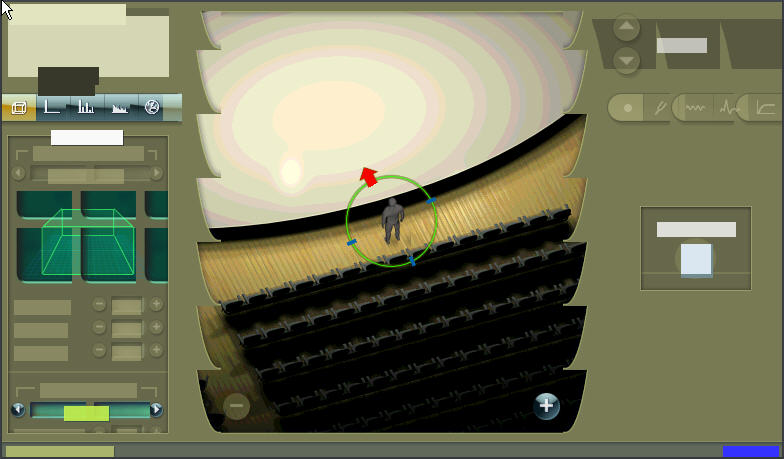
software renderer:

due the updating, i can't get the plugin to start anymore, so i can't access the other modes anymore ...
edit: i wasn't able to access any parameter on the gui ...
what to do now?
everything else is still running fine here ... even blender (a 3d software, as you probably know already) works fine ...
i updated directX to the newest version.
i also updated to the newest driver, now i'm getting the following error msg
with direct 3d:
before i updated, i had the following screens:
direct 3d:
openGL:
software renderer:
due the updating, i can't get the plugin to start anymore, so i can't access the other modes anymore ...
edit: i wasn't able to access any parameter on the gui ...
what to do now?
everything else is still running fine here ... even blender (a 3d software, as you probably know already) works fine ...
Last edited by brok landers on Thu Aug 09, 2007 10:22 pm, edited 1 time in total.
regards,
brok landers
BIGTONEsounddesign
gear is as good as the innovation behind it-the man
brok landers
BIGTONEsounddesign
gear is as good as the innovation behind it-the man
-
- KVRAF
- 4222 posts since 23 Feb, 2004 from Tucson Arizona USA
Yuck. What's with the dynamic range in the OpenGL version?
-
- KVRAF
- 6242 posts since 26 Sep, 2003 from right here, as you can see ...
hmm ... i assume the same, check above ...DevonB wrote:Brok, it's not your card. I just demoed WIVI last night, it works fine with my G550 card. I had to upgrade from a G450 to a G550 because the 450 didn't work with my UAD-1 card.brok landers wrote:well, it could be that my card is the issue ... it's a matrox g550, it's old, but i _never_ had problems with it whatsoever ... the drivers are the newest ...Wallander wrote:brok,
That sounds awkward, as I'm pretty sure others aren't experiencing these issues in any graphics mode. Especially in Software rendering mode it should work on just about any PC setup, because that mode uses native Windows graphics to draw the GUI. Btw, what OS are you on, XP? You're not running Windows on Linux through WINE or something like that?
Devon
regards,
brok landers
BIGTONEsounddesign
gear is as good as the innovation behind it-the man
brok landers
BIGTONEsounddesign
gear is as good as the innovation behind it-the man
-
- KVRAF
- 6242 posts since 26 Sep, 2003 from right here, as you can see ...
like i said, i can't access the other modes anymore, as the plugin doesn't load anymore ...james0tucson wrote:Yuck. What's with the dynamic range in the OpenGL version?
regards,
brok landers
BIGTONEsounddesign
gear is as good as the innovation behind it-the man
brok landers
BIGTONEsounddesign
gear is as good as the innovation behind it-the man
-
- KVRAF
- 7886 posts since 24 Feb, 2003 from Earth, USA
What version of the G550 drivers are you running?brok landers wrote:hmm ... i assume the same, check above ...DevonB wrote:Brok, it's not your card. I just demoed WIVI last night, it works fine with my G550 card. I had to upgrade from a G450 to a G550 because the 450 didn't work with my UAD-1 card.brok landers wrote:well, it could be that my card is the issue ... it's a matrox g550, it's old, but i _never_ had problems with it whatsoever ... the drivers are the newest ...Wallander wrote:brok,
That sounds awkward, as I'm pretty sure others aren't experiencing these issues in any graphics mode. Especially in Software rendering mode it should work on just about any PC setup, because that mode uses native Windows graphics to draw the GUI. Btw, what OS are you on, XP? You're not running Windows on Linux through WINE or something like that?
Devon
Devon
Simple music philosophy - Those who can, make music. Those who can't, make excuses.
Read my VST reviews at Traxmusic!
Read my VST reviews at Traxmusic!
-
- KVRAF
- 6242 posts since 26 Sep, 2003 from right here, as you can see ...
5.99.005 ...
regards,
brok landers
BIGTONEsounddesign
gear is as good as the innovation behind it-the man
brok landers
BIGTONEsounddesign
gear is as good as the innovation behind it-the man