

In cubase, you will need to make a midi track with the plugin midi output as an input, and your hardware midi out (that is linked to your v-amp) as an output; ok? So this midi track works like a cable.
Then, you can also make a midi track with vst-amp loaded as an output if you wish to automate it (like you would with any vsti).
Then, you open the GUI, and don't forget to let the midi cable-track selected! If a track isn't selected in cubase, it won't send midi, as far as I know.
So to make it short:
vst-amp loaded as a midi device for track input
+ your hardware midi ouput loaded instead of a vsti
+ the track hilighted.

FREE V-amps and Bass-V-amps vst controllers
-
- KVRian
- Topic Starter
- 830 posts since 9 Aug, 2004 from Berlin
-
- KVRAF
- 2108 posts since 31 Dec, 2002 from London, UK
Great. I downloaded this. Since this thread was started I've sold my guitar though, as I couldn't (wouldn't) play, so I'm stuck with various sample libraries. I've still got the V-amp2 though, as the power socket is a bit knackered and therefore impossible to sell.
So somehow I'd have to route my guitar library out from the PC to the V-amp 2 and then back in. Not even sure how to do that.
I'd love to test this though
Keep up the good work.
So somehow I'd have to route my guitar library out from the PC to the V-amp 2 and then back in. Not even sure how to do that.
I'd love to test this though
Keep up the good work.
-
- KVRian
- Topic Starter
- 830 posts since 9 Aug, 2004 from Berlin
I updated the v-amp, (the amp change was set to cc19 instead of 61, so it was always changing cab).
http://mokafix.chez-alice.fr/vst/divers ... .part1.rar
http://mokafix.chez-alice.fr/vst/divers ... .part2.rar
And also I did a new bass v-amp version:
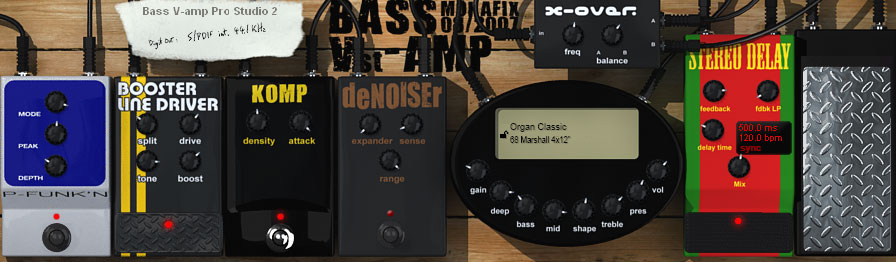
http://mokafix.chez-alice.fr/vst/divers/bassvampgui.jpg
http://mokafix.chez-alice.fr/vst/divers ... .part1.rar
http://mokafix.chez-alice.fr/vst/divers ... .part2.rar
There are still some improvements to do on the gui, but I don't own a bass v-amp myself, and I'd like to know if everything is ok.
So if you own one, please try it and report the bugs if any.
ALSO, I'd like to know some things :
- What does the "global FX on/off" is for? I mean there's already a "bypass" in the FX selection (#15), so I don't get the use of anothe button.
Or does it also turn the disto comp etc off?
Please tell me.
- are the delay loop controls ok? (play, rec, stop,etc.) i did them like they are on v-amp editor (stepped or click buttons), but had some doubts. for instance, shouldn't the play button stay on while playing?
http://mokafix.chez-alice.fr/vst/divers ... .part1.rar
http://mokafix.chez-alice.fr/vst/divers ... .part2.rar
And also I did a new bass v-amp version:
http://mokafix.chez-alice.fr/vst/divers/bassvampgui.jpg
http://mokafix.chez-alice.fr/vst/divers ... .part1.rar
http://mokafix.chez-alice.fr/vst/divers ... .part2.rar
There are still some improvements to do on the gui, but I don't own a bass v-amp myself, and I'd like to know if everything is ok.
So if you own one, please try it and report the bugs if any.
ALSO, I'd like to know some things :
- What does the "global FX on/off" is for? I mean there's already a "bypass" in the FX selection (#15), so I don't get the use of anothe button.
Or does it also turn the disto comp etc off?
Please tell me.
- are the delay loop controls ok? (play, rec, stop,etc.) i did them like they are on v-amp editor (stepped or click buttons), but had some doubts. for instance, shouldn't the play button stay on while playing?
Last edited by Mokafix on Tue Aug 28, 2007 8:18 pm, edited 1 time in total.
-
- KVRist
- 46 posts since 30 Nov, 2006
Thanks for these. I have a V-amp and bass V-amp and this will be very helpful tools. I'm getting errors though trying to download the Bass V-amp files.
I think the 'bypass' is for amp/cab simulation or it could be for the stompbox section. It could also simply be 'No effect' which is also available in the #15 slot in the effect dropdown menu of the Bass V-Amp software. When I can get your files I'll see how that works.
I think the 'bypass' is for amp/cab simulation or it could be for the stompbox section. It could also simply be 'No effect' which is also available in the #15 slot in the effect dropdown menu of the Bass V-Amp software. When I can get your files I'll see how that works.
-
- KVRian
- Topic Starter
- 830 posts since 9 Aug, 2004 from Berlin
I made a mistake in the link : forgot the ".rar" 
Anyway, about the bypass, it's in the Bass v-amp:
you have a bypass choice for amps (choice #32), for cabs (choice #0), for post FX (choice #15), and a "global FX on/off", but I don't know exactly what it is supposed to bypass.
Anyway, you can bypass anything with my GUI, as you have on/off switches on every stomp boxes.
BTW, I also added a choice for the volume pedal. It can switch from output volume to input gain. the two pedals are separated, so when you switch, you actually change the display, but the changes you did on a pedal are kept when you switch.
Anyway, about the bypass, it's in the Bass v-amp:
you have a bypass choice for amps (choice #32), for cabs (choice #0), for post FX (choice #15), and a "global FX on/off", but I don't know exactly what it is supposed to bypass.
Anyway, you can bypass anything with my GUI, as you have on/off switches on every stomp boxes.
BTW, I also added a choice for the volume pedal. It can switch from output volume to input gain. the two pedals are separated, so when you switch, you actually change the display, but the changes you did on a pedal are kept when you switch.
-
- KVRian
- Topic Starter
- 830 posts since 9 Aug, 2004 from Berlin
Ok, I fixed the link.
I tested both archives and links, and everythings seems ok now.
Thanks for telling me!
Please also report me if any bug.
And if it works fluently, keep me posted too
I tested both archives and links, and everythings seems ok now.
Thanks for telling me!
Please also report me if any bug.
And if it works fluently, keep me posted too
-
- KVRian
- Topic Starter
- 830 posts since 9 Aug, 2004 from Berlin
oops.
edit error, but kind of bump now I guess...
has anyone try the bass version BTW? does it work?
do the sampler controls work?
edit error, but kind of bump now I guess...
has anyone try the bass version BTW? does it work?
do the sampler controls work?
-
- KVRist
- 46 posts since 30 Nov, 2006
I've been trying to get these to work but can't figure it out. I have the V-amp and Bass V-amp and tried FL Studio and Cubase. The V-amps just don't respond at all. Do the plugins go to a certain midi channel or can that be set? I have Sonar LE, Ableton Live 6, and EnergyXT that I'll try them in next.
-
- KVRian
- Topic Starter
- 830 posts since 9 Aug, 2004 from Berlin
you just need to make the midi output of the plugins feed midi input of v-amp. in cubase it's done as explained on top of this page, for others, I have no idea...
-
- KVRist
- 46 posts since 30 Nov, 2006
I'll keep working at it in the next couple days and will let you know how it goes. My version of Cubase is VST5, so it's a little older version but should work as far as routings. Just need to be persistent. I'll let you know how it all goes and what steps are needed in these other versions if they end up working. Hope I can get it to work as this would be an escellent way to control the -amps.
-
- KVRian
- Topic Starter
- 830 posts since 9 Aug, 2004 from Berlin
As I officially announced the release on KVR, I might have some questions from more people, so if the guys here who had successful experiences in using it could describe the host they have and the steps they followed, it would be nice. I'd take thos infos and put them on my website.
Thanks in advance.
Thanks in advance.
-

- KVRAF
- 2818 posts since 30 Aug, 2001 from where dinosaurs are still alive
oh, wow.
just got a bass v-amp for dirt cheap, few days ago..and I quite like it too..so this virtual controller is VERY welcomed here.
on a first look the gui is gorgeous (as always), the pedals-swapping is quite funky, and it makes ma want to test it asap.

just got a bass v-amp for dirt cheap, few days ago..and I quite like it too..so this virtual controller is VERY welcomed here.
on a first look the gui is gorgeous (as always), the pedals-swapping is quite funky, and it makes ma want to test it asap.