

Hi all,
the LinuxSampler development team is happy to announce the first official release of LinuxSampler for Windows.
Due to its young nature expect possible issues.
get the windows installer from:
http://www.linuxsampler.org/
windows quickstart howto:
http://www.linuxsampler.org/windows.html
screenshot:
http://www.linuxsampler.org/screenshots ... emiere.png

Free LinuxSampler 0.5.1 for Windows released (ASIO)
-

- KVRAF
- 10286 posts since 17 Sep, 2004 from Austin, TX
The idea of running networked VSTs on both Linux and Win machines is certainly intriguing.
The screenshot, which I imagine is more informative than the quickstart, link is broken.
Once you have 5 posts the links will be active here on KVR, too.
And welcome
The screenshot, which I imagine is more informative than the quickstart, link is broken.
Once you have 5 posts the links will be active here on KVR, too.
And welcome
-

- KVRAF
- 3846 posts since 15 Mar, 2002 from Underworld
This sounds very very interesting and promising, thanks for the linkage mate! Seems like it has nicely implemented Giga support..., that's real cool.
Linux software coming to Windows is a very positive thing, as more people get "addicted" to Linux software, the more people will easier cross over to Linux, later.
Cheers!
Linux software coming to Windows is a very positive thing, as more people get "addicted" to Linux software, the more people will easier cross over to Linux, later.
Cheers!
It is no measure of health to be well adjusted to a profoundly sick society. - Jiddu Krishnamurti
-
- KVRer
- Topic Starter
- 27 posts since 18 Nov, 2007
thanks for the feedback.
yes VST cross-platform networking will be useful because you can combine
the ease of windows with the raw power of cheap and stable linux machines.
I will keep you posted as things develop. For now an important milestone was achieved in supporting the windows platform.
and having exactly the same software on both linux and windows (and OS X) allows you to evaluate its performance on each platform.
the screenshot is here:
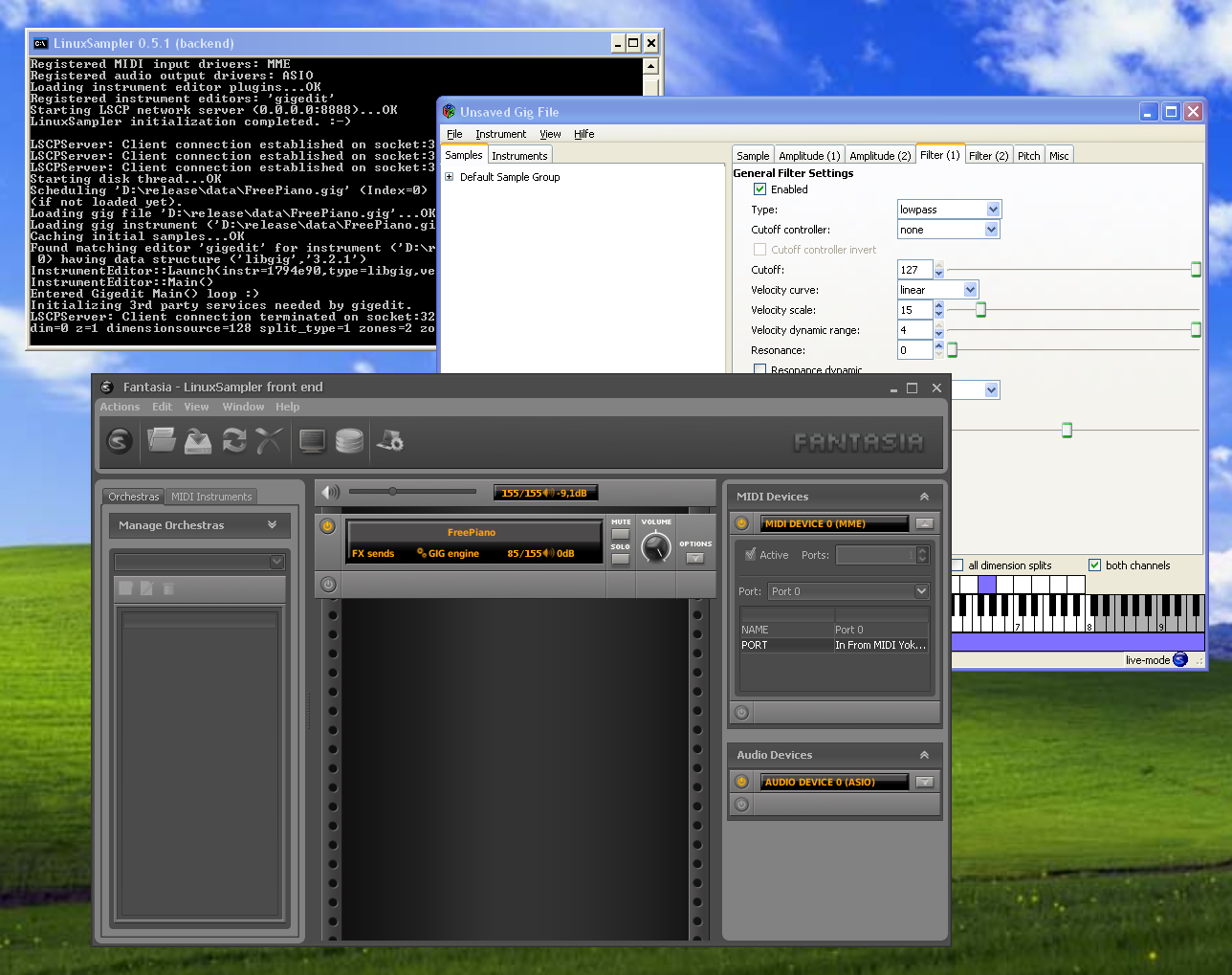
(hoping that this bbc forum code works)
but our long term goal is a new modular sampling engine without particular limitations which characterize currently available commercial samplers.
We will keep you posted as things develop.
If some developers want to join the fun let us know.
cheers,
Benno
http://www.linuxsampler.org
yes VST cross-platform networking will be useful because you can combine
the ease of windows with the raw power of cheap and stable linux machines.
I will keep you posted as things develop. For now an important milestone was achieved in supporting the windows platform.
and having exactly the same software on both linux and windows (and OS X) allows you to evaluate its performance on each platform.
the screenshot is here:
(hoping that this bbc forum code works)
but our long term goal is a new modular sampling engine without particular limitations which characterize currently available commercial samplers.
We will keep you posted as things develop.
If some developers want to join the fun let us know.
cheers,
Benno
http://www.linuxsampler.org
-

- KVRAF
- 5745 posts since 11 Feb, 2005 from Bordeaux France
You can't always get what you waaaant...
-
- KVRer
- Topic Starter
- 27 posts since 18 Nov, 2007
thanks
BTW I have a question about routing routing the output of samplers running standalone (ASIO) into sequencers like cubase on the same machine:
Since LinuxSampler currently works only standalone (ASIO out) and it would be handy for users to route the sampler's audio back into a sequencer, I'd like to add some infos to the documentation in order to explain what's possible to do in this regard and how to set it up.
I have currently only a stereo card (I'm on my laptop) and I'd like to hear how users that own ASIO multi-client cards usually do it.
For example I've read ESI cards do have a DirectWIRE control panel which allows arbitrary routing of channels.
see this PDF, page 31
[url=http://85.25.144.200/download/ESI/MAYA4 ... nglish.pdf]MAYA44-English.pdf[/url|
If I understand correctly you can route channels from application A into the inputs of application B but are hardware inputs (assume the ESI card) simply overwritten ?
For example assume the card has 4 analog ins and you send the sampler (app A) to out 3,4 then use DirectWIRE to route out 3,4 to in 1,2. The sequencer (app B) reads from in 1.2. Does this mean that instead of the analog signals on 1,2 you get the output of app A into app B ?
At this point app B (the sequencer) sends it's audio out to out 1,2 since I assume ports 3,4 are occupied for routing ?
What happens if app B tries to send audio to ports 3,4 ?
LinuxSampler does have FX sends which you can control with a MIDI controller (for reverb,chorus etc) and send the output to an arbitrary audio output channel but for this in absence of VST one needs to have a way to route all the FX send busses back into the sequencer.
I've read on some forums that people sometimes run Kontakt standalone (for various reasons like performance, memory, num midi ports etc) and then route its outs via ASIO into the sequencer.
How do people usually set up both applications to achieve best results ?
With 2 machines you can of course pipe midi from the sequencer box into the sampler box and audio back from the sampler box into the sequencer box (ie using real,virtual midi cables and 2 soundcards).
but since not everyone uses 2 machines the single machine standalone sampler + sequencer scenario is useful too.
thanks in advance for your infos.
Benno
BTW I have a question about routing routing the output of samplers running standalone (ASIO) into sequencers like cubase on the same machine:
Since LinuxSampler currently works only standalone (ASIO out) and it would be handy for users to route the sampler's audio back into a sequencer, I'd like to add some infos to the documentation in order to explain what's possible to do in this regard and how to set it up.
I have currently only a stereo card (I'm on my laptop) and I'd like to hear how users that own ASIO multi-client cards usually do it.
For example I've read ESI cards do have a DirectWIRE control panel which allows arbitrary routing of channels.
see this PDF, page 31
[url=http://85.25.144.200/download/ESI/MAYA4 ... nglish.pdf]MAYA44-English.pdf[/url|
If I understand correctly you can route channels from application A into the inputs of application B but are hardware inputs (assume the ESI card) simply overwritten ?
For example assume the card has 4 analog ins and you send the sampler (app A) to out 3,4 then use DirectWIRE to route out 3,4 to in 1,2. The sequencer (app B) reads from in 1.2. Does this mean that instead of the analog signals on 1,2 you get the output of app A into app B ?
At this point app B (the sequencer) sends it's audio out to out 1,2 since I assume ports 3,4 are occupied for routing ?
What happens if app B tries to send audio to ports 3,4 ?
LinuxSampler does have FX sends which you can control with a MIDI controller (for reverb,chorus etc) and send the output to an arbitrary audio output channel but for this in absence of VST one needs to have a way to route all the FX send busses back into the sequencer.
I've read on some forums that people sometimes run Kontakt standalone (for various reasons like performance, memory, num midi ports etc) and then route its outs via ASIO into the sequencer.
How do people usually set up both applications to achieve best results ?
With 2 machines you can of course pipe midi from the sequencer box into the sampler box and audio back from the sampler box into the sequencer box (ie using real,virtual midi cables and 2 soundcards).
but since not everyone uses 2 machines the single machine standalone sampler + sequencer scenario is useful too.
thanks in advance for your infos.
Benno
-
- KVRian
- 820 posts since 15 Dec, 2004
For the ones that dont have internet in their machine, would you to list what is need to run Linuxsampler and the links? I started to install it, and lots of messages appear like "you need java" "you need gtkdontknow what more" etc.
Thanks very much!
Thanks very much!
-
- KVRist
- 339 posts since 22 Feb, 2004
Did someone say Giga support? You got my attention with that. I'll be trying this out soon, Thanks.DuX wrote: Seems like it has nicely implemented Giga support..., that's real cool.
!
-
- KVRian
- 795 posts since 2 Apr, 2006
This looks very nice, but some extra format functionality wouldn't harm. I have hardly any gig files.
sf2, sfz and nki support would be the way forward!
(though I must say that the featureset and java gui look amazing)
sf2, sfz and nki support would be the way forward!
(though I must say that the featureset and java gui look amazing)
-
- KVRAF
- 5745 posts since 11 Feb, 2005 from Bordeaux France
sbenno, check the Rewire technology, it's free and might be what you're looking for
http://www.propellerheads.se/
go to technologies in the upper menu
http://www.propellerheads.se/
go to technologies in the upper menu
You can't always get what you waaaant...


-
- KVRAF
- 1907 posts since 29 Oct, 2003
Hmmm ... this is starting to look very interesting.
Will you (somehow) get into the Ubuntustudio soon-ish?
Will you (somehow) get into the Ubuntustudio soon-ish?
-
- KVRian
- 820 posts since 15 Dec, 2004
In case anyone like me want to install it, and is not online, you need to install before
Java 1.6 (google it)
gtk+ runtime 2.10.11
gtkmm runtime 2.10.11
After that, the package become installed.
Java 1.6 (google it)
gtk+ runtime 2.10.11
gtkmm runtime 2.10.11
After that, the package become installed.
-
- KVRer
- Topic Starter
- 27 posts since 18 Nov, 2007
stanlea:
unfortunately rewire is not open, the ardour author already asked for the SDK and permission to implement it in ardour and they said no:
http://ardour.org/node/948
http://ardour.org/node/898
probably jack ( www.jackaudio.org ) will be popular on windows in near future. it already runs on windows but is not perfect yet. it does anything rewire does but is much more flexible.
here is the windows version:
http://www.grame.fr/~letz/jackdmp.html
we will hopefully soon have a VST interface in LinuxSampler which will eliminate problem mentioned. but in the meantime running standalone has its limitations.
bob nova: we probably provide the most accurate playback than any sampler when playing giga files. just try other samples and judge yourself. the Kontakt 2.2 giga importer is very erratic.
kyran:
SF2 is old and not optimized for big samples, you can always find a good tool that converts SF2 to GIG. about NKI I don't know. we are currently focussing on producing a very powerful modular engine with flexibility not found in any commercial sampler yet. but it will take some time of course.
tamahome:
yes we fully support scale tuning since LinuxSampler is used in a keyboard in the Middle Eastern market too, and they make lots of use of micro tuned scales
marce:
I added some docs in the linuxsampler windows howto how to install LinuxSampler on a machine without internet connection or in case you have troubles with the installer auto detecting already installed gtk+,gtkmm packages. but basically it is as you said, just install the gtk+,gtkmm and java packages first and then LinuxSampler
see here:
http://www.linuxsampler.org/windows.html
BTW if someone tries out the sampler let us know here on the forum how you find it. pros and cons, what needs to be improved etc.
for bug reports see the links in the windows howto
thanks everyone and enjoy open source sampling
Benno
unfortunately rewire is not open, the ardour author already asked for the SDK and permission to implement it in ardour and they said no:
http://ardour.org/node/948
http://ardour.org/node/898
probably jack ( www.jackaudio.org ) will be popular on windows in near future. it already runs on windows but is not perfect yet. it does anything rewire does but is much more flexible.
here is the windows version:
http://www.grame.fr/~letz/jackdmp.html
we will hopefully soon have a VST interface in LinuxSampler which will eliminate problem mentioned. but in the meantime running standalone has its limitations.
bob nova: we probably provide the most accurate playback than any sampler when playing giga files. just try other samples and judge yourself. the Kontakt 2.2 giga importer is very erratic.
kyran:
SF2 is old and not optimized for big samples, you can always find a good tool that converts SF2 to GIG. about NKI I don't know. we are currently focussing on producing a very powerful modular engine with flexibility not found in any commercial sampler yet. but it will take some time of course.
tamahome:
yes we fully support scale tuning since LinuxSampler is used in a keyboard in the Middle Eastern market too, and they make lots of use of micro tuned scales
marce:
I added some docs in the linuxsampler windows howto how to install LinuxSampler on a machine without internet connection or in case you have troubles with the installer auto detecting already installed gtk+,gtkmm packages. but basically it is as you said, just install the gtk+,gtkmm and java packages first and then LinuxSampler
see here:
http://www.linuxsampler.org/windows.html
BTW if someone tries out the sampler let us know here on the forum how you find it. pros and cons, what needs to be improved etc.
for bug reports see the links in the windows howto
thanks everyone and enjoy open source sampling
Benno