

I think a good solution is to clip the note length to the length of the loop (or -1), so a played note can't overlap with itself, and let them wrap around the end. Once that is done, since there is already some quantization of the start point going on, it makes sense to me to just treat the time between recording start and loop start as the end of the loop.insertpizhere wrote: so, how long before the start should it look for the start of notes, and how long after the end? i agree, it would be really nice if those overhanging notes would overlap the previous and next loops... i'll see what i can do.

piz midi looper (beta!)
-
- KVRist
- 487 posts since 19 Jan, 2003
-
- KVRAF
- 5629 posts since 22 Sep, 2005
PIZ would this cause more hung notes?contrast wrote:I think a good solution is to clip the note length to the length of the loop (or -1), so a played note can't overlap with itself, and let them wrap around the end. Once that is done, since there is already some quantization of the start point going on, it makes sense to me to just treat the time between recording start and loop start as the end of the loop.
L

-
- KVRAF
- Topic Starter
- 2237 posts since 12 Nov, 2002 from swordfish
i guess it might cause notes to hang if you played the same note at the beginning and end of a loop, and they overlapped when looped. i would have to do something about that, but it shouldn't really be a problem.
wrongtastic, baby
tucson's number one gothic rock band since 1995
tucson's number one gothic rock band since 1995
-
- KVRAF
- 5629 posts since 22 Sep, 2005
Ok had a chance to quickly test out the last version (ver 5 if I'm not mistaken??). Note playback seems a lot more stable as I've yet to get any dropped notes  . Great job PIZ
  !!..
!!..
As you stated earler once you've recorded a loop the LoopStart LoopEnd positions reset (I also noticed this when swithcing back and forth from different presets). The thing is that the loop does not automatically start playing until I trip one of those parameters now. Is this suppose to happen??
Also I was wondering if you were planning on adding a way to shift through the built in presets. This would be nice as it would allow for fast on the fly pattern swithcing. Dont know if its possible .. Please let me know..
Thanks again..
L
. Great job PIZ !!.. As you stated earler once you've recorded a loop the LoopStart LoopEnd positions reset (I also noticed this when swithcing back and forth from different presets). The thing is that the loop does not automatically start playing until I trip one of those parameters now. Is this suppose to happen??
Also I was wondering if you were planning on adding a way to shift through the built in presets. This would be nice as it would allow for fast on the fly pattern swithcing. Dont know if its possible
.. Please let me know..Thanks again..
L
-
- KVRAF
- Topic Starter
- 2237 posts since 12 Nov, 2002 from swordfish
i'll implement program change to switch presets...
there must be something wrong if you have to change the endpoints to get the loop to play. 0 on both means it will play the way you recorded it... does it always happen? if it's only with certain loops, it might help if you sent me one (.fxp and .mid).
i have seen something like that happen when i edited a midi file externally and then reloaded it... the next version will be much better for that. you'll be able to adjust the default loop area within the midi file while editing it.
there must be something wrong if you have to change the endpoints to get the loop to play. 0 on both means it will play the way you recorded it... does it always happen? if it's only with certain loops, it might help if you sent me one (.fxp and .mid).
i have seen something like that happen when i edited a midi file externally and then reloaded it... the next version will be much better for that. you'll be able to adjust the default loop area within the midi file while editing it.
wrongtastic, baby
tucson's number one gothic rock band since 1995
tucson's number one gothic rock band since 1995
-
- KVRAF
- 5629 posts since 22 Sep, 2005
I tried to start playback with both at 0 but I hear nothing so I have to set the start point to -8 and the end poing to 8. The thing is this version seems the most stable since the original. I just want it to workinsertpizhere wrote:there must be something wrong if you have to change the endpoints to get the loop to play. 0 on both means it will play the way you recorded it... does it always happen? if it's only with certain loops, it might help if you sent me one (.fxp and .mid).
 . I'm still using ML on eXT 1.41 in AudioMulch 1.0.
How did you do that??insertpizhere wrote:i have seen something like that happen when i edited a midi file externally and then reloaded it...
Sounds good! Can you explaininsertpizhere wrote:the next version will be much better for that. you'll be able to adjust the default loop area within the midi file while editing it.
 ...
...L
-
- KVRAF
- Topic Starter
- 2237 posts since 12 Nov, 2002 from swordfish
all right... i'll see if i can reproduce it with eXT inside AudioMulch. in that case it would get the timing info (indirectly) from AudioMulch, so something weird could be happening... or it may be something i already fixed, but i need to finish what i'm doing before it'll be ready to upload again. does it happen with the "sample" sync mode? that bypasses the usual timeinfo...Lagrange wrote:I tried to start playback with both at 0 but I hear nothing so I have to set the start point to -8 and the end poing to 8. The thing is this version seems the most stable since the original. I just want it to workinsertpizhere wrote:there must be something wrong if you have to change the endpoints to get the loop to play. 0 on both means it will play the way you recorded it... does it always happen? if it's only with certain loops, it might help if you sent me one (.fxp and .mid).
right now it only works if you already saved a preset with a file recorded. to load it again after editing, you have to reload the preset. this will all be a lot better soon.How did you do that??insertpizhere wrote:i have seen something like that happen when i edited a midi file externally and then reloaded it...
i haven't decided exactly how to do it yet. it'll be either a certain note or two other events that you'd put at the loop start and end points... it needs to be something that can be edited easily, and won't be lost when you import and export the file with something like energyXT 1.4. and of course it would be ignored when loaded into midiLooper. i'm thinking maybe a minimum-velocity note 0 on channel 16...Sounds good! Can you explaininsertpizhere wrote:the next version will be much better for that. you'll be able to adjust the default loop area within the midi file while editing it.
wrongtastic, baby
tucson's number one gothic rock band since 1995
tucson's number one gothic rock band since 1995
-
- KVRAF
- Topic Starter
- 2237 posts since 12 Nov, 2002 from swordfish
new version: http://thepiz.org/xt/midiLooper20071230.zip
- loop area is saved in the midi file.
- added "File" parameter to clear loop or reload loop from midi file.
- it will now always load a loop with the current program's name, and try to guess its loop length if it wasn't defined in the preset or in the midi file.
when creating/editing a midi file, the loop area is defined in a separate midi track named "loop area". there should only be one note on this track (can be any note), and the length of the note will set the loop area. if this track isn't there, the loop will be assumed to start at time 0, and will be rounded up from the time of the last event.
the last midi track in the file should be the looped data.
i recommend editing in the energyXT 1.4 sequencer.
for example:
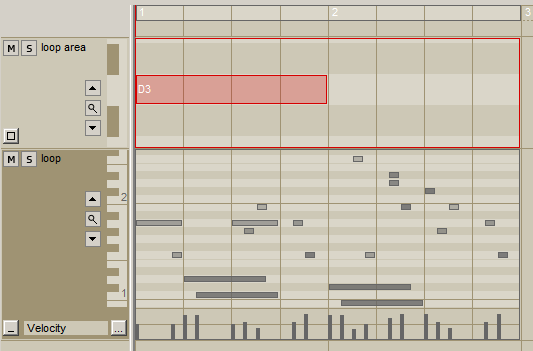
track named "loop area" - contains one note which defines the loop area
last track - data that gets played
make something like this, then export the midi file to the "midiloops" folder. to load it in the looper, rename the current preset to the name of the midi file, then move the "File" parameter all the way to the right...
i know this is kind of weird, but until there's a gui, it'll have to do.
- loop area is saved in the midi file.
- added "File" parameter to clear loop or reload loop from midi file.
- it will now always load a loop with the current program's name, and try to guess its loop length if it wasn't defined in the preset or in the midi file.
when creating/editing a midi file, the loop area is defined in a separate midi track named "loop area". there should only be one note on this track (can be any note), and the length of the note will set the loop area. if this track isn't there, the loop will be assumed to start at time 0, and will be rounded up from the time of the last event.
the last midi track in the file should be the looped data.
i recommend editing in the energyXT 1.4 sequencer.
for example:
track named "loop area" - contains one note which defines the loop area
last track - data that gets played
make something like this, then export the midi file to the "midiloops" folder. to load it in the looper, rename the current preset to the name of the midi file, then move the "File" parameter all the way to the right...
i know this is kind of weird, but until there's a gui, it'll have to do.
wrongtastic, baby
tucson's number one gothic rock band since 1995
tucson's number one gothic rock band since 1995
-
- KVRAF
- 5629 posts since 22 Sep, 2005
So in a piano roll editor how do I determine loop points?
Not weird PIZ just a different approach in a non GUI plugin tis all!
Thanks for the update!!Oh and HappyNewYear!!
edit:
 1st question answered!
L
insertpizhere wrote:make something like this, then export the midi file to the "midiloops" folder. to load it in the looper, rename the current preset to the name of the midi file, then move the "File" parameter all the way to the right...
i know this is kind of weird, but until there's a gui, it'll have to do.
Not weird PIZ just a different approach in a non GUI plugin tis all!Thanks for the update!!Oh and HappyNewYear!!
edit:
track named "loop area" - contains one note which defines the loop area
last track - data that gets played
1st question answered!L
-
- KVRAF
- Topic Starter
- 2237 posts since 12 Nov, 2002 from swordfish
coming soon... it will have several options for note triggering. you'll be able to have a note toggle the pattern on and off, or set a root note and key range, and play the pattern polyphonically.johnny1982 wrote:This is just what I was looking forAny chance the patterns can be triggered by midi notes?
thanks
wrongtastic, baby
tucson's number one gothic rock band since 1995
tucson's number one gothic rock band since 1995
 .. Is this normal?
-
- KVRAF
- Topic Starter
- 2237 posts since 12 Nov, 2002 from swordfish
that's not normal. let me know if this new version still does that:
http://thepiz.org/xt/midiLooper20080103.zip
i fixed a number of small things here and added the following features:
- unsynced loop mode
- note triggering (one note only)
- choose whether to measure loops the host timeline's 0 point (old behavior), or from where you started recording (might make more sense if you're using "loop after rec")
- program change
- 128 programs
http://thepiz.org/xt/midiLooper20080103.zip
i fixed a number of small things here and added the following features:
- unsynced loop mode
- note triggering (one note only)
- choose whether to measure loops the host timeline's 0 point (old behavior), or from where you started recording (might make more sense if you're using "loop after rec")
- program change
- 128 programs
wrongtastic, baby
tucson's number one gothic rock band since 1995
tucson's number one gothic rock band since 1995
-
- KVRAF
- 7030 posts since 28 Apr, 2004 from france
Hi, and big thanks for that plugin !insertpizhere wrote:
(& happy new year, too)
Nice screenshot, is it Ext2 ? Could you tell which skin is it ?
