SKINMAN, the new strike by g200kg (early early alpha)

DSP, Plugin and Host development discussion.
Post Reply New Topic
RELATED
PRODUCTS

Post

hi guys,

i don't actually have the permission to post this (so moderators feel free to delete this post if i violated any rules), but please take my word:
take this post as my encourage to help g200kg to get this wonderful software to where it belongs to: to the very top.
for all of you who love knobman, but dream of a similar software that can actually do whole guis, here you go:

http://www.g200kg.com/en/software/skinman.html
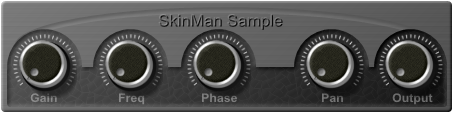

Image

don't expect too much yet, at the current state skinman is early, early alpha, and there's tons of stuff that's left to be implemented, so i thought i'd open this thread for feature suggestions and bugreports, as well as a semi-forum in general to share thoughts/skins, etc ...
let's all help g200kg whereever we can. if we do so, i'm sure skinman is going to get as useful as knobman, which is one of the most innovative software on the planet to me ...

oh, and of course: i'm sure g200kg appreciates donations, so consider it, if you find his software useful ...

thanks, and now try and post!!


btw: i amnot affiliated or somehow connected to g200kg in any supposable way.
regards,
brok landers
BIGTONEsounddesign
gear is as good as the innovation behind it-the man

Post

Amazing.

Post

yes-yes.... very nice looking!!

Those knobs, do they 'rotor' as pretty as they look!!

This is exciting, a complete skin proggie , eh !!!


Thank you for this info!


6 6 6

8)
space for rent!!

Post

6 6 6 wrote:Those knobs, do they 'rotor' as pretty as they look!!
yes, they do, the skin is a very fast draft skin i made from one of my knobs and a bit of edits of the example skin that g200kg included with skinman ...

Image
6 6 6 wrote:Thank you for this info!
no problem ...
regards,
brok landers
BIGTONEsounddesign
gear is as good as the innovation behind it-the man

Post

:-o
Wow. This looks to be a very cool tool.

Post

Just in time for DC2008...
You can't always get what you waaaant...

Post

I downloaded when he first put a link up - it looks great :)

I see he's hot on development with it - there's a release today!

DSP
Image

Post

hello,
thx to creating this thread and trying incomplete software :)

current issue is multiple objects selection&handling. it may takes a little while.

Post

hey, nice to see you here, i guess that's the validation for me for this thread ... man, as i'm sick right now, lying in my bed, i had a little play with it, all i can say: go on!
i'll be back with some suggestions soon ...
regards,
brok landers
BIGTONEsounddesign
gear is as good as the innovation behind it-the man

Post

stanlea wrote:Just in time for DC2008...
indeed, not a bad idea ...
regards,
brok landers
BIGTONEsounddesign
gear is as good as the innovation behind it-the man

Post

ok g200kg, here's some suggestions for skinman (some of them also do apply to knobman):
  • - option to render with or without background
    reason: before i start to make the gui, i cannot say how big it's going to be. so i'd like to ignore the background and the background size, rendering only the actual gui itself. as the layers are hierarchical, the background should be handelled just as a conventional layer, that, when made invisible, is ignored when rendering ... this applies to knobman aswell ...

    - all the shaping possibilities of the knobman primitives should be present on all the skinman primitives, such as:
    1. specular width
    2. ambient
    3. texture zoom
    4. diffusion
    5. independant light direction for primitive specular
    6. antialias switch on/off on all primitives
    7. zoom (i know, i can do this via the two size boxes, which should stay there for asymetric aspects, but if i want to zoom the primitive in relation, i'd like to have a seperate box for this)
    8. rounding edges for primitives for each edge seperately *very inportant* would make a lot more possible with ease... this applies to knobman aswell ...

    - colour applying should be in realtime, meaning, while opening the colour option window, i'd like to see the changes while tweaking, rather than having to press ok to apply the change, so that i can actually see, what i have done ... this applies to knobman aswell ...

    - skinman should include all the lightning options of knobman, with some enhancements:
    1. gradation range (from/to), so that i can apply that gradation to only a specified part of the selected shape ... this applies to knobman aswell ...
    2. gradation colour (start colour, end colour), so that one can do either blendings from the actual primitive colour to the gradation colour, or define the start colour and the end colour of the gradation ... this applies to knobman aswell ...
    3. dropshadow should have it's own light direction, so that one can use it to do more 3d effect on shapes, that can ignore the global light direction ...
    this applies to knobman aswell ...
    4. selectable dropshadow colour ... this applies to knobman aswell ...
    5. independant embossings for inside, outside or both sides of the primitive ... this applies to knobman aswell ...

    - ability for renaming of the primitives in the tree-preview
could you please be so kind and make a statement to the points?
thank you so much in advance!
knobman/skinman will rule!!!
regards,
brok landers
BIGTONEsounddesign
gear is as good as the innovation behind it-the man

Post

Ehm, when I try to open the sample skin I can't see nothing in the "open window" :-? No one experienced this problem?

Post

MaxSynths wrote:Ehm, when I try to open the sample skin I can't see nothing in the "open window" :-? No one experienced this problem?
bug. but you can workaround this behaviour simply by (in the load dialog) navigating to desktop, from there manually to the skinman location, then you'll be able to see it/load it ...
regards,
brok landers
BIGTONEsounddesign
gear is as good as the innovation behind it-the man

Post

brok landers wrote:
MaxSynths wrote:Ehm, when I try to open the sample skin I can't see nothing in the "open window" :-? No one experienced this problem?
bug. but you can workaround this behaviour simply by (in the load dialog) navigating to desktop, from there manually to the skinman location, then you'll be able to see it/load it ...
Oh yes, now it works. Thanks! :D

Post

Even it it works out half as good as Knobman it will be worth having - but I know it will be better :D

Question: does it include/replace Knobman or do you have to fly the knobs in? I should just try it eh

:)

Post Reply

Return to “DSP and Plugin Development”