
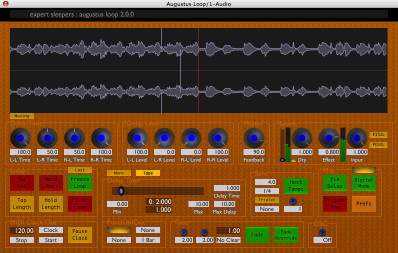
Augustus Loop v2 is released

Official support for: expertsleepers.co.uk
RELATED
PRODUCTS

Post

Image

Go get it!

http://www.expert-sleepers.co.uk/downloads.html

And make some skins!

http://www.expert-sleepers.co.uk/august ... index.html

What's New in Augustus Loop version 2
For a complete list of changes, please refer to the version history section of the user manual.

Quality Improvements
Great attention has been paid to removing the niggling little clicks and pops that used to occur if you used some features and were unlucky with your timing. Specifically, using the following should now never result in an unpleasant audio artefact:

* Clear Loop
* Changing the Input Level (which includes using the Punch In/Out Set Input Level features)
* Tap Record

Freeze Loop
While Freeze Loop is essentially the same feature as has always been found in Augustus Loop, the new implementation in version 2 transforms this function into something altogether more powerful. Whereas in previous versions frozen loops were prone to clicking and popping unless the audio and plug-in settings were just right, version 2's Freeze Loop is totally bomb proof and will loop anything.

Sync Groups
It is now possible to synchronise multiple copies of Augustus Loop that are running within one host application. You can therefore use Augustus Loop to build complex, multi-channel, multi-loop systems.

Tape Sim
A new audio processing section has been added to further expand the range of sounds you can get out of Augustus Loop, consisting of a new tape-style saturation effect and a new filter section.

Skinnable and Scriptable GUI
In version 2 it's possible to completely replace the Augustus Loop user interface. This goes far beyond other 'skinning' systems where you can only change the superficial appearance of the interface. With Augustus Loop you can move user interface elements around, remove things you don't use, add new buttons to drive your own new functionality. A general purpose scripting language lies behind all this, so your new buttons aren't just limited to setting plug-in parameters - you can build complex systems limited only by your imagination (and programming skill!).

OSC
Augustus Loop can now be remotely controlled via the Open Sound Control protocol.

MIDI & OSC Scripting
Augustus Loop's response to MIDI and OSC control can now be completely redefined by scripts written by users. This goes far beyond simply redefining which MIDI CC controls which parameter - you can build elaborate, state-based control systems, driving many copies of Augustus Loop from a single control source.

Waveform Display
A new element has been added to the GUI that enables you to visualise the audio that's recorded onto Augustus Loop's virtual tape. Apart from looking swish, this is a useful tool that helps you understand exactly what the plug-in is doing at any particular time, especially when some of the more complex functions are enabled.

Record Offset
This new feature makes it easy to sync your looping to other performers, even when your computer-based setup is introducing a lot of latency into your audio stream.

Tape Read Mode
Although Augustus Loop remains a fundamentally stereo device, the new Tape Read Mode setting lets you simulate a mono tape echo from days of old.

Post

YYYEEEEEESSSSSSS!!!!

User interface AND MIDI interaction scripting! This is brilliant news. It's going to be such a powerful addition.

I've been dreaming about this kind of functionality for ages. I was getting a little bogged down interfacing ChucK with Augustus through various hosts. Great though ChucK is, it isn't instantly geared towards what I want it to do. Having a scriptable UI is the perfect way to go. Thank you so much!

Ok, I better learn some Lua...

Stephen.

Post

Did I mention there's a skinning competition running right now?

Come on you graphic designers - this is a great opportunity to show off your skills. Rest assured that I'll be touting any good Augustus Loop skins at every opportunity.

Post

:tu: Awesome!
Image
stay juicy!

Post

For anyone, like me, who is going to need to learn some Lua syntax, the manual is here:

http://www.lua.org/manual/5.1/

Post

I'd recommend starting with this:

http://www.lua.org/pil/

Post

Yeah, that looks good.

Any tips on debugging? I haven't got stuck in yet so I haven't tried, but do we have to re-instantiate Augustus (and relaunch whatever's hosting it) each time we want to try out our code, or is there an easier way?

Post

Mac or PC, and what host app?

Post

os wrote:Mac or PC, and what host app?
Mac OS X 10.4, Logic Pro 8/MainStage/Soundtrack Pro.

Post

For AUs, the skin is reloaded every time the plug-in's GUI is opened, so that's very convenient for skin development.
MIDI scripts are only read when the plug-in is loaded, so you have to load the plug-in every time you change your script. (I could probably do something about that in the future.)
Debugging is via print()s in Lua - see the AL manual for details.

Post

os wrote:For AUs, the skin is reloaded every time the plug-in's GUI is opened ... MIDI scripts are only read when the plug-in is loaded ...
Cheers!

It's looking comfortably close to Javascript, so I'm looking forward to this challenge.

Post

It appears that you can only have one waveform display. Is this right? The following code does not make two waveforms display:

Code: Select all

theWaveformDisplay = waveformDisplay( 0, 400, windowW+2, 96 )
add( theWaveformDisplay )
theWaveformDisplay:setVisible( true )
theWaveformDisplay:setMoving( true )

theWaveformDisplay2 = waveformDisplay( 0, 200, windowW+2, 96 )
add( theWaveformDisplay2 )
theWaveformDisplay2:setVisible( true )
theWaveformDisplay2:setMoving( true )
I would like to create a waveform display where the record head (the red line) is at the extreme right of the waveform window (In static mode). I was trying to hack one together as a test, out of two waveform displays positioned next to each other, each hanging half out of their own sides of the plugin window. Is there a good way to reposition the record head?

Post

I'm afraid you can only have one waveform display right now.
I could easily make the record head position a parameter. Consider that the first new feature request anyone's logged for AL2!

Post

os wrote:Consider that the first new feature request anyone's logged for AL2!
I have more!

For GUI development, it would be nice to be able turn off the knobshader. I tried last night to comment most of the lines out of it (if I take the knobshader.txt file away altogether Augustus crashes the host), and I did get a version that displays without shading, but it's a bit glitchy. It blinks every few seconds! It was a bit hit and miss because I don't yet understand Assembly.

Perhaps you could publish a version that doesn't shade the output?

Post

I could probably make knobshader.txt be loaded from the skin bundle too, so you could override it.

The syntax is ARB vp1 - see e.g.
http://en.wikipedia.org/wiki/ARB_(GPU_a ... _language)

If you don't want it shaded you could probably just replace

MOV oColor.w, iColour.w;

with

MOV oColor, iColour;

(and delete most of the preceeding lines, but for safety just change this one line).

Post Reply

Return to “Expert Sleepers”
