Old Free VSTi Gems From The Past

VST, AU, AAX, CLAP, etc. Plugin Virtual Instruments Discussion
Post Reply New Topic
RELATED
PRODUCTS

Post

pinkjimiphoton wrote:there are more ik synths apparently, anyone seen/got them?

http://web.archive.org/web/200310091724 ... /~ikaldor/
hey Jimi :)

which ones are you missing exactly from that list on the URL?

BTW the Timelooper 2 alpha version that was listed on Subtek blog was def good looking :)
shame tho it will never see the light of the day :(


in the meantime some new link for the spelunkers..
all the web archive attempts to find out the missing dlls vanished, so if someone have ideas is very welcome ;)
http://web.archive.org/web/200104172057 ... ugins.html
http://web.archive.org/web/200205221053 ... vstlib.htm
Dubadelica - Electronic music since 1996 http://www.dubadelica.com/about.php
Radio Rebelde - Modern roots reggae with an electronic twist https://radiorebeldereggae.bandcamp.com/

Post

Don't know if these has been already posted (my little contribution to say thanks to you net diggers :D):

Ionic Performer Synth:
http://maltedmedia.com/people/bathory/killer.html

Daniel Smith Music. The Big Blue Piano and Big Blue Organ are interesting:
http://www.danielsmithmusic.com/content/?page_id=27

And here there is something by me :D It's not old, it's not a gem and is also an unfinished project but can be useful for someone, who knows. Simon BD, SN, HH:
http://maxb.altervista.org/vsti.html#simon

Post

BFunKu wrote: TuneFish VSTi
Image
http://www.savefile.com/files/730046
Can somebody reup this pleeeeease?? (link is dead) :cry:

Post

MaxSynths wrote:
Ionic Performer Synth:
http://maltedmedia.com/people/bathory/killer.html
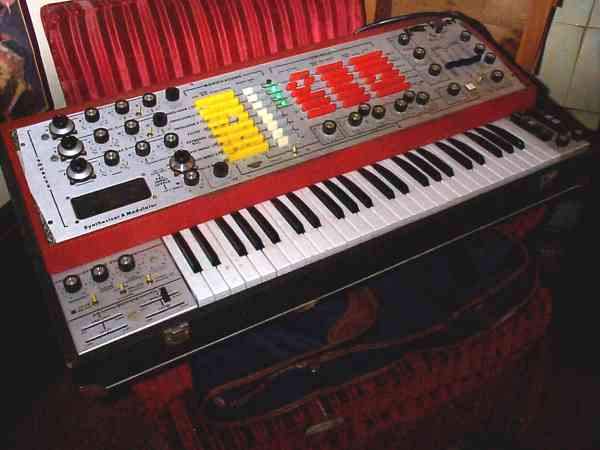
The story on the original is quite interesting, the Ionic Performer was an early 70's failed rip off of the EMS VS3/putney. Instead of the EMS pin matrix the IonicPerformer had rows of rectangular push-button switches - like an early ryhthm box.

Image

Post

MaxSynths wrote:Don't know if these has been already posted (my little contribution to say thanks to you net diggers :D):

Ionic Performer Synth:
http://maltedmedia.com/people/bathory/killer.html

Daniel Smith Music. The Big Blue Piano and Big Blue Organ are interesting:
http://www.danielsmithmusic.com/content/?page_id=27

And here there is something by me :D It's not old, it's not a gem and is also an unfinished project but can be useful for someone, who knows. Simon BD, SN, HH:
http://maxb.altervista.org/vsti.html#simon
thx for the freebies Max ;)

Dave Smith's stuff...i was testing them right some days ago, and at the end, i kept the organ ..not bad for warm organ sounds
Bathory has a quite intricate GUI as for loading presets and such, but i still have to test it fully...its a quite big package to go thru and if i remember correctly there's a shitload of extra presets either, to download

Peace
Dubadelica - Electronic music since 1996 http://www.dubadelica.com/about.php
Radio Rebelde - Modern roots reggae with an electronic twist https://radiorebeldereggae.bandcamp.com/

Post

MaxSynths wrote:
BFunKu wrote: TuneFish VSTi
Image
http://www.savefile.com/files/730046
Can somebody reup this pleeeeease?? (link is dead) :cry:
it's in the junos and jups rar back about 50 pages bro, and is on my website so it should be good
I wish my lawn was Emo, so it would cut itself...
My Music (updated link)
f**k CANCER

Post

Thanks pinkjimiphoton I try to find it here (I've tried on your site but after 20 seconds of psychedelic lights and colors my third eye started to open wider and wider and wider :D)

EDIT: found here (from a post by pinkjimiphoton) http://www.savefile.com/files/1729105 (Tunefish2 and Petro6)

EDIT2: the link above doesn't work properly. This is the right one if anyone is interested: http://rapidshare.com/files/97854134/Ju ... s.rar.html

Post

i knew you'd find it max.
;)

thanks for the new freebee!!

here's a real old freebie,

freebase 002, aka

tec.w3.to_Bassline_0.02.zip

http://www.sendspace.com/file/asoiff
I wish my lawn was Emo, so it would cut itself...
My Music (updated link)
f**k CANCER

Post

--------------------------------------------------------------------------------
-= Analogic v1.1 Documentation =-
--------------------------------------------------------------------------------

Analogic - Table of contents
----------------------------
Analogic : License agreement
Analogic : Files in this package
Analogic : Thanx
Analogic : Version info
Analogic - Topic 1 : What is Analogic ?
Analogic - Topic 2 : Synthesizer layout
Analogic - Topic 3 : The program
Analogic - Topic 4 : Things to remember
Analogic - Topic 5 : Contacting us
Analogic - Appendix A : MIDI support
Analogic - Appendix B : Technical specifications
Analogic - Appendix C : Known bugs in Analogic v1.1
Analogic - Appendix D : Future versions
Analogic - Appendix E : Other NewStyle products


--------------------------------------------------------------------------------


Analogic : License agreement
----------------------------

---------------------------------------------------------------------
*** IF YOU DO NOT AGREE WITH THE TERMS BELOW, REMOVE ALL FILES OF ***
*** THE ANALOGIC PACKAGE FROM YOUR COMPUTER SYSTEM ***
*** BY STARTING THE ANALOGIC PROGRAM, YOU AGREE WITH THESE TERMS! ***
---------------------------------------------------------------------

¯ This product is copyrighted software. This means NewStyle is the
sole owner of any information whatsoever contained in this package.
It is prohibited to sell or get any other kind of profit from this
program, other files in this package, including docs, sounds, banks,
etc. Violators will be hunted down and shot. This is no joke...
Notice there aren't any smileys....
You are free (and encouraged) to use and spread this package in
it's original form.

¯ NewStyle is not responsible for ANY damage WHATSOEVER, direct,
indirect, physical, mental, financial, social, etc.

¯ This product is solely for personal entertainment purposes and
should not be used in medical fields, nuclear reactors, space
shuttles and/or spacestations (MIR is running Analogic v0.8á :-).


--------------------------------------------------------------------------------


Analogic : Files in this package
--------------------------------

The Analogic package includes the files listed below, so
before beginning, please take a moment to make sure you
have all the files required to run.

¯ ANALOGIC.EXE - The executable for Analogic
¯ ANALOGIC.BNK - Default soundbank for Analogic
¯ ANALOGIX.D0? - Misc. datafiles for the program (D00..D04)
¯ ANALOGIC.TXT - This document
¯ FILE_ID.DIZ - Small description of Analogic for BBS's


--------------------------------------------------------------------------------


Analogic : Thanx
----------------

We had a lot of response from Analogic v1.0. Thanks to the
following people for their comments, suggestions and help !
Please don't hesitate to email us. We can't promise all mail
will be answered directly, but we sure as hell do enjoy
receiving replies to our program !:-)

¯ Waka X, MAZ, Spectryl, Neurotix, Luke Freiler

¯ FILE_ID.DIZ logo done by Primemover^phat


--------------------------------------------------------------------------------


Analogic : Version info
-----------------------

Version 1.1 : september 11th 1997
Second release, added some features, like :
¯ Soundblaster stereo mode
¯ New improved (stereo) FX-engine
¯ New oscillator shape : sine
¯ Improved SB driver with MIDI-IN support
¯ MIDI pitchbend support (7 bit)
¯ MIDI all notes off (contr. 123)
¯ Stereo WAV saving
¯ More standard presets
¯ Improved manual
¯ Filter keyboard tracking
¯ Changed last-note to first-note priority
¯ Slightly improved random preset function
¯ Lfo1 & 2 sync on new note
¯ Fixed GUI bug causing the sliders to "randomly" jump
¯ Fixed "not-so-very-white flag" bug
¯ New 'clear' function. Resets current ABCD program to
default flute. (thanx 2 Neurotix 4 his comments !)
¯ Improved internal GUI/synth communication. This means
some controllers are now free for future use.
(program now uses internal sysex commands)
¯ Fixed a minor bug in COM port MIDI support.
¯ Fixed a major bug in DMA buffer allocation routines, which
caused base memory to be overwritten, sometimes crashing
the computer.


Version 1.0 : august 8th 1997
Initial release


--------------------------------------------------------------------------------


Analogic - Topic 1 : What is Analogic ?
---------------------------------------

NewStyle's Analogic is a software based Physical Modelling Synthesizer.
This means it's a digital device (your PC) which emulates analog
equipment (like old synthesizers). Modern synths like the Clavia
NordLead, Yamaha AN1x and Roland JP-8000 use this same principle.
The big advantage of this synth is that it's free. Doesn't cost you
a thing, so check it out !

System requirements :

¯ SB16/AWE or GUS (or both!)
GUS Classic works, GUS PnP might not work on some computers.
¯ VESA 2.0 with linear frame buffer (LFB) support for
the 640x480x256 videomode.
¯ IBM PC Compatible 80486+ or better.


--------------------------------------------------------------------------------


Analogic - Topic 2 : Synthesizer layout
---------------------------------------

The heart of a classic synthesizer is the 'oscillator'. (In analog
terms : VCO, Voltage Controlled Oscillator). An oscillator provides
the basic sounds (shapes) like saw, block, triangle, noise, sine etc.
ÚÄÄÄÄÄÄÄÄÄ¿
³ / \ OSC³ Provides basic sound
³ \ / ³
ÀÄÄÄÄÄÄÄÄÄÙ

A sound on the Analogic is made up of 2 oscillators. The pitch of the
waveform is controlled by the note played, by the pitch envelope and
possibly by LFO's (see below). The second oscillator can be fine- and
coarse-tuned. The two osc's are then mixed together before going into
the filter.
ÚÄÄÄÄÄÄÄÄÄ¿
OSC1 ÄÄÄ¿ OSC1+2 ³ FILTER ³ Removes unwanted
ÃÄÄÄÄÄÄÄÄÄ>³ ³ frequencies.
OSC2 ÄÄÄÙ ÀÄÄÄÄÄÄÄÄÄÙ

The filter can remove certain frequency ranges of a sound.
Analogic has 4 filter types : lowpass (resonant), hipass (resonant),
bandpass and bandreject (last 2 with adjustable bandwidth).
If you don't know what this means, experiment or read a good book
about synthesizers.

The mixed oscillator output goes through the filter into the amplitude
envelope. The Analogic (volume)envelopes are traditional ADSR envelopes
(Attack, Decay, Sustain, Release). The ATTACK controls the sound's fade-in
time, the DECAY determines the time it takes to go from MAX volume to
sustain level, the SUSTAIN level controls the volume of the sound whilst
holding down a key, and finally RELEASE sets how long the sound takes
to fade out after releasing the key.

ÚÄÄÄÄÄÄÄÄÄÄÄ¿
OSC1+2 ÄÄÄÄ> FILTER ÄÄÄÄÄÄ> ³ AMPLITUDE ³ Determines how volume changes
/³\ ³ ENVELOPE ³ during a single note.
³ ÀÄÄÄÄÄÄÄÄÄÄÄÙ
PITCH /³\
ENVELOPE ÚÄÄÄÄÄÄÄÄÄÄÄÄÄÄÄÄÄÄÄÄÄÁÄÄÄÄÄÄÄÄÄÄÄÄÄÄÄÄÄÄÄÄÄÄÄÄÄÄÄÄÄÄÄÄÄÄÄÄÄ¿
³ /\ | A - Attack TIME; time from 0 to max ³
³ / \________ | D - Decay TIME; time from max to sustain ³
³ / \ | S - Sustain LEVEL;anywhere from 0 to max ³
³ A D S R | R - Release TIME; time from sustain to 0 ³
ÀÄÄÄÄÄÄÄÄÄÄÄÄÄÄÄÄÄÄÄÄÄÄÄÄÄÄÄÄÄÄÄÄÄÄÄÄÄÄÄÄÄÄÄÄÄÄÄÄÄÄÄÄÄÄÄÄÄÄÄÙ

So the the pitch envelope controls the pitch of the oscillators,
the filter envelope controls the cutoff frequency of the filter and
the amplitude envelope determines how the volume is affected.

The output of a voice is mixed with the other voices and passed through
the effects engine for some stereo effects. This is the final output.

PIT.ENV FLT.ENV AMP.ENV
\³/ \³/ \³/
voice A : OSC1+2-> FILTER-> VOLUME-> VOICE OUTPUTÄÄÄÄ¿
voice B : OSC1+2-> FILTER-> VOLUME-> VOICE OUTPUTÄÄÄÄÅÄÄÄ> FX-> TO OUTPUT
etc. - Ä'

Analogic also contains LFO's (Low Frequency Oscillators). LFO's don't
produce sound themselves, but they modulate other components.
When an LFO affects the pitch, a vibrato effect is heard. When an LFO
is routed to the amplitude envelope, a tremolo effect is created.
An LFO routed to the filter cutoff creates a wah-wah effect.

NOTE : Each note played has it's own envelopes, but shares it's LFO's
with other notes playing the same preset.


--------------------------------------------------------------------------------


Analogic - Topic 3 : The program
--------------------------------

SCREEN LAYOUT
When Analogic is started, the screen contains all components we
mentioned above. Use of knobs and buttons is therefore straight-forward.
(and we didn't feel like describing all the buttons...:-)


SELECTING PROGRAMS
In the upper-right corner of the screen, there's the program section.
You can select 128 preset programs by pressing the "next" and "prev"
buttons. When selecting "next" and "prev" whilst holding down a
"shift"-key, the counter changes by 10 instead of by 1.


STORING PROGRAMS
The "store" button is used to store the current settings of your
sound into the preset bank. When you press the "store" button, the
current program number will start to blink. You can now select a
program number to store your program under. Press "store" again to
save your program to the bank. To simply store to the current program,
you can just press "store" twice. To cancel a store-operation, hold
down "shift" and press the "store" button again.

[SHIFT]+[STORE] = Cancel store operation


RECORDING TO A .WAV FILE
It's possible to save the sound produced by Analogic to disk.
To start recording to disk, press "TAB". The recording will begin
when a new note is started. To stop recording, simply press "TAB"
again.
When recording is paused (waiting for key), the screen border will
be gray. When recording is turned on, the screen border will be white.
The sound will be saved to a 16 bit WAV file called WAVExxxx.WAV
(where xxxx is an increasing number).
This number starts at 0000 every time you restart Analogic, so
be careful not to write over previous samples !

Synthesizing and saving all at once can be too much for you computer.
When you hear audio drop-outs when saving, try loading a disk-cache.
If that doesn't work, you'll have to decrease the mixrate or number
of voices. (or buy a faster pc (the 'bill gates' solution) :-)


USING ANALOGIC AS A MIDI SOUND MODULE
Up to 4 different programs can be played simultaneously. That's
where the "A","B","C","D" buttons are for. They correspond to MIDI
channels 1,2,3 and 4 resp. So you can select a bassdrum on "A" (MIDI
channel 1) and play a melody with the program on "B" (MIDI channel 2).


PLAYING NOTES USING THE PC KEYBOARD
To play notes, you can use the PC keyboard (the typing device), or
use an external MIDI keyboard. When using the PC keyboard, you'll play
the currently selected program ("A","B","C" or "D"). On a MIDI device,
the channel information is used to determine what program to play.

Because the PC keyboard has limited range, you can shift octaves
up or down by pressing "F4" and "F3" respectively.


Summary of keys :
-----------------
F3 - Shift keyboard down 1 octave
F4 - Shift keyboard up 1 octave
TAB - Toggles sample-saving on/off
ESC - Exits Analogic
ALT_X - Exits Analogic
SPACE - Mute all sound

Other keys (some) on keyboard can be used to play notes.


--------------------------------------------------------------------------------


Analogic - Topic 4 : Things to remember
---------------------------------------

THE PROGRAM

¯ Use the left mousebutton to adjust knobs and sliders. Use the right
button to set default values. A rightclick in the middle of a knob
results in centering the knob. Using RMB on the left/right hand side
of a knob sets results in a minimum/maximum setting of the knob/slider.

¯ The user interface needs a 640x480x256 video mode with linear
frame buffer. When you have VBE2.0 on your VGA card (like those
expensive Matrox things) you'll probably have this. If not, use
something like SciSofts's UniVBE5.2+.
If you have a S3 chipset, you might have a chance it will work
without loading VESA. (works over here !)

¯ When using the S3 support and a lot of memory, the native S3
support might not work.
When your computer has an S3 and Analogic crashes, try loading
UniVBE (or another VESA2.0 driver).

SOUNDCARDS

¯ SB16 works on the newer versions only. No SB Pro. It should work
fine on SB16ASP, SB16PnP & AWE (AWE32 and VE edition tested).

¯ MIDI input is also available on COM ports !
Some modern synthesizers contain a TO-HOST interface, which
connects to a COM-port and can be used for MIDI.
(like new Yamaha products)

¯ When using the /W3 switch (SB and GUS), wave playback is done
using the SB and MIDI IN support is offered by the GUS and SB !
When using the /W2 switch (GUS), MIDI IN and WAVE are done using
the GUS.
When using the /W1 switch (SB), MIDI IN and WAVE are done using
the SB.
The /W0 switch is for no-audio support. WAV saving is still enabled,
but since there is no timing, the WAV files will be pretty weird.

¯ So far only the GUS MIDI section really works 100%.
SB sometimes hangs (99% ok). COM port has weird bug (99% ok).
(just try it out for yourself and let us know what happens)


PLAYBACK

¯ When the ampenv gain is set too high, sound can be distorted when
you play play more than one note. Especially when the resonance is
set to a high level. Lower the gain or the resonance of the
instrument to resolve this.

¯ When using low mixing rates (< 20.000) high notes will not sound
pretty. This is due to laws of physics and can only be resolved
by increasing the mixing rate.

¯ When applying huge amounts of resonance (on low & high pass
filters), you can make the filter unstable by rapidly changing
the cutoff frequency from 0 to MAX. Due to optimizations in the
filter algorithms, the filters may not be 100% stable. This will
not be a problem in normal use.


--------------------------------------------------------------------------------


Analogic - Topic 5 : Contacting us
----------------------------------

'NewStyle' - Holland


Members
------------------------------------------
Guido de Haan
Robert Morcus
Robin Krom

Contacting
------------------------------------------
Email : newstyle@rocketmail.com
Mail : NewStyle
Dusseldorperweg 35
1906 AH Limmen
The Netherlands


You're always welcome to support our efforts by making
a small donation. This will enable us to put time in
improving this product and start work on new projects.
(remember products like Reality and Generator cost ñ500 $US,
so what we ask is peanuts... Don't be Dutch... :-))
Just sign a cheque, fill in the amount (or even better, leave
blank :-) and send it to the address above.
If above sounds like a bad idea, a post-card is also welcome
and offers moral support ! (and good heating in the winter :-)


--------------------------------------------------------------------------------


Analogic - Appendix A : MIDI support
------------------------------------

ÚÄÄÄÄÄÄÄÄÄÄÄÄÄÄÄÄÄÄÄÄÄÄÄÄÄÄÄÄÄÄÄÄÄÄÄÄÄÄÄÄÄÄÄÄÄÄÄÄÄÄÄÄÄÄÄÄÄÄÄÄÄÄÄÄÄÄÄÄÄÄÄÄ¿
³ NEWSTYLE [ Analogic ] Date:01-09-1997 ³
³ Model ANALOGIC MIDI Implementation Chart Version: 1.1 ³
ÃÄÄÄÄÄÄÄÄÄÄÄÄÄÄÄÄÄÄÄÂÄÄÄÄÄÄÄÄÄÄÄÄÄÄÄÄÂÄÄÄÄÄÄÄÄÄÄÄÄÄÄÄÄÂÄÄÄÄÄÄÄÄÄÄÄÄÄÄÄÄÄÄ'
³ ³ Transmitted ³ Recognized ³ Remarks ³
³ Function... ³ ³ ³ ³
ÃÄÄÄÄÄÄÄÄÄÄÄÄÄÄÄÄÄÄÄÅÄÄÄÄÄÄÄÄÄÄÄÄÄÄÄÄÅÄÄÄÄÄÄÄÄÄÄÄÄÄÄÄÄÅÄÄÄÄÄÄÄÄÄÄÄÄÄÄÄÄÄÄ'
³Basic Default ³ x ³ 1 - 4 ³ ³
³Channel Channel ³ x ³ 1 - 4 ³ ³
ÃÄÄÄÄÄÄÄÄÄÄÄÄÄÄÄÄÄÄÄÅÄÄÄÄÄÄÄÄÄÄÄÄÄÄÄÄÅÄÄÄÄÄÄÄÄÄÄÄÄÄÄÄÄÅÄÄÄÄÄÄÄÄÄÄÄÄÄÄÄÄÄÄ'
³ Default ³ x ³ Mode 1,3 ³ ³
³Mode Messages ³ x ³ x ³ ³
³ Altered ³ ************** ³ x ³ ³
ÃÄÄÄÄÄÄÄÄÄÄÄÄÄÄÄÄÄÄÄÅÄÄÄÄÄÄÄÄÄÄÄÄÄÄÄÄÅÄÄÄÄÄÄÄÄÄÄÄÄÄÄÄÄÅÄÄÄÄÄÄÄÄÄÄÄÄÄÄÄÄÄÄ'
³Note ³ x ³ 0 - 127 ³ ³
³Number : True voice³ x ³ 0 - 127 ³ ³
ÃÄÄÄÄÄÄÄÄÄÄÄÄÄÄÄÄÄÄÄÅÄÄÄÄÄÄÄÄÄÄÄÄÄÄÄÄÅÄÄÄÄÄÄÄÄÄÄÄÄÄÄÄÄÅÄÄÄÄÄÄÄÄÄÄÄÄÄÄÄÄÄÄ'
³Velocity Note ON ³ x ³ o 9nH,v=1-127 ³ ³
³ Note OFF ³ x ³ x ³ ³
ÃÄÄÄÄÄÄÄÄÄÄÄÄÄÄÄÄÄÄÄÅÄÄÄÄÄÄÄÄÄÄÄÄÄÄÄÄÅÄÄÄÄÄÄÄÄÄÄÄÄÄÄÄÄÅÄÄÄÄÄÄÄÄÄÄÄÄÄÄÄÄÄÄ'
³After Key's ³ x ³ x ³ ³
³Touch Ch's ³ x ³ x ³ ³
ÃÄÄÄÄÄÄÄÄÄÄÄÄÄÄÄÄÄÄÄÅÄÄÄÄÄÄÄÄÄÄÄÄÄÄÄÄÅÄÄÄÄÄÄÄÄÄÄÄÄÄÄÄÄÅÄÄÄÄÄÄÄÄÄÄÄÄÄÄÄÄÄÄ'
³Pitch Bender ³ x ³ x ³ ³
ÃÄÄÄÄÄÄÄÄÄÄÄÄÄÄÄÄÄÄÄÅÄÄÄÄÄÄÄÄÄÄÄÄÄÄÄÄÅÄÄÄÄÄÄÄÄÄÄÄÄÄÄÄÄÅÄÄÄÄÄÄÄÄÄÄÄÄÄÄÄÄÄÄ'
³Control ³ x ³ o 0 - 127 ³ see list below ³
³Change ³ ³ ³ ³
ÃÄÄÄÄÄÄÄÄÄÄÄÄÄÄÄÄÄÄÄÅÄÄÄÄÄÄÄÄÄÄÄÄÄÄÄÄÅÄÄÄÄÄÄÄÄÄÄÄÄÄÄÄÄÅÄÄÄÄÄÄÄÄÄÄÄÄÄÄÄÄÄÄ'
³Prog ³ x ³ o 0 - 127 ³ ³
³Change : True # ³ ************** ³ ³ ³
ÃÄÄÄÄÄÄÄÄÄÄÄÄÄÄÄÄÄÄÄÅÄÄÄÄÄÄÄÄÄÄÄÄÄÄÄÄÅÄÄÄÄÄÄÄÄÄÄÄÄÄÄÄÄÅÄÄÄÄÄÄÄÄÄÄÄÄÄÄÄÄÄÄ'
³System Exclusive ³ x ³ x ³ ³
ÃÄÄÄÄÄÄÄÄÄÄÄÄÄÄÄÄÄÄÄÅÄÄÄÄÄÄÄÄÄÄÄÄÄÄÄÄÅÄÄÄÄÄÄÄÄÄÄÄÄÄÄÄÄÅÄÄÄÄÄÄÄÄÄÄÄÄÄÄÄÄÄÄ'
³System : Song Pos. ³ x ³ x ³ ³
³ Song Sel. ³ x ³ x ³ ³
³Common : Tune ³ x ³ x ³ ³
ÃÄÄÄÄÄÄÄÄÄÄÄÄÄÄÄÄÄÄÄÅÄÄÄÄÄÄÄÄÄÄÄÄÄÄÄÄÅÄÄÄÄÄÄÄÄÄÄÄÄÄÄÄÄÅÄÄÄÄÄÄÄÄÄÄÄÄÄÄÄÄÄÄ'
³System ³ x ³ x ³ ³
³Real Time ³ x ³ x ³ ³
ÃÄÄÄÄÄÄÄÄÄÄÄÄÄÄÄÄÄÄÄÅÄÄÄÄÄÄÄÄÄÄÄÄÄÄÄÄÅÄÄÄÄÄÄÄÄÄÄÄÄÄÄÄÄÅÄÄÄÄÄÄÄÄÄÄÄÄÄÄÄÄÄÄ'
³Aux :Local ON/OFF ³ ³ x ³ ³
³ :All Notes OFF³ ³ o ³ ³
³Mes- :Active Sens ³ ³ x ³ ³
³sages:Reset ³ ³ x ³ ³
ÃÄÄÄÄÄÄÄÄÄÄÄÄÄÄÄÄÄÄÄÁÄÄÄÄÄÄÄÄÄÄÄÄÄÄÄÄÁÄÄÄÄÄÄÄÄÄÄÄÄÄÄÄÄÁÄÄÄÄÄÄÄÄÄÄÄÄÄÄÄÄÄÄ'
³Notes: ³
³ ³
ÃÄÄÄÄÄÄÄÄÄÄÄÄÄÄÄÄÄÄÄÄÄÄÄÄÄÄÄÄÄÄÄÄÄÄÄÄÄÄÄÄÄÄÄÄÄÄÄÄÄÄÄÄÄÄÄÄÄÄÄÄÄÄÄÄÄÄÄÄÄÄÄÄ'
³ Mode 1 : OMNI ON, POLY Mode 2 : OMNI ON, MONO o : Yes ³
³ Mode 3 : OMNI OFF, POLY Mode 4 : OMNI OFF, MONO x : No ³
ÀÄÄÄÄÄÄÄÄÄÄÄÄÄÄÄÄÄÄÄÄÄÄÄÄÄÄÄÄÄÄÄÄÄÄÄÄÄÄÄÄÄÄÄÄÄÄÄÄÄÄÄÄÄÄÄÄÄÄÄÄÄÄÄÄÄÄÄÄÄÄÄÄÙ

Only channels 1..4 are valid. MIDI data on other channels is ignored.

MIDI controller table :

All controllers have a full range of values (0..127). Switches,
like portamento on/off, use 0..63 as off, 64..127 as on.

Cntr : Description
---------------------------------------------------------
5: Set portamento time
7: Amplitude envelope gain (channel volume)
8: Oscillator's mix
9: Distortion
11: Output Effect (0..5) this is a global setting !
12: Legato switch
13: Ring modulation switch
18: LFO1 sync on/off
19: LFO1 speed
20: LFO1 shape
21: LFO1 dest
22: LFO1 amount
23: LFO1 pulsewidth
24: LFO2 speed
25: LFO2 shape
26: LFO2 dest
27: LFO2 amount
28: LFO2 pulsewidth
29: LFO2 sync on/off
30: OSC1 wave shape
31: OSC2 wave shape
33: Finetune OSC2
34: Osc keyboard tracking
35: OSC2 sync on/off
36: Amplitude envelope decay
37: Amplitude envelope sustain
38: Filter envelope attack
39: Filter envelope decay
40: Filter envelope sustain
41: Filter envelope release
42: Velocity to filter switch
43: Filter envelope gain
44: Base note (when kbt=0)
50: Pitch envelope attack
51: Pitch envelope decay
52: Pitch envelope sustain
53: Pitch envelope release
54: Pitch envelope gain
65: Switch portamento on/off
71: Filter resonance/bandwidth
72: Amplitude envelope release
73: Amplitude envelope attack
74: Filter cutoff
75: Filter type
77: Semitones OSC2
78: OSC1 pulsewidth
79: OSC2 pulsewidth
94: FX send
123: All notes off


--------------------------------------------------------------------------------


Analogic - Appendix B : Technical specifications
------------------------------------------------

Tone Generation Method
Physical Modelling (Subtractive synthesis)

Maximum Simultaneous Polyphony
Configurable (1-32) (first-note priority)

Multitimbral Capacity
4-Part (DVA : Dynamic Voice Allocation)

Internal Voice
Normal Voices
Total.................128

Internal Precision
8.24 fixed point (32 bit)

Oscillators
Physical Model - Accumulating Phase

Filters
Physical Model - 12 dB IIR

Envelopes
Physical Model - Linear ADSR

Effects
Distortion, Panned Delay

Programming
32 bit : Watcom C/C++, PMODE/W and TASM
Credits for PMODE/W go to Daredevil and Tran.


--------------------------------------------------------------------------------


Analogic - Appendix C : Known bugs in Analogic v1.1
---------------------------------------------------

Below is a list of 'bugs' we're aware of :

1. B: The file ANALOGIC.BNK has to be read only.
E: To prevent users from erasing the build-in sounds,
we've made the file read-only and put it in ZIP.
When you don't specify the 'JR' switch when
unzipping the 'R'eadonly attribute will not be
set and you can accidently erase the standard sounds.
Future versions will have 'ROM-sounds' build in.

2. B: Sounds tend to distort quickly.
E: We had to decide between making everything sound
soft (low volume) and virtually distort-proof OR
pumping up the volume with risk of digital distortion.
We decided for the second, so YOU are responsible
for turning down the gain when necessary.
We're working on this. Anybody any ideas ?

3. B: When saving to WAV file sound sometimes drops out.
E: Synthesizing and saving data can become to much for
your computer. Solutions :
- Load a diskcache
- Turn down amount of voices or mixingrate
- Finetune your CPU (faster BIOS settings)
- Get a SCSI harddisk
- Buy a faster CPU

4. B: When starting the program I get a PMODE/W error !
E: We're aware of two errors :
"No RM stack for INT redirection!" and
"Out of memory" (or something like that)
The first is pretty weird and can be solved by
restarting your computer. If that doesn't work
make sure your CONFIG.SYS contains the following line :

STACKS=16,64

The second error means you haven't got enough free
memory. Make sure you're not in a DOS shell and
you haven't got any huge ramdisks etc. installed.
This program needs about 4 Mb of memory.

5. B: When starting the program I get a QEMM error or my
computer hangs or resets irregularly.
E: We had this weird problem and found the error was
the line 'STACKS=0,0' in our CONFIG.SYS. Obviously
some dos extenders (PMODE/W and DOS4GW) don't like this.
(Or this is a QEMM error !?)

6. B: Sometimes SB MIDI input halts and/or notes remain
playing. When you exit the program, the computer hangs.
E: Handling both DMA and MIDI interrupts on a single IRQ
is pretty tricky and unfortunately sometimes fails.
Press CTRL+ALT+DEL to return to the DOS prompt, but it
might be better to reset the computer.


--------------------------------------------------------------------------------


Analogic - Appendix D : Future versions
---------------------------------------

Below is a list of things which may be incorporated into future
versions of Analogic :

¯ Preset/User bank switch
¯ More filter types (notch+lp, notch+hp, 18 dB, 24dB)
¯ Automatic speed calculation (determines # of voices and mixrate)
¯ More oscillator schapes (supersaw, filtered osc)
¯ Reverb, chorus, flange, delay, noise gate, expander, compressor,
distortion, exciter, etc.
¯ Sequencer/Arpeggiator (this program was intended to be used on
a minimal PC working as a MIDI sound-module !)
¯ Improvements to the GUI (like online help)
¯ Bank load graphical interface
¯ Bank select via MSB/LSB 32/0
¯ Named presets
¯ Bass/Treble knobs
¯ More/better soundcard support. Use of CODEC on GUS Max/Pnp and
maybe some other cards. (info on soundcards ? always interested :-)
¯ Non-video mode to be used when using a cut-down computer as
stand-alone MIDI synth


--------------------------------------------------------------------------------


Analogic - Appendix E : Other NewStyle products
-----------------------------------------------

We're working on a lot of things, mainly music/sound-
orientated software. The items below are the few projects
which made it to the release-phase (but eventually were never
released :-)

'NAD'
- 32 channel GUS tracker with MIDI support, sampler,
DSP, semi-realtime synth. Intelligent user interface.
Has been used in live trance-performances by TrancePose.

'Install-It'
- DOS script based install program.
Works great for projects with multiple subdirs, multiple
install options and/or multiple datafiles.

'Make Silly Names'
- 'Automagicly' creates names for songs, demo's etc.

'Video Boot'
- Device driver based program which shows your logo when
the computer is booting. Handy when you don't want users
to see what's being loaded...


--------------------------------------------------------------------------------
* End of document
--------------------------------------------------------------------------------


http://www.sendspace.com/file/fgqrx9
I wish my lawn was Emo, so it would cut itself...
My Music (updated link)
f**k CANCER

Post

pinkjimiphoton wrote:i knew you'd find it max.
;)
Ehm... I've realised right now that there's not Tunefish in the j&j zip :(
pinkjimiphoton wrote: thanks for the new freebee!!
My pleasure! :D

Post

eidenk wrote:
mztk wrote:
pinkjimiphoton wrote:arguru freebase

http://www.maz-sound.com/archives/freebase0002.zip
erm, and the other one? vintage.zip?
:P
I have downloaded that vintage.zip. It is a skin, but for what ?
eh? mmm, must be something else...? hang on a mo...
http://www.websamba.com/luvshack
can{t remember if this link works. nope it doesnt.it{s something referred to as:
freebee vst. i just wanna check it out...jimi?! :help:

anyway, anybody want these? patches for softstep v1.3:
some files from when i stuck my head in there for a few days, which may be useful for new projects, or in themselves as wacked out midi generators. guaranteed to lend credibility to your GM soundset!
you'll need a midi connector like maple midi cable and to familiarise yourself with the prog a little; some parameters can't be changed, and will result in no output or something too fxd up...but you may find them fun, etc. a bit like bankstep, but much more basic.. here ya go:
http://www.box.net/shared/aulafc7c6m
( oh yeah, an' i'm not saying they're brilliant or anything:
:ud: 'they are what they are'.)
http://www.harmony-central.com/Software ... tstep.html

Post

MaxSynths wrote:
pinkjimiphoton wrote:i knew you'd find it max.
;)
Ehm... I've realised right now that there's not Tunefish in the j&j zip :(
pinkjimiphoton wrote: thanks for the new freebee!!
My pleasure! :D
Here it is
http://rapidshare.com/files/160011219/b ... 6.rar.html

And one more obsolete (but pretty cool) VSTi -- as the developer's site seems to be gone forever: Orz
http://rapidshare.com/files/160011339/o ... a.zip.html

Post

Thank you Jazz Franco!! ;)

Post

yo.
'hey man, ( looks around furtively ) you got any drum midis?'
somebody mentioned they'd picked up a load of magazine cd's, fm, etc. i got rid of all mine several years ago, having stripped them out of anything of use. at the time, it was around 80 fm/mix cd's.
here are the drum midifiles that i found on the ones i had, in more convenient form, bulk renamed to show source. there's obviously an issue here perhaps with the publishers, but i'm not aware of them presenting their collection in one go.they were all presented as public domain ( ? kind of...what's the deal, again, with magware like this? sod it, if it's not on just pull the link.)haven't done anything with this lot, but i had some fun a while back loading other files into pattern slots + messing abt.
http://www.box.net/shared/f0ckf5gj3c
all 150kb of it..256 files. if anyone{s got more... 8)

Post

mztk wrote:yo.
'hey man, ( looks around furtively ) you got any drum midis?'
:hihi:

Post Reply

Return to “Instruments”