Wivi Band for iPhone Now Available! Price: $10

For iOS (iPhone, iPad & iPod), Android, Windows Phone, etc. App and Hardware talk
RELATED
PRODUCTS

Post

Wivi Band for iPhone Now Available!

WIVI Band is only available through the iPhone App Store. Price: $10


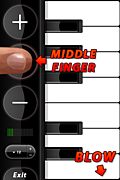
Wivi Band is an application for musical performance, running on the iPhone using the microphone as a wind controller, and an easy-to-learn piano fingering with 5-octave range.

Wivi Band includes a variety of wind instruments, ranging from brass to saxophones and woodwinds, all controlled using the same simple scheme.

Image

Image

Image

More information can be found on the Wivi Band homepage.
Last edited by Wallander on Mon Feb 23, 2009 9:17 am, edited 2 times in total.
Arne @ noteperformer.com

Post

Cool!
Congratulations.

Chris Hein
Chris Hein - Horns:
http://www.chrishein.net

Post

Nice one Arne - looks cool :)

Post

price?

sounds very interesting!

Subz

Post

Thanks! 8) And it works like a charm (the iPhone is quite amazing in this regard).

The App Store price is $10.
Arne @ noteperformer.com

Post

I just bought it. It works with the internal iPhone speaker, but it stops making sound when I plug in headphones. Then, when I unplug headphones the app freezes and stops responding in any way (that is, keys stop changing color when pressed, the volume meter stops moving, and there is no sound).

Post

skrasms wrote:I just bought it. It works with the internal iPhone speaker, but it stops doing anything when I plug in headphones. Then, when I unplug headphones the app freezes and stops responding in any way (that is, keys stop changing color when pressed).
It's programmed to automatically route audio to the headphones when plugged in, but this requires reinitializing the sound engine and may take a few seconds. This is how it works on the testing devices.

You could try plugging the headphones in before starting the app if you experience problems, that may work better for you.
Arne @ noteperformer.com

Post

Wallander wrote: It's programmed to automatically route audio to the headphones when plugged in, but this requires reinitializing the sound engine and may take a few seconds. This is how it works on the testing devices.

You could try plugging the headphones in before starting the app if you experience problems, that may work better for you.
If I plug headphones in after the app is running it just goes to silence. I can wait a whole minute and nothing ever comes out the 1/8" jack.

I tried 6 times plugging in headphones, waiting 20 seconds, then starting the app. One of those times it gave me headphone output, the other 5 it was silent.

It's really strange behavior. It could be a hardware problem with my phone, but I have good luck running Bebot Robot and iTunes with headphones.

Post

skrasms wrote:
Wallander wrote: It's programmed to automatically route audio to the headphones when plugged in, but this requires reinitializing the sound engine and may take a few seconds. This is how it works on the testing devices.

You could try plugging the headphones in before starting the app if you experience problems, that may work better for you.
If I plug headphones in after the app is running it just goes to silence. I can wait a whole minute and nothing ever comes out the 1/8" jack.

I tried 6 times plugging in headphones, waiting 20 seconds, then starting the app. One of those times it gave me headphone output, the other 5 it was silent.

It's really strange behavior. It could be a hardware problem with my phone, but I have good luck running Bebot Robot with headphones.
There are a number of different audio technologies that can be used with the iPhone. WIVI uses the AudioUnit one to get the lowest latency possible. This requires re-routing audio manually for the setup WIVI uses.

Btw, what OS are you on?
Arne @ noteperformer.com

Post

My iPhone software is version 2.2.1

Post

skrasms wrote:My iPhone software is version 2.2.1
Ok, that shouldn't be causing any problems.
Arne @ noteperformer.com

Post

Wallander wrote:
skrasms wrote:My iPhone software is version 2.2.1
Ok, that shouldn't be causing any problems.
So you think there's a hardware problem with my phone?

Post

skrasms wrote:
Wallander wrote:
skrasms wrote:My iPhone software is version 2.2.1
Ok, that shouldn't be causing any problems.
So you think there's a hardware problem with my phone?
Don't worry, from my experience, problems are usually with software not hardware. This is version 1.0, and it could be that our hardware isn't 100% matching. Are you running the first generation iPhone? We only get 2nd generation (3G) in Europe as far as I know.

Can I ask you what model # you have? This can be found in the Settings->About panel.
Arne @ noteperformer.com

Post

It's a 3G iPhone. The model number is MB704LL.

Post

Congrats Arne... I picked it up yesterday and I'm very impressed. One of the most impressive apps for the iphone so far. We were playing with it in the Camel office today... lots of fun. 8)

Col
"Its my firm belief that its a mistake to hold firm beliefs"
https://soundcloud.com/biomechanoid

Post Reply

Return to “Mobile Apps and Hardware”