Knob request corner! =)

DSP, Plugin and Host development discussion.
RELATED
PRODUCTS

Post

MetalSir wrote:
Leslie Sanford wrote:Can't leave well enough alone...

Image
Rect Switch 3rd Version

I used a seperate layer for the shadow. I turned it at angles to enhance the pivot effect of the switch. Don't know if I'm making any improvements at this point, so I'll let y'all decide. :)
man.. really..

i LOVE your works.. you rulez..


really tks a lot! =)
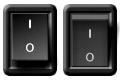
mmmm Leslie can i ask you for some more? =)

can you edit the 3rd version of the switch you made for me? i was thinkin' something like the button you made just with a small difference: when the button is ON the "1" written on the button itself becomes red.. like a small led behind..

so.. (i try to write better).. the SAME button on the 3rd version you made, but with the ON status ONLY with the "1" writted in red.. =)

it is possible? =)


man, really THANKS! :love:
A casa mia si diceva: "sbagli una volta perdi due denti." - Tony Soprano

Post

Try this:

Rect Switch 4

Post

Leslie Sanford wrote:Try this:

Rect Switch 4
:love: :love: :love: :love: :love: :love: :love:
can i ask one last question about? =)
when the button is off is possible to have the same color of the "0" indication on the button?
so: if is OFF both the writting "O" and "1" are white, like the 3dr version i.e... and when is ON the "0" is white and the "1" is red..

can you? =)


:love: :love: :love: :love: :love: :love: :love: :love:
A casa mia si diceva: "sbagli una volta perdi due denti." - Tony Soprano

Post

Leslie has been doing a lot of cool .knobs for you and that is totally awesome. Leslie may even make this change for you and post it because the chap is just cool. However, this really all should be a tool for you to teach yourself something. I appreciate that making a good looking knob is not an easy thing to do. But we're talking about a change you can make by opening up the .knob file in knob man and change a single color somewhere. Who knows, that could be the starting point to where you learn a little bit about knobman and can start tweaking more of people's knobs to make your own. Give it a try, it won't hurt! :)

Post

bvesco wrote:Leslie has been doing a lot of cool .knobs for you and that is totally awesome. Leslie may even make this change for you and post it because the chap is just cool. However, this really all should be a tool for you to teach yourself something. I appreciate that making a good looking knob is not an easy thing to do. But we're talking about a change you can make by opening up the .knob file in knob man and change a single color somewhere. Who knows, that could be the starting point to where you learn a little bit about knobman and can start tweaking more of people's knobs to make your own. Give it a try, it won't hurt! :)
mmm.. lol.. i tried man..
tell me how to do, if you can..

i can see in the frame of the number only the red color.. not the green.. i read some tutorial but with no result at all..


i'm really glad to made something with braking no balls, when i can, obviously.. =)
A casa mia si diceva: "sbagli una volta perdi due denti." - Tony Soprano

Post

MetalSir wrote:
bvesco wrote:Leslie has been doing a lot of cool .knobs for you and that is totally awesome. Leslie may even make this change for you and post it because the chap is just cool. However, this really all should be a tool for you to teach yourself something. I appreciate that making a good looking knob is not an easy thing to do. But we're talking about a change you can make by opening up the .knob file in knob man and change a single color somewhere. Who knows, that could be the starting point to where you learn a little bit about knobman and can start tweaking more of people's knobs to make your own. Give it a try, it won't hurt! :)
mmm.. lol.. i tried man..
tell me how to do, if you can..

i can see in the frame of the number only the red color.. not the green.. i read some tutorial but with no result at all..


i'm really glad to made something with braking no balls, when i can, obviously.. =)
Well it's not IMMEDIATELY obvious, I'll give you that.

But once you've grasped the concepts of knobman (try playing with it for a bit) then it's not hard to guess where to look.

Layer 9, click on the "Colors" button, that's where the values for colour changes in the animation are set.
(make the destination saturation -100, and the destination brightness 26)

Post

JonHodgson wrote:
MetalSir wrote:
bvesco wrote:Leslie has been doing a lot of cool .knobs for you and that is totally awesome. Leslie may even make this change for you and post it because the chap is just cool. However, this really all should be a tool for you to teach yourself something. I appreciate that making a good looking knob is not an easy thing to do. But we're talking about a change you can make by opening up the .knob file in knob man and change a single color somewhere. Who knows, that could be the starting point to where you learn a little bit about knobman and can start tweaking more of people's knobs to make your own. Give it a try, it won't hurt! :)
mmm.. lol.. i tried man..
tell me how to do, if you can..

i can see in the frame of the number only the red color.. not the green.. i read some tutorial but with no result at all..


i'm really glad to made something with braking no balls, when i can, obviously.. =)
Well it's not IMMEDIATELY obvious, I'll give you that.

But once you've grasped the concepts of knobman (try playing with it for a bit) then it's not hard to guess where to look.

Layer 9, click on the "Colors" button, that's where the values for colour changes in the animation are set.
(make the destination saturation -100, and the destination brightness 26)
ok.. now i try.. tks..
A casa mia si diceva: "sbagli una volta perdi due denti." - Tony Soprano

Post

MetalSir wrote:
JonHodgson wrote:
MetalSir wrote:
bvesco wrote:Leslie has been doing a lot of cool .knobs for you and that is totally awesome. Leslie may even make this change for you and post it because the chap is just cool. However, this really all should be a tool for you to teach yourself something. I appreciate that making a good looking knob is not an easy thing to do. But we're talking about a change you can make by opening up the .knob file in knob man and change a single color somewhere. Who knows, that could be the starting point to where you learn a little bit about knobman and can start tweaking more of people's knobs to make your own. Give it a try, it won't hurt! :)
mmm.. lol.. i tried man..
tell me how to do, if you can..

i can see in the frame of the number only the red color.. not the green.. i read some tutorial but with no result at all..


i'm really glad to made something with braking no balls, when i can, obviously.. =)
Well it's not IMMEDIATELY obvious, I'll give you that.

But once you've grasped the concepts of knobman (try playing with it for a bit) then it's not hard to guess where to look.

Layer 9, click on the "Colors" button, that's where the values for colour changes in the animation are set.
(make the destination saturation -100, and the destination brightness 26)
ok.. now i try.. tks..
done! 8)
A casa mia si diceva: "sbagli una volta perdi due denti." - Tony Soprano

Post

there are many examples that are provided with Knobman(for me when I click on open it shows the folder). Find a simple one and try adjusting the parameters that is uses in each menu you will start to see right away what the it does. Try out 3-p wedge or small gaged from the examples file they are only a few layers each but very effective. You don't need many layers to make something complex looking.
GUI designers a resource list of artists: http://sukaudio.blogspot.com/

Post

Hlis93 wrote:OK I sent it to you. Heres the switch if anyone else is interested.

Image

link to PNG images, you'll have select all sizes and then download it.
http://www.flickr.com/photos/35307404@N04/3271271721/
hi hlis! =)
i solved the masks problems here.. =)

now is ok! =)
really tks for your help! =)
A casa mia si diceva: "sbagli una volta perdi due denti." - Tony Soprano

Post

great. :D
GUI designers a resource list of artists: http://sukaudio.blogspot.com/

Post

Hlis93 wrote:great. :D
my girlfriend have done the work.. XD

basically she took your knob and added the background of the metal pannel of the ampli.. and addes some "ON" "OFF" writes orund.. =)

ON:
Image

OFF:
Image


Cool, right? =)
how could not love her?
:love:
A casa mia si diceva: "sbagli una volta perdi due denti." - Tony Soprano

Post

you should give knobman as well to customize the stuff.
GUI designers a resource list of artists: http://sukaudio.blogspot.com/

Post

Hlis93 wrote:you should give knobman as well to customize the stuff.
you mean give her knobman to customize?
she uses mac..

basically i give her the png image of your .knob file.. and she have done the rest of the work in photoshop.. =)
A casa mia si diceva: "sbagli una volta perdi due denti." - Tony Soprano

Post

Theres some cool graphics/knobman work here :D

Post Reply

Return to “DSP and Plugin Development”