


SKINMAN, the new strike by g200kg (early early alpha)
-
- KVRAF
- Topic Starter
- 6242 posts since 26 Sep, 2003 from right here, as you can see ...
that's what they're there for. even if we don't know you in person,g200kg wrote:thanks, guys.
all your posts are encouragement for me
i know it always feels good to know someone cares ...
oops, overlooked thatone, here you go:g200kg wrote:seems need a investigation. could you send me the .skin file?brok landers wrote: and after saving the skinman file and reloading it, this is how it looks:
click here to download
also another 4 things:
- i'd like to open a skinman-file via double clicking directly on it.
but it doesn't work here ...
skinman opens, but it opens blank ...
- depending of the size of the project, fonts sometimes work, sometimes not (especially when not using antialiasing) ...
i assume that's because the font size is relative to the size of a project, rather than absolute ... imo fonts, in order to have them always working, should be absolute sized, no matter how the project is sized ... maybe a button to toggle this?
- the embossing is too small when width is 1, and already too big when 2 ...
can you redo the value scaling (maybe logarithmic), so that we can have more fine adjustments at tiny widths of embossings?
often i'd like to emboss only a tiny bit, currently that's really hard to achieve ... the same goes fot the inside shadows ...
- the highlight fx in the specular section is really great, but can you maybe give it its own section, so that we can also freely position it in the object, aswell as being able to freely rotate it and size it horizontally and vertically? then i could spare so many layers ... also great would be, if we could give it colourse seperateley ...
what do you say? wouldn't that a tremendeous workflow speed enhancement?
thanks in advance!
regards,
brok landers
BIGTONEsounddesign
gear is as good as the innovation behind it-the man
brok landers
BIGTONEsounddesign
gear is as good as the innovation behind it-the man
-

- KVRAF
- 5117 posts since 5 May, 2005 from Stockholm, Sweden
That's terrible...seems like it was something sudden...that's so sad..g200kg wrote:hello,
I have returned.
I lost my wife. that is too painful, too sad.
but now, I leave off mourning.
I'm not surprised you went away for months...It must have been awful..

You have my condolences..
Last edited by lotus2035 on Sun Jun 07, 2009 1:19 pm, edited 1 time in total.
-
- KVRian
- 610 posts since 6 Mar, 2005 from USA
g200kg wrote:
g200kg, I am so sorry for your loss. I'm sure on the bad days it doesn't make any difference, but on the good ones know that you have condolences from truly all around the world.I lost my wife. that is too painful, too sad.
but now, I leave off mourning.
-
- KVRAF
- 7510 posts since 14 Nov, 2006 from Ankara, Turkey
g200kg, I'm very sorry to hear about your loss. My deepest sympathy and condolences for you and your family.
-
Salih Sertkaya Salih Sertkaya https://www.kvraudio.com/forum/memberlist.php?mode=viewprofile&u=202857
- KVRer
- 8 posts since 11 Mar, 2009
g200kg,
I'm very sorry to hear about your loss.
My deepest sympathy and condolences for you and your family.
I'm very sorry to hear about your loss.
My deepest sympathy and condolences for you and your family.
-
- KVRist
- 485 posts since 22 May, 2004 from Yokohama, Japan
thank you all KVR members,
thank you for kind expressions of sympathy.
I am still depressed. but I can do something.
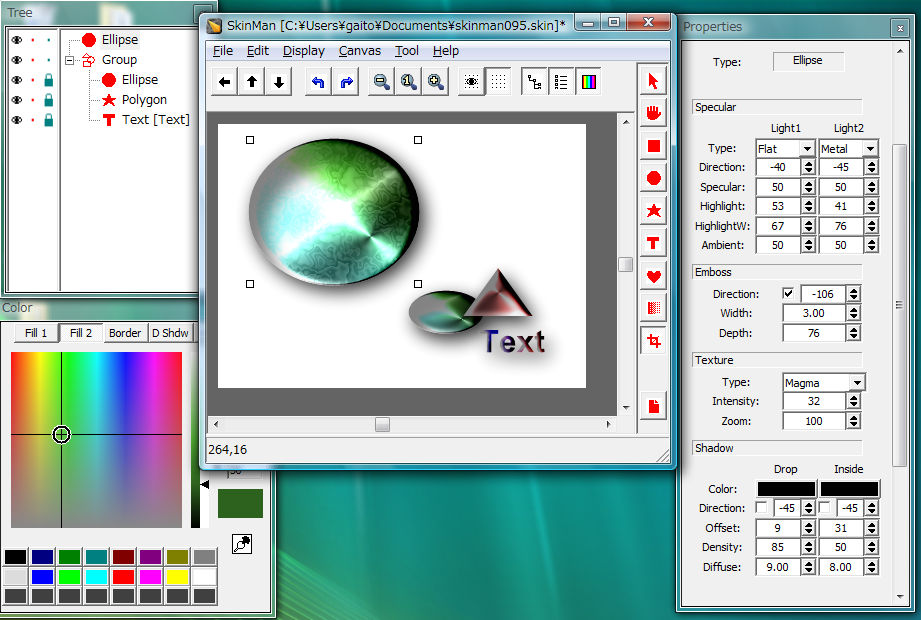
Ver 0.95 20090608
* Tree / Properties window is separated from main window. (USE F5 / F6 / F7 for display control)
(long TextureType/Text/FontName can be displayed if you widen the window)
* Group/Ungroup supported (Use right click menu)
* Dual specular parameters are added
* Trimming tool is added
* FileOpen by Drag&Drop / double clicking
* Fractional EmbossWidth support
* Pipette tool, (can pick from any screen)
* focus changing by TAB key on properties window
* BugFix: position cannot be reloaded if you place object to negative X position.
and many minor bugfixes.
http://www.g200kg.com/en/software/skinman.html
thank you for kind expressions of sympathy.
I am still depressed. but I can do something.
Ver 0.95 20090608
* Tree / Properties window is separated from main window. (USE F5 / F6 / F7 for display control)
(long TextureType/Text/FontName can be displayed if you widen the window)
* Group/Ungroup supported (Use right click menu)
* Dual specular parameters are added
* Trimming tool is added
* FileOpen by Drag&Drop / double clicking
* Fractional EmbossWidth support
* Pipette tool, (can pick from any screen)
* focus changing by TAB key on properties window
* BugFix: position cannot be reloaded if you place object to negative X position.
and many minor bugfixes.
http://www.g200kg.com/en/software/skinman.html
-
- KVRAF
- 8389 posts since 11 Apr, 2003 from back on the hillside again - but now with a garden!
Awesome! GIMPMan!

-
- KVRAF
- Topic Starter
- 6242 posts since 26 Sep, 2003 from right here, as you can see ...
g200kg wrote:thank you all KVR members,
thank you for kind expressions of sympathy.
I am still depressed.
of course you are! and you will be, quite a while, but
that's not only ok, it's necessary ... again, i hope it helps
to know we really care ...
g200kg wrote:but I can do something.
which is good actually, it' s the best therapy for this pain ...
i lost my grandma yesterday night, and though she was very old,
we all loved her very much... of course this isn't comparable to
the fatal loss of a beloved wife, but i can understand you, and
i think we all do ... however, i see myself diving into my work
again, as it keeps me motivated, i think the same happens to you ...
if it's not too barefaced, may i ask you how old you are?
thank you so much! hopefully this will solve my problem ... will try tonight ... however, i found another one:g200kg wrote:Ver 0.95 20090608
* Tree / Properties window is separated from main window. (USE F5 / F6 / F7 for display control)
(long TextureType/Text/FontName can be displayed if you widen the window)
* Group/Ungroup supported (Use right click menu)
* Dual specular parameters are added
* Trimming tool is added
* FileOpen by Drag&Drop / double clicking
* Fractional EmbossWidth support
* Pipette tool, (can pick from any screen)
* focus changing by TAB key on properties window
* BugFix: position cannot be reloaded if you place object to negative X position.
and many minor bugfixes.
somehow, after reloading a skin file, the texture is gone ...
in the texture section there still is the name of the texture, but in brackets (these: () ), and it's not loaded ... reloading sows it again, but after saving and reloading the texture file sometimes is gone again ...
maybe you can find out whats going on with the file i sent you, as it happens there, too ... does this solve the font problem i explained, too?
thanks again for your tremendeous work, skinman and knobman are the bomb!
some further thoughts for skinman:
- as one ideally does the numbers and the radiated line-rings around the knobs in _skinman_, to make sure the knob itself is as small as possible in size (mb-wise), i'd like to see these shapes in skinman, too ... i'm talking of "radiated line", "wave circle", "H-lines" and "V-lines" ...
- when using shapes in knobman, there's one advantage that i often use, and that i'd like to use in skinman, too: the ability to reload another shape on an existing one, i.e. i have loaded a rectangle, did some work on it, but lateron suddenly realize ihave to make a circle with it ... in skinman i have to do all the work that i've done again, in knobman i just change the shape, all edits (such as colours, embossings, shadows, gradations) say the way they are, just the primitive shape changes ...
thanks again, will try the new version tonight, feel hughed!

regards,
brok landers
BIGTONEsounddesign
gear is as good as the innovation behind it-the man
brok landers
BIGTONEsounddesign
gear is as good as the innovation behind it-the man
-
- KVRAF
- Topic Starter
- 6242 posts since 26 Sep, 2003 from right here, as you can see ...
ok ... this is extreeeeemly great g200kg ...
but lemme get on your nerves again ... :
- when i meant that the highlight should be seperate, i also meant,
that is should be freely positionable, so that i can place it wherever
i need it to be within the shape ... so basically, we need coordinate
parameters, just like the shape itself has ... right now i can't "move"
it to the place i need it to be, i can only rotate it and set the size ...
- the name of the texture, when the menue is open, is still not completeley
visible ... i suggest to auto-size the menue by checking the max name lenght
of what is in the texture folder ... so that the longest name of the texture
is used for the size ... you could clip it then, if someone is silly enough to
use 50 characters ...
will try around more, will let you know ...
this is sooo great! again and again i'm overwhelmed ...
-
but lemme get on your nerves again ...
:- when i meant that the highlight should be seperate, i also meant,
that is should be freely positionable, so that i can place it wherever
i need it to be within the shape ... so basically, we need coordinate
parameters, just like the shape itself has ... right now i can't "move"
it to the place i need it to be, i can only rotate it and set the size ...
- the name of the texture, when the menue is open, is still not completeley
visible ... i suggest to auto-size the menue by checking the max name lenght
of what is in the texture folder ... so that the longest name of the texture
is used for the size ... you could clip it then, if someone is silly enough to
use 50 characters ...
will try around more, will let you know ...
this is sooo great! again and again i'm overwhelmed ...
-
regards,
brok landers
BIGTONEsounddesign
gear is as good as the innovation behind it-the man
brok landers
BIGTONEsounddesign
gear is as good as the innovation behind it-the man
-
- KVRist
- 485 posts since 22 May, 2004 from Yokohama, Japan
font problem:
not yet reproduced. investigating...
texture problem:
ok, I see. probably it is a problem related to multiple instance
( or restarting shortly after exit Skinman).
the brackets like (texture) is normal behavior. that indicate the texture is embedded to .skin file.
once .skin is saved, all textures and images are embedded to skin file.
radiated line:
fmm, how about polygon with StarDepth=0 ?
need mask? yes i know i know
shapes changing:
need more consideration.
though i know it is not enough, the [Copy primitive] and [Paste color] / [Paste effects]
may help you to duplicate with another shapes.
highlight position:
sorry, that may be hard to make out but the position is editable.
1) select primitive
2) use gradation tool
3) SHIFT key for "light1" position, CONTROL key for "light2" position
long texture name:
I see. but measuring longest name is need effort. For the meantime,
i will prepare enough space for non-silly cases.

left is polygon with StarDepth=0, right is dual specular with different position.
not yet reproduced. investigating...
texture problem:
ok, I see. probably it is a problem related to multiple instance
( or restarting shortly after exit Skinman).
the brackets like (texture) is normal behavior. that indicate the texture is embedded to .skin file.
once .skin is saved, all textures and images are embedded to skin file.
radiated line:
fmm, how about polygon with StarDepth=0 ?
need mask? yes i know i know
shapes changing:
need more consideration.
though i know it is not enough, the [Copy primitive] and [Paste color] / [Paste effects]
may help you to duplicate with another shapes.
highlight position:
sorry, that may be hard to make out but the position is editable.
1) select primitive
2) use gradation tool
3) SHIFT key for "light1" position, CONTROL key for "light2" position
long texture name:
I see. but measuring longest name is need effort. For the meantime,
i will prepare enough space for non-silly cases.
left is polygon with StarDepth=0, right is dual specular with different position.
-
- KVRAF
- Topic Starter
- 6242 posts since 26 Sep, 2003 from right here, as you can see ...
great, thanks ... however, just to make it clear, you know what i'm talking of?g200kg wrote:font problem:
not yet reproduced. investigating...
i.e. if i use 400x400 size for the whole project, and the font size is i.e. 12, without
antialiasing (there are some fonts that look good without antialiasing, actually sometimes better, as you can see on the little gui i posted).
now, if i change the size of the whole project to say, 356x356, the font changes it's size in relation, too ... but that means, that the non-antialiased font, which often is looking perfect only fixed size, suddenly doesn't work anymore ... that's why i 'd recomment to add
a little "tick" box to the font area, where one could choose the font to be independent from the gui size, so when set on size 12, it stays on size 12, no matter what ...
this prevents the font from changing it's size, thus, when found a size that works for the font, it will always do, no matter what project size one is using ... this probably only matters to non-antialiased fonts, but i use non-antialiased fonts very often for readouts or small labels, as you can see in the gui i posted (see the dropdown menue labels in the screenshot i posted before, these are without antialiasing) ...
hmmm ... although i never use multiple instances of skinman, it could very well be that i restart it too fast after a crash or such ...g200kg wrote:texture problem:
ok, I see. probably it is a problem related to multiple instance
( or restarting shortly after exit Skinman).
the brackets like (texture) is normal behavior. that indicate the texture is embedded to .skin file.
once .skin is saved, all textures and images are embedded to skin file.
but iirc, under certain circumstances i loose the texture already when working in skinman ... it suddenly is gone, and if i store the skinman file and reload it, it's gone forever ... i manually have to select that texture again then ...
maybe that helps ...
that can do it for radiated line, yes ... will try ... but can i "cut out the inside" like in knobman?g200kg wrote:radiated line:
fmm, how about polygon with StarDepth=0 ?
need mask? yes i know i know
anyway, i wasn't only about the radiated lines, but also on the horizontal/vertical lines, aswell as for the wavecircles ...
and yes, masking should be there too, of course ...
you know, some stuff is actually easier done in knobman than in skinman,
but often i'd actually prefer to do such things in skinman, to keep the knob rendering stitched size as small as possible ...
yes, i actually do it that way ...g200kg wrote:shapes changing:
need more consideration.
though i know it is not enough, the [Copy primitive] and [Paste color] / [Paste effects]
may help you to duplicate with another shapes.
whoohaa! works just the way i needed it! great, thank you so much!g200kg wrote:highlight position:
sorry, that may be hard to make out but the position is editable.
1) select primitive
2) use gradation tool
3) SHIFT key for "light1" position, CONTROL key for "light2" position
man, you should do more practicable video tutorials with tips, explaining tricks with skinman ... as you can see, even an experienced user like me isn't aware of a lot that can be actually done in knobman/skinman ...
great, maybe that does it already ...g200kg wrote:long texture name:
I see. but measuring longest name is need effort. For the meantime,
i will prepare enough space for non-silly cases.
and another idea that might speed up the workflow:
- drag and drop between multiple intances of skinman ...
reason:
sometimes i've already done some elements in other gui's, that i'dlike to be able to use in another gui ... so it would be nice if we could just open up the older gui in another skinman instance, then drag and drop the primitive/layer (even groups) into the current sinman instance i'm doing the actual skin at the moment ... or even better: how about being able to save seperate layers/primitives/groups to any location, building a toolbox? so that we can load the individual savings into skinman? that would be really extreeemly handy ... often i design something that looks really cool, but it doesn't fit into the current project, so i'd like to save that layer/primitive/group to my pool, for later re-use ... what do you think?
and now, at the very end:
thank you so much for the grouping ability! this does wonders to the workflow, it's absoluteley gorgeous!

regards,
brok landers
BIGTONEsounddesign
gear is as good as the innovation behind it-the man
brok landers
BIGTONEsounddesign
gear is as good as the innovation behind it-the man
-
- KVRist
- 485 posts since 22 May, 2004 from Yokohama, Japan
I found the (probably) root cause of the texture problem.
it is related to Delete/Undo action.
will be fixed in the next release by this week-end.
thanks!
it is related to Delete/Undo action.
will be fixed in the next release by this week-end.
thanks!
-
- KVRist
- 485 posts since 22 May, 2004 from Yokohama, Japan
ok,
updated to 0.96
http://www.g200kg.com/en/software/skinman.html
Ver 0.96
* BugFix: losing texture/image in some cases.
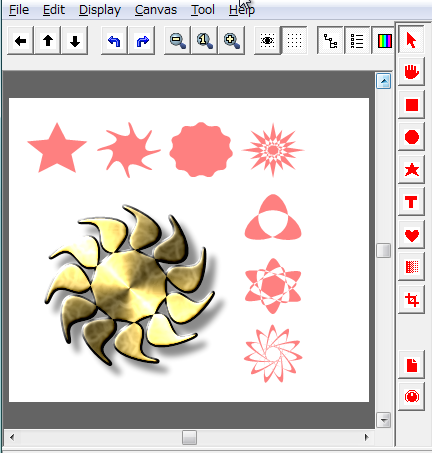
* Polygon curve/twist parameters are added
* ellipse start/stop parameters are added
* 'Tools always in front' option for setup menu is added
(Needed if you use SkinMan in full-screen mode)
* combobox space is extended for Text/Font/TextureType
* Font aspect parameter is added. Accurate font resizing is supported.
(now the texts also resizable by dragging handles)
* improved group resizing accuracy
* "Edit Image/Knob" , "Insert new Knob" menu is added
cooperating with KnobMan.
About FontSize:
= SkinMan's font size management is smattering.
this version is just for freely resizable texts like other objects.
fixed size text is under considering...
About Edit Image/Knob, InsertKnob:
= the "default.knob" file (included in .zip as a sample) is required
in the same folder for "Insert new Knob" operation.
= should be setuped to run KnobMan by d-clicking a ".knob" file.
= "Edit Image/Knob" from r-click menu or "insert new knob"
will launch the KnobMan, after edit&save by KnobMan,
all image/knobs are updated by "Refresh Images/Knobs" menu.
= images/knobs are local copy for this SkinMan instance,
dont worry about destroying original.
new Polygon samples:
updated to 0.96
http://www.g200kg.com/en/software/skinman.html
Ver 0.96
* BugFix: losing texture/image in some cases.
* Polygon curve/twist parameters are added
* ellipse start/stop parameters are added
* 'Tools always in front' option for setup menu is added
(Needed if you use SkinMan in full-screen mode)
* combobox space is extended for Text/Font/TextureType
* Font aspect parameter is added. Accurate font resizing is supported.
(now the texts also resizable by dragging handles)
* improved group resizing accuracy
* "Edit Image/Knob" , "Insert new Knob" menu is added
cooperating with KnobMan.
About FontSize:
= SkinMan's font size management is smattering.
this version is just for freely resizable texts like other objects.
fixed size text is under considering...
About Edit Image/Knob, InsertKnob:
= the "default.knob" file (included in .zip as a sample) is required
in the same folder for "Insert new Knob" operation.
= should be setuped to run KnobMan by d-clicking a ".knob" file.
= "Edit Image/Knob" from r-click menu or "insert new knob"
will launch the KnobMan, after edit&save by KnobMan,
all image/knobs are updated by "Refresh Images/Knobs" menu.
= images/knobs are local copy for this SkinMan instance,
dont worry about destroying original.
new Polygon samples: